
How To Save Money On Web Hosting: 15 Smart Ways To Cut Costs
Learning how to save money on web hosting can help you manage your website budget without sacrificing speed, security, or reliability. Whether you run a personal blog, a business website, or an online store, choosing the right hosting services can prevent unnecessary expenses.
From selecting a suitable plan to avoiding hidden renewal fees, small decisions can make a noticeable difference. Comparing low-cost web hosting services is a useful starting point for finding affordable options.
However, the cheapest plan isn’t always the best value. Understanding how to choose a web hosting provider can help you balance affordability, performance, and the features your website needs.
This guide explores 15 practical ways to reduce hosting expenses while keeping your website secure, reliable, and ready for future growth.
15 Smart Ways To Save Money On Web Hosting
Saving money on web hosting doesn’t mean sacrificing your website’s performance, security, or reliability. The key is choosing suitable services, avoiding unnecessary expenses, and making informed decisions about your hosting needs.
Whether you’re starting a blog, managing a business website, or running an online store, these 15 practical strategies can help you reduce hosting costs. They also show you how to make better use of your existing resources while preparing your website for future growth.
1. Compare Hosting Providers Before Making A Decision
Comparing hosting providers helps you balance affordability, performance, and reliability. Rather than choosing the first company you find, evaluate at least three providers based on their features and overall value.
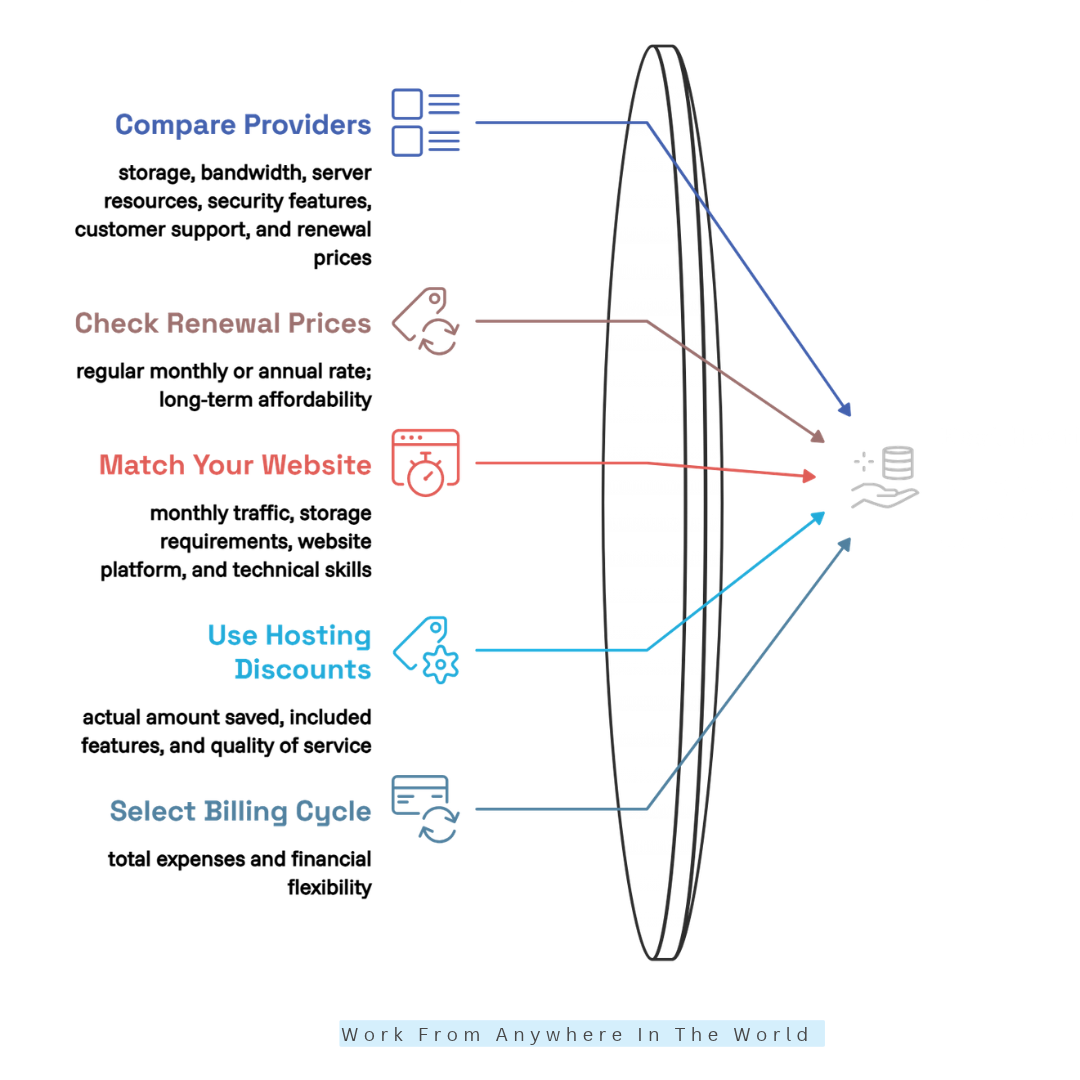
Compare storage, bandwidth, server resources, security, customer support, and renewal prices. Two hosting plans may look similar but offer very different service levels, so reviewing their specifications is important.
For example, a beginner running a WordPress blog may need fewer resources than an online store handling regular customer transactions. Reading our Liquid Web vs GoDaddy comparison can help you understand how hosting providers differ.
Check independent reviews and read the terms carefully before purchasing. A lower introductory price is attractive, but reliable service and long-term affordability matter more than the initial discount.
2. Check Renewal Prices Before Buying A Hosting Plan
Introductory hosting discounts can make a subscription look inexpensive, but renewal prices may increase significantly after the promotional period. Always check the regular monthly or annual rate before committing to a provider.
For example, a plan advertised at $3 per month might renew at $10 per month after the initial term. Actual prices depend on the provider, subscription length, and promotional conditions.
Calculate your expected hosting expenses over several years to understand the true cost. Also, check whether the advertised rate requires a one-year, two-year, or longer commitment.
Comparing providers through resources such as our Hostinger review can help you evaluate pricing alongside features. Choose a plan based on long-term affordability rather than an attractive introductory offer alone.
3. Choose A Hosting Plan That Matches Your Website
Choosing a suitable hosting plan prevents you from paying for resources your website doesn’t need. Shared hosting often works well for personal blogs, portfolios, and smaller business websites because several websites share server resources.
Managed WordPress hosting may provide specialized maintenance and support, while VPS hosting offers greater control over an allocated virtual server environment. Our WP Engine review explores managed WordPress hosting features.
Before choosing, consider your monthly traffic, storage requirements, website platform, and technical skills. A new blog rarely needs the same infrastructure as a busy online store.
You can begin with a suitable entry-level plan and upgrade when your traffic or resource usage justifies the expense. If you need more control, our Hostinger VPS tutorial explains important aspects of managing a virtual server.
4. Take Advantage Of Hosting Discounts And Seasonal Deals
Seasonal promotions can help you reduce your initial web hosting expenses. Many providers offer special deals during major shopping events, anniversary sales, or promotional campaigns.
Before purchasing, compare the discounted price with the standard rate and check what you will pay at renewal. Some offers require longer subscription periods or substantial upfront payments.
You can also explore student, nonprofit, or other eligible discounts when available. However, a large percentage discount doesn’t automatically mean you’re receiving the best overall value.
For example, comparing the features discussed in our Bluehost review with other hosting options can help you assess an offer. Focus on genuine savings, included features, and reliable service rather than promotional claims.
5. Select The Right Billing Cycle
Your hosting billing cycle can influence both your total expenses and financial flexibility. Monthly subscriptions generally require less money upfront, while annual or multi-year plans may offer lower effective monthly rates.
However, longer commitments require larger initial payments and may make switching providers less convenient. Always consider your website’s needs and how confident you are in your hosting provider.
For example, a hosting plan costing $5 per month on an annual subscription would total $60 before applicable taxes or additional charges. Check the full amount due at checkout rather than focusing only on the monthly equivalent.
If you trust your provider and plan to maintain your website long-term, annual billing may offer worthwhile savings. Our WHC Web Hosting Canada review offers another hosting option to explore before committing.
6. Avoid Paying For Unnecessary Hosting Add-Ons
Optional hosting add-ons can quietly increase your website expenses. Providers may offer premium email services, website builders, security packages, automated backups, and additional management tools during checkout.
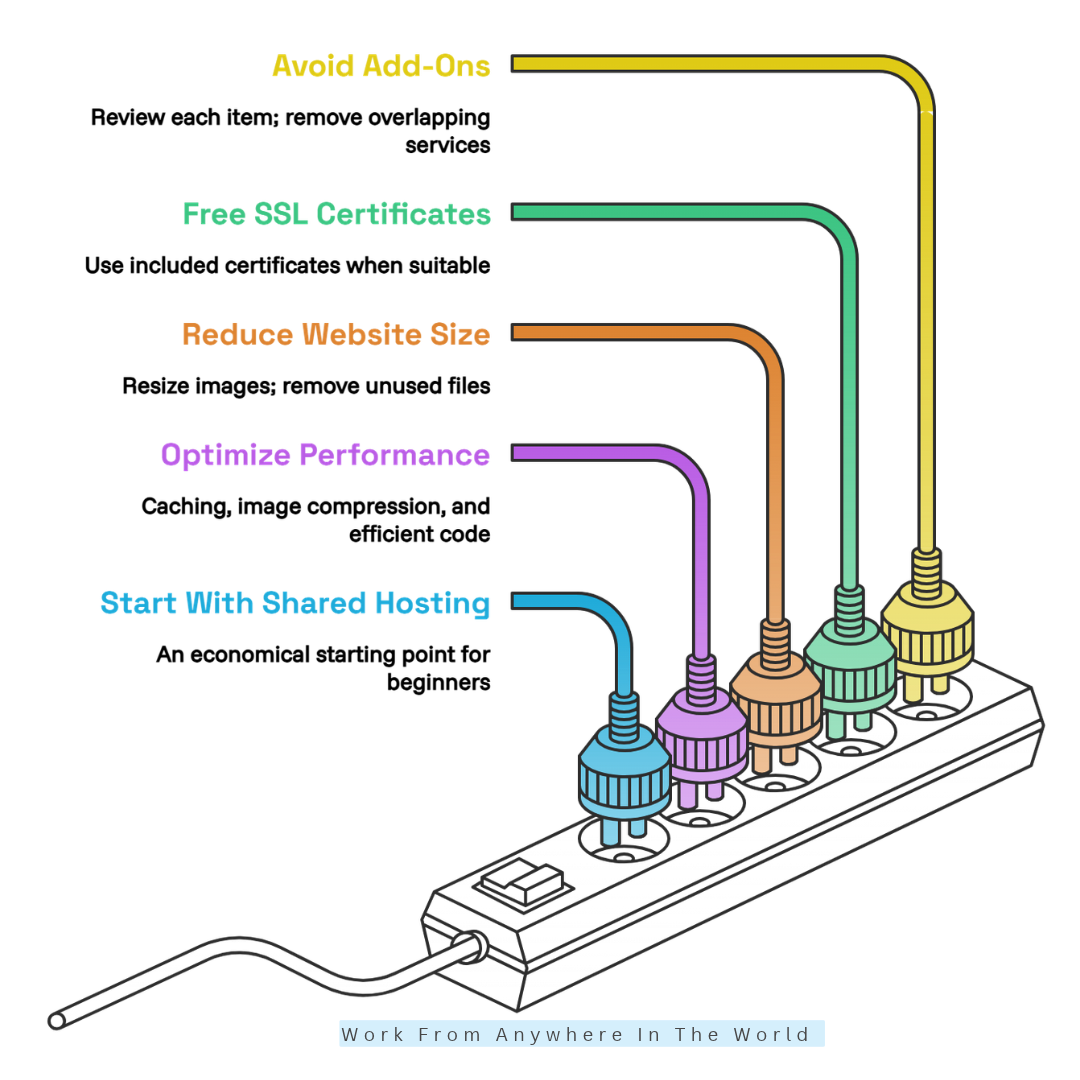
Some features are valuable, but others may duplicate services you already use. Review each item carefully and determine whether it serves a genuine purpose before agreeing to additional charges.
For example, if your hosting package includes a suitable SSL certificate, you may not need to purchase another one. Similarly, an existing backup service may make an additional subscription unnecessary if both meet your recovery requirements.
Keep essential protections in place while removing overlapping services. Understanding the features available through providers such as Cloudways can help you evaluate what’s included before paying for extras.
7. Use Free SSL Certificates When Suitable
An SSL/TLS certificate enables encrypted HTTPS connections, helping protect information exchanged between your website and its visitors. However, website security also depends on proper configuration and additional safeguards.
Many hosting providers include free SSL certificates through services such as Let’s Encrypt. Check whether your hosting package supports automatic installation and renewal before purchasing a premium certificate.
Premium certificates may provide additional validation or organizational features that some businesses require. For a standard blog or small website, a suitable free certificate is often sufficient.
After activation, confirm that your website uses HTTPS correctly and that internal resources load securely. Our GreenGeeks hosting guide provides another resource for exploring hosting features and website management.
8. Reduce Website Size To Avoid Unnecessary Upgrades
A website filled with oversized images, unused files, and duplicate media can consume valuable storage space. Some hosting plans also impose file-count or inode limits that may affect your available resources.
Start by resizing images to suitable dimensions and compressing them before uploading. Modern formats such as WebP and AVIF can reduce image file sizes while maintaining good visual quality.
Remove unused themes, inactive plugins, and duplicate files once you’ve confirmed they’re no longer needed. Store essential backups in a separate, secure location to improve your recovery options.
These improvements can delay unnecessary storage upgrades while helping your pages load more efficiently. For additional ideas, explore our website speed optimization tips.
9. Optimize Your Website For Better Performance
Website optimization helps you get more value from your existing hosting plan. Caching, image compression, and efficient code can reduce unnecessary processing and improve loading speeds.
For WordPress websites, a compatible caching plugin can store prebuilt page versions, reducing the need to generate every page from scratch. A content delivery network (CDN) can serve eligible static files from servers closer to visitors.
Some providers already include caching or CDN services in their hosting packages. Check your plan’s features and usage limits before installing additional tools that might duplicate existing functionality.
Optimization cannot replace additional server resources when they’re genuinely needed. However, understanding the capabilities of WordPress hosting services can help you make better decisions about performance and future upgrades.
10. Start With Shared Hosting For Small Websites
Shared hosting is often an economical starting point because multiple websites use the same physical server. This arrangement lets hosting companies spread infrastructure costs across customers.
It can suit personal blogs, portfolios, informational websites, and smaller business sites with moderate traffic. Many plans include a control panel, SSL support, and convenient application installers.
However, server resources are shared, and performance depends on the provider’s infrastructure and usage limits. Review storage allowances, backup policies, security features, and upgrade options before purchasing.
Starting with shared hosting can keep initial costs low without requiring advanced server administration. Comparing the best web hosting providers for WordPress can help you find a suitable entry-level option.
11. Review Resource Usage Before Upgrading Your Plan
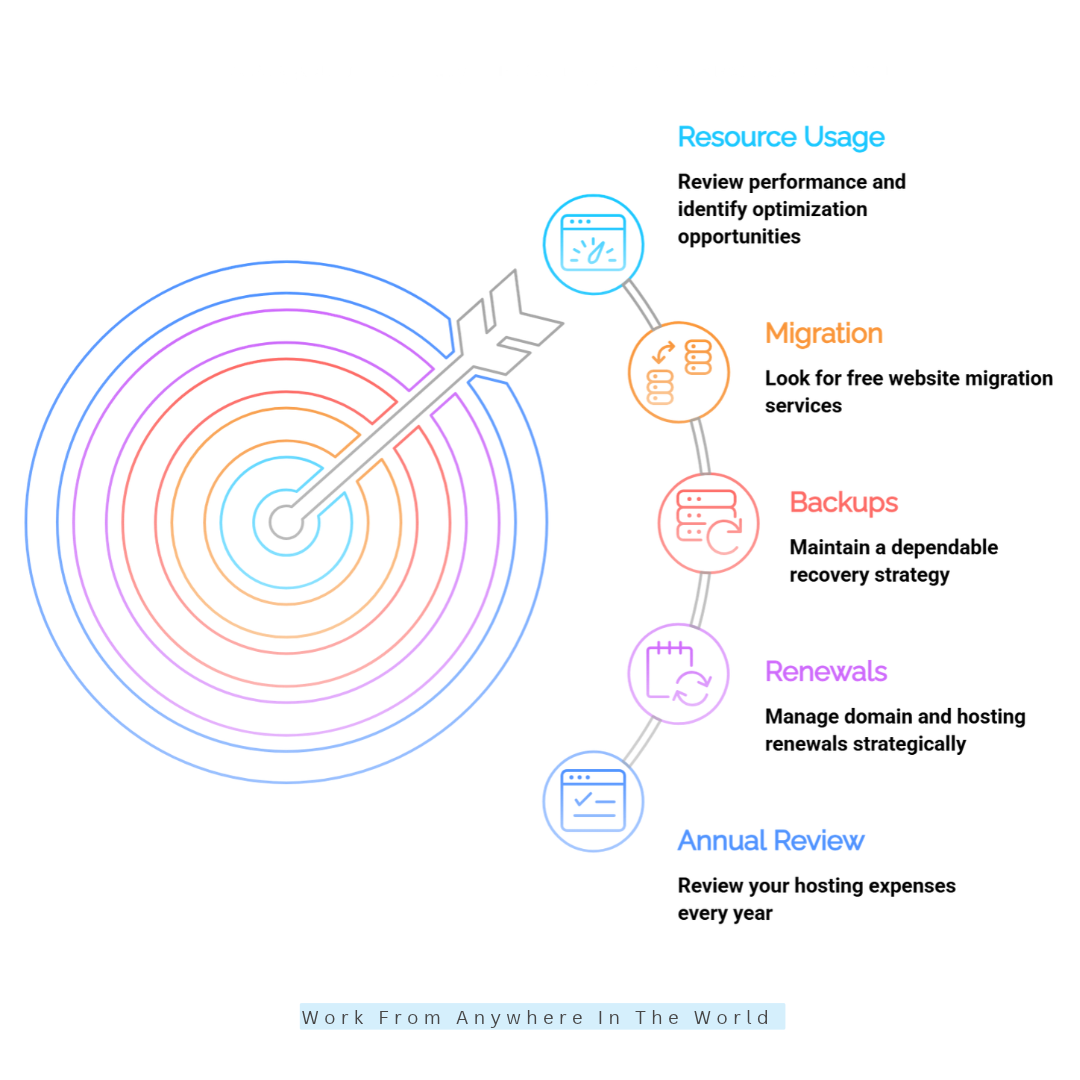
Before upgrading your hosting plan, review your website’s performance and identify opportunities for improvement. High resource usage may result from increased traffic, inefficient plugins, oversized images, database queries, or poorly optimized code.
Check your hosting dashboard for CPU usage, memory consumption, storage, and bandwidth. If the reports indicate a performance issue, investigate its cause before purchasing additional resources.
For example, compressing images and enabling appropriate caching can improve an image-heavy blog’s performance. However, a growing online store with frequent database activity may genuinely require more CPU or memory.
Contact your hosting provider if the reports are unclear. Understanding how to host your website can also help you make informed decisions about server resources and future upgrades.
12. Look For Free Website Migration Services
Switching to a less expensive hosting provider can reduce ongoing expenses, especially when your renewal fees have increased. However, migration may involve technical work, potential downtime, and extra costs if you need professional assistance.
Some hosting companies offer free migration for eligible websites, while others provide automated tools or guided WordPress transfers. Before switching, confirm whether the service covers website files, databases, email accounts, and other essential components.
Create a complete backup before beginning the migration process. Afterward, test important pages, contact forms, login functions, and checkout processes where applicable to ensure everything works correctly.
Update DNS records carefully and allow time for changes to propagate. Our Web Hosting Canada tutorial provides another resource for understanding hosting setup and management.
Free migration can make switching more economical, provided the process protects your website data and minimizes disruption.
13. Use Free Backup Tools Without Compromising Protection
Website backups can help you recover from accidental deletions, failed updates, and certain security incidents. Before purchasing a separate backup subscription, check whether your hosting package already includes automatic backups and restoration options.
If you need additional protection, consider a suitable free backup plugin or tool. Evaluate its storage limits, scheduling features, and recovery process before relying on it.
Keeping a backup outside your hosting account provides additional protection if your hosting service becomes inaccessible. Regularly verify your backups to ensure they can be restored successfully when needed.
Websites with frequent changes, such as online stores, may require more frequent backups than simple blogs. Our Jetpack for WordPress review explores another WordPress tool worth investigating when reviewing your website’s features.
The goal is to avoid duplicate expenses while maintaining a dependable recovery strategy that protects your valuable website content.
14. Manage Domain And Hosting Renewals Strategically
Domain registration and web hosting are separate services, even when a provider offers them together. Some hosting promotions include a free domain for a limited period, but renewal fees may apply afterward.
Before accepting a bundle, check eligible domain extensions, promotional conditions, and standard renewal prices. Comparing domain costs across reputable registrars can help you identify better long-term value.
However, consider transfer fees, eligibility requirements, and renewal timing before moving a domain. Track both hosting and domain expiration dates to prevent unexpected service interruptions.
Calculate the combined cost of hosting and domain registration over several years. Our Wealthy Affiliate Hosting vs. Bluehost comparison offers another perspective on evaluating different website hosting arrangements.
Strategic renewal planning helps you identify genuine savings instead of relying on promotional prices that may increase after the first year.
15. Review Your Hosting Expenses Every Year
An annual hosting review can uncover recurring expenses that no longer serve your website. Start by listing hosting subscriptions, domain registration, email services, backup tools, security products, and other website-related costs.
Identify duplicate features, unused services, and plans that exceed your current requirements. Then compare renewal prices with suitable alternatives while considering performance, support quality, migration costs, and security.
Set a reminder before your hosting subscription renews so you have enough time to evaluate your options. Review your resources again whenever website traffic changes significantly or your online business expands.
For additional budgeting ideas, explore our guide to creating a business plan. Keeping hosting expenses aligned with your broader financial goals can support more sustainable website management.
Regular reviews turn hosting cost management into a practical strategy for long-term website growth.
How To Choose The Best Budget-Friendly Web Hosting
Choosing budget-friendly web hosting involves more than comparing prices. To save money on web hosting, consider renewal rates, essential features, performance, and long-term value.
Look for a provider with reliable uptime, sufficient server resources, SSL support, regular backups, and responsive customer service. Check which features are included to avoid paying extra for services you don’t need.
For a new blog or small business website, shared hosting may provide sufficient resources at an affordable price. However, review storage limits, renewal conditions, and available upgrade options before committing.
As your website grows, monitor its performance and resource usage before purchasing a more expensive plan. Upgrading only when necessary can help you control expenses without compromising reliability.
The best budget-friendly hosting plan balances affordability, security, performance, and scalability. Making informed decisions today can help you manage costs while building a stronger online presence.
Frequently Asked Questions
Q1: Is Cheap Web Hosting Worth It?
Yes. Cheap web hosting can offer excellent value when it provides sufficient resources, reliable performance, appropriate security, and responsive customer support. The key is choosing a plan that meets your website’s needs.
Compare the complete package rather than focusing on the lowest advertised price. A hosting plan that causes frequent downtime or requires expensive add-ons may cost more in the long run.
Q2: Can I Change My Hosting Provider To Save Money?
Yes. Switching to a more affordable hosting provider can reduce your website expenses if the new service meets your requirements. Compare renewal prices, migration assistance, backup options, and technical compatibility.
Before switching, create a complete backup of your website and confirm that important files and databases are included. Test the migrated website carefully to minimize disruption and protect your valuable content.
Q3: Is Free Web Hosting A Good Option?
Free web hosting can be useful for learning, experimenting, or creating small personal projects. However, free plans often have limitations involving storage, functionality, advertising, performance, or customer support.
For an established blog or business website, affordable paid hosting may provide greater reliability and flexibility. Consider your long-term goals before choosing a free service that could restrict future growth.
Q4: Should I Pay For Web Hosting Monthly Or Annually?
Monthly billing offers greater flexibility and requires less money upfront, making it suitable for new projects. Annual or multi-year subscriptions may provide lower effective monthly rates but require a larger initial payment.
Compare the total cost, renewal prices, refund conditions, and subscription commitments before deciding. Choose a billing cycle that fits your budget and confidence in the hosting provider.
Q5: Does Website Speed Affect Hosting Costs?
Yes. Website speed and resource efficiency can influence whether your current hosting plan meets your needs. Caching, image compression, and code optimization may reduce unnecessary server demands and help you avoid premature upgrades.
However, performance also depends on server quality, database activity, network conditions, and website design. Optimization helps you use existing resources efficiently but cannot replace additional capacity when genuinely required.
Q6: How Often Should I Review My Hosting Plan?
Review your hosting plan at least once a year, preferably before its renewal date. This gives you time to compare prices, identify unused services, and evaluate whether your current package still fits your needs.
Additional reviews are useful when website traffic increases, resource limits become restrictive, or your provider changes its pricing. Regular checks can prevent unnecessary expenses and support long-term website growth.
Conclusion
Learning how to save money on web hosting starts with making informed decisions rather than simply choosing the lowest price. Comparing providers, checking renewal rates, and selecting suitable resources can help you reduce unnecessary expenses.
Small improvements, such as optimizing images, removing unused add-ons, and reviewing your hosting plan regularly, can lead to worthwhile savings. The goal is to balance affordability with reliable performance, security, and room for growth.
Review your current hosting expenses today and identify one practical change that could improve your website’s value. With careful planning, you can keep costs manageable while building a successful online presence.
I trust you enjoyed this guide on How To Save Money On Web Hosting: 15 Smart Ways To Cut Costs. Please stay tuned for more helpful articles on affiliate marketing, online business, and working from anywhere in the world.
Take care!
— JeannetteZ 🌍✨
💬 Your Opinion Is Important To Me
Do you have thoughts, ideas, or questions? I’d love to hear from you. Please leave your comments below or email me directly at Jeannette@WorkFromAnywhereInTheWorld.com.
📚 More Work From Anywhere Reads
🚀 Ready to Build a Business You Can Run from Home
Or from Anywhere in the World?
Imagine earning income on your terms — from home, a cozy café, or wherever life takes you.
With the right tools, training, and community support, it’s entirely possible.
Start your own online business for free — no credit card needed.
Disclosure
This post may contain affiliate links. As an Amazon Associate and participant in other affiliate programs, I earn from qualifying purchases at no extra cost to you. Please read my full affiliate disclosure.