Best WordPress Hosting For Bloggers: 9 Powerful Options
Choosing the best WordPress hosting for bloggers is one of the most important decisions you’ll make when starting or growing a blog. Your hosting provider affects your website’s speed, reliability, security, and ability to handle increasing traffic.
The right hosting service can also help you manage costs and reduce time spent troubleshooting technical problems. Understanding how to choose a web hosting provider is a useful starting point.
Whether you’re launching your first blog or expanding an established website, comparing WordPress hosting services can help you find a solution that fits your needs and budget.
In this guide, you’ll discover nine WordPress hosting options for bloggers, their key features, advantages, and limitations. You’ll also learn what to consider before investing in a hosting plan.
9 Best WordPress Hosting Providers For Bloggers
Finding the best WordPress hosting for bloggers depends on your budget, technical experience, and long-term website goals. Some providers focus on affordability and beginner-friendly tools, while others offer advanced performance features and managed services.
The following nine hosting providers offer different advantages for personal blogs, affiliate websites, and growing online businesses. Comparing their features, limitations, and upgrade options will help you choose a reliable hosting solution that supports your blogging journey.
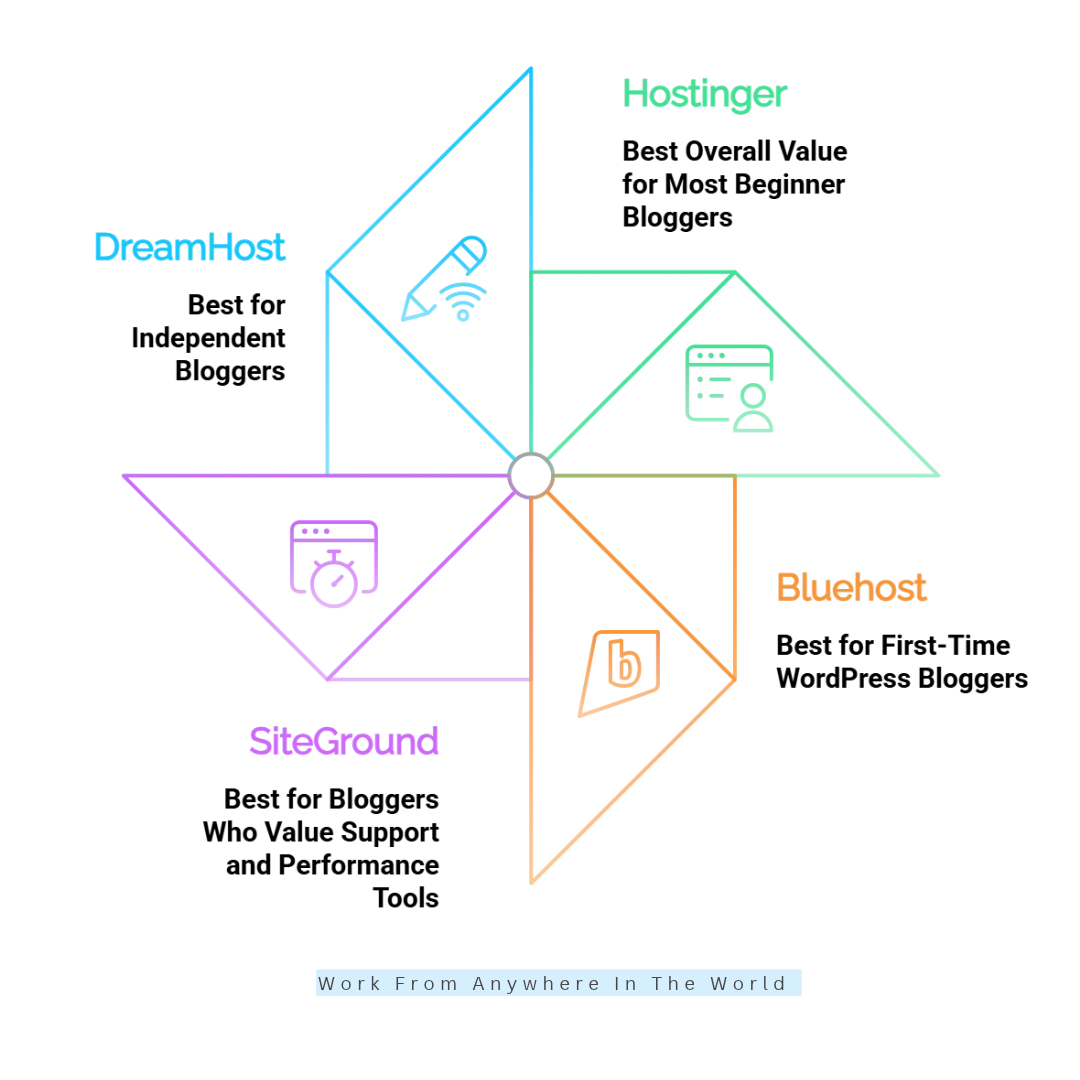
1. Hostinger — Best Overall Value For Most Beginner Bloggers
Hostinger is a strong option for bloggers who want to launch a WordPress website without spending too much on hosting. Its beginner-friendly dashboard, installation tools, and performance features simplify the setup process.
You can manage your website, connect a domain, configure SSL, and access WordPress through a central dashboard. These features make it easier to focus on publishing content instead of learning complex server administration.
For bloggers creating tutorials, affiliate articles, or lifestyle content, this convenience can be especially valuable. Our Hostinger review explores its hosting features, advantages, and limitations in greater detail.
Hostinger offers several hosting tiers, allowing you to upgrade as your website grows. If you need more control, our Hostinger VPS tutorial explains important aspects of managing a virtual server.
However, backup options, staging, storage allowances, and website limits vary depending on the selected plan. Review these features carefully before choosing a subscription.
Key Advantages
- Beginner-friendly hosting dashboard.
- WordPress installation and migration tools.
- SSL certificates and performance features on eligible plans.
- Upgrade options for growing websites.
Potential Limitation And Best For: Hostinger’s introductory prices may increase at renewal, and certain features require higher-tier plans. Compare the total subscription costs and included services before purchasing.
Hostinger suits beginner bloggers, niche website owners, and affiliate marketers seeking affordable WordPress hosting. Its straightforward management tools make it practical for personal blogs, gardening websites, and lifestyle publications.
2. Bluehost — Best For First-Time WordPress Bloggers
Bluehost is worth considering if you’re starting your first blog and want a straightforward setup process. Its WordPress hosting options include guided onboarding tools that help beginners install WordPress and begin creating content.
Launching a blog involves choosing a domain, selecting hosting, installing a theme, and configuring essential plugins. Bluehost’s guided setup can make these tasks easier to manage, particularly for first-time website owners.
The company also offers hosting products beyond entry-level shared hosting, providing potential upgrade options as your website grows. Our Bluehost review examines its features and hosting capabilities.
Before choosing a plan, consider your storage requirements, expected traffic, and preferred level of technical support. Our Wealthy Affiliate Hosting vs. Bluehost comparison provides another perspective on different hosting arrangements.
Key Advantages
- Guided WordPress setup for beginners.
- Domain and SSL offers on eligible plans.
- Hosting options for different website needs.
- WordPress learning resources.
Potential Limitation And Best For: Bluehost’s introductory prices may increase upon renewal, and certain features require higher-tier plans or additional payments. Review the full pricing structure before subscribing.
Bluehost is suitable for first-time bloggers, personal website owners, and small publishers who value guided WordPress setup. Its onboarding tools allow beginners to focus on creating content while gradually learning website management.
3. SiteGround — Best For Bloggers Who Value Support And Performance Tools
SiteGround is a useful choice for bloggers seeking WordPress-specific management features alongside hosting support. Its Site Tools dashboard provides access to website management functions, while built-in caching can improve loading performance when configured correctly.
For bloggers publishing image-heavy tutorials, detailed guides, or extensive article collections, convenient management tools can save time. Caching, backups, and security features also help simplify routine website maintenance.
SiteGround is worth comparing if you publish frequently or collaborate with other contributors. However, staging environments and collaboration features depend on your subscription.
Understanding how to improve website speed can help you make better use of performance tools, regardless of which hosting provider you choose.
Key Advantages
- WordPress-oriented website management tools.
- Built-in caching features.
- Backup and security tools, depending on the plan.
- Support options for website management questions.
Potential Limitation And Best For: SiteGround’s renewal rates may be considerably higher than its introductory prices, and advanced features may require more expensive plans.
SiteGround suits bloggers who value technical support, convenient management tools, and performance optimization. It can be particularly useful for growing content websites that aren’t ready for premium managed WordPress hosting.
4. DreamHost — Best For Independent Bloggers
DreamHost is a practical option for independent bloggers who want a straightforward hosting environment. It offers standard hosting packages and managed WordPress services, allowing website owners to balance affordability with convenience.
For beginners, the main advantage is having room to establish a publishing routine without investing immediately in premium infrastructure. You can build your website, organize categories, publish articles, and gradually develop an audience.
DreamHost provides different hosting plans with varying resource levels and management features. Our guide on how to host your website explains additional considerations when setting up and managing a website.
As your blog grows, compare available upgrade options with your actual resource requirements. This approach helps you avoid unnecessary expenses while maintaining enough flexibility for future development.
Key Advantages
- Options for personal and business websites.
- WordPress hosting choices for different experience levels.
- Upgrade paths for growing websites.
- Managed hosting options for additional assistance.
Potential Limitation And Best For: DreamHost’s features vary between standard hosting and managed WordPress plans. Compare storage, backups, management tools, and renewal costs before making a decision.
DreamHost is suitable for independent writers, personal bloggers, and small publishers seeking a practical starting point. Its range of hosting options makes it worth considering when balancing affordability with future website requirements.
5. WordPress.com — Best For Bloggers Who Prefer Managed Hosting
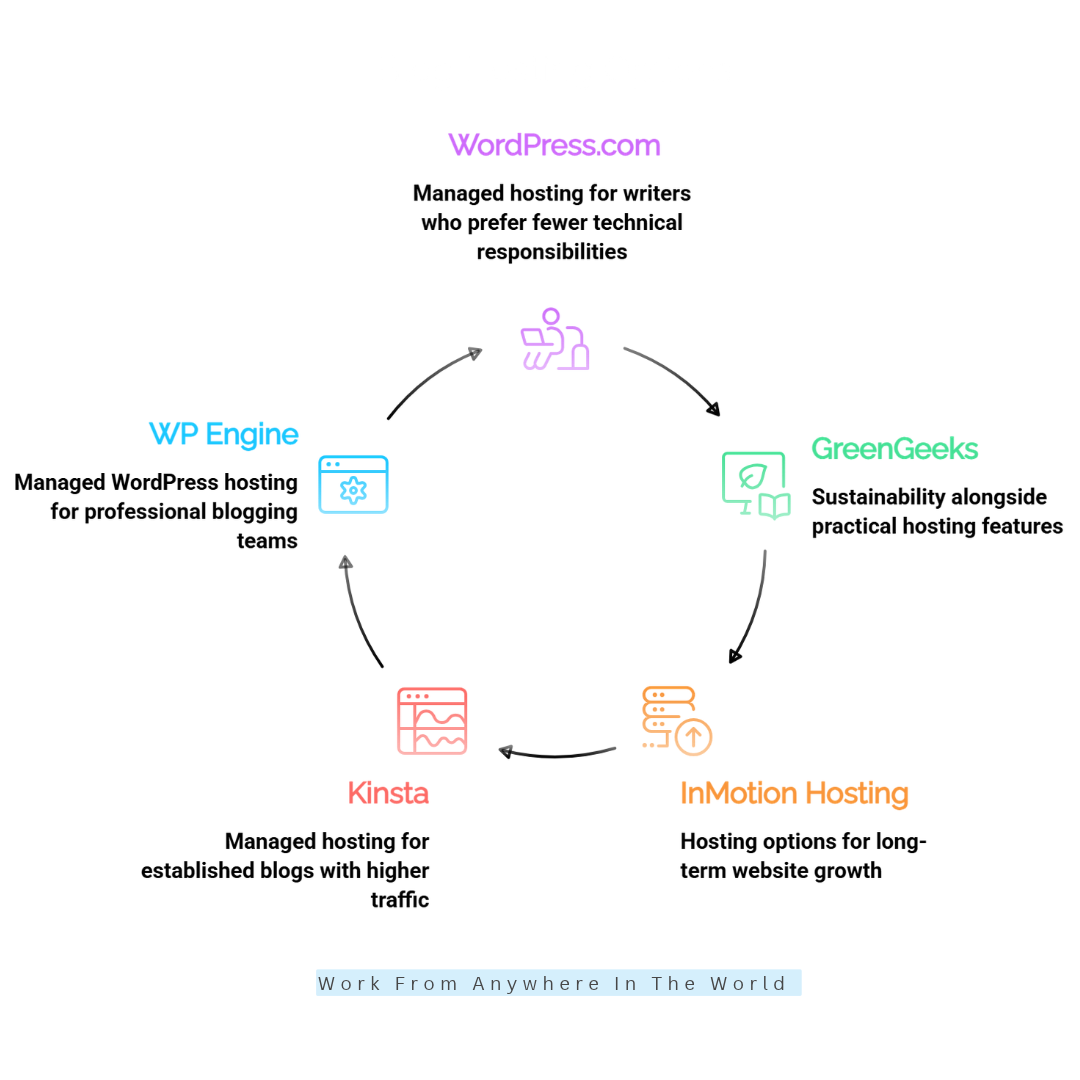
WordPress.com is particularly appealing to bloggers who want to spend more time writing and less time managing technical tasks. Its hosting plans combine website publishing tools with infrastructure management, including WordPress software updates.
Unlike self-hosted WordPress, which requires a separate hosting account, WordPress.com provides hosting and publishing tools within one platform. This arrangement can simplify website administration for writers who prefer fewer technical responsibilities.
However, paid plans offer different levels of customization, plugin access, storage, and monetization capabilities. Understanding why WordPress is a popular blogging platform can help you evaluate its suitability for your publishing goals.
Before committing, compare the available plans with your long-term requirements. A simple personal blog may need fewer features than an affiliate website or an expanding online publication.
Key Advantages
- Hosting and WordPress publishing tools in one place.
- Managed WordPress software updates.
- Simplified website administration.
- Paid plans with additional website features.
Potential Limitation And Best For: Customization, plugin access, and monetization features depend on your subscription. Review the available plans carefully before committing.
WordPress.com suits writers, hobby bloggers, and publishers who prefer managed hosting over maintaining a separate hosting account. It provides a convenient environment for publishing articles and managing content with fewer technical responsibilities.
6. GreenGeeks — Best For Environment-Conscious Bloggers
GreenGeeks is worth exploring if environmental responsibility is part of your hosting decision. The company emphasizes its renewable-energy approach while offering hosting options for WordPress websites and smaller online projects.
For bloggers, the essential considerations remain website speed, backups, security, customer support, and room for growth. A sustainability-focused provider can be a good choice when its technical features and overall costs meet your requirements.
Our GreenGeeks review explores the company’s environmentally focused hosting approach. You can also read our GreenGeeks hosting guide for a closer look at its features and website management options.
Consider how you intend to use your website before selecting a plan. A simple text-based blog may need fewer resources than a large website with high-resolution images, extensive search functionality, and multiple plugins.
Key Advantages
- Sustainability-focused hosting approach.
- WordPress hosting options.
- SSL and website management features on eligible plans.
- Upgrade options as publishing needs increase.
Potential Limitation And Best For: GreenGeeks’ renewal prices and plan limits deserve careful consideration, especially if your website requires additional resources. Its environmental initiatives do not replace the need to evaluate performance and reliability.
GreenGeeks suits bloggers who value sustainability alongside practical hosting features. It can be a good fit for personal blogs, gardening websites, and lifestyle publications when the selected plan meets their technical requirements and budget.
7. InMotion Hosting — Best For Growing Content Websites
InMotion Hosting is a practical option for bloggers who expect their websites to become more resource-intensive over time. It offers different hosting products, including WordPress-focused services and higher-capacity options.
A growing blog may eventually contain hundreds of published articles, extensive image libraries, search features, forms, and additional plugins. As these elements increase, your hosting requirements may change.
Having a provider with suitable upgrade paths can make it easier to move beyond entry-level hosting when necessary. However, a larger plan isn’t automatically the right choice for every growing website.
If your blog receives modest traffic and uses a lightweight theme, basic hosting may still provide sufficient resources. Comparing web hosting providers for WordPress can help you evaluate your options before upgrading.
Key Advantages
- Different hosting tiers for evolving needs.
- WordPress-focused hosting options.
- Tools for website management.
- Options for websites that eventually need more resources.
Potential Limitation And Best For: Some InMotion Hosting plans may include more resources than a beginner needs, while advanced services can increase expenses. Review renewal rates, included features, and resource allowances before subscribing.
InMotion Hosting suits growing content websites, business blogs, and publishers planning for future expansion. Its range of hosting options makes it worth comparing when your website begins requiring additional resources.
8. Kinsta — Best For Established Blogs With Higher Traffic
Kinsta is a premium managed WordPress hosting provider designed for website owners who value specialized infrastructure and management tools. It can suit established blogs where performance, reliability, and support are important business considerations.
For example, a successful affiliate website may depend on organic search traffic to generate leads and income. In this situation, downtime or poor website performance can affect more than the visitor’s reading experience.
Managed hosting can reduce routine technical responsibilities while providing tools for monitoring and maintaining your website. However, premium hosting doesn’t automatically improve search rankings or guarantee better business results.
Content quality, search intent, technical SEO, internal linking, and user experience remain essential. Our Rank Math guide explores practical WordPress SEO improvements that complement a reliable hosting environment.
Key Advantages
- Managed WordPress hosting environment.
- Website management and performance tools.
- Backup and security features based on your plan.
- Options suited to professional website operations.
Potential Limitation And Best For: Kinsta generally costs more than entry-level shared hosting, and its plans have specific resource and usage limits. Compare the additional expense with your website’s actual requirements before upgrading.
Kinsta suits established publishers, monetized blogs, and businesses that rely on WordPress for revenue. Its managed infrastructure can be valuable when efficient website operations justify the premium investment.
9. WP Engine — Best For Professional Blogging Teams
WP Engine specializes in managed WordPress hosting for websites requiring a more advanced management environment. It’s worth considering when your blog becomes an important business asset that needs reliable development and maintenance tools.
Publishing teams can use staging environments to test updates and design changes before applying them to a live website. These workflows can reduce the risk of unexpected problems when supported by the selected hosting plan.
Our WP Engine review explores its managed WordPress features and website management capabilities. These tools may be particularly useful for professional publishers handling complex websites.
However, WP Engine isn’t necessary for every blogger. If you’re still publishing your first few dozen articles, a reliable budget hosting provider may offer better value.
Key Advantages
- Managed WordPress infrastructure.
- Development and staging tools on eligible plans.
- Website management features for professional workflows.
- Hosting options for business-critical publishing.
Potential Limitation And Best For: WP Engine’s premium pricing and plan-specific limits may not suit beginners or small personal blogs. Check website allowances, storage, traffic policies, and plugin compatibility before subscribing.
WP Engine suits professional publishers, established content businesses, and teams managing important WordPress websites. Its specialized environment can support more complex publishing workflows when the additional investment is justified.
How To Choose The Best WordPress Hosting For Bloggers
Choosing the best WordPress hosting for bloggers involves more than comparing introductory prices. Website performance, security, customer support, and future growth are equally important when selecting a reliable provider.
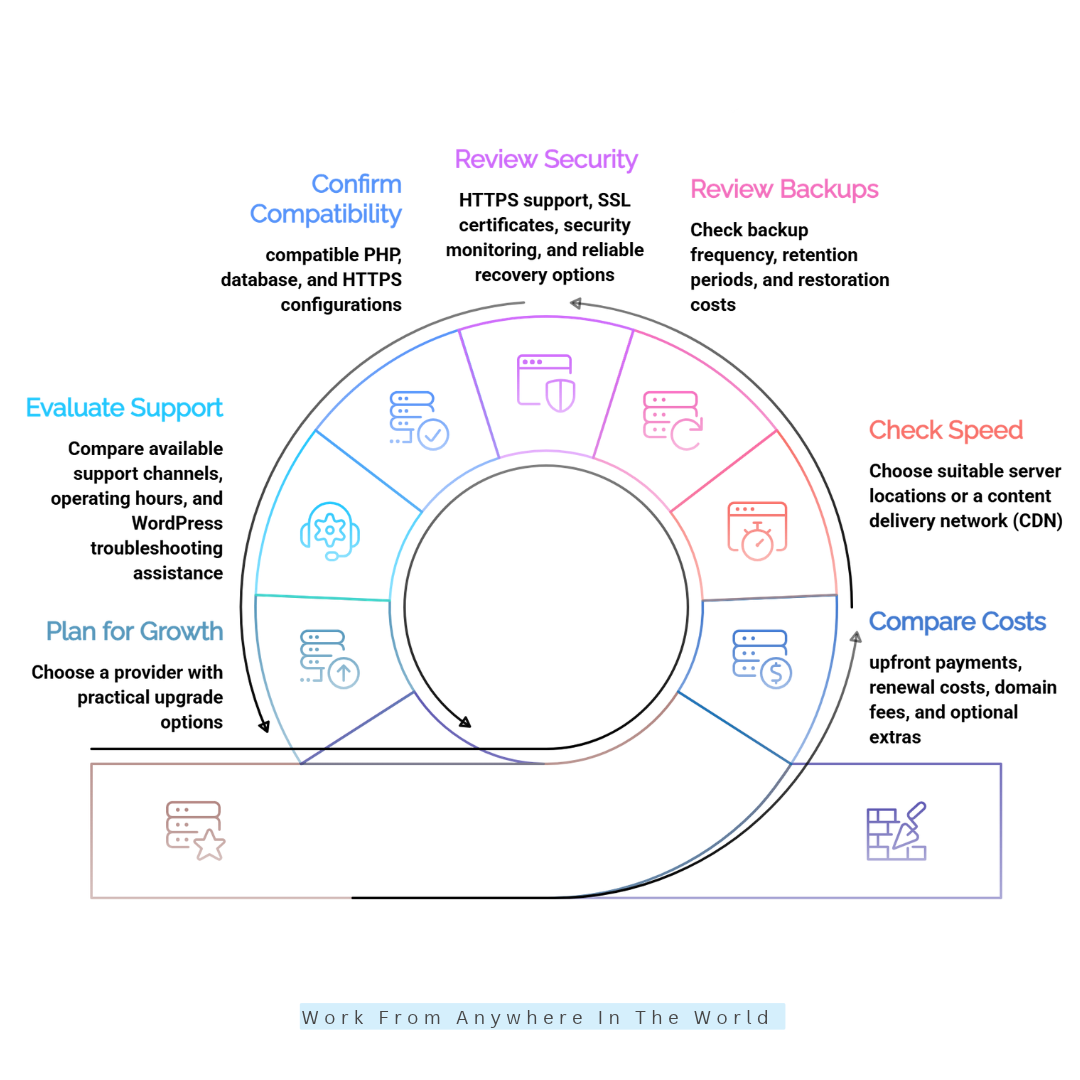
These seven factors will help you balance affordability, website management, and long-term blogging needs without paying for unnecessary features.
1. Compare Hosting Costs And Renewal Prices
Hosting prices vary depending on the provider, subscription length, and included features. Some companies offer attractive introductory rates that increase significantly when your plan renews.
Compare upfront payments, renewal costs, domain fees, and optional extras before subscribing. Our guide on how to save money on web hosting offers additional ways to control expenses.
An affordable hosting plan can help beginners invest more in creating quality content. Choose a provider that offers essential features at a sustainable long-term cost.
2. Check Website Speed And Server Location
Website speed affects how quickly readers can access your articles and navigate your website. Hosting infrastructure, caching, themes, and image optimization all contribute to loading performance.
Choose a suitable server location or content delivery network (CDN) based on your target audience. For example, if most readers are in Bangladesh, evaluate loading speeds for South Asian visitors.
Google PageSpeed Insights can help identify performance problems and opportunities for improvement. Regular testing is particularly useful as your website grows and you publish more content.
3. Look For Reliable Backup Options
Regular backups protect your articles, images, and website settings if an update fails or content disappears. Check backup frequency, retention periods, and restoration costs before selecting a hosting plan.
Daily backups can be particularly helpful for frequently updated blogs. Keeping an independent backup copy provides additional protection if your hosting account becomes inaccessible.
Reliable backup and restoration options make recovering from technical problems easier. They also help reduce the risk of losing valuable content you’ve spent months or years creating.
4. Review Security Features
Look for HTTPS support, SSL certificates, security monitoring, and reliable recovery options. Some hosting plans also include malware scanning and protection against malicious traffic.
Strengthen these protections by using strong passwords, enabling two-factor authentication, and updating WordPress regularly. Our guide on how to tell if a website is legitimate explores additional signs of website trustworthiness.
Review which security features your hosting plan includes and whether additional protection costs extra. A secure hosting environment helps protect both your website and its visitors.
5. Confirm WordPress Compatibility
Check the official WordPress hosting requirements before choosing a provider. Your hosting plan should support compatible PHP and database versions, along with HTTPS connections.
One-click WordPress installation simplifies the initial setup, but ongoing compatibility is equally important. Our WordPress tutorial for beginners explains the platform’s essential features and setup process.
If you use page builders or resource-intensive plugins, review your hosting plan’s available resources. Choosing compatible hosting can help prevent unnecessary performance and maintenance problems.
6. Evaluate Customer Support
Responsive customer support can help resolve installation errors, downtime, and website configuration problems. Compare available support channels, operating hours, and WordPress troubleshooting assistance.
Recent customer reviews may provide useful insights into response times and service quality. Look for consistent feedback about how effectively the provider handles technical problems.
Beginners often benefit from hosting companies that explain technical issues clearly. Helpful support allows you to resolve problems efficiently and return to creating content.
7. Choose Hosting That Can Grow With Your Blog
Your hosting requirements may change as website traffic, published content, and technical demands increase. Shared hosting can suit a small blog, while larger publications may eventually need additional resources.
Choose a provider with practical upgrade options rather than paying for unnecessary capacity immediately. Comparing low-cost web hosting services can help you identify affordable starting points.
Monitor website traffic and resource usage before upgrading your plan. This approach keeps hosting expenses aligned with your website’s actual needs while leaving room for future growth.
Frequently Asked Questions
Q1: Is Shared Hosting Good Enough For A New Blog?
Yes. Shared hosting is usually sufficient for a new blog with modest traffic, a lightweight theme, and a few essential plugins. It’s an affordable way to get started without paying for resources you don’t need.
As your blog grows, monitor its speed, traffic, and resource usage. Consider upgrading when your current plan consistently reaches its limits or your website requires more advanced features.
Q2: Is Managed WordPress Hosting Worth It For Bloggers?
Managed WordPress hosting can be worthwhile if you value specialized support, automated maintenance, backups, and performance tools. It reduces some of the technical responsibilities involved in running a website.
However, beginners publishing a few articles weekly may find shared hosting more cost-effective. Consider managed hosting when your website’s traffic, complexity, or maintenance needs justify the extra cost.
Q3: Can I Change My WordPress Hosting Provider Later?
Yes. You can migrate your WordPress website to another compatible hosting provider. The process generally involves transferring website files, databases, and relevant settings to the new hosting environment.
Always create a complete backup before starting the migration. Test your website afterward, update DNS settings when necessary, and check whether your new provider offers migration assistance.
Q4: Can I Start A WordPress Blog With Free Hosting?
Yes. Some platforms offer free hosting options, allowing beginners to experiment with WordPress without paying for a hosting subscription. However, free plans often limit storage, customization, and monetization.
Free hosting can be useful for learning or running a small personal project. For a professional blog or growing online business, paid hosting generally provides greater flexibility and control.
Q5: How Much Should Beginners Spend On WordPress Hosting?
Beginners should choose a hosting plan that provides essential features without stretching their budget. Consider storage, SSL certificates, backups, customer support, and renewal prices rather than focusing only on introductory offers.
You don’t need premium hosting to publish your first articles. Start with a reliable, affordable plan and upgrade when your website’s performance or resource needs require it.
Q6: What Is The Difference Between Shared And Managed WordPress Hosting?
Shared hosting places multiple websites on the same server, making it a budget-friendly choice for beginners. Website owners generally handle more of their own WordPress maintenance, updates, and troubleshooting.
Managed WordPress hosting provides specialized services that may include automated updates, backups, performance optimization, and WordPress-focused support. It’s often more expensive but can save time for busy bloggers.
Conclusion
Choosing the best WordPress hosting for bloggers means finding the right balance between affordability, performance, security, and future growth. The ideal provider depends on your blogging experience, website requirements, and long-term goals.
Hostinger and Bluehost offer beginner-friendly options, while SiteGround and GreenGeeks provide alternatives worth exploring. WordPress.com simplifies website management, whereas Kinsta and WP Engine cater to more established publications.
Before you decide, compare renewal prices, backup options, customer support, and hosting performance. A reliable hosting foundation allows you to spend less time managing technical problems and more time creating valuable content.
Remember, successful blogging requires more than reliable hosting. Consistent publishing, helpful articles, and effective marketing strategies can help you attract readers and build a sustainable online business.
I trust you enjoyed this guide to Best WordPress Hosting For Bloggers: 9 Powerful Options. Please stay tuned for more helpful articles on affiliate marketing, online business, and working from anywhere in the world.
Take care!
— JeannetteZ 🌍✨
💬 Your Opinion Is Important To Me
Do you have thoughts, ideas, or questions? I’d love to hear from you. Please leave your comments below or email me directly at Jeannette@WorkFromAnywhereInTheWorld.com.
📚 More Work From Anywhere Reads
🚀 Ready to Build a Business You Can Run from Home
Or from Anywhere in the World?
Imagine earning income on your terms — from home, a cozy café, or wherever life takes you.
With the right tools, training, and community support, it’s entirely possible.
Start your own online business for free — no credit card needed.
Disclosure
This post may contain affiliate links. As an Amazon Associate and participant in other affiliate programs, I earn from qualifying purchases at no extra cost to you. Please read my full affiliate disclosure.