9 Best WordPress Image Optimizer Plugins
Images are essential for improving your website’s visual appeal, but large file sizes can slow download times and affect SEO and user experience.
That’s where WordPress Image Optimizer Plugins come in! These powerful tools compress and optimize images without compromising quality, improving site performance, boosting rankings, and enhancing user engagement.
This blog will explore the best plugins to keep your website fast, efficient, and visually stunning.
What Is An Image Optimization Plugin?
An Image Optimization Plugin is designed to compress and enhance website images, improving page speed and performance without compromising quality.
These plugins automatically resize, compress, and convert images into efficient formats like WebP, reducing load times and enhancing user experience.
They often include features such as lazy loading, which delays image loading until needed, and bulk optimization, which allows users to optimize multiple images simultaneously. Many also integrate with Content Delivery Networks (CDNs) to serve images faster.
Popular plugins like Smush, Imagify, and ShortPixel help website owners, especially those using platforms like WordPress, maintain visually appealing content while improving SEO rankings and mobile responsiveness.
By reducing image file sizes, these plugins improve website performance, reduce bandwidth usage, and enhance overall site efficiency—crucial for e-commerce, blogs, and content-heavy websites.
Why It’s Important To Optimize Images For WordPress
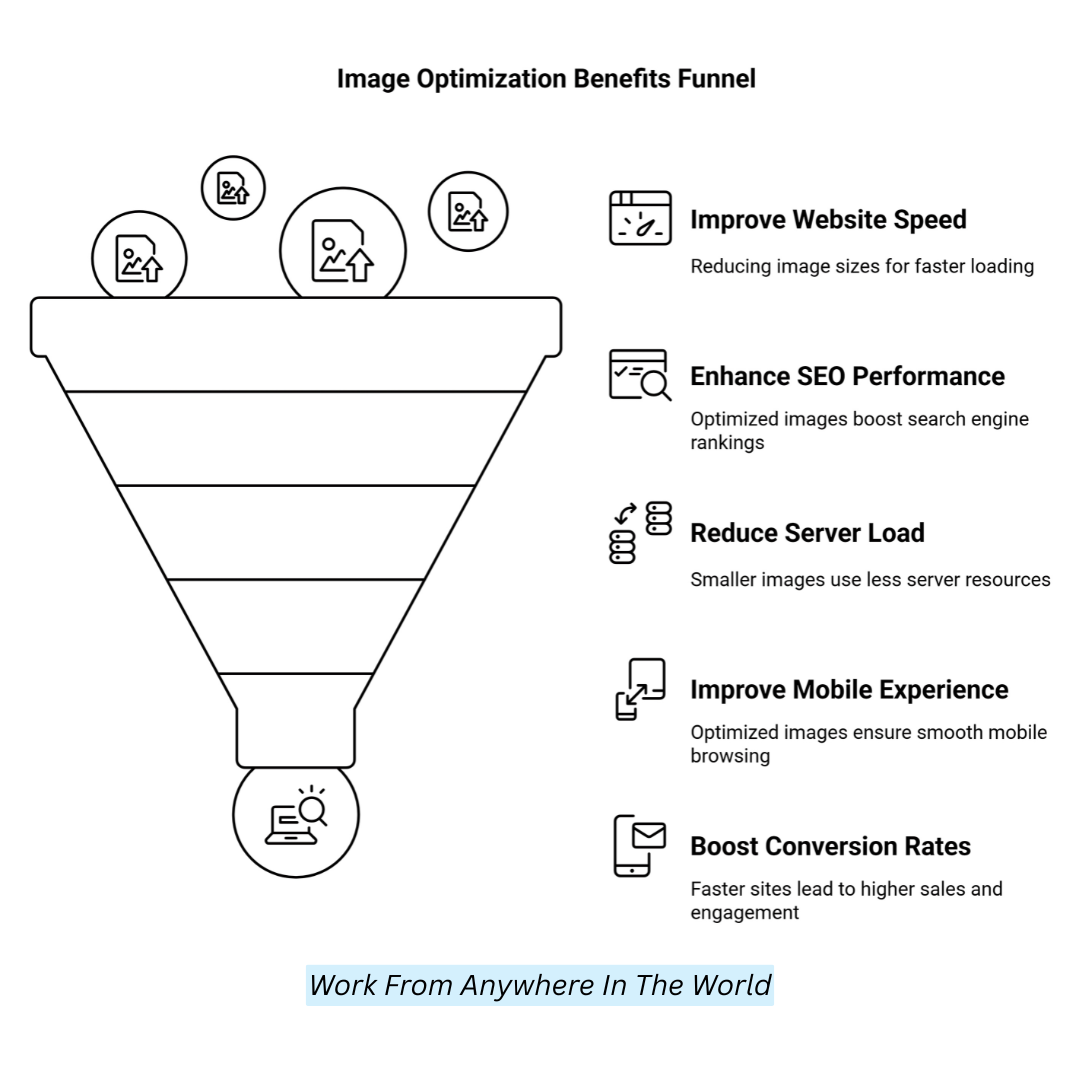
1. Improves Website Speed
Large picture files can significantly slow down your website, increasing bounce rates and creating a bad user experience.
Slow-loading pages frustrate visitors, making them leave before exploring your content. Optimizing images reduces file sizes without sacrificing quality, ensuring your site loads quickly, keeps users engaged, and improves overall performance.
2. Enhances SEO Performance
Search engines favour fast-loading websites, meaning image optimization plays a crucial role in SEO. Compressed images, appropriately named files, and descriptive alt text improve search visibility.
Alt-text improves accessibility and raises the likelihood of a higher search engine ranking by assisting visually impaired people and search engines in understanding the image information.
3. Reduces Server Load And Bandwidth Usage
Unoptimized images consume unnecessary server space and bandwidth, especially on high-traffic websites. This may result in slower performance and higher hosting costs.
By reducing image file sizes, you ease server strain, decrease load times, and enhance efficiency. This optimization is crucial for shared hosting plans with limited resources.
4. Improves Mobile Experience
With mobile browsing surpassing desktop usage, a mobile-friendly site is essential. Large images slow page load times on smartphones, frustrating users with sluggish performance.
Optimized images ensure faster load times and a responsive design, allowing visitors to browse smoothly. This results in better user engagement, retention, and overall website reputation.
5. Boosts Conversion Rates
Website speed directly affects user behaviour and conversion rates. If a site takes too long to load, visitors are more likely to leave without completing a purchase or inquiry.
Faster-loading pages create a seamless browsing experience, increasing engagement, trust, and conversions, whether for an online store, blog, or service-based website.
Best WordPress Image Optimizer Plugins
1. Smush WordPress Image Optimizer Plugin
Smush is one of the best and easiest-to-use WordPress image optimizer plugins. It is built to help you instantly compress pictures without losing quality, so your website loads faster.
Smush can be used on all website types, from single-serving blogs to enterprise eCommerce stores. It is particularly powerful for image-heavy websites because it optimizes all media files.
Whether you are a Bega inner or an experienced WordPress user, Smush makes it easy to reduce your image file sizes, improving your site performance and SEO.
Features
- Data compression of images for storage without sacrificing quality
- Lazy load pages so that images are only loaded when needed, resulting in faster pages
- Optimize bulk images, one-click compress images
- Great for low- and high-domain-authority sites looking to improve site speed.
- It supports multiple image formats: PNG, JPEG, and GIF, so it is available on any site.
Pricing
Smush is a free download with basic image compression features. It is always free, but it also offers a premium version for $5.99/month that includes advanced tools such as unlimited image optimization, web conversion, and priority support for larger websites.
Pros And Cons
Pros
- User-friendly interface
- Bulk image optimization
- Free version available
- Lazy loading feature
Cons
- Premium features are only available for paid plans.
- The Free version features are minimal
- It can be slow with large sites

2. ShortPixel Image Optimizer
ShortPixel Image Optimizer is an easy yet powerful WordPress image optimizer plugin that can optimize images quickly and efficiently.
It provides both lossy and lossless image compression and is most suitable for image-rich websites such as blogs, portfolios, and e-commerce sites.
ShortPixel supports several formats, including JPEG, PNG, GIF, WebP, etc. It is an all-in-one image optimization plugin that is easy to set up and powerful, making it ideal for anyone looking to speed up their website, improve the user experience, and boost their search engine optimization.
Features
- Options for compression to lower file sizes without compromising image quality
- Basic functionality to support WebP and AVIF formats for performance.
- Bulk optimization for streamlined media libraries.
- On-the-fly image encoding to desired dimensions
- Perfect for small and large sites with many images.
Pricing
ShortPixel offers a free plan for optimizing up to 100 images per month. Paid plans begin at $4.99 monthly for 5,000 images, with larger plans available for higher usage and image optimization in bulk.
Pros And Cons
Pros
- Supports various attractive image formats
- Small websites get a free plan.
- Bulk image optimization speeds up improvements to large websites.
Cons
- 100 images per month on the free plan
- Advanced features are only available with a paid plan
- It may be too much for smaller, less image-heavy sites
3. EWWW Image Optimizer
EWWW Image Optimizer is a robust, flexible WordPress image optimization plugin that improves website performance by optimizing images.
This option can be lossless or lossy when splitting the image file without sacrificing quality. EWWW allows you to automatically optimize new uploads or bulk-optimize existing media.
It also enables WebP conversion, an image format that helps site speed. Improving load times and general performance is essential for small blogs and huge e-commerce networks, which is why EWWW Image Optimizer provides image optimization for every user.
Features
- Image compression algorithms — lossless and lossy that let you cut the file down without losing image quality.
- WebP conversion for faster loading and improved site performance
- New images are optimized automatically on upload
- Optimize all of your existing images in bulk with our tools to save you time and effort.
- It supports various image formats, including PNG, JPEG, and GIF.
Pricing
A free version of EWWW Image Optimizer allows basic image optimization. With the premium edition, which starts at $7.50 a month, you may choose from more sophisticated features like WebP conversion, priority assistance, and unlimited optimization.
Pros And Cons
Pros
- You are a basic features free edition
- WebP conversion for better performance
- Optimization with no need for a third-party server
Cons
- The paid version has some advanced features
- For smaller sites, the Premium plan may be unnecessary
- Performance might be slow for large media libraries for bulk optimization

4. Imagify WordPress Image Optimizer Plugin
Imagify is a powerful, easy-to-use WordPress image optimizer plugin that improves your site’s performance by compressing images.
It provides lossy and lossless compression options to help reduce image size without a significant quality loss. It also supports automatic image optimization on new photos you upload and bulk optimization on existing images.
It also offers WebP conversion to aid with loading speeds. Whether you’re running a small blog or a large e-commerce site, Imagify will be a solid boost to website speed and SEO.
Features
- Compression is lossless and lossy to reduce images without losing quality
- Automatic optimization of your newly uploaded images
- Bulk image optimization for the big media libraries
- supports all image formats, including PNG, JPEG, GIF, and more.
- Seamless integration with your WordPress website through an easy-to-use interface
Pricing
Imagify has a free plan that limits you to 25MB of image optimization a month. If you’re not keen on clicking on any of these like thresholds, the first paid plan at $4.99 monthly, 1GB of lighthouse pictures enhanced, with a bigger tier selection to facilitate past image-heavy sites.
Pros And Cons
Pros
- Recent Posts Free plan with basic features
- Convert WebP for faster site speed
- Stand-Out Features: Easy integration with WordPress
- Optimizing in bulk to save time
Cons
- The free plan has a monthly limit on image optimization
- Premium Plan: Some advanced features are only available here
- Basic plans may be too costly for small sites
Wealthy Affiliate – Mini Review
If you’ve ever thought about turning your blog, passion, or niche into an online business,
Wealthy Affiliate (WA) is one of the most beginner-friendly platforms I’ve used.
It combines step-by-step training, website hosting, AI-powered tools,
keyword research, and an active community all in one place.
What I like most is that you can start free (no credit card needed), explore the platform,
test the tools, and connect with other entrepreneurs before upgrading.
WA isn’t a “get rich quick” scheme — success comes from consistent effort
and applying what you learn over time.
5. Optimus WordPress Image Optimizer
Optimus is a WordPress image optimizer plugin suited for size and quality. As a leading plugin, it offers lossless compression to serve images at optimal quality without compromising site performance.
By default, it automatically optimizes your photos when you upload them, providing bulk optimization for existing images in your media library.
Optimus’s clear and straightforward interface makes it the perfect choice for WordPress users searching for a simple method to speed up their websites.
Features
- Lossless compression for images that preserves image quality
- Automatic image optimization (at upload time) for new images
- Bulk Optimization of Existing Media
- Supported various image formats (PNG, JPEG, GIF, etc.
- Faster performance due to no need for a third-party server for image optimization
Pricing
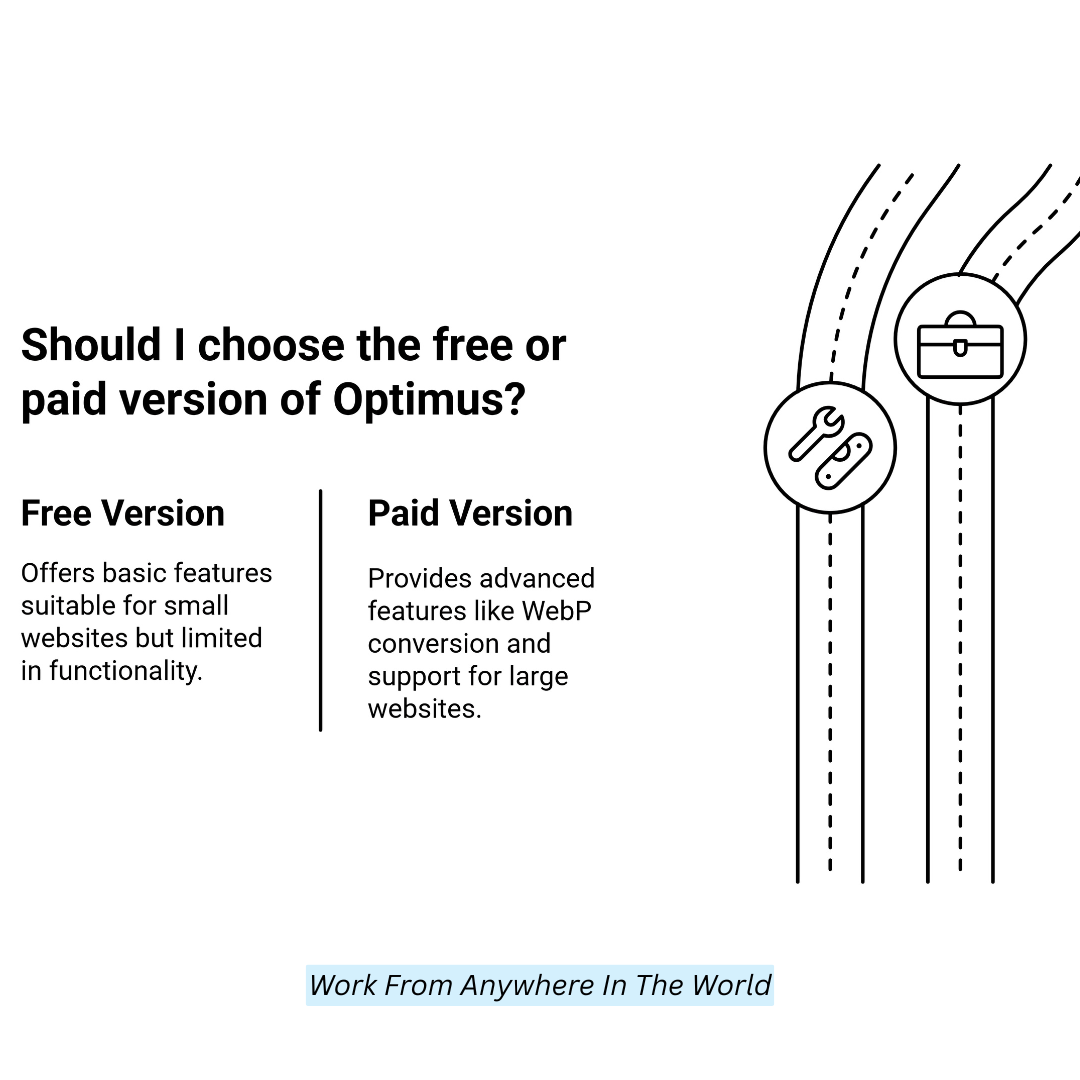
Optimus offers a free version with basic image optimization features. Paid plans start from $49 annually for unlimited images, priority support, and features such as automatic conversion to WebP.
Pros And Cons
Pros
- Lossless Compression Preserves Image Quality.
- You must have a free version with basic features.
- Easy to use, intuitive interface.
Cons
- Only the premium edition has access to premium features.
- Conversion to WebP is available in the paid plan only
- The free version can support only a few very large websites.
6. Tiny Image WordPress Image Optimizer Plugin
If your goal is image compression without deep technical settings, this essential WordPress image optimizer plugin is a good choice.
It is one of the most reliable WordPress image optimizer plugins for lossless compression. It optimizes your images without losing their quality to load them faster.
The Tiny Image plugin extends your existing WordPress media library. It supports multiple formats, such as JPEG, PNG, and GIF, and can automatically optimize images upon upload.
Features
- New images are automatically optimized on upload
- Bulk optimization for current media
- JPEG, PNG, and GIF format support
- All-around simple interface for integration with WP
- Image optimization is done on your server to keep the performance faster
Pricing
One of them, Tiny Image, comes with a free version with minor image optimization features. A premium plan with additional image optimization, high resolutions, and support costs $39 annually.
Pros And Cons
Pros
- The free plan includes basic features
- Simple interface for fast configuration
- Bulk for already existing images
Cons
- Advanced features, such as unlimited optimization, are only in the paid version.
- Small websites with few images might not need a premium version
- WebP conversion is not included in the free plan
7. reSmush.it
reSmush.it is a free and easy-to-use WordPress image optimizer plugin that provides high-quality image compression. It is among the known WordPress image optimizer plugins that use reSmush.
You then use Image Optimize. The plugin supports JPEG, PNG, and GIF image types, and you can optimize photos when you submit them to the WordPress dashboard.
It’s an excellent option for sites that need a simple, lightweight solution to speed up their websites via image optimization.
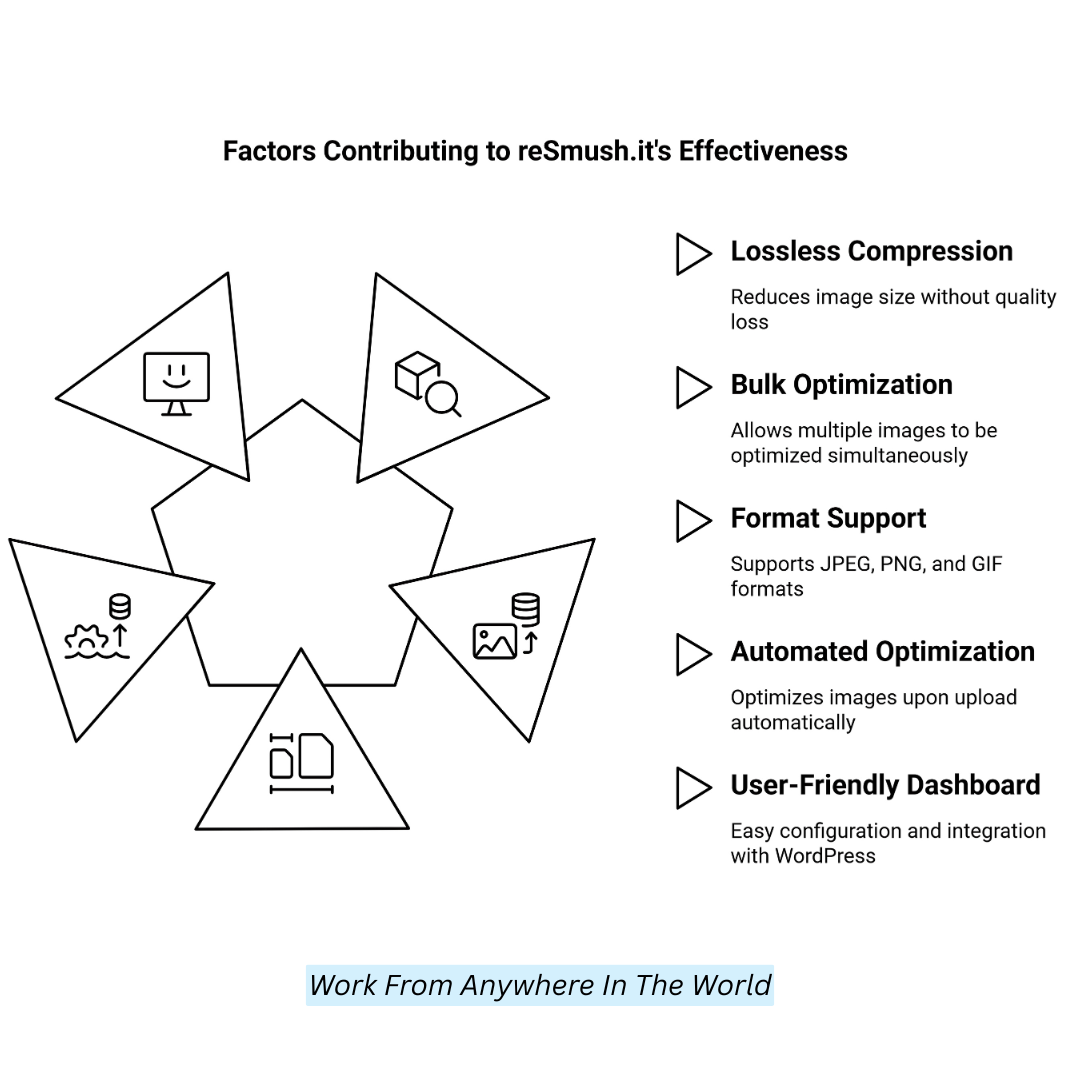
Features
- Lossless compression to reduce image size without loss of image quality
- Optimizing multiple images at once in a bulk
- Support for JPEG, PNG, and GIF image formats
- Automated image optimization upon upload
- User-Friendly Dashboard For Quick Configuration and Integration With WordPress
Pricing
reSmush provides a free version with no image optimization limits. For users with large image optimization needs, premium features with a higher image size limit start at $5/mo.
Pros And Cons
Pros
- Unlimited image optimization in the Free version
- This means that images retain their quality with lossless compression
- Quick and easy-to-use interface and setup
Cons
- Limited premium features are available in the free edition.
- No support for conversion to/from WebP
- May have API rate limits for high-volume sites
8. ImageRecycle
ImageRecycle is a multipurpose one-click WordPress image optimizer plugin that compresses image and PDF file sizes to improve website performance.
It is one of the best WordPress image optimizer plugins available. It offers lossy and lossless compression options, making it suitable for websites of any size.
The ImageRecycle WordPress plugin optimizes new uploads automatically and performs bulk optimizations on existing images.
It’s a great option for websites with large media libraries because it supports WebP conversion, which can speed up your site.
Features
- Multi-image optimization to reduce time for large media libraries
- Modern image formats like WebP to optimize site performance
- Optimize automatically on image upload
- It can handle JPEG, PNG, GIF, and PDF formats
- Easy to set up and integrate with WordPress, with a simple, intuitive interface
Pricing
ImageRecycle offers a free plan for small websites, limited to 100MB of optimization per month. Paid plans begin at $9.99 a month for 5GB of optimization and add priority support and larger image size limits, among other features.
Pros And Cons
Pros
- Large websites save time with bulk optimization
- Conversion to WEBP for improved site speed
- Free plan for small websites
Cons
- Limited optimization in the free plan.
- The paid plan offers some advanced features.
- The higher plans can get pretty expensive for smaller sites with more straightforward needs.
FAQs
Q1: Why Do I Need An Image Optimizer Plugin For My WordPress Website?
Image optimization plugins reduce file sizes without compromising quality, improving page load times. This improves SEO rankings and enhances user experience.
Q2: How Do Image Optimization Plugins Work?
These plugins reduce file sizes by using compression techniques like lossless or lossy compression. They may also convert images to modern formats like WebP and optimize metadata for efficiency.
Q3: Will Image Optimization Affect The Quality Of My Images?
Most plugins allow you to choose between different levels of compression. Lossless compression maintains original quality, while lossy compression aggressively reduces file size with minimal quality loss.
Q4: Do These Plugins Support Bulk Image Optimization?
Yes, Many plugins support bulk optimization, which lets you reduce several photos at once rather than optimize each separately.
Q5: Can Image Optimization Improve SEO?
Yes! Pages that load more quickly enhance the user experience and are preferred by search engines, which in turn raises their rankings.
Conclusion
Optimizing images with WordPress image optimization plugins is essential for improving website performance, loading pages faster, and enhancing the user experience.
Whether you want basic compression, lazy loading, or WebP conversion, there is a plugin that meets your needs. The image optimization plugins can help speed up loading times by optimizing images and reducing server strain on any WordPress site, large or small!
I trust you enjoyed this article on the 9 Best WordPress Image Optimizer Plugins. Please stay tuned for more insightful blogs on affiliate marketing, online business, and working from anywhere in the world.
Take care!
— JeannetteZ
💬 Your Opinion Is Important To Me
Do you have thoughts, ideas, or questions? I’d love to hear from you. Please leave your comments below or email me directly at Jeannette@WorkFromAnywhereInTheWorld.com.
📚 More Wealthy Affiliate Reads
If you found this article helpful, explore more of my Wealthy Affiliate insights below:
- How Wealthy Affiliate Works – An Interesting Approach
- Helpful Wealthy Affiliate Review for Beginners by a Beginner
- Wealthy Affiliate Review – Scam or Legit? The Truth Exposed
- An Insider Wealthy Affiliate Review
- Wealthy Affiliate Review 2025 – A Personal Perspective
- Why Wealthy Affiliate Is My #1 Recommendation for Online Success
- An Insider Wealthy Affiliate vs Bluehost Review
- Jaaxy AI Review: Smart Keyword Research For Modern Bloggers
- Wealthy Affiliate Image Studio: Smart AI for Bloggers
- Wealthy Affiliate Coupons for Premium Memberships
🚀 Ready to Build a Business You Can Run from Home or from Anywhere in the World?
Imagine creating income on your terms — from home, a cozy café, or wherever life takes you.
With the right tools, training, and community support, it’s entirely possible.
Start your own online business for free — no credit card needed.
Disclosure
This post may contain affiliate links. As an Amazon Associate and participant in other affiliate programs, I earn from qualifying purchases at no extra cost to you. Please read my full affiliate disclosure.