14 Best Microphones For Working From Home
When comparing microphones for working from home, consider how you communicate throughout the day and which features will support those tasks.
The right microphone can make your voice clearer during video meetings, client calls, online training, interviews, and presentations. You don't need a recording studio to sound professional.
The right microphone, sensible placement, and a few simple settings can make your voice easier to hear and understand. Your ideal microphone will depend on how you work.
Someone attending occasional video meetings may need something very different from a podcaster, content creator, online teacher, or consultant.
Connection type, pickup pattern, controls, and monitoring features are also worth considering. Understanding these differences can help you avoid paying for features you won't use.
This guide explains what to look for and compares 14 microphones for working from home to help you find one that suits your workspace and everyday needs.
What To Look For In Microphones For Working From Home
You do not need to understand every microphone specification before buying one. Focus on the features that can make a noticeable difference during meetings, calls, presentations, and recordings.
Your typical workday is a good starting point. Someone who mainly attends video meetings may have different needs from a content creator, online teacher, podcaster, or consultant.
Think about your workspace as well. Background noise, desk space, computer connections, and whether you need to move around can all influence which microphone will work best.
Ease of use also matters. A microphone with convenient controls and a simple setup may be more practical than one with advanced features you rarely need.
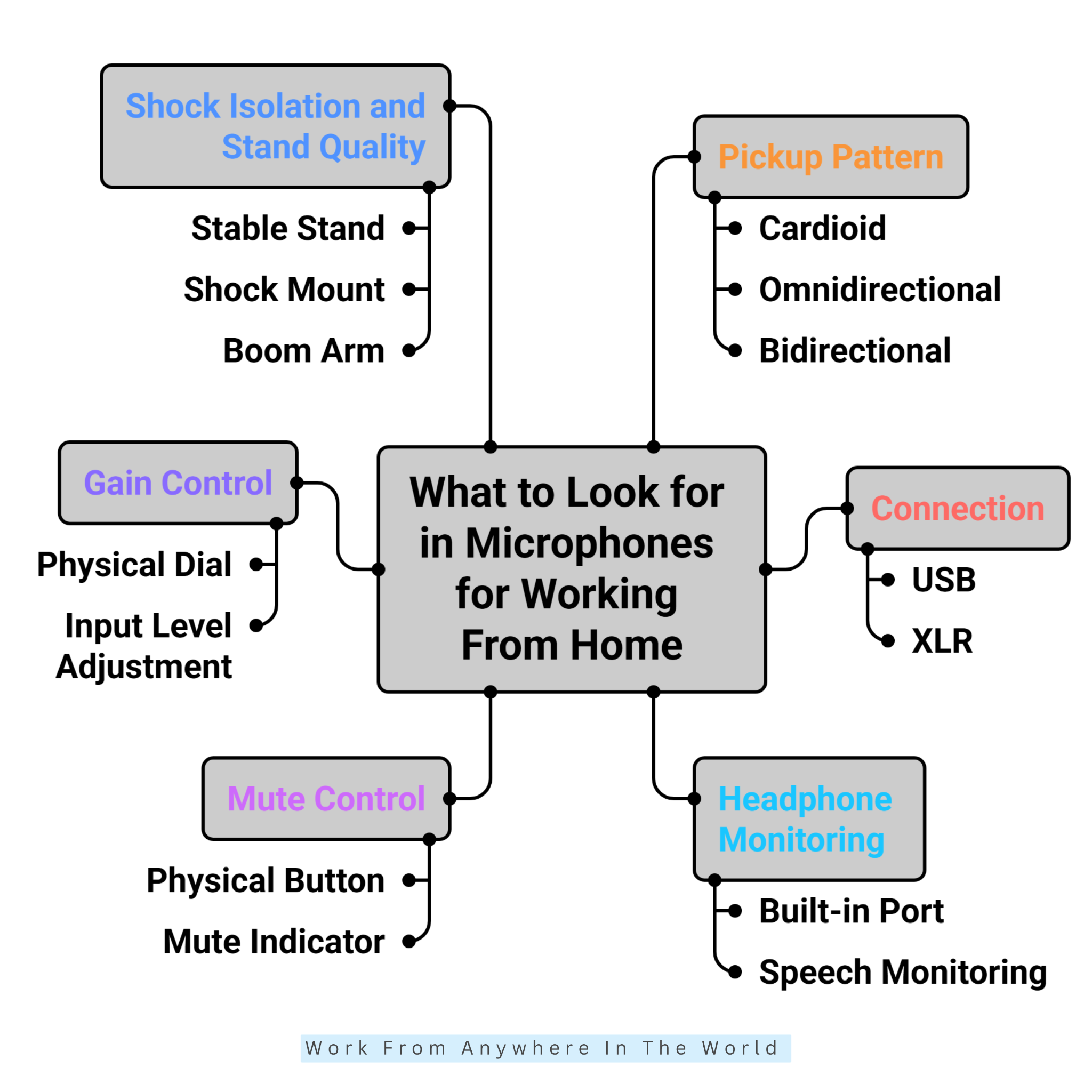
The following features will help you compare microphones for working from home and decide what matters most for your setup. Start with the features that support your everyday tasks, then consider which additional options would genuinely improve the way you work.
1. Pickup Pattern
A microphone's pickup pattern determines where it captures sound from. Choosing the right pattern can help your voice sound clearer while reducing unwanted noise from other directions.
Cardioid microphones capture most of their sound from the front. They are a practical choice for one person working at a desk, especially during video meetings, calls, presentations, and recordings.
Omnidirectional microphones capture sound from all directions. They can work well when several people need to speak into the same microphone, although they may also capture more background noise.
Bidirectional microphones capture sound mainly from the front and back. This pattern can be useful for interviews or conversations where two people sit opposite each other.
For most home-office users, a cardioid microphone provides a useful balance between voice clarity and background-noise control.
Key Points
- Cardioid works well for one person.
- Omnidirectional captures sound from all directions.
- Bidirectional can suit two-person conversations.
- Consider how many people will use the microphone.
- Cardioid is a practical choice for many home offices.
2. Connection
The connection type determines how easily you can use a microphone with your computer and other equipment. The two most common options are USB and XLR microphones.
USB microphones connect directly to a compatible computer and are generally easy to set up. They work well for video meetings, online calls, presentations, and many types of content creation.
XLR microphones usually require additional equipment, such as an audio interface or mixer. They provide greater flexibility for people who want more control over their audio setup.
Some microphones include both USB and XLR connections. This gives you the convenience of USB now while allowing you to expand your audio equipment later.
For everyday calls through Zoom, Microsoft Teams, or Google Meet, a USB microphone is often sufficient. Your choice ultimately depends on how you plan to use the microphone and whether you expect your setup to become more advanced.
Key Points
- USB microphones connect directly to compatible computers.
- XLR microphones generally require additional audio equipment.
- USB is practical for many home-office tasks.
- Dual USB/XLR models provide greater flexibility.
- Consider whether your audio needs may change later.
This needs a little clarification because the first sentence is awkward, and we can explain direct monitoring more clearly for readers.
3. Headphone Monitoring
Headphone monitoring allows you to listen to your microphone through headphones connected directly to it. On compatible models, you can hear your voice as the microphone captures it.
This makes it easier to notice whether your voice is too loud or too quiet. You may also catch background noise, keyboard sounds, or other unwanted audio before it becomes a problem.
Some microphones offer zero-latency monitoring, which lets you hear your voice without a noticeable delay. This can make monitoring more comfortable during longer conversations or recordings.
Headphone monitoring can be particularly useful during client meetings, presentations, online teaching, podcasts, and other recordings. It gives you more control over how your audio sounds while you're speaking.
You may not need this feature for occasional video calls. However, it can be valuable when clear, consistent audio is essential to your work.
Key Points
- Lets you hear the audio your microphone captures.
- Helps identify volume and background-noise problems.
- Zero-latency monitoring avoids distracting delays.
- Useful for meetings, teaching, podcasts, and recordings.
- May be unnecessary for occasional calls.
4. Mute Control
A physical mute button lets you silence your microphone instantly without searching for the mute control inside your meeting software. This can be particularly convenient during frequent calls.
Unexpected sounds are common when working from home. A phone may ring, a delivery may arrive, someone may speak nearby, or a pet may suddenly decide that your meeting needs their contribution.
Some microphones include a light or other visual indicator that shows whether the microphone is muted. This helps prevent the awkward mistake of speaking while muted or assuming you're muted when you're not.
The location of the mute button matters as well. It should be easy to reach without moving the microphone or creating unnecessary noise during a call.
For people who attend frequent video meetings, a dedicated mute control is a simple feature that can make everyday communication easier to manage.
Key Points
- Provides quick access to muting.
- Useful when unexpected background sounds occur.
- A visual indicator shows the microphone's mute status.
- Look for a control that is easy to reach.
- Particularly convenient for frequent video calls.
5. Gain Control
Gain controls how strongly the microphone captures your voice. Adjusting it correctly helps you achieve a clear, consistent sound without making your voice too quiet or introducing unnecessary noise.
A physical gain dial makes adjustments easier because you don't have to search through your computer's audio settings. This can be especially convenient when you use the microphone for different tasks.
Higher gain does not automatically mean better sound. Too much can increase background noise or cause distortion, while too little may make your voice difficult for others to hear.
Start by speaking at your normal volume and adjusting the gain gradually. Listen through headphones or check your recording level until your voice sounds clear without distortion.
Once you find a suitable setting, you may need only occasional adjustments. Changes in microphone position, speaking distance, or the type of work you're doing can still affect the ideal level.
Key Points
- Gain controls the microphone's input level.
- A physical dial makes adjustments convenient.
- Higher gain does not necessarily improve audio.
- Too much gain can increase noise or distortion.
- Adjust the level while speaking normally.
6. Shock Isolation And Stand Quality
Microphones can pick up vibrations that travel through your desk. Typing, moving your mouse, adjusting equipment, or accidentally bumping the surface can create unwanted sounds in your audio.
A sturdy microphone stand helps keep the microphone stable while you work. A shock mount provides additional isolation by reducing vibrations before they reach the microphone.
A boom arm can make positioning easier by allowing you to move the microphone closer to your mouth without taking up as much desk space. You can also reposition it when you need more room.
The surface beneath your equipment matters as well. A lightweight or unstable desk may transfer more movement to the microphone, particularly while you're typing or using other equipment.
For frequent meetings, presentations, podcasts, or recordings, good microphone positioning and stability can noticeably improve your audio. A suitable stand or mounting system can therefore be just as important as some of the microphone's built-in features.
Key Points
- Desk vibrations can create unwanted microphone noise.
- A stable stand helps keep the microphone secure.
- Shock mounts reduce vibrations reaching the microphone.
- Boom arms provide flexible positioning and save desk space.
- Good positioning can improve overall audio quality.
14 Best Microphones To Choose From
Choosing a microphone becomes easier once you know which features matter for your work. The next step is comparing models that suit different home-office needs.
Some microphones focus on simple USB connectivity for everyday meetings and calls. Others provide additional controls and connection options for podcasting, online teaching, presentations, or content creation.
Your workspace matters too. Desk space, background noise, computer compatibility, and how frequently you record can all influence which model suits you best.
The following options range from straightforward microphones for everyday communication to more advanced models for people who need greater control over their audio.
Compare the features that matter most to you rather than looking for the microphone with the longest specification list. The best choice fits naturally into your workflow.
1. FIFINE K669B
The FIFINE K669B is a straightforward USB condenser microphone for people who want clearer audio without a complicated setup. Its cardioid pickup pattern focuses primarily on sound coming from the front.
It connects directly to compatible computers via USB and doesn't require an audio interface or external power supply. This makes it suitable for beginners who want a microphone they can set up relatively quickly.
The microphone includes a desktop tripod stand and an on-mic gain control for making quick adjustments. Its metal construction also gives it a more substantial design than some basic desktop microphones.
As a condenser microphone, the K669B can capture surrounding sounds, so it suits relatively quiet workspaces best. Careful positioning and an appropriate gain setting can help reduce unwanted background noise.
It can be a practical choice for video meetings, online teaching, voice recordings, and content creation when simple USB connectivity is more important than advanced audio controls.
Key Points
- USB condenser microphone
- Cardioid pickup pattern
- Built-in gain control
- Desktop tripod included
- Best suited to relatively quiet spaces
2. Samson Q2U
The Samson Q2U combines simple USB connectivity with the flexibility of an XLR connection. Its dynamic cardioid design focuses on sound from the front while reducing sounds coming from the sides and rear.
Because a dynamic microphone is less sensitive to surrounding sounds, the Q2U can work particularly well in untreated home offices. This can be helpful when background noise is difficult to eliminate completely.
You can connect the microphone directly to a compatible computer through USB or use its XLR connection with an audio interface or mixer. These options let you start with a simple setup and expand your equipment later.
A built-in headphone output provides zero-latency monitoring and includes its own level control. The microphone also has an on/off switch for quickly silencing the audio when needed.
The Q2U comes with a desktop tripod stand, microphone clip, windscreen, USB cable, and XLR cable. It can suit remote workers, online teachers, podcasters, and content creators who want a microphone that can adapt as their audio needs change.
Key Points
- Dynamic cardioid microphone
- USB and XLR connectivity
- Zero-latency headphone monitoring
- On/off microphone switch
- Desktop stand, windscreen, and cables included
3. FIFINE AM8
The FIFINE AM8 is a dynamic cardioid microphone designed to focus on your voice while reducing unwanted background sound. This can make it useful in home offices where complete silence isn't always possible.
It offers both USB and XLR connections, giving you flexibility as your audio setup changes. USB provides straightforward plug-and-play connectivity, while XLR lets you connect the microphone to an audio interface or mixer.
When connected through USB, the AM8 provides gain control, tap-to-mute functionality, and real-time headphone monitoring. These controls are convenient for meetings, online teaching, streaming, podcasts, and recordings.
The microphone also includes a sturdy desktop base and supports standard microphone stands. When positioned correctly, its dynamic design can help reduce sounds from keyboards, fans, and other activity around your workspace.
The AM8 can suit remote professionals, podcasters, streamers, and content creators who want simple USB connectivity now, with the option of expanding to an XLR setup later.
Key Points
- Dynamic cardioid microphone
- USB and XLR connectivity
- Gain and mute controls in USB mode
- Real-time headphone monitoring
- Suitable for workspaces with some background noise
4. Audio-Technica ATR2100x-USB
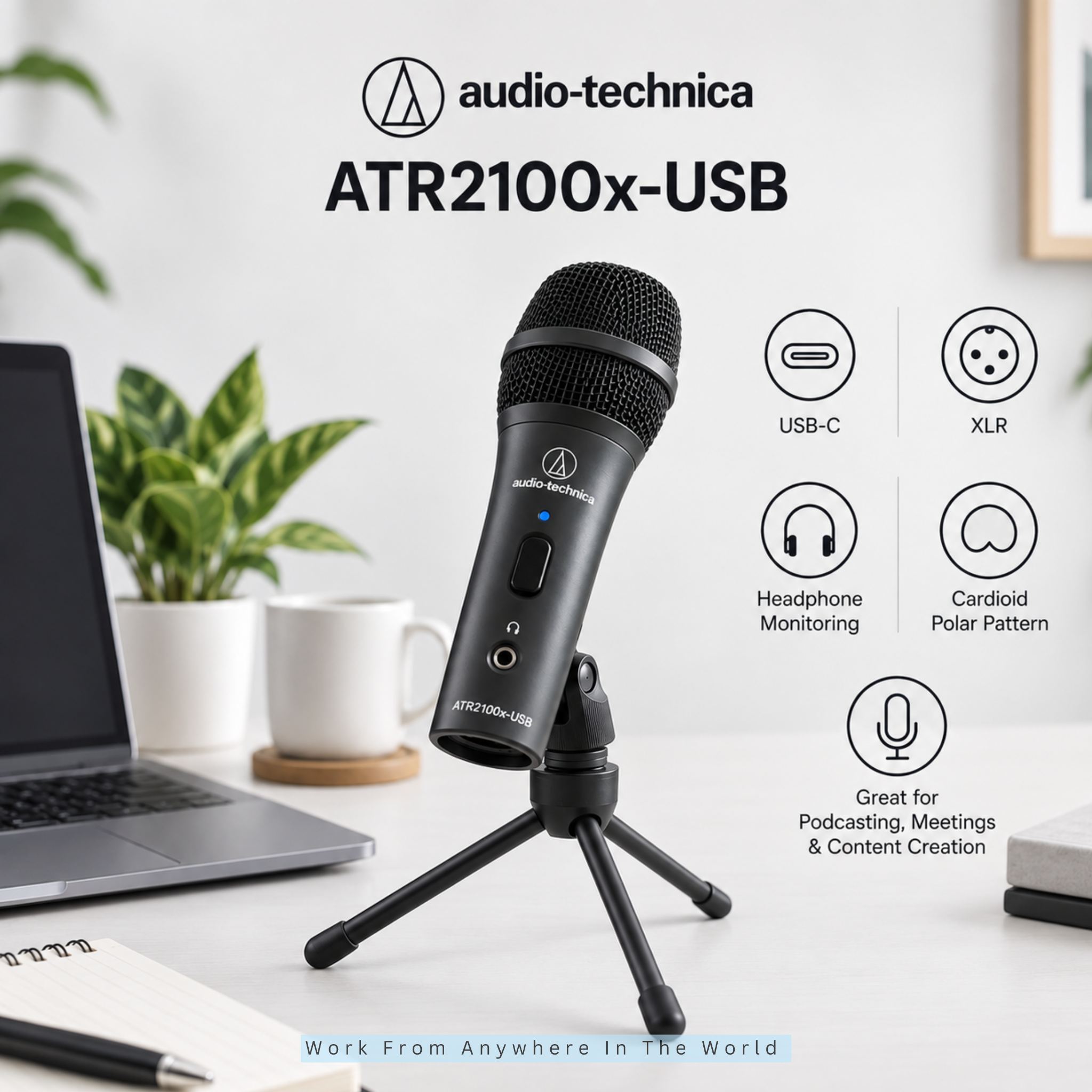
The Audio-Technica ATR2100x-USB is a dynamic cardioid microphone designed primarily for voice applications. It can work well for remote meetings, podcasting, online teaching, voice recordings, and content creation.
Its cardioid pickup pattern focuses primarily on sound from the front while reducing sound from the sides and rear. This can help limit unwanted room noise in a typical home-office environment.
The microphone provides both USB-C and XLR outputs. You can connect it directly to a compatible computer through USB or use the XLR connection with an audio interface or mixer as your setup develops.
A built-in headphone jack provides direct monitoring, while a headphone volume dial lets you adjust the listening level. The microphone also includes an on/off switch to quickly mute it when needed.
The box includes a desktop tripod, stand clamp, two USB cables, and an XLR cable. Its USB and XLR connectivity makes it especially useful for people who want a simple home-office microphone with room to expand their audio setup later.
Key Points
- Dynamic cardioid microphone
- USB-C and XLR outputs
- Direct headphone monitoring
- Headphone volume control and on/off switch
- Desktop stand and cables included
5. MAONO AU-A04
The MAONO AU-A04 is a USB condenser microphone designed for people who want a straightforward setup for voice communication and recording. Its cardioid pickup pattern focuses primarily on sound coming from the front.
The microphone connects directly through USB, so an additional audio interface is not required. Its plug-and-play design can be convenient for people setting up their first dedicated home-office microphone.
The A04 is commonly offered as a microphone kit with accessories for positioning and reducing unwanted vibrations or breath sounds. This can make it easier to create a practical desk setup without selecting every component individually.
As a condenser microphone, it suits relatively quiet workspaces where you can control surrounding sounds. Careful positioning can also help keep the speaker's voice clear during meetings and recordings.
The AU-A04 can work well for online meetings, teaching, voiceovers, podcasting, and beginner content creation. Its simple USB connection makes it particularly suitable for people who prefer an uncomplicated setup.
Key Points
- USB condenser microphone
- Cardioid pickup pattern
- Plug-and-play connectivity
- Available with useful mounting accessories
- Better suited to relatively quiet workspaces
6. MAONO A04 Gen2
The MAONO A04 Gen2 is a condenser microphone that offers both USB and XLR connectivity. This gives users a straightforward way to start with USB while keeping the option of adding an audio interface or mixer later.
When connected through USB, the microphone supports digital audio up to 24-bit/192 kHz. It can connect to compatible computers and smartphones, making it suitable for a range of home-office and recording setups.
The A04 Gen2 also works with MAONO Link software. Users can adjust microphone gain, muting, noise reduction, and different audio presets designed for activities such as voiceovers, podcasts, streaming, and recording.
Its XLR connection also lets users expand their setup with an audio interface or mixer. Because it is a condenser microphone, careful placement and a relatively quiet workspace can still help achieve better results.
The A04 Gen2 can suit people who want more control than a basic plug-and-play microphone provides. Its combination of two connection types and software controls also gives users room to develop a more advanced audio setup later.
Key Points
- Condenser microphone
- USB and XLR connectivity
- Up to 24-bit/192 kHz USB audio
- MAONO Link software controls
- Noise reduction and audio presets
7. Audio-Technica AT2020USB-X
The Audio-Technica AT2020USB-X is a USB condenser microphone designed for clear, detailed voice capture. It can work well for meetings, presentations, podcasts, voiceovers, and other spoken-word applications.
Its cardioid pickup pattern focuses primarily on sound coming from the front while reducing sound from the sides and rear. This helps keep attention on the speaker when the microphone is positioned correctly.
USB connectivity lets you connect directly to a compatible computer without an external audio interface. The microphone also supports high-resolution digital audio, making it suitable for more than everyday video calls.
A built-in headphone jack provides direct monitoring, while volume and mix controls let you adjust what you hear. A touch-sensitive mute button lets you quickly silence the microphone during calls or recordings.
Because the AT2020USB-X is a sensitive condenser microphone, it performs best in a relatively quiet workspace with limited echo. It is a good option for users who want detailed USB audio without moving to a more complicated XLR setup.
Key Points
- Cardioid condenser microphone
- USB connectivity
- Up to 24-bit/96 kHz audio
- Headphone volume and mix controls
- Touch-sensitive mute button
Wealthy Affiliate – Mini Review
If you’ve ever thought about turning your blog, passion, or niche into an online business,
Wealthy Affiliate (WA) is one of the most beginner-friendly platforms I’ve used.
It combines step-by-step training, website hosting, AI-powered tools,
keyword research, and an active community all in one place.
What I like most is that you can start for free (no credit card needed), explore the platform,
test the tools, and connect with other entrepreneurs before upgrading.
WA isn’t a “get rich quick” scheme — success comes from consistent effort
and applying what you learn over time.
8. HyperX SoloCast
The HyperX SoloCast is a compact USB condenser microphone designed for people who want a straightforward upgrade from a laptop microphone or headset. Its small footprint also makes it practical for home offices with limited desk space.
Its cardioid pickup pattern focuses primarily on sound coming from the front. This helps keep attention on your voice when you position the microphone correctly.
The SoloCast uses a plug-and-play USB-C connection and supports recording at up to 24-bit/96 kHz. It can connect directly to compatible computers without requiring an external audio interface.
A tap-to-mute sensor lets you silence the microphone quickly, while an LED indicator shows its status. The adjustable desktop stand can also sit under some monitors or be replaced with a compatible microphone stand or boom arm.
As a condenser microphone, the SoloCast suits reasonably quiet workspaces where you can control background noise and room echo. Its uncomplicated design makes it particularly useful when simple voice communication and recording are the priorities.
Key Points
- USB condenser microphone
- Cardioid pickup pattern
- Up to 24-bit/96 kHz recording
- Tap-to-mute with LED indicator
- Compact adjustable stand
9. Logitech G Yeti GX
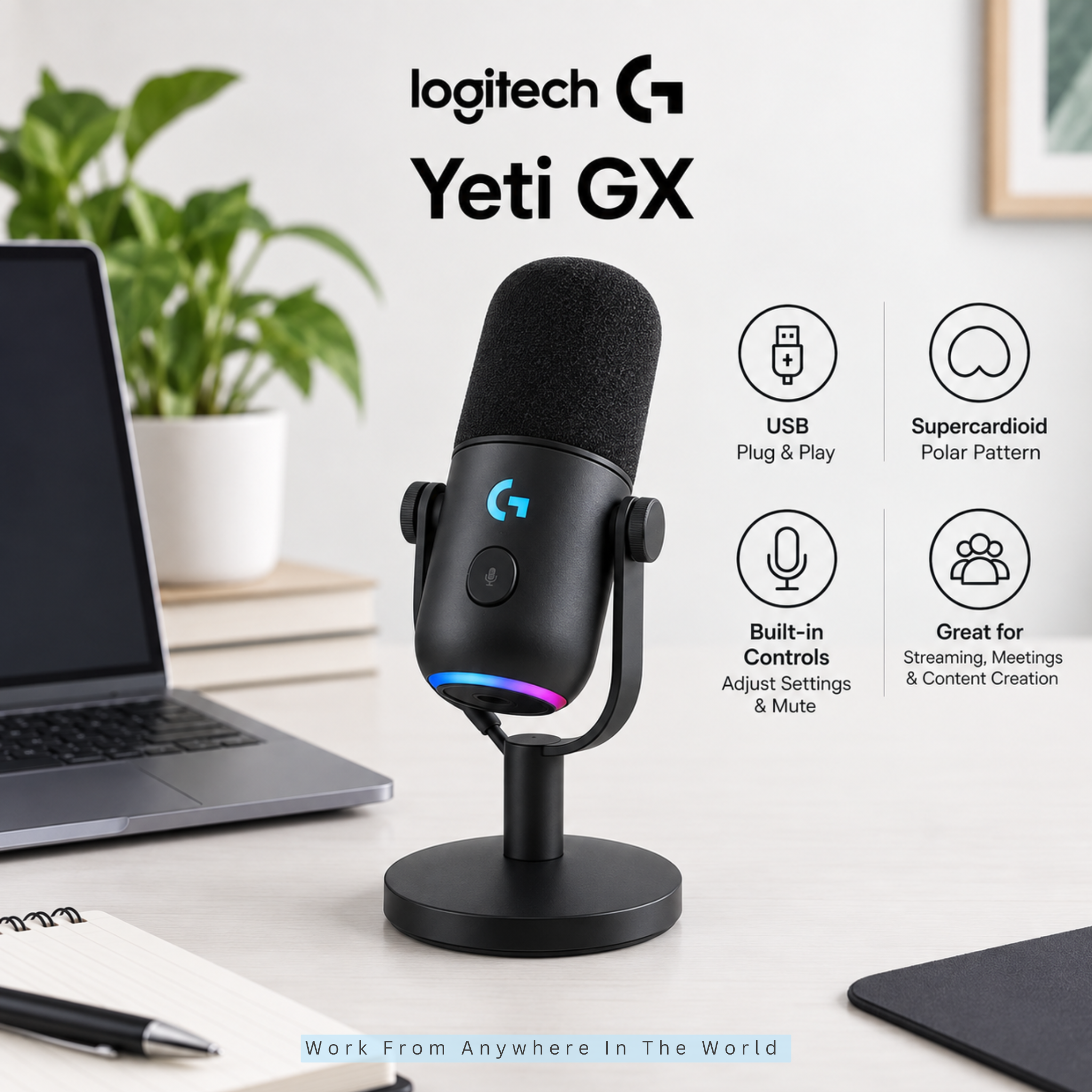
The Logitech G Yeti GX is a USB dynamic microphone designed to focus closely on the speaker's voice. Its supercardioid pickup pattern helps reduce unwanted sounds coming from other directions.
Its dynamic design can be useful in home offices where keyboards and other background sounds are difficult to eliminate completely. Logitech specifically designed the microphone to reduce noise and keyboard clicks.
The Yeti GX connects directly via USB and includes adjustable gain control and a mute function. Its compact desktop design also makes it practical when desk space is limited.
One particularly useful feature is Smart Audio Lock. It uses an analog limiter to help prevent clipping and a downward expander to automatically reduce ambient background noise.
The microphone also works with Logitech G HUB and Blue VO!CE software for additional audio adjustments. This makes the Yeti GX suitable for people who want simple USB connectivity with more control over their sound.
Key Points
- Dynamic USB microphone
- Supercardioid pickup pattern
- Designed to reduce keyboard and background noise
- Smart Audio Lock
- G HUB and Blue VO!CE controls
10. RØDE PodMic USB
The RØDE PodMic USB is a dynamic cardioid microphone designed primarily for speech. It can handle everyday work calls while also providing features for podcasting, voiceovers, streaming, and other content creation.
It offers both USB-C and XLR connectivity. USB lets you connect directly to a compatible computer, while XLR lets you use the microphone with an audio interface or mixer as your setup grows.
A built-in headphone output provides zero-latency monitoring with its own level control. When connected through USB, the microphone also provides onboard APHEX audio processing, including a noise gate, compressor, and high-pass filter.
The PodMic USB includes an internal pop filter to reduce plosive sounds and an internal shock mount to reduce vibrations. Its integrated swing mount also makes it easier to position the microphone on a suitable desktop stand or boom arm.
Its USB and XLR connectivity makes the PodMic USB especially useful for people whose audio needs extend beyond video meetings. It provides a simple USB setup while leaving room for a more advanced recording system later.
Key Points
- Dynamic cardioid microphone
- USB-C and XLR connectivity
- Zero-latency headphone monitoring
- Onboard audio processing
- Internal pop filter and shock mount
11. HyperX QuadCast 2 S
The HyperX QuadCast 2 S is a USB condenser microphone designed for users who want more control over how their microphone captures sound. Its four selectable polar patterns make it adaptable to different home-office and recording situations.
You can choose between cardioid, omnidirectional, bidirectional, and stereo pickup patterns. Cardioid works well for individual calls and recordings, while the other patterns provide additional options for interviews, conversations, or other recording setups.
A built-in shock mount helps reduce unwanted vibrations, while a tap-to-mute sensor provides quick control during meetings or recordings. The microphone also includes a headphone jack for direct monitoring.
A multifunction knob lets you control microphone gain, headphone volume, monitoring balance, and the selected polar pattern. The QuadCast 2 S also supports up to 32-bit/192 kHz audio through its USB connection.
As a condenser microphone, it suits relatively quiet workspaces where you can control background noise and room echo. Its range of controls makes it particularly useful for people who use the same microphone for both everyday communication and more advanced recording.
Key Points
- USB condenser microphone
- Four selectable pickup patterns
- Up to 32-bit/192 kHz audio
- Built-in shock mount and tap-to-mute
- Direct headphone monitoring
12. Elgato Wave:3 MK.2
The Elgato Wave:3 MK.2 is a USB condenser microphone designed for people who want simple hardware controls combined with more advanced audio management. Its cardioid pickup pattern focuses primarily on the speaker's voice.
A multifunction dial controls microphone gain, headphone volume, monitoring balance, and Voice Tune. The microphone also includes tap-to-mute and a headphone output for real-time monitoring.
The Wave:3 MK.2 includes Elgato's Wave FX Processor, which handles audio processing directly on the microphone. Features such as equalization, compression, and Clipguard 2.0 can help users manage and refine their voice without building a complicated recording setup.
It also integrates with Wave Link software for managing microphone and computer audio. This can be particularly useful when you need to balance several audio sources for online presentations, recordings, podcasts, or streaming.
As a condenser microphone, careful positioning can still help achieve better results in a home office. The combination of onboard processing and software controls makes the Wave:3 MK.2 particularly useful for people who want greater control over their computer audio.
Key Points
- USB condenser microphone
- Cardioid pickup pattern
- Wave FX onboard processing
- Clipguard 2.0
- Headphone monitoring and tap-to-mute
13. Shure MV7+
The Shure MV7+ is a dynamic microphone designed for clear voice recording in home offices and other spaces where background noise can be difficult to control. Its Voice Isolation Technology helps the microphone focus on the speaker while reducing unwanted background noise.
It offers both USB-C and XLR connectivity. USB-C provides a straightforward connection to compatible computers and mobile devices, while XLR allows the microphone to work with an audio interface or mixer.
A built-in headphone jack provides real-time monitoring. The LED touch panel works as an audio level meter and provides quick access to muting, while additional settings can be adjusted through Shure's MOTIV Mix software.
The MV7+ also includes useful digital processing features. These include a real-time Denoiser, improved Auto Level Mode, and Digital Pop Stopper, which helps reduce harsh plosive sounds while speaking.
Its dynamic design and voice-focused features make it well-suited for people who spend a lot of time speaking during meetings, presentations, podcasts, online teaching, or recordings. The USB and XLR connections also provide room to expand the audio setup later.
Key Points
- Dynamic voice-focused microphone
- USB-C and XLR connectivity
- Voice Isolation Technology
- Real-time Denoiser and Auto Level Mode
- Headphone monitoring and LED touch panel
14. Blue Snowball iCE
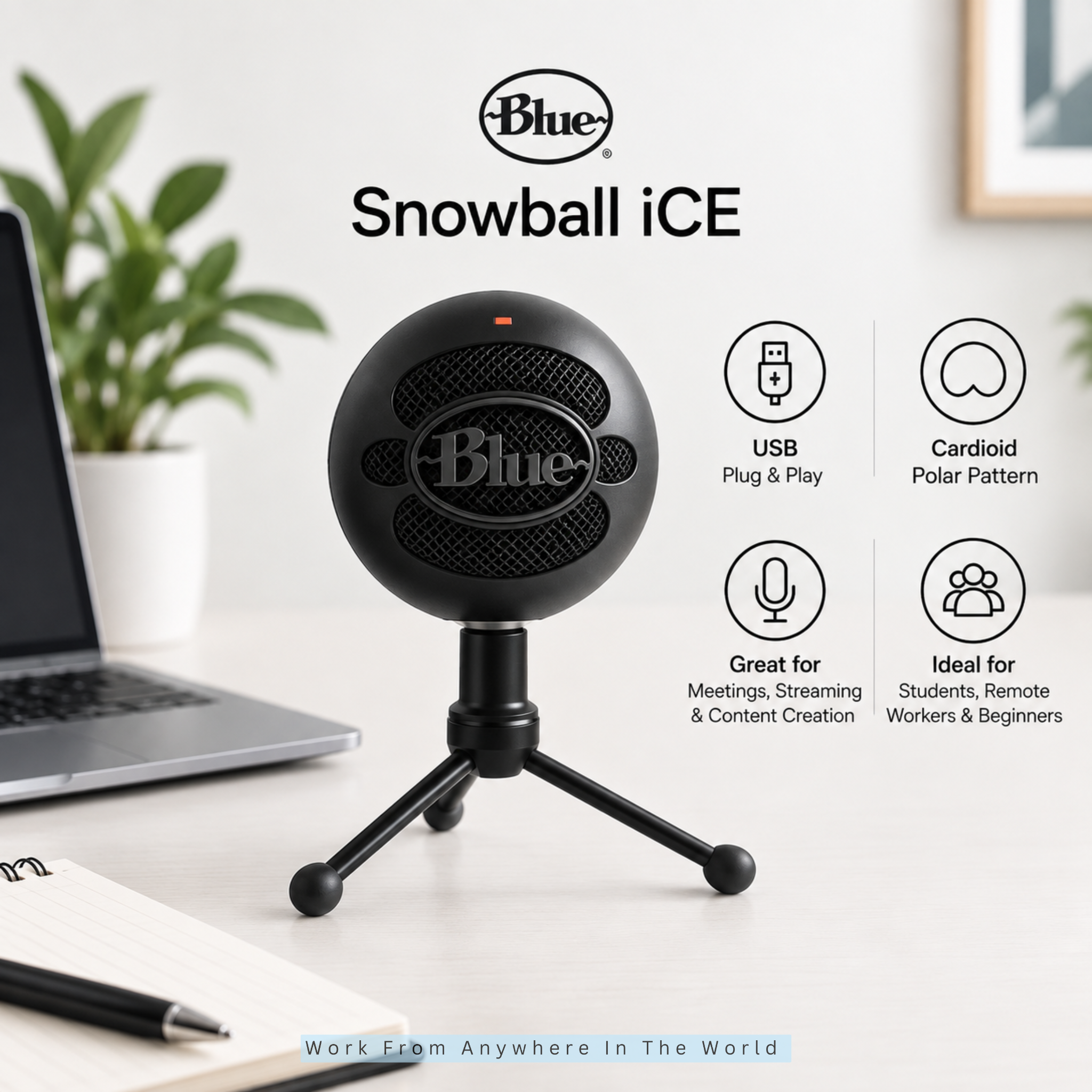
The Blue Snowball iCE is a USB condenser microphone designed for people who want a straightforward upgrade from a built-in computer microphone. Its simple design makes it particularly suitable for everyday communication and basic recording.
Its cardioid pickup pattern captures sound primarily from directly in front of the microphone. This makes it suitable for one-person video meetings, online classes, podcasts, voiceovers, and other spoken-word applications.
The microphone connects directly to a compatible computer via USB, without an external audio interface. Its plug-and-play design also keeps setup simple for first-time dedicated microphone users.
An adjustable desktop stand is included for positioning the microphone on a workspace. You can also remove the stand if you prefer to attach the Snowball iCE to a compatible boom arm.
As a condenser microphone, it suits relatively quiet spaces where you can control background noise and room echo. Its uncomplicated design makes it a practical option when ease of use matters more than advanced onboard controls.
Key Points
- USB condenser microphone
- Cardioid pickup pattern
- Plug-and-play connectivity
- Adjustable desktop stand
- Compatible with a boom arm
Frequently Asked Questions
Q1: Do I Need A Separate Microphone For Working From Home?
Not necessarily. A laptop or headset microphone may be sufficient for occasional calls, but a dedicated microphone can provide clearer and more consistent audio for frequent meetings, presentations, online teaching, and customer calls.
Q2: Is USB Or XLR Better For A Home-Office Microphone?
USB microphones are generally easier to set up because they connect directly to a compatible computer. XLR microphones require additional equipment but provide more flexibility for advanced audio setups.
A microphone with both connections can give you the convenience of USB while leaving room to expand your setup later.
Q3: What Type Of Microphone Is Best For A Noisy Room?
A dynamic microphone can be a good choice for a noisy or untreated room because it is generally less sensitive to surrounding sounds than a condenser microphone.
A directional pickup pattern and positioning the microphone close to your mouth can also help reduce unwanted background noise.
Q4: Are USB Microphones Good Enough For Professional Calls?
Yes. A quality USB microphone can provide clear audio for Zoom, Microsoft Teams, Google Meet, interviews, presentations, and customer meetings without requiring a separate audio interface.
Good microphone placement and appropriate gain settings can also make a noticeable difference in how your voice sounds.
Q5: How Far Should A Microphone Be From Your Mouth?
Around 6–12 inches can be a useful starting point, although the ideal distance depends on the microphone and your speaking volume.
Keeping the microphone reasonably close can help capture your voice clearly while reducing room noise and echo. Follow the manufacturer's recommendations when available.
Q6: Where Should I Place A Microphone In My Home Office?
Place the microphone where it can capture your voice clearly without interfering with your keyboard, monitor, or other equipment. For a directional microphone, make sure you are speaking toward the correct side or end.
A desktop stand or boom arm can make positioning easier. Keep the microphone away from noisy fans, speakers, open windows, and other background noise.
Conclusion
When comparing microphones for working from home, think about your workspace, daily communication, and the features you will actually use. The most advanced microphone is not necessarily the best choice for your needs.
A USB cardioid microphone can provide a convenient setup for everyday meetings and calls. A dynamic microphone may suit a noisier workspace, while a condenser microphone can capture detailed sound in a quieter environment.
Good audio also depends on how you use your equipment. Proper microphone placement, suitable gain settings, and a stable stand can make a noticeable difference to the way your voice sounds.
Choose a microphone that fits naturally into your workspace and the way you communicate. With the right setup, your voice can come through clearly and consistently during meetings, presentations, online teaching, podcasts, and recordings.
I trust you enjoyed this article on the 14 Best Microphones For Working From Home. Please stay tuned for more insightful blogs on affiliate marketing, online business, and working from anywhere in the world.
Take care!
— JeannetteZ 🌍✨
💬 Your Opinion Is Important To Me
Do you have thoughts, ideas, or questions? I’d love to hear from you. Please leave your comments below or email me directly at Jeannette@WorkFromAnywhereInTheWorld.com.
📚 More Work From Anywhere Reads
🚀 Ready to Build a Business You Can Run from Home
Or from Anywhere in the World?
Imagine creating income on your terms — from home, a cozy café, or wherever life takes you.
With the right tools, training, and community support, it’s entirely possible.
Start your own online business for free — no credit card needed.
Disclosure
This post may contain affiliate links. As an Amazon Associate and participant in other affiliate programs, I earn from qualifying purchases at no extra cost to you. Please read my full affiliate disclosure.