11 Best Headsets For Working From Home
Choosing the best headsets for working from home involves more than finding a pair that sounds good. Your headset becomes part of your everyday workspace, especially when meetings, calls, and online conversations fill much of your working day.
Clear communication matters in both directions. You need to hear colleagues and clients easily, while your microphone should capture your voice clearly without allowing every sound in your home to dominate the conversation.
How and where you work can also influence your choice. A quiet private office creates different needs from a shared workspace where conversations, pets, household activity, or outside noise may compete for your attention.
Comfort becomes increasingly important when you wear a headset for hours at a time. Fit, weight, connectivity, battery life, and simple controls can all influence whether a headset works comfortably with your daily routine.
No single model suits every remote worker. This guide covers the features worth considering and compares 11 headsets with different strengths, helping you find an option that fits your workspace and how you work.
Why Use A Headset When Working From Home?
A headset can make everyday communication easier when meetings, calls, and online conversations are part of your work routine. It keeps your hands free while helping you hear conversations clearly and stay focused on the people you’re speaking with.
Your home office setup can also influence how much background noise you encounter. Household activity, pets, traffic, and other distractions can make it harder to concentrate or join calls comfortably.
A headset with a well-positioned microphone can help your voice come through more clearly during conversations. This can be particularly useful when you’re building a sustainable online business and regularly speak with clients, colleagues, or customers from your home office.
Headsets can also provide greater privacy in shared spaces. Instead of playing a meeting through computer speakers, you can listen without everyone nearby hearing the entire conversation.
The right headset should fit naturally into the way you work rather than become another distraction. Once you know why and how you’ll use it, you can focus on the features that matter most for your particular workspace and routine.
What To Consider When Choosing A Headset
Choosing a headset for your home office involves more than comparing sound quality. The way you communicate, your working environment, and how long you wear the headset can all influence which features matter most.
Someone who spends much of the day in virtual meetings may prioritize microphone quality and comfort. If your workspace is noisy, effective noise control may be more important than it would be in a quiet private office.
Connectivity also deserves attention, especially if you regularly switch between a computer, phone, or other devices. Battery life becomes important for wireless models when you need your headset to last throughout the working day.
Small details can make a noticeable difference as well. Controls that are easy to reach, a comfortable fit, and compatibility with the devices and platforms you use can make everyday communication much smoother.
Before comparing the best headsets for working from home, consider the following six features. They will help you identify what you actually need and make it easier to compare the models later in this guide.
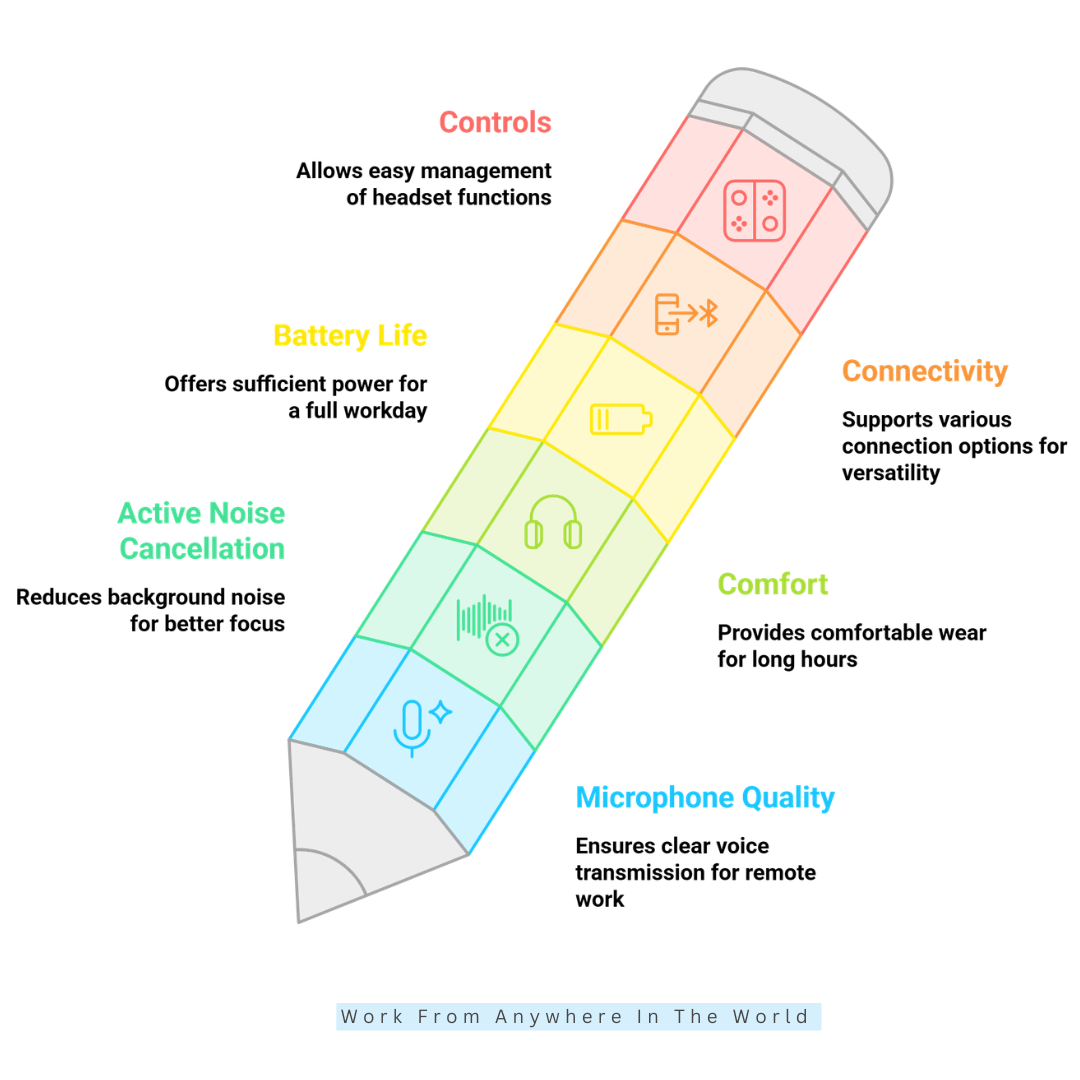
1. Microphone Quality
For remote work, microphone quality can be just as important as the sound you hear through the headset. During meetings and calls, your voice should come through clearly without sounding muffled, distant, or overwhelmed by background noise.
A boom microphone can work particularly well for frequent calls because it stays close to your mouth. Some headsets instead use multiple built-in microphones and processing technology to separate your voice from surrounding sounds.
Your working environment matters too. If your home office is near household activity, pets, traffic, or other sources of noise, look for a microphone designed to reduce the amount of background sound transmitted during calls.
Don’t rely entirely on product descriptions such as “clear calls” or “noise-cancelling microphone.” Independent microphone tests and recordings can give you a better idea of how a headset performs in realistic working conditions.
When comparing the best headsets for working from home, prioritize microphone performance if meetings, client conversations, or online calls make up a significant part of your working day.
Key Points
- Prioritize clear voice transmission for frequent calls.
- Consider a boom microphone for consistent positioning.
- Look for background-noise reduction in busy environments.
- Check independent microphone tests when possible.
- Match microphone quality to your daily communication needs.
2. Active Noise Cancellation
Active noise cancellation, commonly called ANC, uses electronic processing to reduce some of the surrounding sounds you hear through a headset. It can be particularly useful when your home office isn’t completely quiet.
ANC generally works best with steady, predictable sounds such as fans, air conditioners, traffic, or a low household hum. Reducing these ongoing distractions can make it easier to concentrate during calls or focused work.
Sudden or irregular sounds can be more difficult to block completely. A barking dog, a closing door, a nearby conversation, or other unexpected noise may still be noticeable even when active noise cancellation is turned on.
It is also important to distinguish between the noise you hear and the noise your microphone transmits to other people. ANC primarily improves your listening experience and does not automatically prevent callers from hearing sounds around you.
When choosing a headset for working from home, consider ANC and microphone noise reduction separately. If you work in a busy environment, both features may be valuable for different reasons.
Key Points
- ANC reduces some surrounding noise.
- It works particularly well with steady background sounds.
- Sudden or irregular noises may still be noticeable.
- ANC and microphone noise reduction serve different purposes.
- Consider both features when working in a noisy home environment.
3. Comfort
Comfort becomes increasingly important when you wear a headset for several hours during the working day. A model that feels perfectly comfortable during a short meeting may become distracting after extended use.
Look at the ear cushions, headband padding, ear-cup shape, and available adjustments. A headset should fit securely without creating excessive pressure around your ears or across the top of your head.
Weight matters as well, but a lightweight headset isn’t automatically more comfortable. How the weight is distributed and how well the headset fits your head can make just as much difference during long working sessions.
If possible, try the headset for more than a few moments before deciding whether it feels right. Move your head naturally and consider whether the earcups, headband, or clamping pressure become noticeable as you wear it.
When shopping online, look for independent reviews that discuss long-term comfort rather than relying only on product specifications. This matters most when comparing the best headsets for working from home for frequent meetings or all-day use.
Key Points
- Consider comfort during extended use, not just short calls.
- Check ear cushions, headband padding, and adjustability.
- Don’t judge comfort by headset weight alone.
- When possible, test the fit for several minutes.
- Look for reviews that discuss long-term comfort.
4. Battery Life
Battery life is an important consideration when choosing a wireless headset for working from home. Manufacturer estimates can be useful for comparison, but actual performance depends on how you use the headset throughout the day.
Talk time may differ from general listening time, particularly when features such as active noise cancellation are enabled. Volume levels, connection type, and other settings can also affect how long the battery lasts between charges.
Think about your typical working schedule rather than looking only for the highest battery rating. If you spend several hours in meetings or calls, your headset should comfortably handle your longest realistic workday without needing frequent recharging.
Charging convenience matters too. Fast charging can be especially useful if you forget to charge your headset or need extra battery life before an unexpected meeting.
A practical wireless headset should fit naturally into your routine. Reliable battery life combined with convenient charging can be more useful than simply choosing the model with the largest advertised battery capacity.
Key Points
- Compare battery estimates with your actual working routine.
- Remember that talk time and listening time may differ.
- ANC and other features can affect battery life.
- Look for enough capacity to cover your working day.
- Consider fast charging for added convenience.
5. Connectivity
Connectivity affects how easily a headset works with the devices you use throughout the day. Bluetooth is convenient for wireless use, but it isn’t the only connection worth considering for a home office.
USB headsets can provide a simple, direct connection to a computer without relying on Bluetooth. Some wireless business headsets also include a dedicated USB receiver designed to provide a stable connection with a laptop or desktop computer.
Think about the devices you regularly use for work. If your meetings happen on a computer but you also take calls on your smartphone, a headset that can work comfortably with both devices may simplify your routine.
Multipoint Bluetooth can be particularly useful when you regularly switch between a laptop and smartphone. However, the number of devices supported and the way the headset switches between them can vary from one model to another.
Before buying, check the headset’s compatibility with your computer, phone, and the communication platforms you use most often. The best connection option is the one that fits your existing home office technology without adding unnecessary complications.
Key Points
- Consider Bluetooth, USB, and dedicated wireless receivers.
- Match the connection type to your everyday devices.
- Multipoint Bluetooth can simplify switching between devices.
- Check how simultaneous connections work before buying.
- Confirm compatibility with your existing technology.
6. Controls
Easy-to-use controls can make a noticeable difference during a busy working day. Being able to adjust the volume, mute your microphone, answer a call, or manage playback without searching through software menus can save unnecessary interruptions.
Physical buttons can be particularly useful during meetings because you can often find them by touch. Well-positioned controls allow you to make quick adjustments while keeping your attention on the conversation or task in front of you.
Some headsets also include a flip-to-mute microphone, which automatically mutes the microphone when you raise the boom. This can be convenient when household noise suddenly appears or you need to mute yourself quickly.
Touch controls are another option, although they may not suit everyone. Consider whether you prefer buttons you can feel, touch-sensitive controls, or a combination of both when comparing different headset designs.
The best controls should feel intuitive during everyday use. Look for the functions you use most frequently and consider how easily you can access them without interrupting your workflow.
Key Points
- Look for easy access to volume, mute, and call controls.
- Physical buttons can be easier to operate by touch.
- Flip-to-mute microphones provide convenient muting.
- Consider whether you prefer physical or touch controls.
- Choose controls that fit your workflow naturally.
11 Best Headsets For Working From Home
Once you know which features matter most, you can start comparing headsets based on how well they fit your particular working routine. Different models are designed around different priorities, so there isn’t one headset that will suit every home office.
Some remote workers spend much of the day in meetings and need excellent microphone performance. Others may place greater importance on active noise cancellation, wireless freedom, or comfort during long periods of focused work.
Your workspace can influence the decision as well. A quiet private office may call for something simple, while a busier household could make stronger noise control and reliable microphone performance more valuable.
Consider your computer, phone, and other devices too. Connection options, battery life, controls, and compatibility can affect how conveniently a headset fits into your existing setup.
The following 11 best headsets for working from home offer different strengths for different working styles and budgets. Comparing those strengths with your own priorities can help you narrow down the options without paying for features you don’t need.
1. Sony WH-1000XM6 — Best For Focus
The Sony WH-1000XM6 is well suited to remote workers who need periods of focused work alongside regular video meetings. Its active noise cancellation can help reduce distracting sounds and create a quieter listening environment.
The over-ear design also makes it suitable for longer working sessions. Comfortable earcups and an adjustable fit can be particularly valuable when you move between meetings, focused tasks, and everyday listening throughout the day.
Built-in microphones support voice communication without requiring a traditional boom microphone. This makes the headset a versatile option for workers who want strong noise control while still being able to handle online meetings and calls.
The WH-1000XM6 can also be used for music, podcasts, travel, and other everyday listening. That versatility may appeal to someone who would rather use one pair of headphones for both work and personal use.
Its biggest strength is its combination of active noise cancellation, everyday versatility, and an over-ear design. However, someone primarily looking for a straightforward headset for occasional work calls may not need all of its additional features.
Key Points
- Strong active noise cancellation for focused work.
- Suitable for meetings and everyday listening.
- Over-ear design for extended use.
- Built-in microphones for voice calls.
- Versatile for both work and personal use.
2. Logitech Zone Vibe 100 — Best Value
The Logitech Zone Vibe 100 is a practical choice for remote workers who want wireless convenience without moving into a more feature-heavy business headset. Its lightweight over-ear design is intended for both work calls and everyday listening.
Comfort is one of its strengths. Memory-foam ear cushions and a relatively lightweight design can make it easier to wear during meetings, focused work, or longer periods at your computer.
The headset uses dual noise-cancelling microphones with beamforming technology to help capture your voice more clearly during calls. A flip-to-mute boom also provides a convenient way to mute the microphone when you need privacy.
Multipoint Bluetooth allows two active device connections, which can be useful if you regularly move between a computer and smartphone. Logitech also includes controls for calls, volume, playback, and Bluetooth pairing directly on the headset.
One important distinction is that the Zone Vibe 100 does not include active noise cancellation. It is better suited to someone who prioritizes comfort, wireless flexibility, and clear calls rather than strong isolation from surrounding noise.
Key Points
- Lightweight over-ear design for extended use.
- Dual noise-cancelling microphones for calls.
- Multipoint Bluetooth for two active devices.
- Convenient flip-to-mute microphone.
- No active noise cancellation.
3. Jabra Evolve2 65 Flex — Best Overall
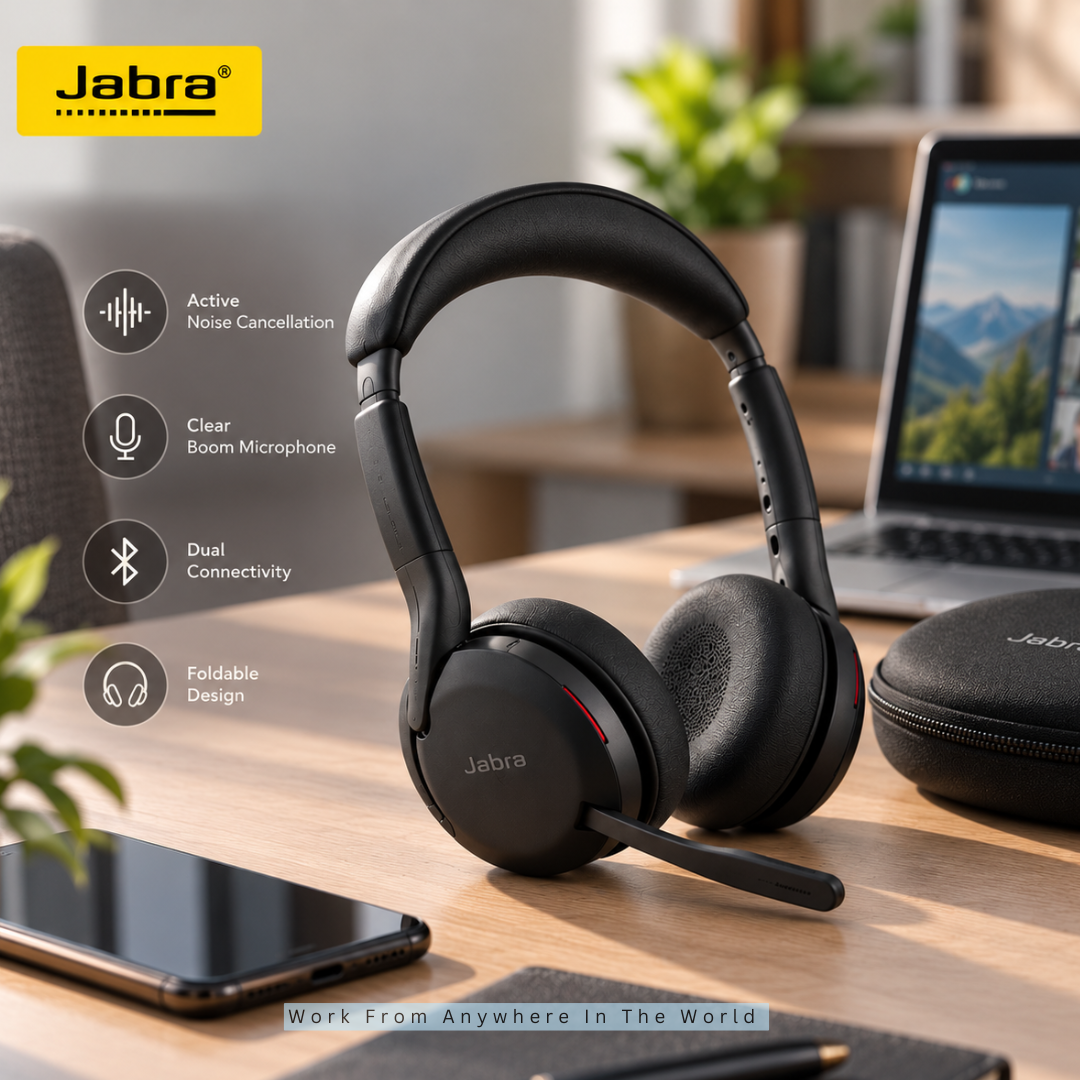
The Jabra Evolve2 65 Flex is a strong all-around option for remote professionals who spend a significant part of the working day in meetings and calls. It combines a boom microphone, Hybrid Active Noise Cancellation, wireless connectivity, and a compact foldable design.
Jabra’s ClearVoice microphone technology is designed to help isolate your voice from surrounding noise during conversations. The boom microphone can also be raised to mute a call, providing a quick way to control your microphone during meetings.
The headset’s Hybrid ANC helps reduce distracting sounds when you need to concentrate. Jabra’s AirComfort technology, cushioned headband, and flexible earcups are designed to improve comfort during longer working sessions.
Dual connectivity allows two simultaneous Bluetooth connections, making it easier to move between devices. The Evolve2 65 Flex is also certified for leading meeting platforms, including Microsoft Teams, Google Meet, and Zoom.
Its collapsible design makes it particularly useful for people who divide their time between a home office, coworking space, and other locations. For someone who only needs a basic headset for occasional calls, however, its extensive business-focused features may be more than necessary.
Key Points
- Hybrid Active Noise Cancellation for focused work.
- ClearVoice microphone technology for professional calls.
- Dual connectivity for switching between devices.
- Foldable design for working from different locations.
- Certified for leading virtual meeting platforms.
4. Poly Voyager Focus 2 — Best For Frequent Calls
The Poly Voyager Focus 2 is designed for professionals who spend much of their working day in meetings and calls. Its combination of a boom microphone, hybrid active noise cancellation, and dedicated call features makes it particularly suitable for communication-heavy roles.
Poly’s Acoustic Fence technology uses multiple microphones to help reduce surrounding noise transmitted during calls. This can be valuable in a busy home office where conversations, household activity, or other sounds might otherwise interfere with your voice.
The headset also offers three levels of hybrid active noise cancellation, allowing you to adjust how much surrounding sound you hear. A cushioned headband and plush ear cushions are designed to support comfortable use during longer periods of calls and meetings.
Smart controls add some useful conveniences for frequent callers. The headset includes sensors for answering calls and pausing music, a rotating microphone boom for muting, and a dynamic mute alert if you begin speaking while muted.
The Voyager Focus 2 is especially well suited to customer support, sales, management, and other meeting-heavy roles. Someone who only joins occasional calls, however, may not need its extensive business-focused communication features.
Key Points
- Designed for frequent meetings and professional calls.
- Acoustic Fence technology helps reduce background noise.
- Three levels of hybrid active noise cancellation.
- Convenient mute and call-management features.
- Comfortable design for extended use.
5. Anker Soundcore Space Q45 — Best Affordable ANC Option
The Anker Soundcore Space Q45 is a practical choice for remote workers who want active noise cancellation without moving into more premium headphones. Its adaptive noise cancellation is designed to adjust to surrounding sounds and can help reduce distractions during focused work.
The over-ear design can also suit longer listening sessions. Cushioned earcups and an adjustable headband help provide a comfortable fit when you are moving between work, meetings, and everyday listening.
Battery life is another strength of the Space Q45. It is designed for extended wireless use, while fast charging can provide additional listening time when you need to recharge between meetings or other activities.
Multipoint connectivity allows the headphones to connect with two devices at the same time. This can be convenient if you regularly move between a computer and smartphone during your working day.
The Space Q45 also works well for music, podcasts, and travel, making it a versatile option beyond the home office. However, its built-in microphone system is less specialized for professional calls than a dedicated business headset with a boom microphone.
Key Points
- Adaptive active noise cancellation for focused work.
- Comfortable over-ear design for extended listening.
- Long battery life with fast-charging support.
- Multipoint connectivity for two devices.
- Versatile for work, travel, and personal listening.
Wealthy Affiliate – Mini Review
If you’ve ever thought about turning your blog, passion, or niche into an online business,
Wealthy Affiliate (WA) is one of the most beginner-friendly platforms I’ve used.
It combines step-by-step training, website hosting, AI-powered tools,
keyword research, and an active community all in one place.
What I like most is that you can start for free (no credit card needed), explore the platform,
test the tools, and connect with other entrepreneurs before upgrading.
WA isn’t a “get rich quick” scheme — success comes from consistent effort
and applying what you learn over time.
6. Jabra Evolve 20 — Best Budget Business Headset
The Jabra Evolve 20 is a practical wired business headset for remote workers who want straightforward calling features without paying for wireless technology. Its USB connection makes it easy to connect directly to a compatible computer and begin using it for everyday calls.
A noise-cancelling boom microphone is designed to help reduce unwanted background sound during conversations. Keeping the microphone close to your mouth can also provide more consistent voice pickup during meetings and online calls.
Inline controls provide convenient access to functions such as volume and mute. This can be particularly useful during busy meetings when you want to make quick adjustments without searching for controls on your computer.
The Evolve 20 is available in mono and stereo versions, giving you the option of keeping one ear open to your surroundings or using both earcups. This flexibility can suit freelancers, customer support teams, students, and other home-based professionals.
Its main limitation is the wired connection, which restricts movement compared with a wireless headset. However, workers who spend most of their time at a desk may appreciate the simplicity of not managing Bluetooth connections or recharging a battery.
Key Points
- Wired USB connection for straightforward computer use.
- Noise-cancelling boom microphone for clearer calls.
- Convenient inline volume and mute controls.
- Available in mono and stereo versions.
- No battery charging required.
7. Yealink UH34 — Best Wired Option
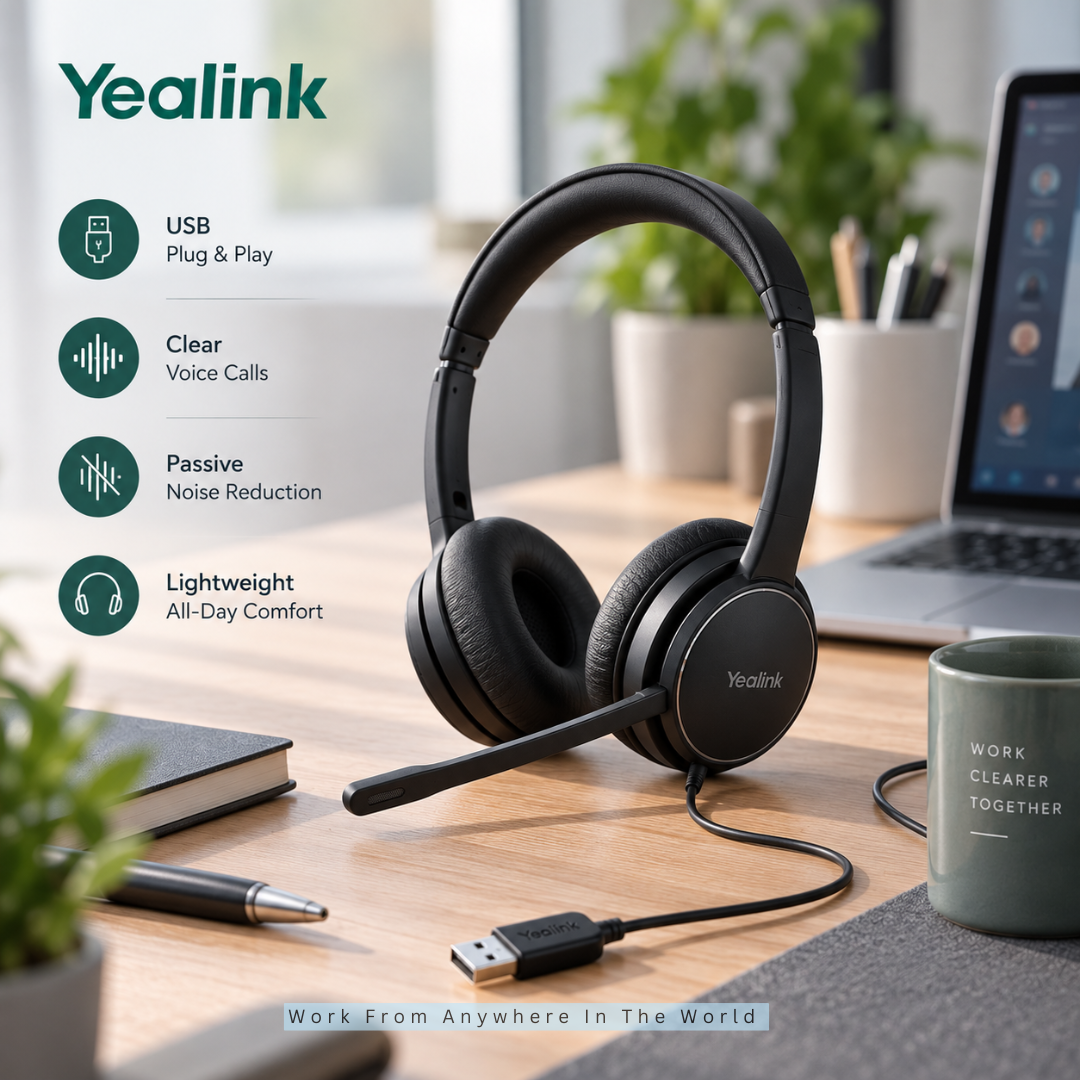
The Yealink UH34 is a straightforward wired headset for remote workers who value dependable calling and simple connectivity. Its USB connection makes it easy to use with a compatible computer without pairing devices or managing a wireless connection.
The boom microphone includes noise-cancelling technology designed to reduce surrounding sound during conversations. This can help keep your voice clearer during video meetings, customer calls, and everyday online collaboration.
Its lightweight design makes the UH34 suitable for regular office communication and longer periods at your desk. Inline controls also provide convenient access to call, mute, and volume functions without requiring you to use controls on your computer.
Because it draws power through its wired connection, there is no battery to recharge. This can be particularly useful for people who spend long working days at their computers and want a headset that is ready whenever a call begins.
The main limitation is freedom of movement. A wired headset keeps you close to your computer, making the UH34 better suited to desk-based remote work than situations where you regularly move around during calls.
Key Points
- Wired USB connection for reliable computer use.
- Noise-cancelling boom microphone for voice calls.
- Lightweight design for extended wear.
- Convenient inline call and volume controls.
- No battery charging required.
8. Soundcore Life Q20 — Best Budget Pick
The Soundcore Life Q20 is a budget-friendly option for remote workers who want wireless over-ear headphones with active noise cancellation. It can be a practical choice when you want to reduce everyday distractions without needing the specialized features of a business headset.
Its hybrid active noise cancellation is designed to reduce steady, low-frequency sounds such as traffic and background hum. This can make it easier to concentrate when working in a home environment with predictable surrounding noise.
The padded headband and memory-foam earcups are designed for longer listening sessions. Battery life is another strength, making the Life Q20 suitable for people who want wireless headphones without having to recharge them frequently.
The headset can also be used for music, podcasts, and video, giving it more versatility than a basic call-only headset. This may appeal to students, freelancers, and home-based workers who want one affordable pair of headphones for several purposes.
Its built-in microphone is less specialized for professional calls than the boom microphones found on dedicated business headsets. If you regularly work in a busy shared space or spend much of your day on calls, a headset with a boom microphone may be a better fit.
Key Points
- Budget-friendly wireless over-ear headphones.
- Hybrid active noise cancellation for steady background sounds.
- Comfortable design for longer listening sessions.
- Long battery life for everyday wireless use.
- Better suited to quieter calls than busy shared environments.
9. Logitech H390 — Best For Simple, Affordable Calls
The Logitech H390 is a straightforward USB headset for remote workers who primarily need clear communication for meetings and calls. Its wired connection also eliminates Bluetooth pairing and battery charging, keeping everyday setup simple.
The noise-cancelling boom microphone is designed to reduce unwanted background sound during conversations. The microphone can also be positioned for clearer voice pickup and moved out of the way when it isn’t needed.
Inline controls provide quick access to volume and mute functions during calls. This can be particularly convenient when you need to make an adjustment without interrupting a meeting to search through computer settings.
The adjustable headband and padded earcups provide basic comfort for everyday use. Its simple design can suit students, freelancers, and home-based workers who need a dependable headset for regular online communication.
The H390 is best suited to workers who prioritize simple USB connectivity and essential calling features. People who spend most of the working day wearing a headset may prefer a model designed specifically for extended comfort.
Key Points
- Simple wired USB connection.
- Noise-cancelling boom microphone for calls.
- Inline volume and mute controls.
- No Bluetooth pairing or battery charging.
- Practical for everyday meetings and online communication.
10. Logitech H570e — Best For Long Call Days
The Logitech H570e is a business-focused wired headset designed for people who spend a substantial part of their working day on calls. Its USB connection provides a straightforward computer setup without requiring Bluetooth pairing or battery charging.
The adjustable padded headband and replaceable ear pads are designed with extended use in mind. The H570e is available in mono and stereo versions, allowing you to choose whether you prefer to keep one ear open to your surroundings.
A noise-cancelling boom microphone is positioned close to your mouth to help reduce distracting background sound during conversations. The flexible boom can also be adjusted to suit your preferred microphone position.
Inline controls provide convenient access to call functions, volume, and mute. An indicator light also shows when the microphone is muted, which can be useful during meeting-heavy working days.
The H570e is particularly suitable for long work calls, customer conversations, and back-to-back online meetings. Its main limitation is mobility, as the wired connection keeps you relatively close to your computer.
Key Points
- Designed for frequent professional calls.
- Wired USB connection requires no battery charging.
- Noise-cancelling boom microphone for clearer communication.
- Available in mono and stereo versions.
- Inline controls for convenient call management.
11. JLab Go Work Gen 2 — Best Affordable Wireless Headset
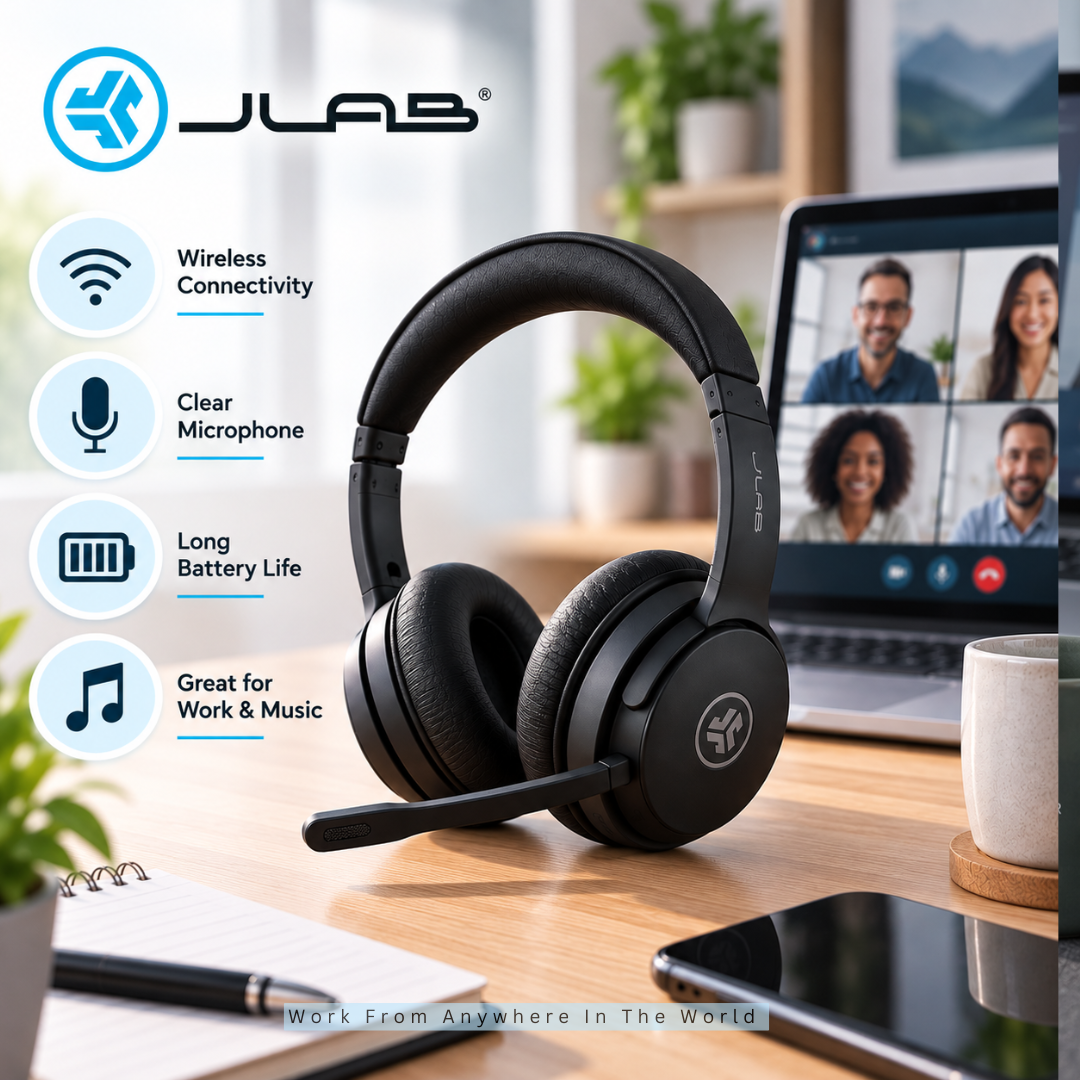
The JLab Go Work Gen 2 is a practical option for remote workers who want wireless freedom without moving into a more specialized business headset. Its Bluetooth connection allows you to move around more easily during meetings instead of remaining close to your computer.
A rotating boom microphone is designed for everyday calls and online collaboration. The microphone can also be raised when you aren’t using it, while onboard controls provide convenient access to volume, mute, and other frequently used functions.
Bluetooth multipoint allows the headset to connect to two devices at the same time. This can be particularly useful if you regularly switch between meetings on your computer and calls on your smartphone.
The over-ear design and wireless connectivity also make the headset suitable for music, podcasts, and general computer use. This versatility can appeal to students, freelancers, and remote workers who want one headset for both communication and everyday listening.
The Go Work Gen 2 doesn’t provide the same advanced noise-control features found on more specialized business headsets. However, it offers a useful combination of wireless mobility, everyday calling features, and multipoint connectivity for a home office.
Key Points
- Wireless design provides greater freedom of movement.
- Rotating boom microphone for everyday calls.
- Bluetooth multipoint connects two devices.
- Onboard controls for convenient call management.
- Suitable for both work and general listening.
Frequently Asked Questions
Q1: Do I Need A Headset With A Microphone For Remote Work?
No. You can use separate headphones and a microphone or rely on your computer’s built-in microphone when it provides adequate sound quality.
A headset simply combines listening and speaking into one convenient device. It can be particularly useful if meetings and online calls are a regular part of your remote work routine.
Q2: Is A Boom Microphone Better For Work Calls?
A boom microphone can provide consistent voice pickup because it remains close to your mouth. This makes it particularly useful for people who spend several hours each day in meetings or speaking with clients.
However, a boom microphone isn’t essential for everyone. Some headphones use built-in microphone systems that can provide good call quality without placing a microphone directly in front of your mouth.
Q3: Do I Need Noise Cancellation For Working From Home?
Not necessarily. Active noise cancellation is most useful when your workspace has regular background sounds such as traffic, fans, household activity, or nearby conversations.
If you work in a quiet home office, you may not benefit enough from ANC to make it a priority. Microphone quality and comfort could be more important for your particular working environment.
Q4: Are Wired Headsets Better Than Wireless Ones?
Neither is automatically better. Wired headsets provide a straightforward connection, don’t require charging, and can be practical when you spend most of your working day at a desk.
Wireless headsets provide greater freedom of movement and may connect to multiple devices. Your workspace, devices, and working habits should determine which option is more convenient.
Q5: Can I Use Regular Bluetooth Headphones For Zoom Meetings?
Yes. Many Bluetooth headphones can be used for Zoom meetings and other video calls, provided they are compatible with your device and include a suitable microphone.
If meetings are an important part of your work, test the microphone and connection before relying on them. A dedicated business headset may provide more convenient call controls or more consistent microphone positioning.
Q6: Are Gaming Headsets Good For Working From Home?
They can be. Many gaming headsets include boom microphones, comfortable earcups, and designs intended for extended wear, which can also be useful for working from home.
Consider whether the connection type, microphone quality, controls, and overall design suit your professional needs. A gaming headset doesn’t need to be labelled as a business product to work well for meetings.
Conclusion
The best headsets for working from home are the ones that fit naturally into the way you work. Your workspace, communication needs, and daily routine should guide your decision more than any single feature.
Whether you’re working remotely or building an online business from home, or exploring Pet Reiki income ideas, the right headset can make everyday communication and focused work more comfortable.
Frequent callers may want to prioritize microphone quality, comfort, and convenient call controls. If focused work is more important, active noise cancellation and comfortable long-term wear may deserve greater attention.
Wired headsets offer straightforward reliability without batteries or pairing, while wireless models provide greater freedom of movement. Neither is automatically better; the right choice depends on how you spend your working day.
Start with the problems you want your headset to solve, then compare the features that address those needs. A well-chosen headset can make meetings, calls, and focused work more comfortable without paying for features you are unlikely to use.
I trust you enjoyed this article on the [Blog Post Title]. Please stay tuned for more insightful blogs on affiliate marketing, online business, and working from anywhere in the world.
Take care!
— JeannetteZ 🌍✨
💬 Your Opinion Is Important To Me
Do you have thoughts, ideas, or questions? I’d love to hear from you. Please leave your comments below or email me directly at Jeannette@WorkFromAnywhereInTheWorld.com.
📚 More Work From Anywhere Reads
🚀 Ready to Build a Business You Can Run from Home
Or from Anywhere in the World?
Imagine creating income on your terms — from home, a cozy café, or wherever life takes you.
With the right tools, training, and community support, it’s entirely possible.
Start your own online business for free — no credit card needed.
Disclosure
This post may contain affiliate links. As an Amazon Associate and participant in other affiliate programs, I earn from qualifying purchases at no extra cost to you. Please read my full affiliate disclosure.