
Essential Home Office Supplies List
This home office supplies list is an essential starting point for creating a comfortable, organized, and productive workspace. The right equipment, furniture, and everyday supplies can make working from home easier and more enjoyable.
Whether you’re building an online business, working remotely, or managing freelance projects, a well-equipped home office helps you stay focused. Thoughtful choices can also improve comfort and reduce unnecessary distractions.
From ergonomic chairs and adjustable desks to reliable computers, office accessories, and practical storage solutions, every item serves a purpose. Creating an efficient workspace doesn’t mean buying everything at once.
This comprehensive guide explores the essentials for setting up or upgrading your home office. You’ll discover what matters most, how to choose suitable equipment, and practical ways to create a workspace that supports your daily needs.
Essential Home Office Supplies List: 11 Must-Have Items
Creating a productive workspace starts with choosing equipment, furniture, and supplies that suit your daily responsibilities. Each item on this home office supplies list supports comfort, organization, or efficiency.
The following 11 essentials will help you build a practical home office, whether you’re working remotely, freelancing, or running your own business.
1. Laptop Or Desktop Computer
A laptop or desktop computer is the foundation of a productive home office. It supports everyday tasks such as emails, virtual meetings, content creation, bookkeeping, research, and project management.
Whether you work remotely, manage an online business, or freelance, a dependable computer helps you complete tasks efficiently. Explore our guides to the best laptops for working from home and computers for working from home to compare suitable options.
Why It Matters
Every practical home office supplies list begins with a reliable computer because most professional tasks depend on it. A responsive system reduces loading times and makes switching between applications easier.
Good performance also supports video conferencing, document editing, creative projects, and data management. When your computer handles your workload smoothly, you can concentrate on your work instead of dealing with frustrating delays.
Buying Tips
Start by considering your daily tasks and the software you use. Basic office work generally requires a capable processor, sufficient memory, and fast SSD storage for smooth performance.
Creative professionals may need dedicated graphics capabilities and a high-resolution display. Laptop users should consider portability and battery life, while desktop users may benefit from easier upgrades and improved cooling.
Choose a computer that accommodates your current workload while allowing room for future needs. This can help you avoid replacing equipment prematurely as your responsibilities grow.
Pro Tip
Prioritize reliable performance over unnecessary design features. A computer suited to your workload can remain useful for years, helping you work efficiently as software requirements and projects evolve.
2. Ergonomic Office Chair
What It Is
An ergonomic office chair is designed to support your body during long working hours while encouraging a healthy sitting posture. Unlike standard dining or living room chairs, it includes adjustable features that help align your back, shoulders, neck, and arms for greater comfort throughout the workday.
Why It Matters
A comfortable chair can make a noticeable difference in both productivity and overall well-being. Long periods of sitting become easier when your body receives proper support, allowing you to stay focused without constant discomfort. Better posture also contributes to a more pleasant working experience, especially during extended meetings, writing sessions, or creative work. Even the most advanced office setup feels incomplete if your seating isn’t comfortable.
Buying Tips
Look for adjustable lumbar support, seat height, armrests, and reclining options that allow you to customize the chair to your body. Breathable mesh materials work well in warmer environments, while high-quality cushioning offers additional comfort during extended use. Stability, durable construction, and smooth-rolling wheels also contribute to a better long-term experience. Instead of choosing solely by appearance, focus on comfort and adjustability.
Pro Tip
Spend a few minutes adjusting every feature after assembling your chair. Small changes to seat height, lumbar support, and armrest position often create a surprisingly large improvement in daily comfort and posture.
3. Adjustable Desk
What It Is
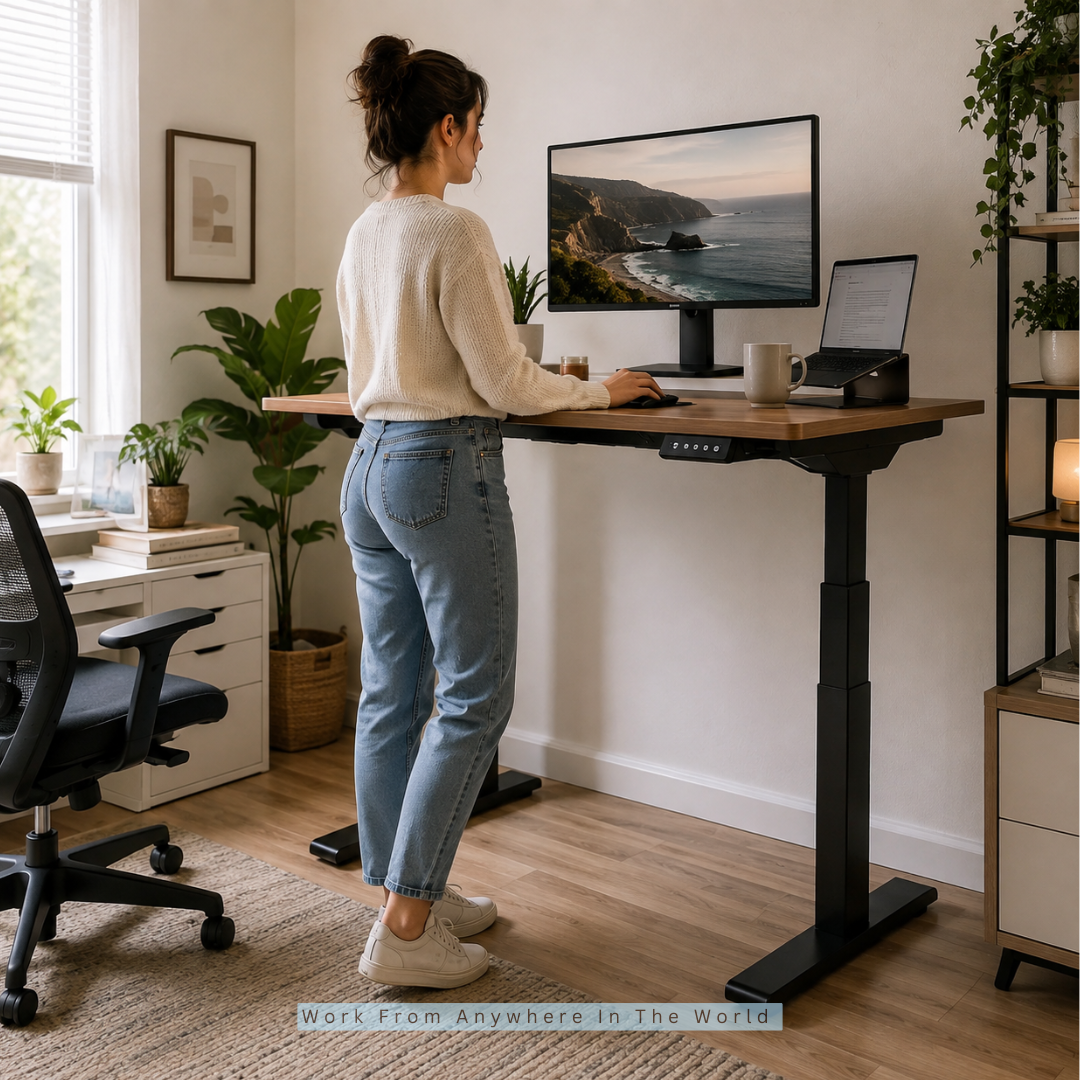
An adjustable desk offers the flexibility to alternate between sitting and standing while working. It creates a workspace that adapts to your comfort preferences and supports different working styles, making it a valuable addition to both small home offices and dedicated workspaces.
Why It Matters
Flexibility plays an important role in maintaining comfort throughout a busy workday. An adjustable desk encourages movement, making it easier to change positions without interrupting your workflow. During lengthy projects, many professionals find that switching between sitting and standing helps them feel rejuvenated and fosters a more dynamic, interesting work atmosphere.
Buying Tips
Choose a desk with a sturdy frame, smooth height adjustment, and enough surface space for your monitor, keyboard, and office accessories. Electric models provide quick adjustments with the touch of a button, while manual options often deliver excellent value. Cable management features, durable materials, and a stable design further improve the overall workspace experience.
Pro Tip
Rather than standing continuously, try alternating between sitting and standing at regular intervals. This balanced approach often feels more natural and helps maintain comfort throughout the day.
4. Wireless Keyboard And Mouse
What It Is
A wireless keyboard and mouse provide the primary means of interacting with your computer while keeping your desk clean, organized, and free of unnecessary cables. Together, they improve comfort, accuracy, and overall efficiency during everyday work.
Why It Matters
These accessories are used almost constantly throughout the workday, making their comfort and responsiveness incredibly important. A well-designed keyboard improves typing speed, while a precise mouse enhances navigation and control. Better input devices also contribute to a more enjoyable workspace, allowing you to work comfortably across writing, editing, designing, research, and administrative tasks.
Buying Tips
Choose a keyboard with comfortable key travel, responsive feedback, and a layout that matches your workflow. For the mouse, look for ergonomic shaping, adjustable sensitivity, reliable wireless connectivity, and long battery life. Quiet operation, programmable buttons, and rechargeable batteries can further improve convenience and productivity over time.
Pro Tip
Even small upgrades to your keyboard and mouse can transform your daily work experience. Comfortable peripherals often reduce fatigue, improve accuracy, and make every task feel smoother from the first hour of work to the last.
5. High-Speed Internet Connection And Wi-Fi Router
What It Is
A high-speed internet connection paired with a reliable Wi-Fi router keeps your home office connected to the digital world. It supports video conferencing, cloud storage, file sharing, online collaboration, streaming, and web-based applications without unnecessary interruptions.
Why It Matters
Even the most advanced home office equipment cannot perform at its best without a stable internet connection. Slow speeds or weak signals can interrupt meetings, delay uploads, and reduce productivity. A dependable network allows you to communicate confidently, access online resources instantly, and complete tasks efficiently. Whether you work independently or collaborate with a remote team, reliable internet creates a smoother and more professional work experience.
Buying Tips
Choose an internet plan that matches your daily workload and the number of connected devices in your home. Pair it with a modern dual-band or tri-band router that provides strong coverage throughout your workspace. Features such as Wi-Fi 6 support, security updates, guest networks, and parental controls can add extra value while preparing your setup for future technology.
Pro Tip
Place your router in an open, central location rather than hiding it in a cabinet. Better placement often improves signal strength and helps maintain a faster, more stable connection across your entire workspace.
6. Noise-Cancelling Headphones
What It Is
By reducing background noise, noise-cancelling headphones make it easier to concentrate on work, participate in online meetings, and enjoy crisper audio all day long.
Why It Matters
Working from home often means dealing with everyday household noise, neighbourhood activity, or conversations nearby. Quality headphones help minimize these distractions, allowing you to concentrate for longer periods. They also improve the clarity of virtual meetings, making conversations sound more natural while helping your voice come across more clearly to clients and coworkers.
Buying Tips
Look for comfortable ear cushions, adjustable headbands, excellent battery life, and active noise cancellation. Built-in microphones with clear voice pickup are especially useful if you frequently attend online meetings. Wireless models offer greater freedom of movement, while multipoint Bluetooth connectivity allows easy switching between multiple devices.
Pro Tip
Just as important as sound quality is comfort. Headphones that feel comfortable after several hours of use often become one of the most valuable investments in your home office.
7. Webcam
What It Is
A webcam captures high-quality video for virtual meetings, webinars, online teaching, interviews, client presentations, and content creation, helping you present yourself professionally in every online interaction.
Why It Matters
Clear video creates a stronger first impression during remote communication. While many laptops include built-in cameras, a dedicated webcam typically delivers sharper image quality, better lighting performance, and smoother video. Professional visuals can improve communication, increase confidence, and make virtual conversations feel more engaging for everyone involved.
Buying Tips
Choose a webcam with Full HD or 4K resolution, autofocus, automatic light correction, and a quality built-in microphone if needed. Privacy shutters add extra security when the camera isn’t in use. Compatibility with popular meeting platforms ensures a hassle-free setup across different devices.
Pro Tip
Good lighting often improves video quality more than purchasing a premium camera. Position a light source in front of you to achieve a brighter, more professional appearance during meetings.

8. Printer And Scanner
What It Is
A printer and scanner allow you to print contracts, invoices, reports, shipping labels, and other important documents, as well as create digital copies for storage, sharing, and recordkeeping.
Why It Matters
Although many workplaces have become increasingly paperless, printed documents remain valuable in many industries. Having a printer nearby saves time and provides greater flexibility whenever physical copies are needed. A built-in scanner also makes it easy to organize paperwork digitally, helping you maintain a cleaner and more efficient document management system.
Buying Tips
All-in-one printers combine printing, scanning, and copying in one compact device, making them ideal for most home offices. Consider print speed, wireless connectivity, operating costs, and automatic duplex printing before making your decision. Choosing a model with affordable replacement ink or toner can significantly reduce long-term expenses.
Pro Tip
Print only when necessary and store digital copies whenever possible. This simple habit helps reduce paper use, lower printing costs, and keep your workspace organized.
9. Notebook And Premium Pens
What It Is
A notebook and quality pens remain essential office tools for brainstorming, planning, note-taking, sketching ideas, tracking goals, and recording important information during meetings or creative sessions.
Why It Matters
Despite the convenience of digital apps, writing by hand continues to offer unique advantages. It encourages deeper focus, supports memory retention, and provides a quick way to capture ideas before they’re forgotten. Keeping a notebook within reach makes planning projects, outlining strategies, and organizing daily priorities simple and effective.
Buying Tips
Select a durable notebook with high-quality paper that prevents ink from bleeding through the pages. Choose pens that write smoothly and feel comfortable during extended use. Spiral-bound notebooks lay flat for easier writing, while hardcover journals offer greater durability for everyday use.
Pro Tip
Keep one notebook dedicated to daily tasks and another for ideas, long-term planning, or meeting notes. Separating information makes it much easier to stay organized and quickly locate important details later.
Wealthy Affiliate – Mini Review
If you’ve ever thought about turning your blog, passion, or niche into an online business,
Wealthy Affiliate (WA) is one of the most beginner-friendly platforms I’ve used.
It combines step-by-step training, website hosting, AI-powered tools,
keyword research, and an active community all in one place.
What I like most is that you can start for free (no credit card needed), explore the platform,
test the tools, and connect with other entrepreneurs before upgrading.
WA isn’t a “get rich quick” scheme — success comes from consistent effort
and applying what you learn over time.
10. Desk Lamp
What It Is
A desk lamp provides focused lighting for your workspace, helping you read documents, type comfortably, and complete detailed tasks regardless of the room’s natural lighting conditions. It also adds warmth and style to your office while creating a more inviting environment.
Why It Matters
Proper lighting influences both comfort and productivity. A well-lit workspace reduces unnecessary eye strain, improves visibility, and helps you stay focused during long work sessions. Whether you’re reviewing paperwork, attending virtual meetings, or working late into the evening, the right desk lamp creates consistent lighting that supports concentration and makes your workspace feel more professional.
Buying Tips
Select an LED desk lamp that can be adjusted for colour temperature and brightness to suit various duties during the day. Flexible arms or rotating heads allow you to direct light exactly where it’s needed. Energy-efficient models with touch controls, USB charging ports, or automatic dimming features provide additional convenience while helping reduce electricity consumption.
Pro Tip
Position your desk lamp beside your dominant hand to reduce shadows while writing or working. A simple lighting adjustment can make your desk feel brighter, cleaner, and significantly more comfortable.
11. Desk Organizer
What It Is
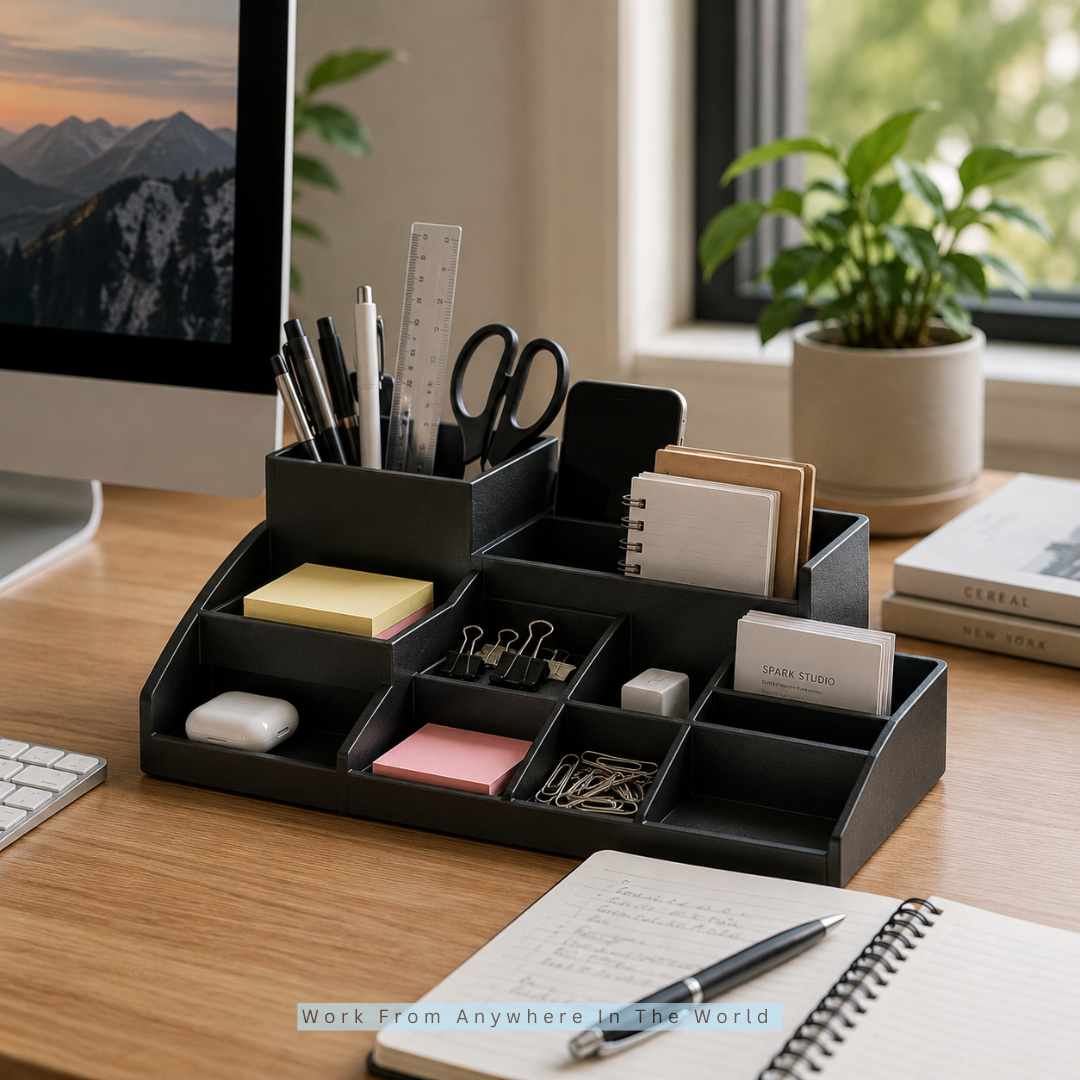
A desk organizer keeps frequently used office supplies neatly arranged, giving every item a dedicated place. It helps manage pens, sticky notes, clips, chargers, business cards, and other essentials without creating unnecessary desk clutter.
Why It Matters
An organized workspace supports a more efficient workflow. Instead of searching for small items throughout the day, everything remains within easy reach. A clean desk also creates a calmer working environment, allowing you to focus on priorities rather than distractions. Good organization often saves valuable time while giving your home office a polished and professional appearance.
Buying Tips
Select an organizer with multiple compartments that match the supplies you use most often. Durable materials such as bamboo, metal, or high-quality plastic provide long-lasting performance. Compact designs work well for smaller desks, while modular organizers offer greater flexibility as your workspace grows and your storage needs change.
Pro Tip
Review your desk organizer every few weeks and remove items you no longer use regularly. Keeping only essential supplies nearby helps maintain a tidy workspace and improves daily efficiency.
Frequently Asked Questions
Q1: How Can I Build A Home Office On A Budget?
Start with the essentials you use every day and upgrade gradually as your needs grow. Investing in quality items like a comfortable chair and dependable computer often provides greater long-term value than purchasing many inexpensive accessories at once.
Q2: Is An Ergonomic Chair Really Worth Buying?
Yes. An ergonomic chair supports better posture and improves comfort during long work sessions. You can tailor the chair to your body with its adjustable features, contributing to a more pleasurable and effective working environment.
Q3: Should I Choose A Laptop Or A Desktop Computer?
The best choice depends on your work style. A laptop offers portability and flexibility, while a desktop usually delivers stronger performance, easier upgrades, and greater value for users who work from a dedicated home office.
Q4: Why Is Cable Management Important In A Home Office?
Organized cables create a cleaner workspace, reduce clutter, and make it easier to access your devices. Proper cable management also improves safety and gives your office a more professional appearance.
Q5: What Office Supplies Improve Productivity The Most?
Items such as an external monitor, notebook, desk organizer, adjustable lighting, and noise-cancelling headphones can make daily tasks more comfortable while helping you stay organized and focused throughout the workday.
Q6: How Often Should I Upgrade My Home Office Equipment?
Upgrade equipment when it no longer supports your workflow efficiently or when your work requirements change. Prioritizing performance, comfort, and reliability helps ensure each upgrade provides meaningful value over time.
Q7: How Do I Keep My Home Office Organized Every Day?
Give every office supply a dedicated place, organize documents regularly, manage cables neatly, and remove unnecessary items from your desk. Small daily habits help maintain a workspace that stays clean, efficient, and ready for production.
Conclusion
A productive workspace isn’t built overnight, and it doesn’t require purchasing everything at once. The most effective home offices grow step by step, with each upgrade making daily work a little easier and more enjoyable. By following this list of home office supplies, you can choose practical essentials that match your goals, budget, and workflow. A comfortable, organized, and well-equipped workspace creates the perfect foundation for staying focused, working efficiently, and achieving long-term success from home.
I trust you enjoyed this guide on the Essential Home Office Supplies List. Please stay tuned for more insightful blogs on affiliate marketing, online business, and working from anywhere in the world.
Take care!
— JeannetteZ 🌍✨
💬 Your Opinion Is Important To Me
Do you have thoughts, ideas, or questions? I’d love to hear from you. Please leave your comments below or email me directly at Jeannette@WorkFromAnywhereInTheWorld.com.
📚 More Work From Anywhere Reads
🚀 Ready to Build a Business You Can Run from Home
Or from Anywhere in the World?
Imagine earning income on your terms — from home, a cozy café, or wherever life takes you.
With the right tools, training, and community support, it’s entirely possible.
Start your own online business for free — no credit card needed.
Disclosure
This post may contain affiliate links. As an Amazon Associate and participant in other affiliate programs, I earn from qualifying purchases at no extra cost to you. Please read my full affiliate disclosure.