WP Engine Review: 10 Powerful WordPress Hosting Features
Choosing the right managed WordPress hosting provider can make website maintenance easier and support long-term growth. This WP Engine Review explores a hosting platform designed specifically for WordPress websites, with tools for performance, security, backups, and development.
WP Engine offers a managed hosting environment that reduces some of the technical work involved in running a website. However, its specialized services may cost more than basic shared hosting.
In this review, we’ll explore WP Engine’s features, advantages, limitations, and pricing considerations. You’ll discover whether its hosting services suit your website’s requirements, budget, and future plans.
What Is WP Engine Hosting?
WP Engine is a managed WordPress hosting provider that specializes in hosting and supporting WordPress websites. Unlike general-purpose shared hosting, its platform is designed around WordPress performance, security, and website management.
The company handles several technical hosting tasks, including server-level maintenance, backups, and performance optimization. This approach allows website owners to spend more time creating content and managing their businesses.
WP Engine stores your website files and database on its hosting infrastructure. Visitors access your website through your domain name, while you manage hosting settings, backups, and development tools through the WP Engine User Portal.
Its services are designed for bloggers, businesses, publishers, developers, and agencies. Available features include staging environments, caching, automated backups, and content delivery tools that can simplify website maintenance.
Managed WordPress hosting can be particularly useful for growing websites that need specialized tools and technical support. However, the right choice depends on your traffic, budget, technical requirements, and long-term goals.
Features Of WP Engine Hosting
WP Engine offers a range of managed WordPress hosting features designed to simplify website maintenance, improve performance, and support development. Its tools help website owners manage technical tasks while focusing on content and business growth.
Let’s explore 10 important WP Engine features and how they can benefit different types of WordPress websites.
1. Managed WordPress Hosting
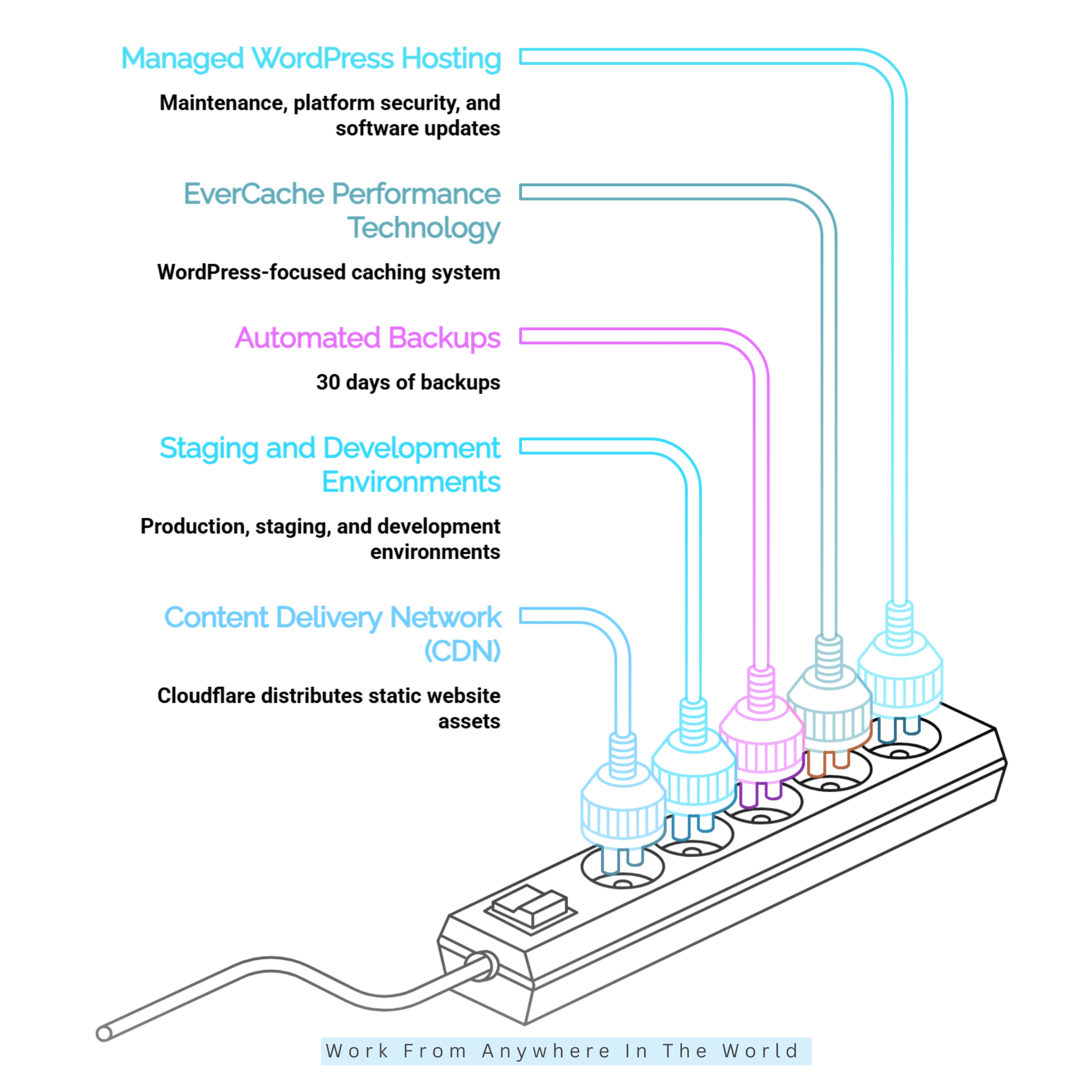
WP Engine provides managed WordPress hosting that handles many technical tasks involved in maintaining a website. Its services include hosting infrastructure management, security measures, backups, and WordPress-related updates.
This approach allows bloggers and business owners to focus more on creating content, improving their websites, and serving visitors. It can be particularly helpful for people who prefer not to manage server maintenance themselves.
However, managed hosting does not eliminate every responsibility. Website owners must still maintain their content, monitor plugin compatibility, and ensure their websites function correctly.
Our guide to WordPress vs Managed WordPress explains the differences and helps readers understand which approach may suit their needs.
2. EverCache Performance Technology
WP Engine uses EverCache, its WordPress-focused caching technology, to improve website performance. Caching stores reusable website content so visitors can access pages without requiring the server to process every request from scratch.
This technology can reduce server workload and improve response times, particularly for content-heavy websites with frequently visited pages. Faster delivery can also create a more comfortable browsing experience.
However, caching alone cannot guarantee excellent performance. Themes, plugins, image sizes, database activity, and traffic patterns also influence how quickly a website loads.
For additional ways to improve loading times, explore our best tips to improve your website speed. These practical suggestions complement WP Engine’s caching technology.
Our guide on how to make your WordPress site faster explores additional ways to improve loading times beyond server-level caching.
3. Automated Backups
WP Engine provides automated backups to help website owners recover from unexpected problems or unsuccessful updates. Users can also create manual backup checkpoints before making important changes.
Backup management is available through the WP Engine User Portal. According to the provider’s documentation, backup points are retained for 30 days, allowing users to restore an earlier version of the website when necessary.
For additional protection, maintaining an independent backup outside the hosting environment is a sensible precaution. This provides another recovery option if problems affect your hosting account.
4. Staging And Development Environments
WP Engine provides separate production, staging, and development environments to support safer website management. These environments allow users to test changes before applying them to their live websites.
A staging environment is particularly useful when updating plugins, modifying a theme, or introducing new features. You can check whether everything works correctly without immediately affecting visitors.
Development environments support larger website projects and ongoing improvements. These tools are especially valuable for agencies, developers, and businesses that regularly update their websites.
5. Content Delivery Network (CDN)
WP Engine uses Cloudflare-powered content delivery technology to help distribute website assets across multiple geographic locations. A content delivery network can deliver images and other static files from servers closer to visitors.
This approach may reduce loading times for websites serving international audiences. It can also help distribute traffic and reduce the workload on the main hosting server.
However, CDN availability and configuration depend on the selected hosting setup. Website owners should confirm that their domain and network settings support the relevant WP Engine features.
6. SSL Certificates And Secure Connections
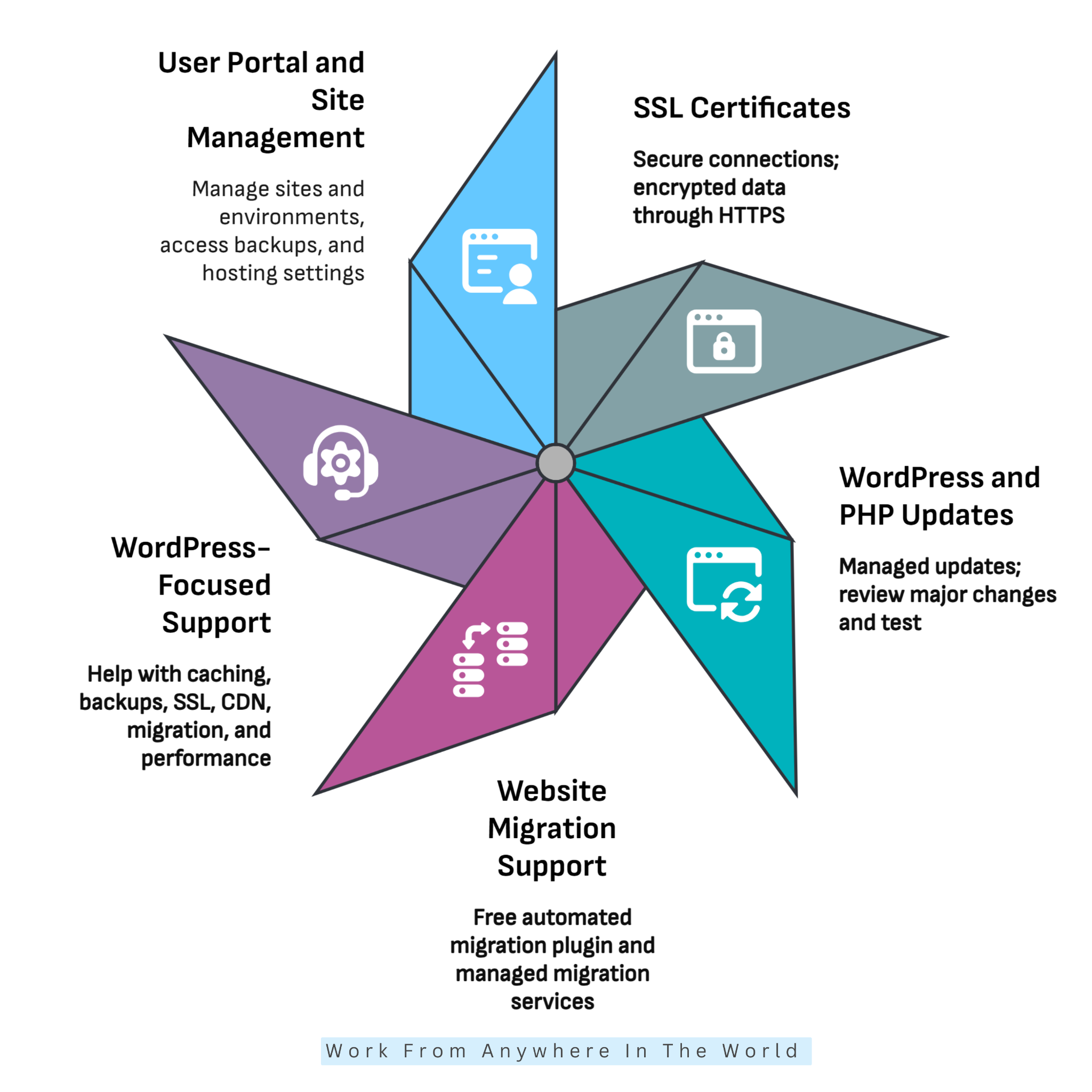
WP Engine supports SSL certificates that help protect information exchanged between websites and visitors. When HTTPS is enabled, the connection is encrypted, helping safeguard data submitted through login pages, contact forms, and online stores.
SSL certificates are available for connected domains, with setup and management options accessible through the WP Engine User Portal. This makes it easier to establish secure connections without manually configuring every technical detail.
However, website owners should confirm that HTTPS works correctly across their websites. Check for certificate warnings, insecure content, and pages that do not redirect to secure connections.
7. WordPress And PHP Updates
WP Engine manages certain WordPress and PHP updates as part of its managed hosting services. Keeping software current can improve security, maintain compatibility, and support reliable website performance.
Automatic update management reduces routine maintenance work, allowing website owners to concentrate on publishing content and developing their businesses.
However, software updates can occasionally cause compatibility problems with themes, plugins, or custom features. Our guide on choosing a WordPress theme explains key considerations when selecting a suitable theme.
Testing important changes in a staging environment helps identify potential issues before they affect visitors.
Wealthy Affiliate – Mini Review
If you’ve ever thought about turning your blog, passion, or niche into an online business,
Wealthy Affiliate (WA) is one of the most beginner-friendly platforms I’ve used.
It combines step-by-step training, website hosting, AI-powered tools,
keyword research, and an active community all in one place.
What I like most is that you can start for free (no credit card needed), explore the platform,
test the tools, and connect with other entrepreneurs before upgrading.
WA isn’t a “get rich quick” scheme — success comes from consistent effort
and applying what you learn over time.
8. Website Migration Support
WP Engine offers migration tools to help website owners transfer existing WordPress websites from another hosting provider. Its free automated migration plugin can simplify moving website files and databases.
Managed migration assistance may also be available with eligible hosting plans. These services can be helpful for businesses moving established websites or handling more complicated transfers.
Before migrating, create an independent backup and confirm how your domain and email services are configured. After the transfer, test your pages, images, contact forms, and login functionality.
Our website migration checklist provides additional guidance for preparing and checking a website transfer.
9. WordPress-Focused Support
WP Engine provides WordPress-focused technical support for hosting-related questions and website management concerns. Its support resources cover topics such as caching, backups, SSL certificates, migrations, and performance.
This specialized assistance can be valuable for bloggers, businesses, and agencies that rely on WordPress. Access to hosting documentation also helps users resolve common problems independently.
However, support does not necessarily cover every issue involving third-party themes, plugins, or custom development. Some problems may require assistance from the relevant software developer.
10. User Portal And Site Management
WP Engine provides a dedicated User Portal for managing WordPress websites and hosting environments. Unlike traditional cPanel hosting, its interface focuses on WordPress-specific tools and management tasks.
Users can access backups, manage website environments, review hosting settings, and organize development workflows. Keeping these functions in one place can simplify everyday administration.
The interface may require some adjustment for website owners familiar with cPanel. For those learning to manage WordPress, our WordPress tutorial for beginners explains the basics of working with the platform.
Pros Of WP Engine Hosting
WP Engine offers several advantages for website owners who want specialized WordPress hosting without managing every technical detail themselves. Its combination of managed services, development tools, and support can make running a growing website more convenient.
Let’s explore five benefits that may make WP Engine a suitable choice for bloggers, businesses, and agencies.
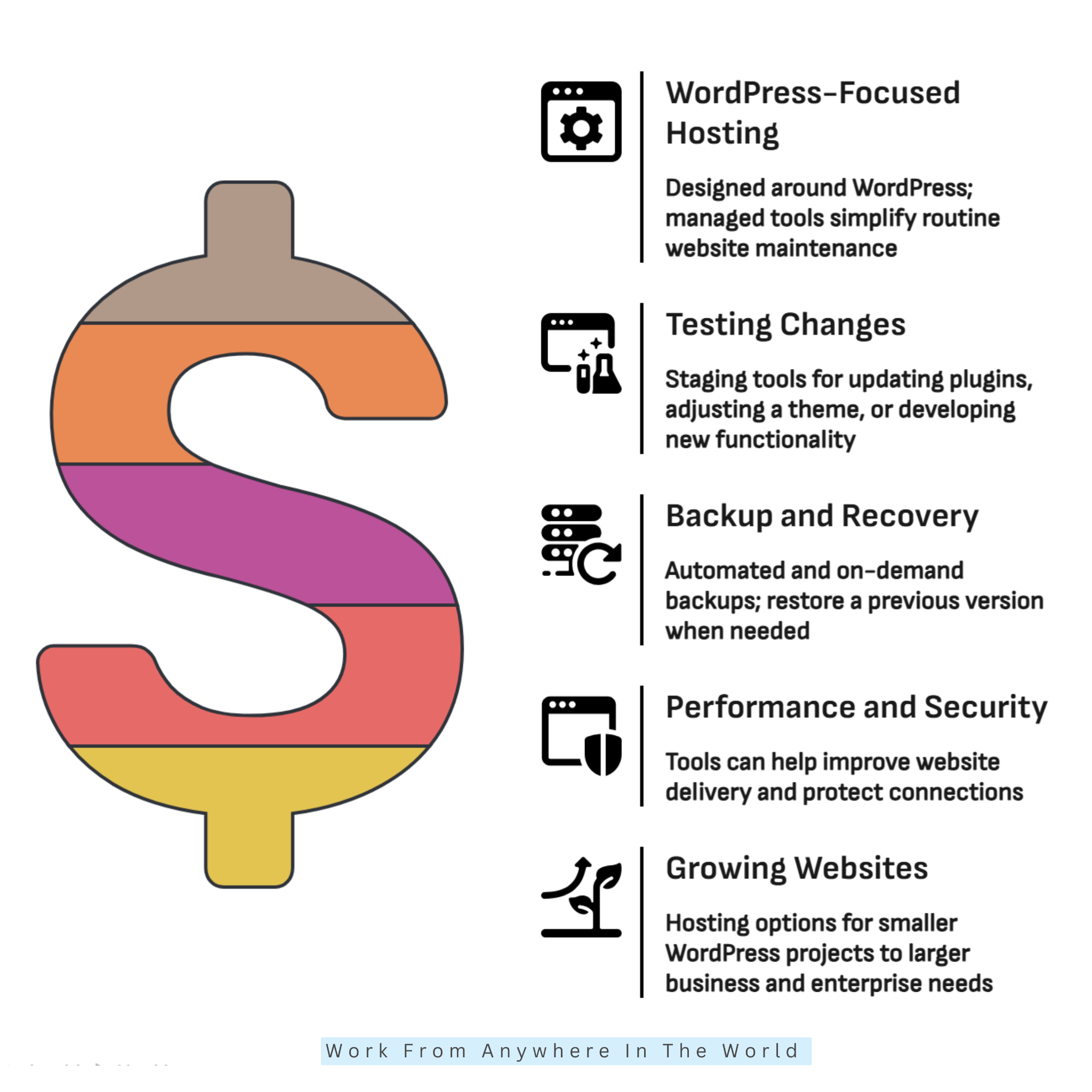
1. WordPress-Focused Hosting Environment
WP Engine specializes in WordPress hosting rather than supporting a wide range of website platforms. This focused approach allows the company to provide tools and services designed around WordPress requirements.
For bloggers and business owners, this can mean less time spent managing hosting infrastructure and more time creating content, attracting visitors, and developing their websites.
A specialized hosting environment can be particularly beneficial for established websites that depend on WordPress for everyday business operations.
2. Useful Tools For Testing Changes
WP Engine’s staging and development environments allow website owners to test changes without immediately affecting their live websites. This can make updates and improvements less stressful.
For example, you can experiment with a new theme, test plugin compatibility, or introduce additional functionality before making changes visible to visitors.
These tools are particularly valuable for developers and agencies managing several projects. They also benefit bloggers who regularly improve their website designs and features.
3. Built-In Backup And Recovery Options
WP Engine’s automated and manual backup options provide convenient recovery points when website problems occur. This can be reassuring when installing updates or making important changes.
If an update causes unexpected problems, restoring an earlier backup may help return the website to a working state. Having recovery tools within the hosting portal simplifies this process.
However, maintaining an independent backup remains a sensible precaution. Combining hosting backups with separate copies of important data provides additional protection.
4. Performance And Security Tools
WP Engine combines caching, content delivery, SSL support, and security measures within its managed hosting platform. This integration can reduce the need to configure every hosting feature separately.
These tools can help websites deliver content efficiently while supporting safer browsing experiences. However, their effectiveness also depends on website configuration and ongoing maintenance.
Choosing reliable plugins is particularly important. Our Wordfence Security Plugin Review explores an additional WordPress security solution and its features.
5. Support For Growing Websites
WP Engine offers hosting options designed for websites with different levels of complexity and resource requirements. This flexibility can be useful as a blog develops into a larger online business.
Growing websites may need additional storage, greater traffic capacity, or more advanced development tools. WP Engine’s managed services can help support these changing requirements.
Before upgrading, compare the available resources with your website’s actual needs. Our guide to choosing a good web hosting provider explains important factors to consider when evaluating hosting services.
Cons Of WP Engine Hosting
Although WP Engine offers specialized WordPress hosting and useful management tools, it may not suit every website or budget. Understanding its limitations can help you decide whether the additional services justify the investment.
Here are five potential drawbacks to consider before choosing WP Engine.
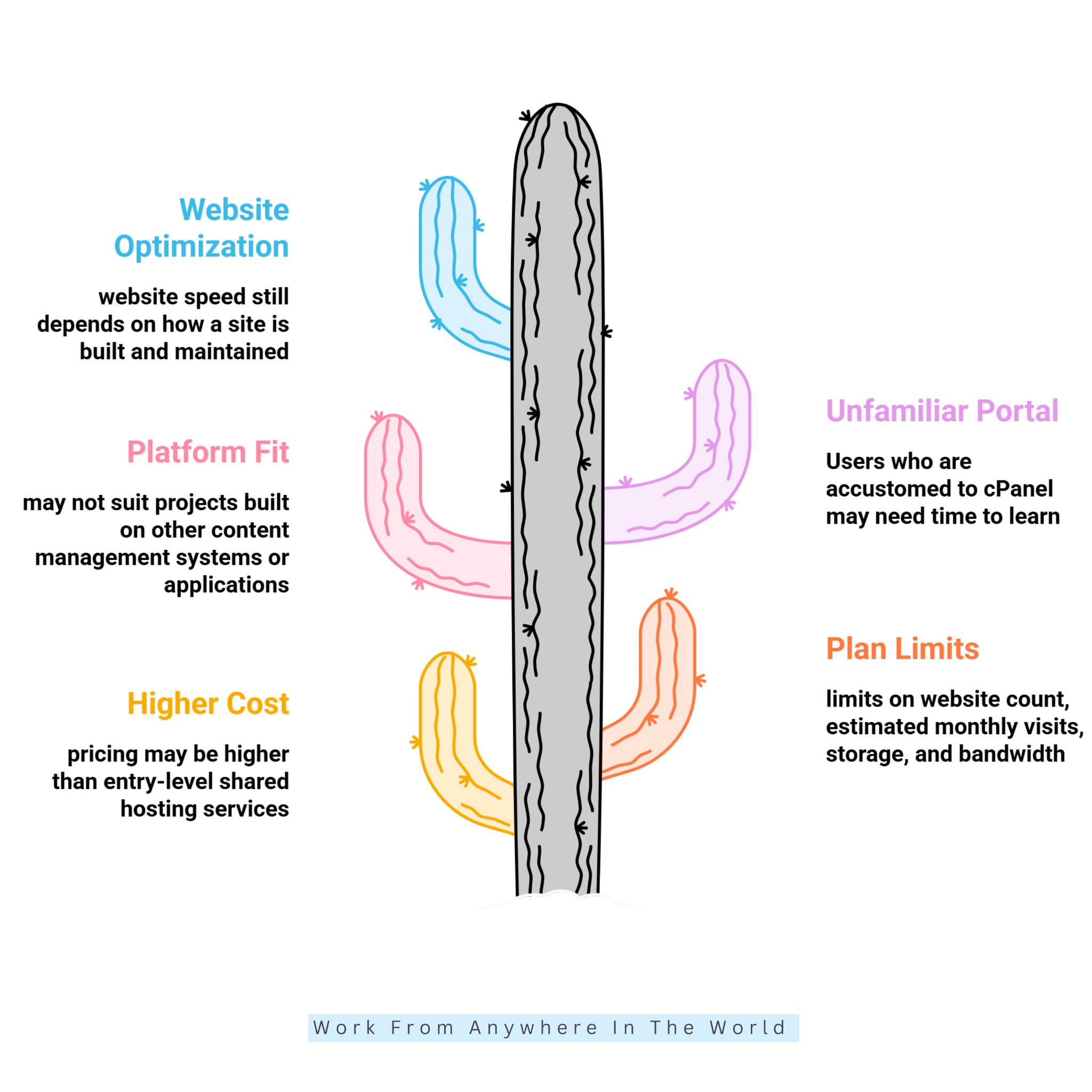
1. Higher Cost Than Basic Shared Hosting
WP Engine generally costs more than entry-level shared hosting because it provides specialized WordPress management, performance tools, and technical support.
For new bloggers, personal websites, or small projects, these additional services may exceed their immediate requirements. A more affordable hosting provider could be sufficient during the early stages.
However, established businesses may find value in the convenience of managed hosting. Compare annual costs, renewal rates, and included features before making a decision.
Our guide to the best low-cost web hosting services explores alternatives for website owners working with smaller budgets.
2. Plan Limits Need Careful Review
WP Engine hosting plans have specific allowances for websites, monthly visits, storage, and bandwidth. These limits can affect businesses managing multiple websites or experiencing significant traffic growth.
For example, a successful marketing campaign or seasonal increase in visitors may create additional hosting demands. Exceeding certain allowances could result in extra charges or the need to upgrade.
Review your website’s traffic patterns, media requirements, and expected growth before selecting a plan. Choosing suitable resources from the beginning can help avoid unnecessary expenses.
3. Not Designed For Every Website Platform
WP Engine specializes in WordPress hosting rather than providing a general-purpose environment for different website platforms.
This specialization benefits WordPress users but limits its suitability for projects built with other content management systems or custom applications.
If your business uses another platform, consider a hosting provider that supports its specific technical requirements. Confirm software compatibility before committing to a hosting package.
4. The User Portal May Feel Unfamiliar
WP Engine uses its own User Portal instead of the traditional cPanel interface found with many shared hosting providers.
Website owners accustomed to cPanel may need time to learn how to manage domains, backups, staging environments, and hosting settings.
Although the portal is designed for WordPress workflows, the adjustment may initially slow down familiar tasks. Reviewing WP Engine’s documentation can make the transition easier.
5. Hosting Does Not Replace Website Optimization
WP Engine provides caching, content delivery, and performance management tools. However, these features cannot resolve every problem caused by an inefficient website.
Large images, poorly optimized themes, excessive plugins, and complicated database queries can still affect loading times. Regular maintenance remains essential for a responsive website.
Website owners should continue optimizing media, removing unnecessary plugins, and monitoring performance. Combining good website practices with managed hosting can deliver more consistent results.
What To Consider Before Choosing WP Engine
Before choosing WP Engine, consider your website’s requirements, expected traffic, budget, and long-term growth plans. WP Engine specializes in managed WordPress hosting, making it a suitable option for bloggers, publishers, eCommerce businesses, developers, and agencies that depend on WordPress. Businesses managing multiple websites may also benefit from its staging environments, automated backups, and WordPress-focused management tools.
Pricing is another important factor. WP Engine generally costs more than traditional shared hosting because it includes managed services and specialized WordPress features. Before purchasing, compare plans and check website limits, monthly visit allowances, storage capacity, and bandwidth. Choose a plan that meets your current needs while leaving room for future growth.
You should also consider how much technical control you need. WP Engine provides a dedicated User Portal rather than the traditional cPanel interface. Although its portal is designed around WordPress management, users familiar with cPanel may need some time to adjust. Additionally, WP Engine is built specifically for WordPress, so it may not suit websites running other content management systems.
Finally, consider your website’s performance and maintenance needs. Features such as EverCache, CDN integration, staging environments, and automated backups can simplify website management. However, they do not eliminate the need for regular website optimization, plugin compatibility checks, and independent backups.
Overall, WP Engine is worth considering if you want managed WordPress hosting with development and performance tools. Evaluate its features, pricing, and limitations before selecting a plan that supports your website’s goals.
WP Engine Pricing And Plans
WP Engine offers managed WordPress hosting plans for websites with different traffic levels, technical requirements, and business goals. Its pricing depends on the selected package, website capacity, billing period, and additional services.
The provider offers Essential, Business, and Enterprise hosting options. Each serves different needs, from smaller WordPress websites to organizations requiring more advanced infrastructure.
1. Essential Plan
The Essential plan provides a starting point for bloggers, small businesses, and website owners who want managed WordPress hosting without handling every technical task themselves.
Its features include automated backups, SSL certificates, managed WordPress and PHP updates, and technical support. Website owners can also access tools for staging, caching, and website management.
This plan may suit smaller websites that need reliable management tools without the additional services offered by higher-tier packages.
2. Business Plan
The Business plan is designed for growing websites that need additional resources and specialized support. It builds on the Essential plan with features intended for more demanding WordPress environments.
Depending on the selected configuration, these services can include isolated hosting resources, managed migrations, expanded technical support, and enhanced uptime commitments.
Businesses managing established websites or experiencing increasing traffic may benefit from these additional capabilities.
3. Enterprise Plan
The Enterprise plan provides customized hosting solutions for organizations with complex WordPress requirements. It is designed for large websites, publishers, agencies, and businesses that depend heavily on their online operations.
Available services may include dedicated account management, priority technical support, advanced security options, and personalized migration assistance.
Because Enterprise hosting is customized, organizations generally need to contact WP Engine to discuss their infrastructure, traffic, and support requirements.
4. What To Check Before Choosing A Plan
Before selecting a hosting package, compare the number of supported websites, estimated monthly visits, storage capacity, bandwidth, and included services.
Consider whether your website needs advanced security, additional development tools, or specialized technical assistance. Some features may be available only with certain packages or as optional add-ons.
Billing terms also deserve attention. Promotional offers, renewal rates, and additional charges can affect the overall cost of hosting. Visit the official WP Engine plans and pricing page to compare current packages and select a suitable option for your website.
Frequently Asked Questions
Q1: Is WP Engine Suitable For WordPress?
Yes. WP Engine specializes in managed WordPress hosting, offering automated backups, caching, security measures, and development tools. Its services can support personal blogs, business websites, and larger WordPress projects.
The platform is particularly useful for website owners who want specialized WordPress tools without managing every aspect of their hosting infrastructure.
Q2: Does WP Engine Include SSL?
Yes. WP Engine supports SSL certificates that enable secure HTTPS connections. These certificates help protect information exchanged between websites and visitors.
SSL setup depends on your domain and network configuration. After activation, check that your website loads securely without certificate warnings.
Q3: Does WP Engine Provide Backups?
Yes. WP Engine provides automated daily backups and allows users to create manual backup checkpoints before making important website changes.
According to its support documentation, WP Engine retains backups for 30 days. Keeping an independent backup provides additional protection.
Q4: Can I Test Changes Before Publishing Them?
Yes. WP Engine provides staging and development environments where users can test website changes without immediately affecting their live websites.
These tools are useful for checking plugin updates, modifying themes, and introducing new functionality before publishing changes.
Q5: Is WP Engine A Good Choice For Beginners?
WP Engine can suit beginners who prefer managed WordPress hosting and want help with technical maintenance. Its specialized tools can simplify everyday website management.
However, its pricing may be less suitable for new bloggers on a limited budget. Comparing affordable hosting alternatives can help beginners make an informed decision.
Q6: Can I Migrate My Existing WordPress Website To WP Engine?
Yes. WP Engine offers an automated migration plugin to help transfer existing WordPress websites from another hosting provider. Additional migration assistance may be available with eligible plans.
Before migrating, create an independent backup and review your domain and email settings. Test your website carefully after completing the transfer.
Conclusion
WP Engine provides specialized managed WordPress hosting for bloggers, businesses, publishers, and agencies. Its combination of performance tools, automated backups, security features, and development environments can make website management more convenient.
The platform is particularly appealing to website owners who want to spend less time handling technical hosting tasks. Staging environments, WordPress-focused support, and built-in management tools can also make ongoing improvements easier.
However, WP Engine may not be the most economical choice for every project. Its pricing, resource limits, and WordPress-only environment deserve careful consideration, especially for beginners working with smaller budgets.
Before choosing a plan, evaluate your website’s traffic, technical requirements, and future growth. Compare the available services with your budget to determine whether managed hosting provides worthwhile benefits.
Overall, WP Engine can be an excellent choice for established WordPress websites that benefit from specialized hosting and development tools. Selecting the right plan and maintaining good website practices can help support long-term performance and growth.
I trust you enjoyed this WP Engine Review: 10 Powerful WordPress Hosting Features. Please stay tuned for more insightful articles on affiliate marketing, website management, online business, and working from anywhere in the world.
Take care!
— JeannetteZ 🌍✨
💬 Your Opinion Is Important To Me
Do you have thoughts, ideas, or questions? I’d love to hear from you. Please leave your comments below or email me directly at Jeannette@WorkFromAnywhereInTheWorld.com.
📚 More Work From Anywhere Reads
🚀 Ready to Build a Business You Can Run from Home
Or from Anywhere in the World?
Imagine earning income on your terms — from home, a cozy café, or wherever life takes you.
With the right tools, training, and community support, it’s entirely possible.
Start your own online business for free — no credit card needed.
Disclosure
This post may contain affiliate links. As an Amazon Associate and participant in other affiliate programs, I earn from qualifying purchases at no extra cost to you. Please read my full affiliate disclosure.