

14 Best Freelancer Project Management Software
Freelancer project management software can make a remarkable difference when juggling multiple clients, tight deadlines, and competing priorities. Without an organized system, even experienced freelancers can struggle to keep everything running smoothly.
From tracking assignments and managing deadlines to communicating with clients, the right tools bring essential activities together. This helps independent professionals stay organized, reduce unnecessary stress, and maintain control over their workloads.
Many platforms also offer time tracking, invoicing, file sharing, and collaboration features. These capabilities can simplify everyday responsibilities, reduce administrative errors, and create a more professional experience for clients.
Whether you’re managing occasional freelance assignments or building a full-time business, choosing suitable software can improve your daily workflow. In this guide, we’ll explore useful tools, essential features, and practical tips to help you manage freelance projects more efficiently.
Why Freelancers Need Project Management Software
Freelancers manage far more than their assigned projects. From communicating with clients and organizing deadlines to tracking payments and maintaining records, every responsibility requires attention.
Freelancer project management software brings these activities together, helping independent professionals work more efficiently. Let’s explore seven ways these tools can simplify daily operations and support a successful freelance business.
1. Organized Task Management
Managing several freelance projects simultaneously can make it difficult to remember every deadline, assignment, and client request. Without a reliable system, important details may get overlooked.
Project management software organizes tasks into manageable steps, allowing freelancers to prioritize assignments and track upcoming deadlines. Many platforms provide checklists, calendars, and visual boards that make daily responsibilities easier to understand.
For example, a freelance writer handling multiple articles can organize research, drafting, editing, and submission dates within separate projects. This makes it easier to identify urgent tasks without confusing different client requirements.
A structured task management system also reduces unnecessary stress and improves consistency. Using a time management matrix can further help freelancers distinguish urgent responsibilities from tasks that can be scheduled for later.
2. Time Tracking And Productivity
Understanding how much time different assignments require is essential for managing a profitable freelance business. Accurate time tracking also helps professionals estimate workloads and avoid accepting more projects than they can realistically complete.
Many project management platforms include timers, timesheets, and productivity reports. Our guide to time tracking for remote workers explores how monitoring working hours can support better scheduling and efficiency.
For example, a freelance graphic designer may find that client revisions take longer than originally estimated. Tracking these hours provides valuable information when preparing future project proposals.
Reliable time records also support accurate client billing and better scheduling decisions. Over time, freelancers can use this information to improve productivity while maintaining a healthier balance between work and personal responsibilities.
3. Centralized Communication
Freelancers often communicate with several clients while managing different projects and deadlines. Keeping track of emails, messages, feedback, and project updates across multiple platforms can quickly become overwhelming.
Freelancer project management software brings these conversations into one central location. This makes it easier to review client instructions, share updates, and find important information without searching through countless messages.
For example, a freelance designer working with several clients can keep project discussions, requested revisions, and approval notes organized. Clear communication reduces misunderstandings and helps everyone stay informed throughout the project.
Centralized communication becomes even more valuable when collaborating with international clients or multilingual teams. Specialized platforms, such as those discussed in our Lingotek Translation Review, can help coordinate translation assignments, language reviews, and multilingual content workflows.
By keeping communication organized and responsibilities clearly defined, freelancers can build stronger client relationships. This creates a more professional experience while making everyday project management easier.
4. Efficient Project Planning
Planning multiple projects without a structured system can lead to overlapping schedules, forgotten milestones, and unexpected delays. Freelancers need a reliable way to coordinate their assignments and manage client expectations.
Project management software lets users create timelines, set milestones, and monitor progress. Visual planning tools make it easier to understand how individual tasks contribute to completing an entire project.
For example, a freelance website developer can organize a project into planning, design, development, testing, and launch stages. Assigning deadlines to each phase helps identify potential scheduling conflicts before they become serious problems.
Clear project plans also make communication with clients more straightforward. Applying productivity tips for working from home can further support consistent routines and help freelancers manage competing priorities.
5. Automated Invoicing And Payments
Preparing invoices, tracking outstanding payments, and following up with clients can consume valuable working hours. These administrative responsibilities become increasingly demanding as a freelance business grows.
Some project management platforms include invoicing features or integrate with accounting and payment applications. Depending on the software, freelancers may be able to generate invoices, record payments, and schedule reminders.
For example, a freelance consultant managing several monthly clients can organize billing information alongside project records. This reduces the need to maintain separate spreadsheets or repeatedly enter the same information.
Automating routine billing tasks can save time and reduce administrative mistakes. Accurate records also support financial planning, while understanding how to set freelance rates helps professionals charge appropriately for their time and expertise.
6. Enhanced Professionalism
Professionalism involves more than delivering excellent work. Clients also appreciate clear communication, dependable schedules, organized documentation, and timely responses throughout a project.
Using project management software helps freelancers maintain structured workflows and provide consistent updates. Shared timelines, progress reports, and organized project records can demonstrate reliability and attention to detail.
For example, a freelance marketing consultant can provide clients with clear project milestones and regular progress summaries. This transparency helps clients understand what has been completed and what happens next.
An organized approach can strengthen client confidence and create a more positive working relationship. Satisfied clients may be more inclined to offer repeat assignments or recommend a freelancer to others.
7. Progress Tracking And Reporting
Tracking completed assignments and outstanding responsibilities becomes more challenging as the number of freelance projects increases. Without clear progress information, identifying delays can be difficult.
Many project management tools provide dashboards, reports, and visual indicators showing completed tasks, upcoming deadlines, and ongoing activities. These features offer a clearer picture of individual projects and overall workloads.
For example, a freelance content creator can monitor how many articles are being researched, written, edited, or prepared for publication. Reviewing this information helps identify delays and adjust schedules before deadlines are missed.
Progress reports can also reveal recurring workflow problems and opportunities for improvement. Combined with suitable freelancer productivity tools, regular performance reviews can help independent professionals work more efficiently and maintain consistent service quality.
Freelancer Project Management Software
Choosing the right freelancer project management software can make everyday tasks easier to organize and manage. From tracking deadlines and communicating with clients to monitoring progress, these platforms offer valuable support for independent professionals.
Some tools focus on simple task management, while others provide advanced automation, collaboration, and reporting features. Exploring different online business tools can help you identify solutions that complement your existing workflow.
The best choice depends on your workload, budget, and the types of projects you handle. If you’re planning to start your own freelance business, choosing the right software early can help you build organized working habits.
Let’s explore some popular project management platforms and their key features to help you find a solution that suits your freelance business.
1. Monday.com
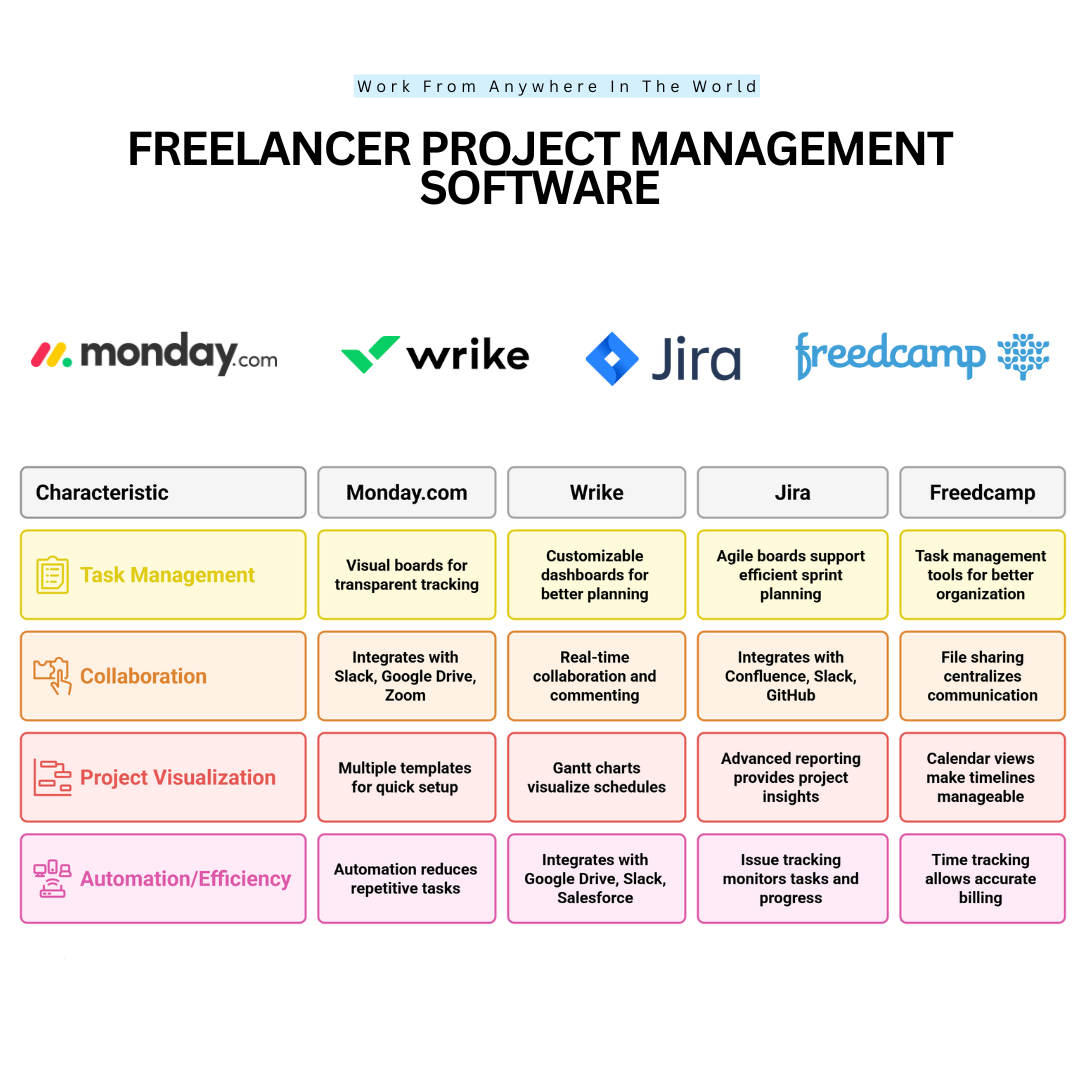
Monday.com is powerful freelancer project management software that helps individuals and teams organize tasks, track deadlines, and collaborate efficiently through customizable boards and automation.
Setting up Monday.com is straightforward: users create an account, choose a template for their project type, and customize boards with tasks, deadlines, priorities, and team assignments.
Its visual dashboards, timelines, and automation features make task tracking and collaboration simple. Monday.com supports individual freelancers and large teams, with over 150,000 organizations worldwide using it.
Monday.com offers several subscription options with different features, automation capabilities, and collaboration tools. Freelancers can compare the available plans on the official Monday.com pricing page to find an option that suits their workload and budget.
Key Points
- Visual boards and dashboards make it easier for all users to track tasks, deadlines, and priorities.
- Automation features reduce repetitive tasks by automatically sending notifications and reminders, saving time.
- Multiple templates allow quick setup for various industries, from marketing campaigns to software development.
- Integration with apps like Slack, Google Drive, and Zoom significantly improves collaboration and workflow efficiency.
2. Wrike
Wrike is a versatile project management platform that helps freelancers, independent contractors, and teams plan assignments, monitor deadlines, and collaborate efficiently. Its flexible features accommodate both straightforward tasks and more complex projects.
Getting started involves creating an account, setting up a workspace, and organizing projects into individual tasks. Users can customize workflows with boards, Gantt charts, calendars, and task assignments to match their working preferences.
Wrike also provides collaboration features, time tracking, document sharing, and reporting tools. These capabilities help freelancers communicate with clients, monitor progress, and manage several projects without constantly switching between applications.
Wrike offers plans for different project management needs, from basic task organization to advanced reporting and automation. Freelancers can explore the features and subscription options on the official Wrike pricing page before choosing a plan.
Key Points
- Customizable Dashboards: Provide a clear overview of tasks, deadlines, and project progress to support better planning and organization.
- Real-Time Collaboration: Comments, updates, and shared project information help freelancers communicate with clients and team members.
- Gantt Charts And Timelines: Visual scheduling tools make it easier to manage deadlines, project stages, and dependencies between tasks.
- Application Integrations: Connections with services such as Google Drive, Slack, and Salesforce can simplify document sharing and everyday workflows.
3. Jira
Jira is a powerful project management platform designed primarily for software developers, IT professionals, and agile teams. Freelancers can use it to organize technical assignments, track issues, and collaborate on complex development projects.
Getting started involves creating an account, selecting a project type, and configuring workflows to match specific requirements. Jira’s customizable boards and sprints help organize development tasks, while our Trello App Review explores a simpler approach to visual project management.
Jira provides task tracking, bug reporting, agile project management, and collaboration features. These capabilities are particularly valuable for freelance developers managing software updates, testing procedures, and ongoing client projects.
Jira provides different subscription options for teams with varying project requirements. Freelancers can compare task management, automation, and reporting capabilities on the official Jira pricing page to determine which plan best supports their work.
Key Points
- Agile Project Boards: Scrum and Kanban boards help organize tasks, plan sprints, and monitor development activities throughout a project.
- Issue And Bug Tracking: Detailed issue records allow freelancers to identify technical problems, prioritize fixes, and track progress toward resolution.
- Advanced Reporting: Dashboards and reports provide insights into project performance, completed tasks, outstanding issues, and potential bottlenecks.
- Application Integrations: Connections with tools such as Confluence, Slack, and GitHub support documentation, team communication, and development workflows.
4. Freedcamp
Freedcamp is a cloud-based project management platform that helps freelancers, small businesses, and teams organize tasks, coordinate projects, and collaborate in one central workspace.
Getting started is straightforward. Users can create an account, set up a workspace, add projects, and organize assignments with customizable boards, calendars, and milestones.
The platform provides task management, time tracking, file sharing, discussions, and project templates. These features make it easier to monitor responsibilities, exchange information, and maintain organized workflows.
For example, a freelance consultant working with several clients can create separate projects, monitor deadlines, and keep important documents accessible. This reduces the need to manage assignments through multiple disconnected applications.
Freedcamp offers a free plan with essential project management features, while paid subscriptions provide additional capabilities, storage, and integrations. The best option depends on project complexity and collaboration needs.
Freedcamp offers a free plan alongside paid subscriptions with additional project management capabilities. Freelancers can review the available features and limitations on the official Freedcamp pricing page before selecting an option.
Key Points
- Task Management: Organize, prioritize, and monitor assignments to keep projects on schedule and responsibilities clearly defined.
- Time Tracking: Record working hours to support accurate client billing and better workload planning.
- File Sharing And Discussions: Keep important documents, feedback, and project conversations together to improve collaboration.
- Calendars And Milestones: Visualize deadlines, track important project stages, and identify upcoming responsibilities.
5. Zoho Projects
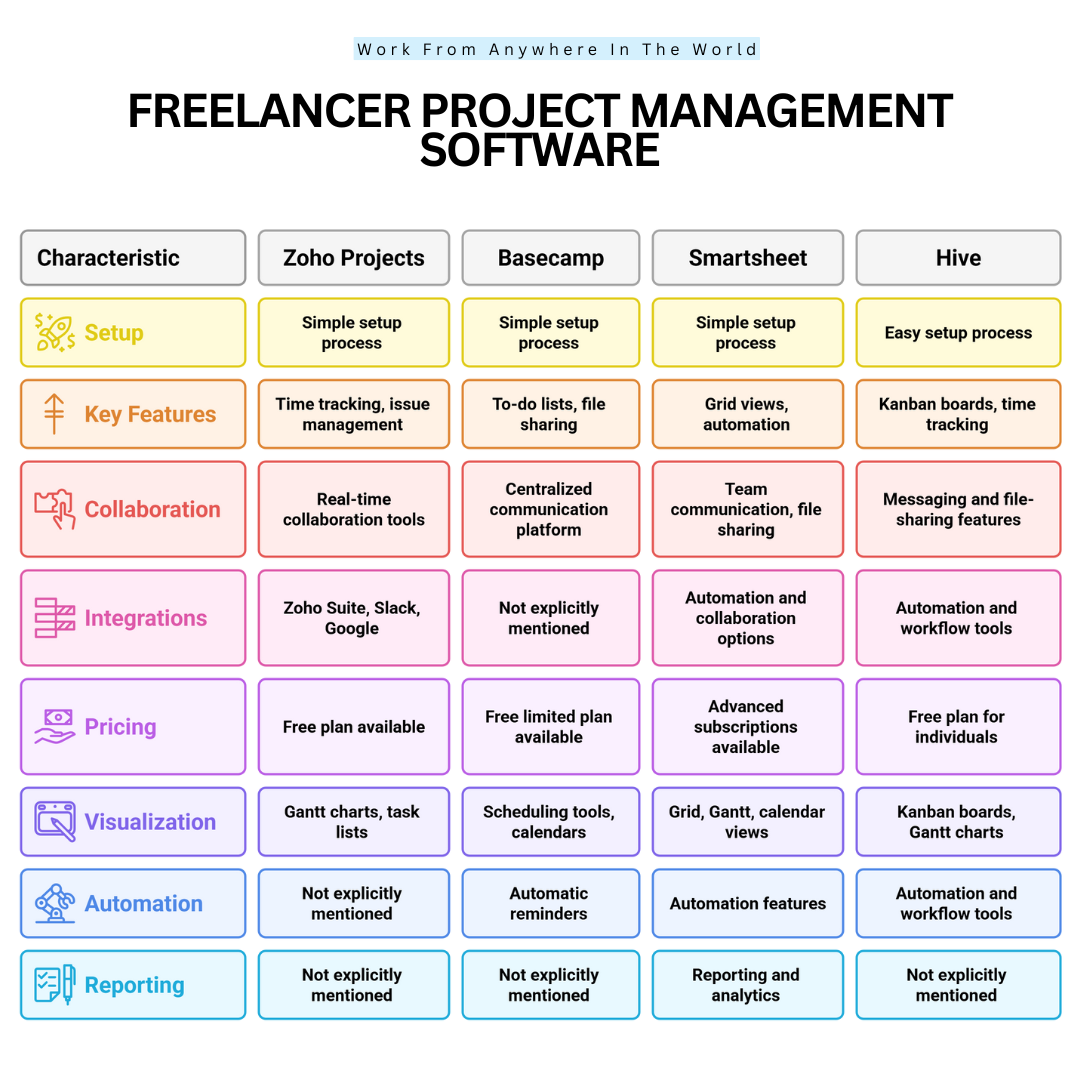
Zoho Projects is a versatile project management platform that helps freelancers and teams organize assignments, track working hours, and collaborate efficiently. Its customizable workflows and Gantt charts make it suitable for projects of varying complexity.
Getting started involves creating an account, setting up projects, adding tasks, and assigning responsibilities. Users can organize their work through task lists, visual timelines, and milestones to maintain a clear overview of upcoming deadlines.
The platform also provides time tracking, issue management, document sharing, and collaboration features. These capabilities help freelancers coordinate assignments, monitor progress, and maintain organized communication with clients or colleagues.
For example, a freelance marketing consultant can use Zoho Projects to coordinate campaign activities, share documents, and monitor deadlines. This becomes especially valuable when working with distributed teams or several clients simultaneously.
Our guide to managing a virtual team successfully offers additional strategies for improving communication, coordinating responsibilities, and maintaining productive remote collaboration.
Zoho Projects provides several subscription options with different levels of automation, reporting, and collaboration functionality. Freelancers can compare features on the official Zoho Projects pricing page to choose a plan that fits their projects and budget.
Key Points
- Gantt Charts And Task Lists: Visual timelines help freelancers organize assignments, monitor deadlines, and understand dependencies between project activities.
- Time Tracking: Recording working hours supports accurate client billing, productivity monitoring, and more realistic project estimates.
- Issue Management And Collaboration: Built-in tools help teams identify problems, discuss solutions, and coordinate project responsibilities.
- Application Integrations: Connections with other Zoho applications, Slack, and Google Workspace can simplify information sharing and support more efficient workflows.
6. Basecamp
Basecamp is a user-friendly project management platform that helps freelancers and teams organize tasks, communicate with clients, and share important files. Its straightforward design makes everyday project coordination easier without requiring complicated workflows.
Getting started involves creating an account, setting up individual projects, adding to-do lists, and inviting collaborators. Each project provides a dedicated space for organizing responsibilities, discussions, schedules, and shared documents.
Basecamp brings essential project information together, reducing the need to switch between separate messaging and task management applications. This centralized approach can be particularly useful for freelancers juggling several clients and ongoing assignments.
For example, a freelance web designer can create separate projects for different clients, share design files, collect feedback, and monitor deadlines. Keeping these activities organized helps prevent missed instructions and unnecessary communication delays.
Clear communication remains essential even when everyone uses the same platform. Our guide to communication skills explores ways to express ideas clearly, reduce misunderstandings, and build stronger professional relationships.
Basecamp offers subscription options designed for different project workloads and team sizes. Freelancers can compare project limits, storage, and collaboration features on the official Basecamp pricing page before choosing a package that fits.
Key Points
- To-Do Lists And Task Management: Organize assignments, establish responsibilities, and monitor progress to keep projects moving toward completion.
- Centralized Communication: Message boards, group chats, and notifications help freelancers keep discussions organized with clients and collaborators.
- File Storage And Document Sharing: Shared project spaces keep important files, reference materials, and documents accessible to authorized team members.
- Scheduling And Reminders: Calendars, deadlines, and notifications help freelancers plan upcoming activities and stay informed about important milestones.
Wealthy Affiliate – Mini Review
If you’ve ever thought about turning your blog, passion, or niche into an online business,
Wealthy Affiliate (WA) is one of the most beginner-friendly platforms I’ve used.
It combines step-by-step training, website hosting, AI-powered tools,
keyword research, and an active community all in one place.
What I like most is that you can start free (no credit card needed), explore the platform,
test the tools, and connect with other entrepreneurs before upgrading.
WA isn’t a “get rich quick” scheme — success comes from consistent effort
and applying what you learn over time.
7. Smartsheet
Smartsheet is a cloud-based work management platform that helps freelancers, teams, and businesses plan projects, track progress, and automate everyday tasks. Its spreadsheet-style interface combines familiar grid layouts with advanced project management capabilities.
Getting started involves creating an account, selecting a template or blank sheet, and organizing tasks into manageable activities. Users can assign responsibilities, establish deadlines, and customize workflows using grids, Gantt charts, and calendar views.
The platform also supports team collaboration, file sharing, reporting, and automated notifications. These capabilities make it easier to coordinate assignments, monitor important milestones, and keep project information accessible.
For example, a freelance marketing consultant can use Smartsheet to organize campaign schedules, monitor deliverables, and share progress reports with clients. Visual dashboards help identify upcoming deadlines and potential delays before they affect project delivery.
Smartsheet’s automation features can also reduce repetitive administrative work, allowing freelancers to concentrate on more valuable activities. Similar principles apply to email marketing automations, where scheduled actions and automated workflows help simplify recurring responsibilities.
Smartsheet offers subscription plans with different levels of automation, reporting, and collaboration functionality. Freelancers can compare features on the official Smartsheet pricing page to find an option that fits their workload and budget.
Key Points
- Flexible Project Views: Grid, Gantt, and calendar layouts help freelancers visualize project schedules, organize assignments, and monitor progress.
- Workflow Automation: Automated reminders, notifications, and updates reduce repetitive tasks and help keep projects moving forward.
- Team Collaboration: Shared documents, comments, and real-time updates support communication between freelancers, clients, and team members.
- Reporting And Analytics: Dashboards and reports provide insights into project performance, workload distribution, completed tasks, and potential delays.
8. Hive
Hive is a versatile project management platform that combines task tracking, team collaboration, and workflow automation in one centralized workspace. Its flexible features help freelancers organize assignments, monitor deadlines, and manage projects more efficiently.
Getting started involves creating an account, choosing a project template, or building a workspace from scratch. Users can add tasks, assign responsibilities, establish deadlines, and customize their projects using Kanban boards, calendars, and Gantt charts.
Hive also provides time tracking, messaging, file sharing, and automation features. These capabilities help freelancers coordinate daily responsibilities, communicate with clients, and keep important project information organized.
For example, a freelance content manager can use Hive to schedule assignments, coordinate revisions, and monitor publication deadlines. Keeping these activities together makes it easier to identify outstanding tasks and maintain consistent progress.
Hive’s customizable workflows can also complement effective SMART goals for time management. Setting clear objectives and measurable deadlines helps freelancers use project management features more effectively while staying focused on their priorities.
Hive provides a free plan alongside paid subscriptions with additional project management and collaboration capabilities. Freelancers can review the available features, integrations, and optional add-ons on the official Hive pricing page to determine which option best meets their needs.
Key Points
- Flexible Project Views: Kanban boards, Gantt charts, and calendars help freelancers organize tasks, visualize timelines, and monitor upcoming deadlines.
- Built-In Time Tracking: Recording working hours supports accurate client billing, productivity monitoring, and more realistic project estimates.
- Messaging And File Sharing: Centralized communication tools make it easier to exchange feedback, access documents, and coordinate responsibilities.
- Workflow Automation: Automated notifications, task updates, and recurring processes reduce repetitive administrative work and support efficient project delivery.
9. ProofHub
ProofHub is a comprehensive project management and team collaboration platform designed for freelancers, small businesses, and larger teams. It brings task management, communication, scheduling, and file sharing together in one organized workspace.
Getting started involves creating an account, setting up projects, adding tasks, and assigning responsibilities. Users can customize their workflows with Kanban boards, Gantt charts, calendars, and task lists to suit different project requirements.
ProofHub also includes time tracking, discussions, file management, and reporting tools. These features help freelancers coordinate assignments, monitor progress, and maintain clear communication throughout each project.
For example, a freelance graphic designer can use ProofHub to organize client requests, share design drafts, collect feedback, and track revisions.
Keeping project discussions and documents together makes it easier to manage approvals and avoid overlooking important details.
Organized project management is especially valuable when freelancers work with several clients at once. Combining ProofHub’s collaboration features with effective strategies for finding and managing freelance clients can help build stronger working relationships and encourage repeat business.
ProofHub offers subscription plans with different project management and collaboration capabilities, using a flat-rate pricing approach rather than separate per-user charges.
Freelancers can compare the available options on the official ProofHub pricing page to determine whether the platform suits their workload and budget.
Key Points
- Task Management And Kanban Boards: Visual boards and task lists help freelancers organize assignments, establish priorities, and monitor progress throughout each project.
- Time Tracking And Timesheets: Built-in tracking tools help record working hours, support accurate client billing, and evaluate project productivity.
- Centralized Team Communication: Discussions, comments, and shared files keep project conversations organized and reduce unnecessary email exchanges.
- Gantt Charts And Calendars: Visual scheduling tools help freelancers plan project timelines, identify dependencies, and stay informed about important deadlines.
10. Paymo
Paymo is an all-in-one project management platform that helps freelancers organize tasks, track working hours, and manage client billing. By combining project planning with financial tools, Paymo simplifies everyday responsibilities and reduces the need for multiple applications.
Getting started involves creating an account, setting up projects, adding tasks, and establishing deadlines. Users can organize their assignments through Kanban boards, task lists, and calendar views, making it easier to manage different projects and priorities.
Paymo also includes built-in time tracking, invoicing, expense management, and reporting features. These tools help freelancers understand how much time they spend on assignments while keeping important financial information organized.
For example, a freelance website developer can track the hours spent designing pages, making revisions, and communicating with clients. Once the work is completed, recorded time can be used to prepare invoices and maintain accurate billing records.
Reliable billing practices are essential for maintaining healthy client relationships and managing freelance income. Alongside Paymo’s invoicing features, understanding the best payment options for small businesses can help freelancers choose convenient ways to receive payments from their clients.
Paymo offers subscription options for different business needs, with features and usage limits varying by plan. Freelancers can compare time tracking, invoicing, and project management capabilities on the official Paymo pricing page before selecting a suitable option.
Key Points
- Task Management And Kanban Boards: Visual boards and organized task lists help freelancers establish priorities, manage assignments, and monitor project progress.
- Built-In Time Tracking: Time records support accurate client billing, productivity analysis, and detailed reporting for completed assignments.
- Invoicing And Expense Management: Integrated financial tools simplify invoice preparation, expense tracking, and the organization of project-related costs.
- Calendars And Project Scheduling: Calendar views, reminders, and project timelines help freelancers coordinate activities and stay informed about upcoming deadlines.
11. Taskade
Taskade is a collaborative project management platform that helps freelancers, small teams, and remote workers organize tasks, plan projects, and coordinate daily activities. Its flexible workspace combines task management, visual planning, and communication tools to simplify project coordination.
Getting started involves creating an account, setting up a workspace, and adding individual projects or tasks. Users can organize their assignments through lists, boards, and mind maps, making it easier to visualize responsibilities and establish priorities.
Taskade supports real-time collaboration, task tracking, and communication within shared workspaces. Its AI-powered features can also assist with brainstorming, organizing information, and developing structured workflows, although available capabilities depend on the selected plan.
For example, a freelance content writer can use Taskade to brainstorm article ideas, create outlines, organize research, and monitor writing deadlines. Shared workspaces also make it easier to collaborate with editors or clients while keeping feedback and assignments organized.
These features can be especially useful for freelancers developing the top work-from-home skills needed for successful remote careers. Strong organizational habits, effective communication, and independent time management complement the practical tools available in Taskade.
Taskade offers subscription options with different collaboration, automation, and AI capabilities. Freelancers can explore the available plans and feature allowances on the official Taskade pricing page to determine which option best supports their working style.
Key Points
- Flexible Task Views: Lists, boards, and mind maps help freelancers organize assignments, visualize project structures, and monitor progress.
- Real-Time Collaboration: Shared workspaces and communication features support teamwork, feedback, and project coordination across different locations.
- Templates And Workflow Customization: Reusable templates and customizable processes simplify recurring assignments and help maintain consistent project organization.
- Scheduling And Task Reminders: Due dates, reminders, and available calendar integrations help freelancers plan activities and manage important deadlines.
12. MeisterTask
MeisterTask is a user-friendly project management platform that helps freelancers organize assignments, track progress, and collaborate with clients or team members. Its visual Kanban boards and customizable workflows make everyday project coordination easier to manage.
Getting started involves creating an account, setting up a project, and adding individual tasks. Users can assign responsibilities, establish deadlines, create checklists, and organize assignments into different stages using customizable Kanban boards.
MeisterTask also provides task automation, time tracking, project templates, and integrations with other productivity applications. These features help freelancers manage recurring responsibilities, monitor working hours, and maintain organized project workflows.
For example, a freelance graphic designer can create separate columns for new requests, designs in progress, client feedback, and completed assignments. Moving tasks between these stages provides a clear overview of each project’s progress and helps identify outstanding revisions.
Visual task management can be especially valuable for freelancers balancing multiple assignments. Combining MeisterTask’s organizational features with effective time-management tips for bloggers can help freelance writers and content creators establish priorities, reduce distractions, and maintain consistent publishing schedules.
MeisterTask offers a free plan alongside paid subscriptions with additional project management and collaboration features. Freelancers can compare project limits, automation tools, and available integrations on the official MeisterTask pricing page before choosing a plan.
Key Points
- Kanban Boards And Customizable Workflows: Visual boards help freelancers organize assignments, establish priorities, and monitor progress through different project stages.
- Task Automation: Automated actions can reduce repetitive administrative work, update task information, and simplify recurring project processes.
- Time Tracking: Available tracking features help freelancers record working hours, evaluate productivity, and prepare more accurate project estimates.
- Third-Party Integrations: Connections with supported applications, including communication and automation tools, help freelancers coordinate information across their existing workflows.
13. Bitrix24
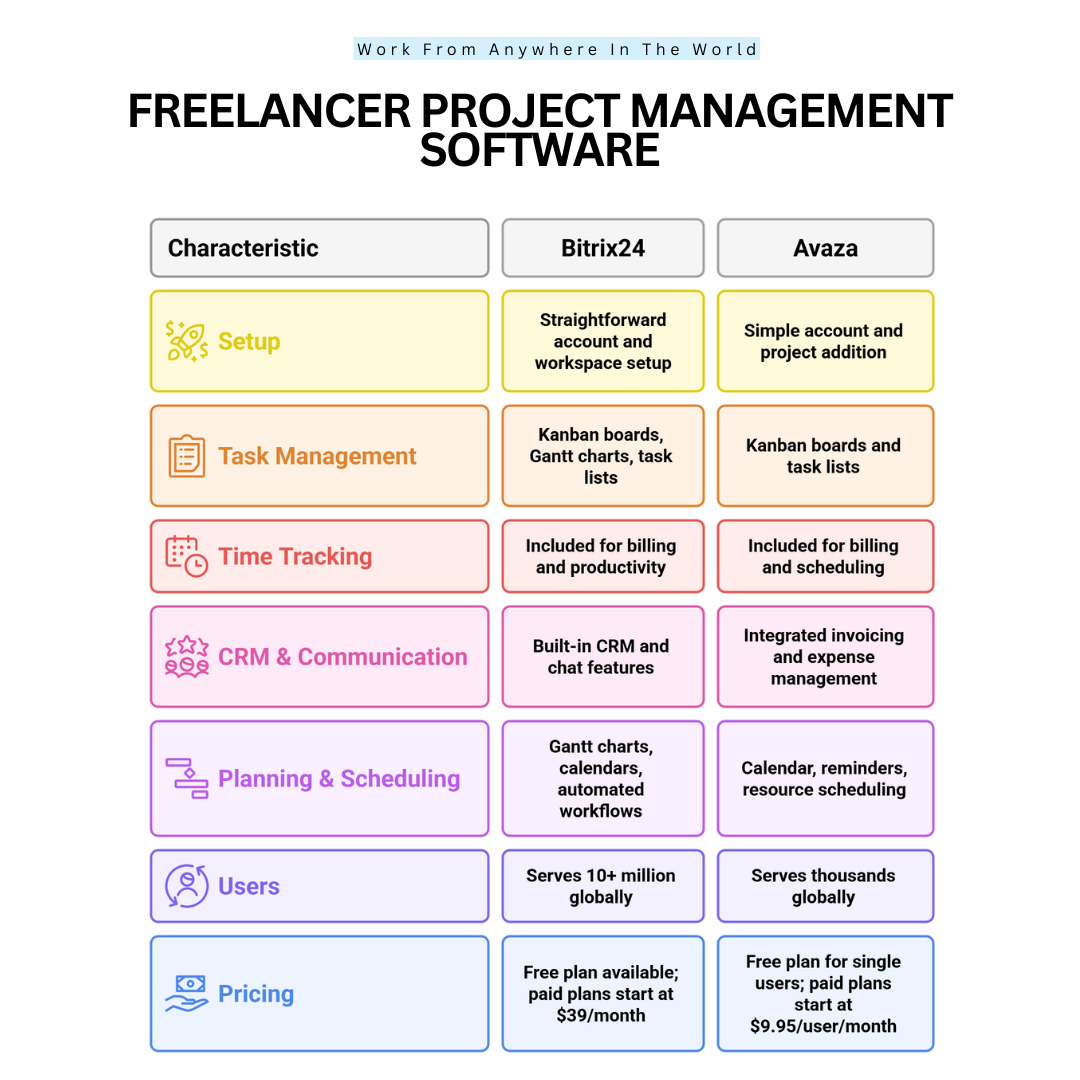
Bitrix24 is an all-in-one business management platform that combines project planning, team collaboration, and customer relationship management (CRM). Its wide range of tools helps freelancers and businesses organize assignments, communicate with clients, and coordinate daily operations.
Getting started involves creating an account, setting up a workspace, and adding projects or individual tasks. Users can assign responsibilities, establish deadlines, and customize workflows through Kanban boards, Gantt charts, calendars, and task lists.
Bitrix24 also includes time tracking, file sharing, messaging, CRM features, and workflow automation. Bringing these functions together can reduce the need for separate applications and make important project information easier to access.
For example, a freelance digital marketing consultant can use Bitrix24 to organize campaign tasks, schedule client meetings, monitor project deadlines, and maintain customer records. Its CRM features help keep client communications and project responsibilities connected.
Freelancers who manage ongoing customer relationships may also benefit from understanding ERP vs CRM. Knowing how these business systems differ can help determine which features are most useful for managing clients, projects, and everyday operations.
Bitrix24 offers a free plan alongside paid subscriptions with additional CRM, automation, and business management capabilities. Freelancers can compare the available features and subscription options on the official Bitrix24 pricing page to find a suitable solution.
Key Points
- Task Management And Kanban Boards: Visual boards and organized task lists help freelancers establish priorities, assign responsibilities, and monitor project progress.
- Time Tracking And Workload Monitoring: Tracking tools support productivity assessments, project planning, and more accurate records of time spent on assignments.
- Built-In CRM And Communication: Customer records, messaging, and collaboration features help organize client interactions and reduce scattered communication.
- Gantt Charts And Workflow Automation: Scheduling tools and automated processes support project planning, deadline management, and consistent task coordination.
14. Avaza
Avaza is a cloud-based project and business management platform that helps freelancers organize tasks, track working hours, and manage project finances. Its combination of planning, collaboration, and billing tools makes it particularly useful for independent professionals handling several client assignments.
Getting started involves creating an account, adding projects, assigning tasks, and establishing deadlines. Users can organize assignments through Kanban boards, task lists, and calendar views, making it easier to follow project progress and manage competing priorities.
Avaza also provides time tracking, invoicing, expense management, resource scheduling, and team collaboration features. These capabilities connect everyday project activities with financial administration, helping freelancers maintain more organized business records.
For example, a freelance virtual assistant can use Avaza to manage administrative assignments for several clients, record billable hours, and prepare invoices. Tracking project expenses and deadlines in the same workspace can also reduce administrative work.
Financial organization becomes increasingly important as a freelance business grows. Understanding B2B customer retention strategies can also help freelancers maintain lasting client relationships through dependable service, clear communication, and consistent project delivery.
Avaza provides a free plan and paid subscription options with different allowances for projects, users, and financial management features. Freelancers can compare the available plans on the official Avaza pricing page to determine which option best meets their workload and budget.
Key Points
- Task Management And Kanban Boards: Organized task lists and visual boards help freelancers prioritize assignments, monitor progress, and coordinate multiple projects.
- Built-In Time Tracking: Recording working hours supports accurate client billing, productivity monitoring, and realistic project scheduling.
- Invoicing And Expense Management: Integrated financial tools help freelancers prepare invoices, record expenses, and maintain organized project-related financial information.
- Calendars And Resource Scheduling: Scheduling tools help freelancers manage deadlines, coordinate assignments, and plan workloads across several projects.
Conclusion
Choosing the right freelancer project management software can make managing multiple clients, deadlines, and daily responsibilities much easier.
From task tracking and team communication to time management and invoicing, these platforms help freelancers stay organized and maintain productive workflows.
Each tool offers different advantages. Some focus on simple task management, while others combine collaboration, automation, and financial features in one convenient platform.
The best choice depends on your workload, budget, and preferred working style. Start with the features you need most and explore additional capabilities as your freelance business grows.
With the right tools and consistent organizational habits, freelancers can reduce unnecessary stress, strengthen client relationships, and build a more sustainable business.
I trust you enjoyed this article on the 14 Best Freelancer Project Management Software. Please stay tuned for more insightful blogs on affiliate marketing, online business, and working from anywhere in the world.
Take care!
— JeannetteZ
💬 Your Opinion Is Important To Me
Do you have thoughts, ideas, or questions? I’d love to hear from you. Please leave your comments below or email me directly at Jeannette@WorkFromAnywhereInTheWorld.com.
📚 More Work From Anywhere Reads
🚀 Ready to Build a Business You Can Run from Home
or from Anywhere in the World?
Imagine creating income on your terms — from home, a cozy café, or wherever life takes you.
With the right tools, training, and community support, it’s entirely possible.
Start your own online business for free — no credit card needed.
Disclosure
This post may contain affiliate links. As an Amazon Associate and participant in other affiliate programs, I earn from qualifying purchases at no extra cost to you. Please read my full affiliate disclosure.