10 Best Mobile Laptop Computer Desk Carts
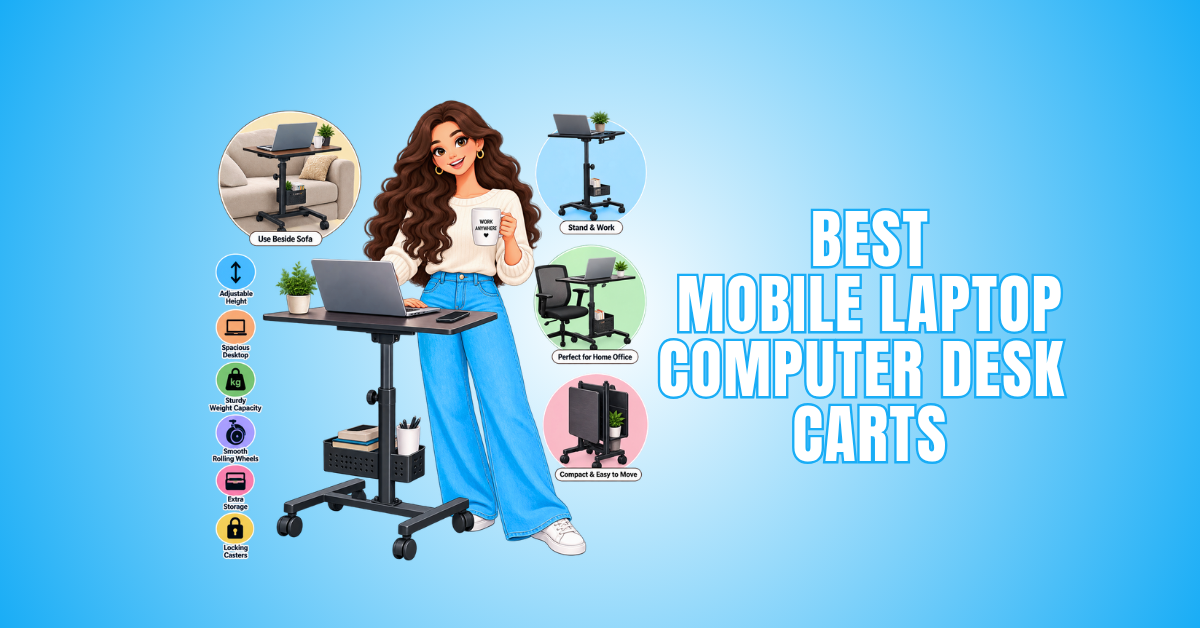
Mobile laptop computer desk carts can turn almost any room into a flexible workspace. They make it easy to work beside a sofa, bed, conference table, or workstation.
Some models are simple rolling laptop tables, while others include adjustable heights, locking wheels, storage, keyboard trays, or room for monitors and accessories.
The right choice depends on your equipment, available space, and how you prefer to work. Consider how often you plan to move your workspace and which features will make it more comfortable and practical.
What To Look For In A Mobile Laptop Computer Desk Cart
Choosing the right mobile laptop computer desk cart starts with understanding how and where you plan to use it. The best option should fit your workspace, equipment, and daily routine.
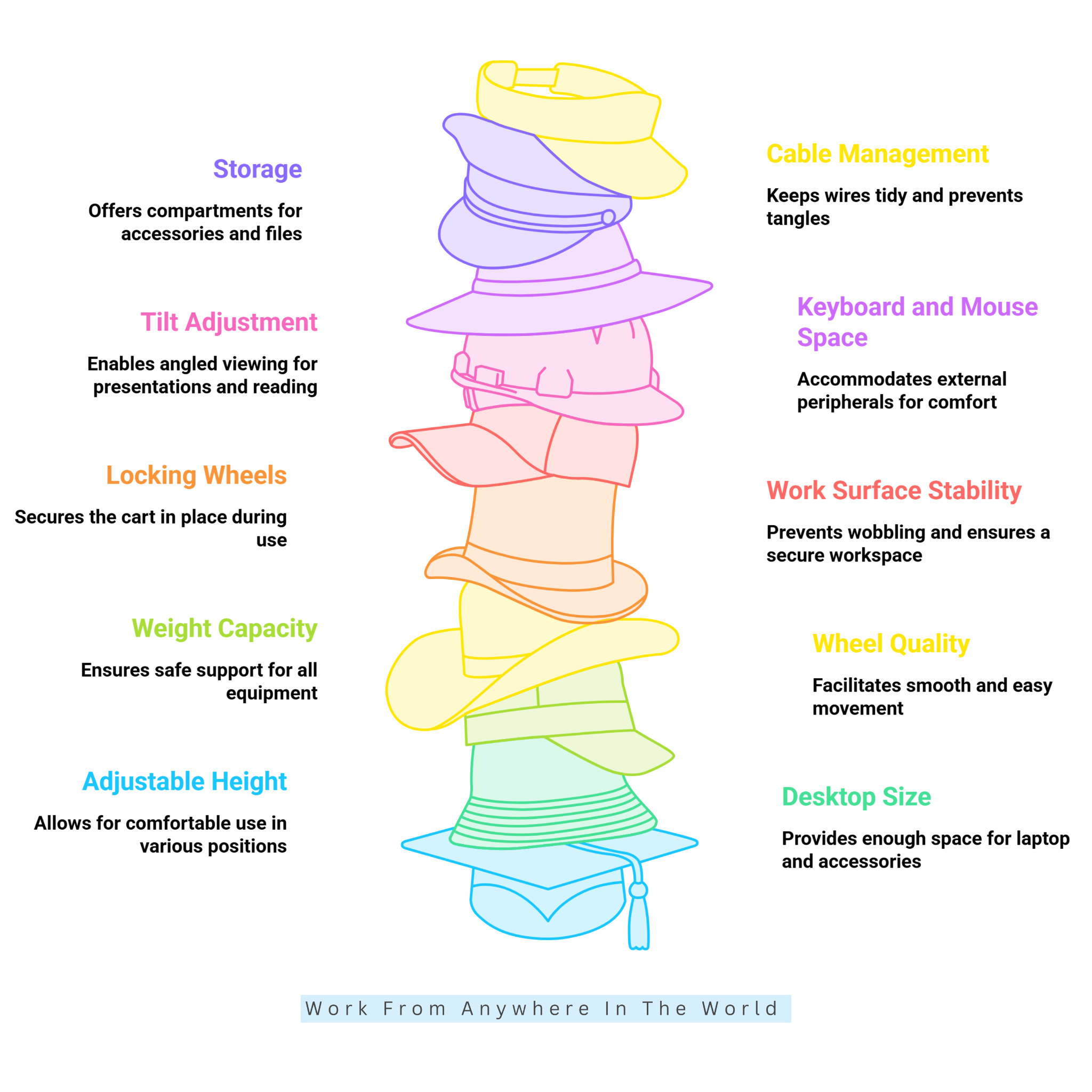
Features such as adjustable height, desk size, weight capacity, wheel quality, and stability can make a noticeable difference. Storage and cable management may also be important, depending on your setup.
Before choosing a cart, consider the following features to find the right balance of comfort, mobility, and function. Taking a few minutes to compare these details can help you narrow your options before you buy.
1. Adjustable Height
Adjustable height gives you more flexibility with a mobile laptop desk cart. A fixed-height model may work well with one chair but become uncomfortable when you change your seating position or want to stand.
Check the cart’s minimum and maximum height before buying. Some models are designed mainly for seated work, while others accommodate both sitting and standing.
Choose a height range that fits your daily routine and keeps your laptop at a comfortable working level. An easy-to-use adjustment mechanism can also make switching between positions more convenient.
2. Desktop Size
The right desktop size depends on more than your laptop’s dimensions. Measure your laptop and consider the accessories you normally use alongside it.
A compact surface may work well for a laptop alone, but an external keyboard, mouse, notebook, phone, or monitor will require additional space.
Mobile carts range from compact tabletops for smaller spaces to larger work surfaces. Choose a size that gives you enough room to work comfortably without making the cart unnecessarily bulky.
3. Weight Capacity
Weight capacity tells you how much equipment the cart can safely support. Don’t assume a cart is strong enough simply because it has a solid-looking frame.
Check the manufacturer’s stated weight limit and consider everything you plan to place on the cart. A laptop may be lightweight, but a monitor, docking station, keyboard, speakers, and other accessories can add considerable weight.
Choosing a cart with some extra capacity can provide greater flexibility as your setup changes. It can also help prevent overloading the work surface and affecting the cart’s stability.
4. Wheel Quality
Wheel quality directly affects how easily you can move your mobile laptop computer desk cart. Look for casters that roll smoothly and suit your flooring.
Small wheels may work well on smooth office floors, while larger casters can be easier to move across slightly uneven surfaces. Consider how often you plan to move the cart and whether it will travel between rooms.
Good-quality wheels should let the cart move smoothly while staying easy to steer and control. Durable casters can also help the cart perform reliably with regular use.
5. Locking Wheels
Locking wheels help combine mobility with stability. The cart should move easily when you need to change locations but stay securely in place while you work.
Many mobile laptop carts use two locking casters, while some models lock all four wheels. Check how the locks operate and whether they are easy to reach.
Reliable wheel locks are especially useful when typing, using a mouse, or working with additional equipment. They can help keep the workstation steady and reduce unwanted movement during use.
6. Work Surface Stability
A large work surface is useful only when it remains stable during everyday use. Look for a sturdy frame and a tabletop that does not wobble while you type or use your equipment.
Stability matters even more when you add an external monitor, keyboard, or other accessories. Check the construction materials, frame design, and stated weight capacity.
Customer reviews can also provide helpful information about wobbling, movement, or assembly concerns. A stable work surface can make your mobile workstation more comfortable and practical.
7. Tilt Adjustment
A tilting desktop can make a mobile laptop cart more flexible for certain tasks. It can be useful when reading documents, viewing materials, or giving presentations where the screen or work surface needs to be angled.
However, tilt adjustment may not be necessary for everyone. When choosing a tilting model, look for a safety edge, stopper, or similar feature that helps prevent your laptop from sliding.
Check how securely the desktop locks into position and whether the angle is easy to adjust. A reliable locking mechanism helps keep the work surface steady at your preferred angle.
8. Keyboard And Mouse Space
A standard tabletop may provide enough room when using your laptop’s built-in keyboard and trackpad. However, an external keyboard and mouse will require additional workspace.
Some mobile laptop carts include a separate keyboard tray, leaving the main surface available for a monitor, notebook, or other accessories.
Consider your entire setup before choosing a cart, rather than focusing only on the laptop. Measuring your keyboard, mouse, and other accessories can help you avoid a cramped work surface.
9. Storage
Storage can be useful when your mobile workstation needs to hold more than a laptop. Some carts include shelves, drawers, or compartments for chargers, notebooks, files, headphones, and other accessories.
However, additional storage can increase the cart’s overall size and weight. A simpler design may be easier to move when you mainly carry a laptop from room to room.
Choose storage based on your workflow and the items you use regularly. The goal is to have enough space for essentials without adding features that take up unnecessary room.
10. Cable Management
The more equipment you add to a mobile workstation, the more important cable management becomes. A laptop, monitor, docking station, charger, and other accessories can quickly create cables that become tangled or catch on furniture.
Look for built-in cable holes, clips, channels, or other routing features that help keep wires organized. Good cable management can also make the cart easier and safer to move between rooms.
Before choosing a cart, consider where the cables will sit and how they will connect to your equipment. Make sure they can reach an outlet comfortably without leaving excessive slack.
10 Popular Mobile Laptop Computer Desk Cart Models
Mobile laptop computer desk carts come in many designs, from compact rolling tables to larger sit-to-stand workstations. Each model offers a different combination of workspace, adjustability, mobility, and storage.
Some carts are designed for a simple laptop setup, while others provide room for monitors, keyboards, accessories, and additional equipment.
The following 10 models represent a variety of styles and features. Comparing their designs can help you choose the mobile workstation that best fits your workspace and daily routine.
1. Seville Classics airLIFT Mobile Laptop Sitting Desk Cart
The Seville Classics airLIFT Mobile Laptop Sitting Desk Cart is a compact option for everyday laptop work at home or in an office. Its 23.75 × 16-inch work surface fits a laptop, mouse, and a few small accessories.
The adjustable height helps accommodate different seated working positions. Four casters make the cart easy to move, while two locking wheels help keep it stable during use.
With a 15-pound weight capacity, this model suits a laptop and basic accessories better than a heavier multi-device setup. Its compact footprint can work particularly well in bedrooms, apartments, and smaller workspaces.
This cart is a practical option when mobility and simplicity matter more than extra storage or advanced workstation features. Its straightforward design also suits smaller spaces where a full workstation isn’t needed.
2. Seville Classics airLIFT Pneumatic Mobile Desk Cart
The Seville Classics airLIFT Pneumatic Mobile Desk Cart offers more flexibility for people who regularly switch between sitting and standing. Its 25.6 × 18.9-inch desktop fits a laptop, keyboard, mouse, and everyday accessories.
A pneumatic height-adjustment system makes it easy to raise or lower the work surface. The height adjusts from approximately 29.3 to 42.2 inches, while the desktop supports up to 35 pounds.
Four casters make the cart easy to move between work areas, while two locking wheels help keep it stable during use. The larger surface and higher weight capacity make it suitable for home offices, shared workspaces, and flexible work areas.
This model is a practical choice when you need more than a basic laptop setup. Its sit-to-stand adjustment also provides greater flexibility for changing your working position throughout the day.
3. Seville Classics airLIFT Tilting Mobile Desk Cart
The Seville Classics airLIFT Tilting Mobile Desk Cart provides more flexibility than a standard flat laptop table. Its main work surface measures 17.5 × 15.7 inches, with an additional 9.8 × 8.3-inch side surface for smaller accessories.
The tabletop can tilt, making the cart useful for reading, writing, presentations, or adjusting a laptop to a different viewing angle. You can also adjust its height from about 27.5 to 40 inches.
Four casters make the cart easy to move, while two locking wheels help keep it stable when parked. With a 20-pound weight capacity, it suits a laptop and lightweight accessories better than heavier equipment.
The combination of mobility, height adjustment, and tilt makes this cart suitable for flexible home, office, training, or presentation setups. The separate side surface also provides a convenient place for a mouse, phone, or other small items.
This one is accurate too. VIVO confirms the 31.6 × 15.7-inch desktop, five height settings from 28 to 43.6 inches, 44-pound capacity, steel/particle-board construction, and four lockable casters. VIVO
4. VIVO 32″ Mobile Computer Workstation
The VIVO 32″ Mobile Computer Workstation provides a larger working area for people who need more room than a compact laptop cart offers. Its 31.6 × 15.7-inch desktop fits a laptop, keyboard, mouse, notebook, and other everyday equipment.
The height adjusts through five locking positions, ranging from 28 to 43.6 inches for seated or standing work. Four lockable casters allow you to move the cart easily and secure it once it reaches your workspace.
With a weight capacity of up to 44 pounds, the cart can accommodate more equipment than many lighter laptop tables. Its steel frame and particle-board desktop provide a practical setup for regular indoor use.
The compact design can work well in home offices, classrooms, shared work areas, and other spaces where a movable workstation is useful. Its combination of a larger desktop and relatively small footprint also makes it versatile for different work setups.
5. VIVO 28″ Mobile Computer Workstation
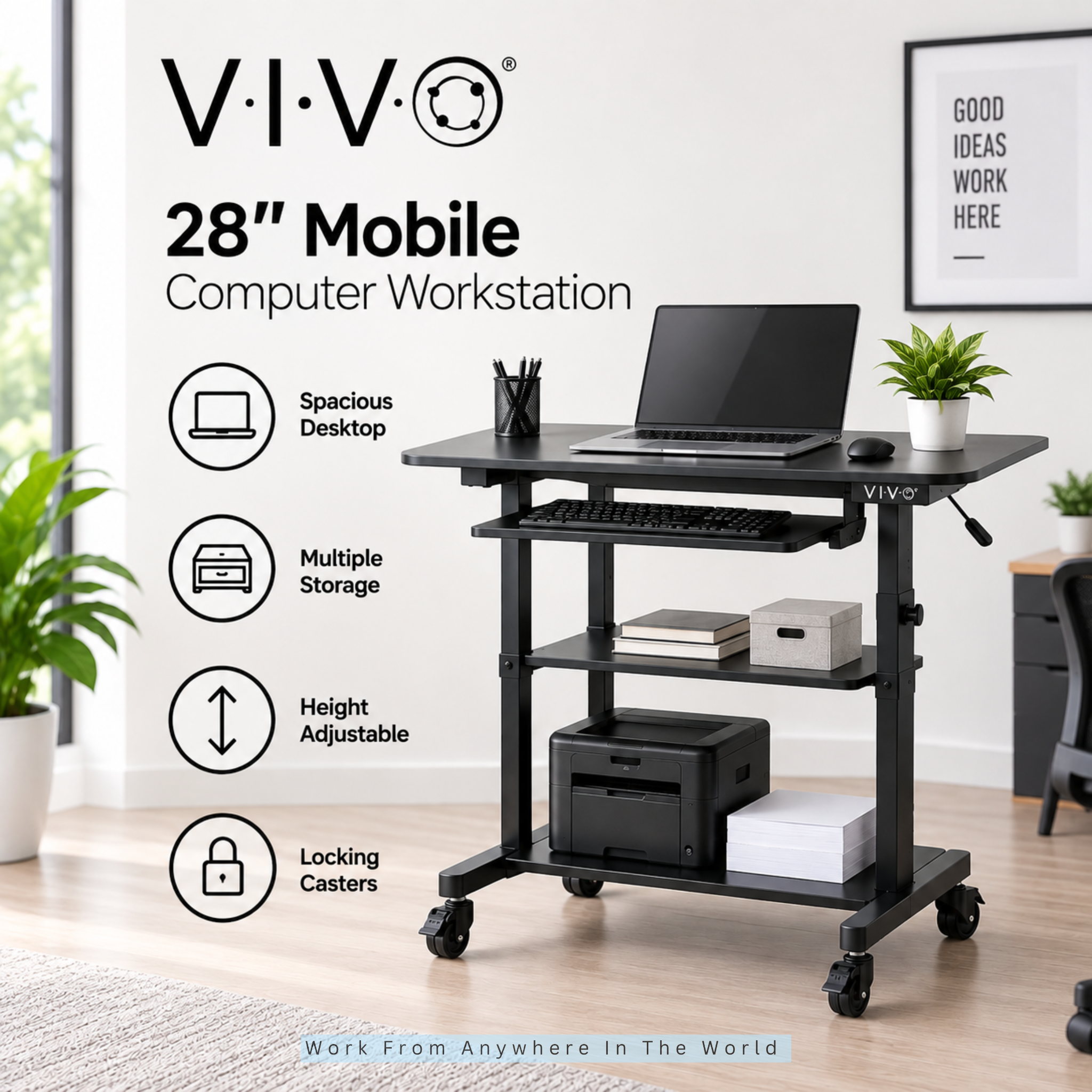
The VIVO 28″ Mobile Computer Workstation provides additional storage along with a movable work surface. Its 27.5 × 14-inch desktop offers room for a laptop, while a separate keyboard tray and two additional shelves help organize equipment and accessories.
The height adjusts from 37 to 54.5 inches through 11 locking positions, making the workstation particularly useful for standing work and presentation-style setups.
The cart supports up to 132 pounds in total, with a recommended maximum of 33 pounds per shelf. Two locking casters help keep the workstation stable once it is positioned.
This larger design can work well in offices, classrooms, training areas, and workspaces where several pieces of equipment need to stay together.
6. VIVO 24″ Multi-Purpose Mobile Podium
The VIVO 24″ Multi-Purpose Mobile Podium combines a rolling workstation with features suited to presentations and standing tasks. Its 23.7 × 15.8-inch desktop provides room for a laptop or presentation equipment.
The desktop tilts from 0° to 40°, letting you position the work surface at different angles. Its height adjusts from 40.5 to 49.3 inches, making it better suited to standing work than lower seated positions.
Four lockable casters make the podium easy to move and secure once positioned. The desktop supports up to 44 pounds, while a lower shelf provides additional space for accessories.
This cart can work well in classrooms, meeting rooms, training spaces, and presentation areas where equipment needs to move frequently. Its taller height range is worth considering when choosing it for a seated workspace.
7. VIVO 28″ Pneumatic Mobile Workstation
The VIVO 28″ Pneumatic Mobile Workstation is a practical option for people who want smooth height adjustment rather than several fixed positions. Its pneumatic mechanism adjusts the work surface from 28.5 to 44.4 inches for seated or standing tasks.
The 28.3 × 18.9-inch desktop provides room for a laptop, mouse, keyboard, and selected accessories. With a 22-pound weight capacity, it is better suited to a moderate setup than heavier equipment.
Four lockable casters make the workstation easy to move and secure once positioned. Its relatively compact design can work well in home offices, bedrooms, classrooms, and shared work areas.
This model is particularly useful when you regularly change your working height. The pneumatic adjustment makes those transitions quick and convenient throughout the day.
8. Mount-It! Rolling Laptop Tray And Projector Cart
The Mount-It! Rolling Laptop Tray And Projector Cart is designed for situations where a laptop cart needs to support more than everyday desk work. Two adjustable platforms allow you to separate a laptop from a projector, mouse, or other equipment.
Together, the platforms provide a 29.75 × 17.75-inch work area. Each tray can tilt up to 45 degrees and adjust in height from approximately 27 to 35 inches.
Each tray supports up to 22 pounds, for a total capacity of 44 pounds. Locking casters and a wide base help keep the cart stable once it is positioned.
This design can work well in classrooms, training rooms, offices, and presentation areas where equipment frequently moves between locations. The two separate surfaces also make it more versatile than a basic rolling laptop table.
9. Techni Mobili Rolling Laptop Cart
The Techni Mobili Rolling Laptop Cart is a practical option for people who need a compact workstation that can move easily between rooms. Its desktop provides space for a laptop, mouse, and basic accessories.
The rolling design makes the cart convenient for home offices, bedrooms, classrooms, and shared work areas. Locking casters help keep the workstation stable once it is positioned.
Its compact footprint can be useful where a traditional desk would take up too much space. The simple design focuses on everyday laptop use rather than heavy equipment or extensive storage.
This cart can provide a convenient workspace for basic computing tasks when portability is a priority. Its smaller design can also make it easier to store when the workstation is not in use.
10. Luxor Pneumatic Adjustable-Height Laptop Desk Cart
The Luxor Pneumatic Adjustable-Height Laptop Desk Cart provides a flexible workstation for home offices, classrooms, training rooms, and other shared spaces. Its 28.1 × 19.6-inch tabletop fits a laptop, mouse, keyboard, and everyday accessories.
Pneumatic height adjustment lets the desktop move from 27.1 to 41.9 inches, offering flexibility for seated and standing work. The work surface supports up to 35 pounds.
Full-swivel casters make the cart easy to move between work areas, while locking brakes help keep it securely positioned during use. Its compact footprint also makes it suitable for spaces where a larger desk may not be practical.
This model combines a useful work surface with mobility and convenient height adjustment. Its straightforward design makes it suitable for a variety of flexible work environments.

Frequently Asked Questions
Q1: Can I Use A Mobile Laptop Cart While Standing?
Yes. Many models have adjustable-height surfaces designed for both seated and standing work. Check the minimum and maximum height to make sure the cart suits your height and preferred working position.
Q2: What Size Mobile Laptop Desk Cart Should I Buy?
Choose a surface that fits your laptop along with the accessories you regularly use. A keyboard, mouse, monitor, notebook, or other equipment may require a larger desktop.
Q3: How Much Weight Can A Mobile Laptop Desk Cart Hold?
Weight capacity varies considerably by model. Check the manufacturer’s stated limit and consider the combined weight of your laptop, monitor, keyboard, accessories, and other equipment.
Q4: Are Mobile Laptop Desk Carts Suitable For Small Spaces?
Yes. Compact models can work well in apartments, bedrooms, dorm rooms, and small offices. Look for a narrow base and a tabletop that provides enough workspace without taking up unnecessary floor space.
Q5: Is A Mobile Laptop Cart Better Than A Regular Desk?
It depends on how you plan to use your workspace. A regular desk generally provides more permanent working and storage space, while a mobile cart offers greater flexibility and can be moved between different locations.
Q6: Do I Need Locking Wheels On A Mobile Laptop Cart?
Locking wheels help keep the cart stable while you work. They are especially helpful when typing, using a mouse, or placing additional equipment on the work surface.
Conclusion
Mobile laptop computer desk carts can make everyday work more flexible, especially when you need to move your workstation between rooms or change between seated and standing positions.
The right cart depends on your laptop size, available space, equipment, and working habits. Features such as adjustable height, a stable work surface, locking wheels, and sufficient weight capacity can make a noticeable difference.
Some people may need only a compact cart for a laptop and mouse, while others may benefit from additional storage, keyboard space, or a larger work surface. Choosing features based on how you actually work can help you avoid unnecessary extras.
With the right setup, a mobile laptop computer desk cart can provide a convenient and adaptable workspace that moves with you.
Whether you work from a home office, bedroom, classroom, or shared space, the right cart can make it easier to create a functional workstation where you need it.
I trust you enjoyed this article on the 10 Best Mobile Laptop Computer Desk Carts. Please stay tuned for more insightful blogs on affiliate marketing, online business, and working from anywhere in the world.
Take care!
— JeannetteZ 🌍✨
💬 Your Opinion Is Important To Me
Do you have thoughts, ideas, or questions? I’d love to hear from you. Please leave your comments below or email me directly at Jeannette@WorkFromAnywhereInTheWorld.com.
📚 More Work From Anywhere Reads
🚀 Ready to Build a Business You Can Run from Home
Or from Anywhere in the World?
Imagine creating income on your terms — from home, a cozy café, or wherever life takes you.
With the right tools, training, and community support, it’s entirely possible.
Start your own online business for free — no credit card needed.
Disclosure
This post may contain affiliate links. As an Amazon Associate and participant in other affiliate programs, I earn from qualifying purchases at no extra cost to you. Please read my full affiliate disclosure.