How To Boost Website Speed: 15 Powerful Tips
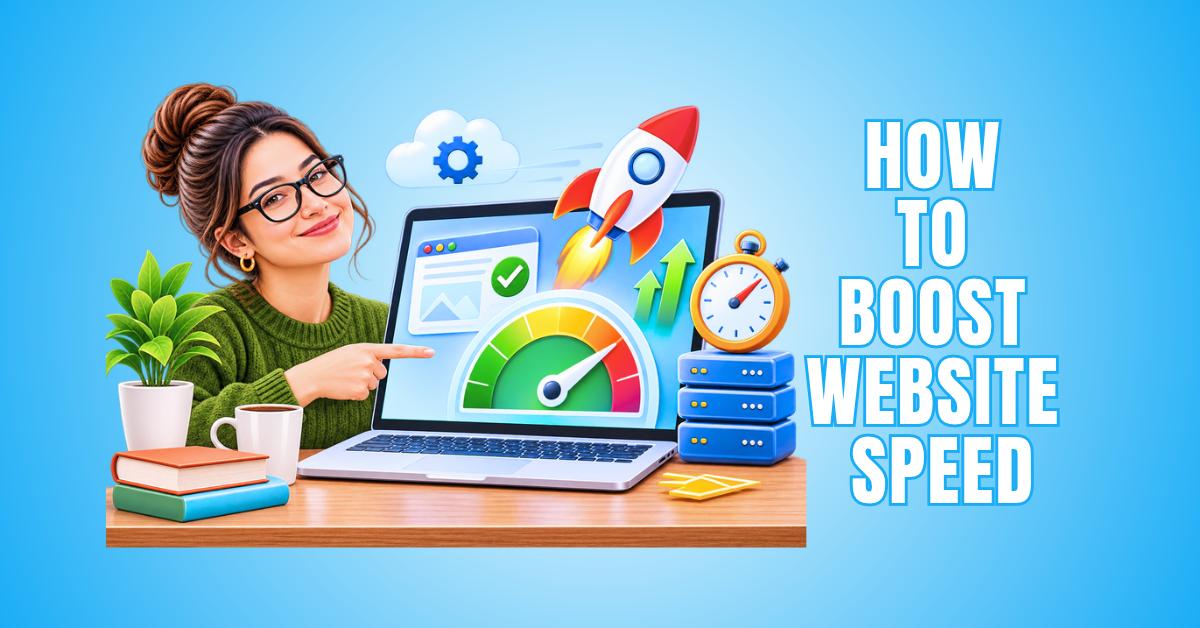
Learning how to boost website speed is essential for delivering an enjoyable digital experience. Visitors expect web pages to load quickly, whether browsing a blog, shopping online, or searching for information.
A slow website can interrupt navigation, frustrate visitors, and make it harder for them to find what they need. It can also affect engagement, search visibility, and conversion rates.
Optimizing blog images to load faster is one of the most effective ways to improve website performance without sacrificing visual quality or your website’s overall appearance.
A fast-loading website can also support your efforts to increase organic traffic while providing visitors with a smoother browsing experience and encouraging them to explore additional articles.
Website performance is equally important if you want to maximize your AdSense earnings. A well-optimized website helps balance advertising opportunities with a positive user experience.
This guide explores 15 powerful ways to boost website speed without compromising its design or functionality. You’ll also discover useful tools to measure, monitor, and improve website performance.
Why Does Website Speed Matter?
Website speed matters because it affects how visitors interact with your website. Faster loading improves accessibility, supports a better browsing experience, and helps visitors complete their desired actions.
Understanding how to boost website speed can benefit bloggers, affiliate marketers, and online business owners. Here are six important reasons why website speed matters.
1. Improves User Experience
A fast-loading website offers a seamless browsing experience. Visitors can access information, explore related pages, and interact with website features without experiencing unnecessary technical delays.
For example, readers exploring our Nature guide to 22 types of North American owls benefit when wildlife photographs and species descriptions load efficiently without interrupting their reading experience.
This creates a positive first impression and makes navigation more convenient across different devices and screen sizes. Visitors may also be more inclined to return to a website that consistently performs well.
2. Supports SEO Performance
Website speed contributes to page experience, including Google’s Core Web Vitals. Optimizing loading performance, responsiveness, and visual stability supports technical SEO and overall website quality.
Using WordPress SEO tools such as Rank Math can help website owners manage other important aspects of website optimization alongside their performance improvements.
However, speed alone does not guarantee higher rankings because Google considers multiple factors when evaluating search results. Combining faster loading with valuable content and effective SEO practices supports long-term search visibility.
3. Reduces Visitor Frustration
Slow-loading pages can interrupt browsing and discourage visitors from accessing important information. Readers may abandon a website if photographs, navigation menus, or other essential elements take too long to appear.
For example, someone following our 30-minute vegan Italian recipes wants to access ingredient lists, preparation instructions, and photographs without unnecessary interruptions while preparing a meal.
Improving website speed reduces unnecessary waiting and makes content easier to access. A smoother browsing experience encourages visitors to explore your website without frustrating technical delays or interruptions.
4. Improves Mobile Experience
Understanding the differences between mobile websites and desktop websites can help you recognize the importance of optimizing website performance for different devices and screen sizes.
Mobile visitors often browse under different network conditions and with varying device capabilities. Optimizing images, layouts, and scripts helps pages load more efficiently, even when internet connections are slower.
Better mobile performance is particularly important for image-rich content, such as our 30-minute vegan stir-fry recipes. Readers can conveniently follow cooking instructions using their smartphones or tablets.
5. Supports Better Conversions
Faster product pages and checkout processes make online shopping more convenient. Visitors can review products, complete forms, and purchase items with fewer delays or unexpected interruptions.
Combining faster loading with proven eCommerce conversion rate optimization strategies can improve the purchasing experience. Although speed does not guarantee sales, reducing technical friction can support better conversion opportunities.
6. Encourages Visitor Engagement
A responsive website makes it easier to explore additional content. Visitors can discover related articles, browse product categories, watch educational videos, and interact with useful website features.
For example, readers exploring our PawReiki guide to crown chakra healing for horses may also want to discover related articles about other horse chakras and complementary wellness practices.
Implementing effective tricks to increase blog comments alongside website performance improvements can encourage meaningful interactions and help build stronger relationships with your audience.
Smooth navigation encourages visitors to explore more pages and engage with website content. These positive experiences can help strengthen reader loyalty and encourage repeat visits over time.
15 Powerful Ways To Boost Website Speed
Improving website speed involves optimizing several elements, from reliable hosting and image compression to efficient coding and resource delivery. Even small adjustments can make a noticeable difference in website performance.
Here are 15 practical ways to boost website speed, reduce loading times, and create a smoother browsing experience without compromising your website’s design or functionality.
1. Choose A Reliable Web Hosting Provider
Your hosting provider creates the foundation for website performance. A slow server can increase response times, even when other website elements are properly optimized.
Understanding how to choose a web hosting provider helps you select dependable infrastructure, adequate server capacity, strong uptime, and prompt technical support.
Shared hosting may suit smaller websites, while growing businesses can consider VPS, cloud, or managed hosting. Also, check server locations and scalability options before selecting a plan.
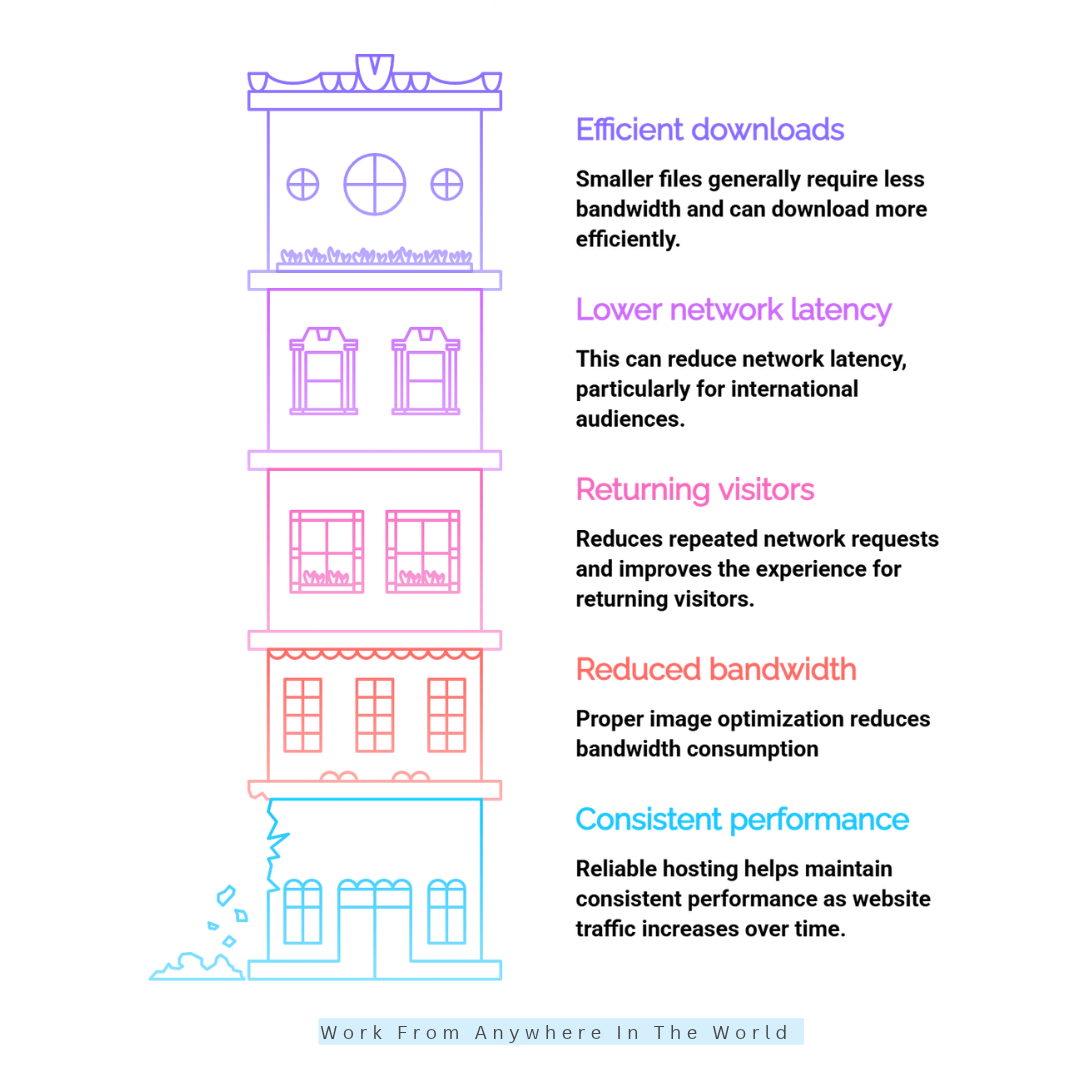
If your website receives visitors from different countries, suitable server infrastructure and CDN support can improve content delivery. Reliable hosting helps maintain consistent performance as website traffic increases over time.
2. Optimize Images Without Losing Quality
Large image files can significantly increase page loading time, especially on image-heavy websites. Start by resizing images according to their actual display dimensions instead of uploading unnecessarily large files.
Use modern formats like WebP or AVIF to reduce file sizes while preserving satisfactory visual quality. Image compression tools like TinyPNG, ShortPixel, and Imagify can streamline this task.
Also, consider responsive images so browsers can select suitable image sizes for different screens. Avoid excessive compression, as it can degrade image quality and negatively affect the visual experience.
Proper image optimization reduces bandwidth consumption and helps visitors access visual content more efficiently. This is particularly important for websites featuring numerous photographs, illustrations, and educational graphics.
3. Enable Browser Caching
Browser caching allows visitors’ browsers to store certain website resources locally, including images, fonts, stylesheets, and JavaScript files.
When someone revisits your website, the browser can reuse eligible cached resources instead of downloading everything again. This reduces repeated network requests and improves the experience for returning visitors.
You can configure caching through HTTP headers such as Cache-Control and Expires. Many hosting providers and performance plugins offer convenient caching settings to simplify this process.
Static resources that rarely change can generally have longer cache lifetimes. However, frequently updated files need suitable expiration settings or versioning to ensure visitors receive the latest website content.
4. Use A Content Delivery Network (CDN)
A Content Delivery Network distributes website resources across geographically distributed servers. A CDN delivers eligible cached content from an available edge location, reducing the need to contact your primary hosting server.
This can reduce network latency, particularly for international audiences. Popular CDN providers include Cloudflare, Amazon CloudFront, and Fastly, which offer various performance optimization features.
A CDN can help deliver images, stylesheets, JavaScript files, and other static resources efficiently. This is particularly beneficial for websites attracting readers from different countries and geographical regions.
For example, visitors from Bangladesh may benefit when cached content is available through a nearby CDN location. Actual improvements depend on network routing, caching configuration, and content availability.
5. Minify CSS And JavaScript And HTML Files
Minification removes unnecessary spaces, comments, and formatting characters from website code without changing its intended functionality. Smaller files generally require less bandwidth and can download more efficiently.
HTML, CSS, and JavaScript can be minified with specialized tools or performance plugins. Terser is a popular JavaScript minification tool, while Autoptimize provides optimization options for WordPress websites.
However, implement minification carefully because incorrect configurations can affect scripts, layouts, or interactive features. Always test important pages after applying changes to ensure everything continues functioning correctly.
Combining minification with effective caching can further improve resource delivery and overall website performance.
6. Reduce Unnecessary Plugins And Extensions
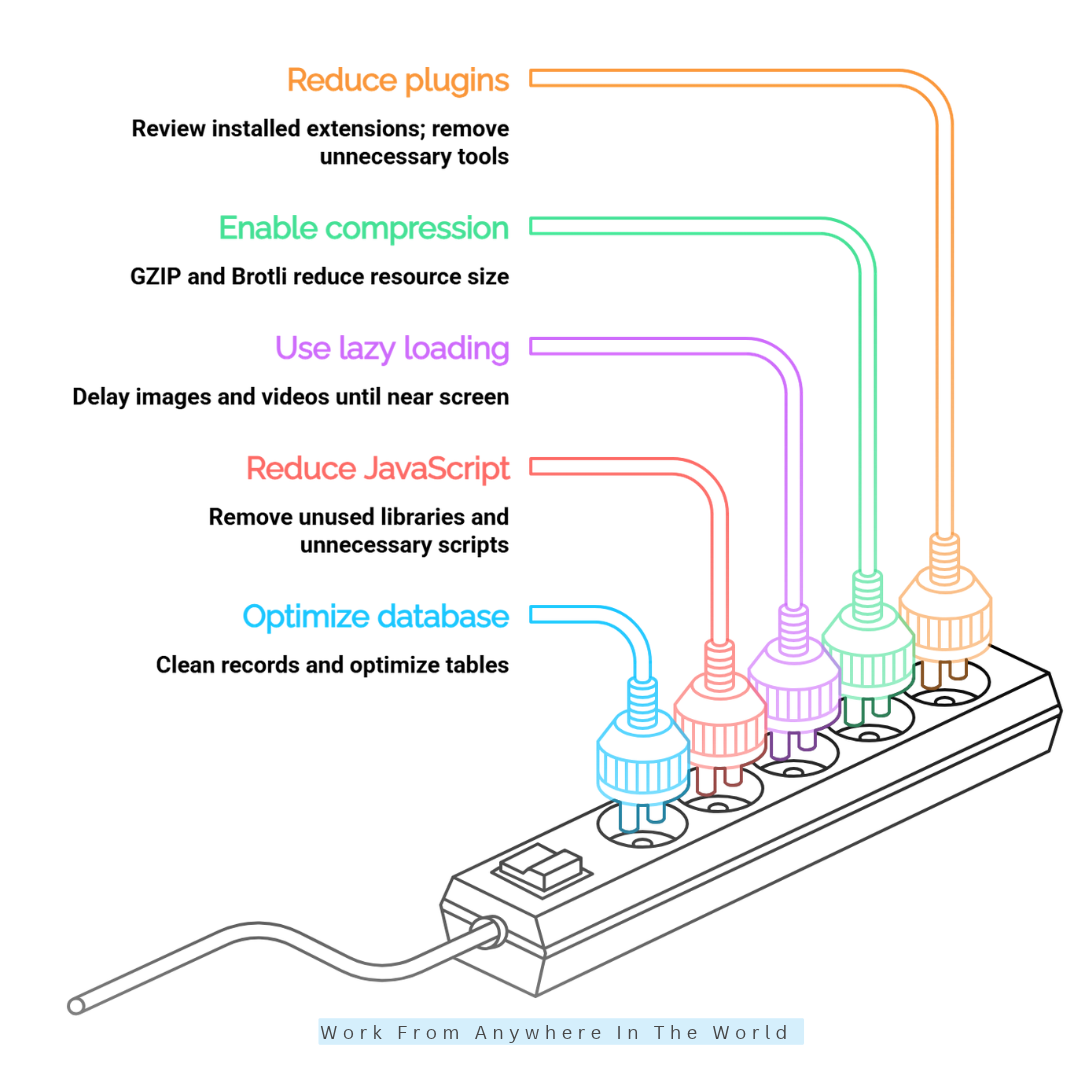
Installing too many plugins can introduce unnecessary scripts, stylesheets, database queries, and server processing. Some plugins introduce additional loading time or compatibility issues despite providing useful features.
Review your installed extensions and identify outdated tools, duplicate features, and plugins you no longer need. When comparing the best WordPress SEO plugins, choose one that meets your requirements rather than installing several with overlapping features.
Similarly, when selecting WordPress image optimizer plugins, avoid using multiple tools that perform the same compression and optimization tasks. Overlapping functionality may create conflicts or unnecessary processing.
Online store owners should also carefully evaluate their WordPress eCommerce plugins. Choose extensions that provide essential functionality without introducing unnecessary features that could affect website performance.
Remove unnecessary extensions after checking whether your website depends on their functionality. Keep essential plugins updated and choose actively maintained alternatives that are compatible with your website.
Regular plugin audits help reduce avoidable resource usage and make website maintenance more manageable. Remember that plugin quality and functionality matter more than the total number of installed plugins.
7. Enable GZIP Or Brotli Compression
GZIP and Brotli are compression methods that reduce the size of suitable website resources before transferring them to visitors’ browsers. They are particularly useful for text-based files, including HTML, CSS, and JavaScript.
Smaller transfer sizes can reduce bandwidth consumption and improve download performance. This is especially beneficial for visitors using slower internet connections or mobile devices with limited network capabilities.
Many modern hosting providers and CDN services support both compression methods. Check your server configuration or HTTP response headers to determine whether compression is already enabled.
Brotli can provide better compression for many web resources, although actual results depend on the content and settings. Avoid expecting significant additional benefits when compressing already compressed image formats such as WebP and AVIF.
You can learn more about HTTP compression to understand how web servers and browsers work together to deliver compressed resources efficiently.
8. Utilize Lazy Loading For Photos And Videos
Lazy loading delays downloading certain images and embedded videos until they approach the visitor’s visible screen area. This can reduce unnecessary initial downloads, particularly on long articles, product pages, and image galleries.
Modern browsers support native lazy loading through the loading=”lazy” attribute for images and iframes. Many WordPress websites already include native lazy-loading functionality for suitable images.
For example, photographs further down a comprehensive gardening tutorial or a lengthy vegan recipe collection do not need to load immediately when someone opens the page. They can load gradually as visitors scroll through the article.
Lazy loading can also be beneficial for educational websites containing embedded YouTube videos. Delaying the loading of video embeds below the visible screen area can reduce unnecessary initial resource requests.
However, avoid lazy-loading important above-the-fold images, especially the main Largest Contentful Paint (LCP) image. Delaying these resources can negatively affect initial loading performance.
Follow Google’s recommendations for browser-level image lazy loading. Apply this technique selectively to improve initial page efficiency without compromising accessibility or the visitor experience.
9. Reduce Unnecessary JavaScript
JavaScript supports interactive website features, including navigation menus, forms, animations, shopping carts, and sliders. However, excessive scripts can delay page rendering and make interactions less responsive.
Review your website’s JavaScript files and remove unused libraries, unnecessary tracking scripts, and outdated integrations. Pay particular attention to third-party scripts that load across your website but provide limited benefits.
You can use the defer attribute for suitable scripts that do not need to execute immediately. Code splitting can also help larger websites load only the JavaScript required for specific pages or interactive features.
Google’s guide to reducing JavaScript execution time provides additional information about identifying and addressing excessive script processing.
Always test interactive elements after making changes, including navigation menus, contact forms, and checkout functionality. Incorrectly delaying essential scripts can prevent important website features from working properly.
Reducing unnecessary JavaScript helps browsers process essential content and interactions more efficiently. It can also improve website responsiveness, particularly on mobile devices with limited processing capabilities.
10. Optimize Your Website Database
Websites using content management systems often rely on databases to store articles, products, comments, user accounts, and settings. Over time, unnecessary records, expired temporary data, spam comments, and old revisions can accumulate.
Using reliable anti-spam plugins for WordPress can help reduce the accumulation of unwanted comments. Preventing unnecessary records from accumulating complements regular database maintenance.
For WordPress websites, tools such as WP-Optimize can help clean certain database records and optimize tables. Review the available cleanup options carefully before removing any stored information.
However, database size alone does not determine website speed. Poorly written queries, missing indexes, and inefficient database operations can also affect website performance.
Create a complete database backup before making changes and test optimization carefully. Avoid deleting records or database tables unless you understand their purpose and know they are no longer required.
Regular database maintenance helps reduce unnecessary storage and supports efficient website management. This becomes increasingly important as your website grows and you continue publishing new articles, photographs, and other resources.
11. Remove Unused CSS And Optimize Stylesheets
CSS controls the appearance, layout, and visual presentation of your website. Large stylesheets containing unnecessary rules can increase resource sizes and browser processing requirements, affecting overall loading performance.
Understanding how to choose a WordPress theme can help you select a lightweight design. Review your theme, plugins, and custom stylesheets to identify CSS that is no longer needed.
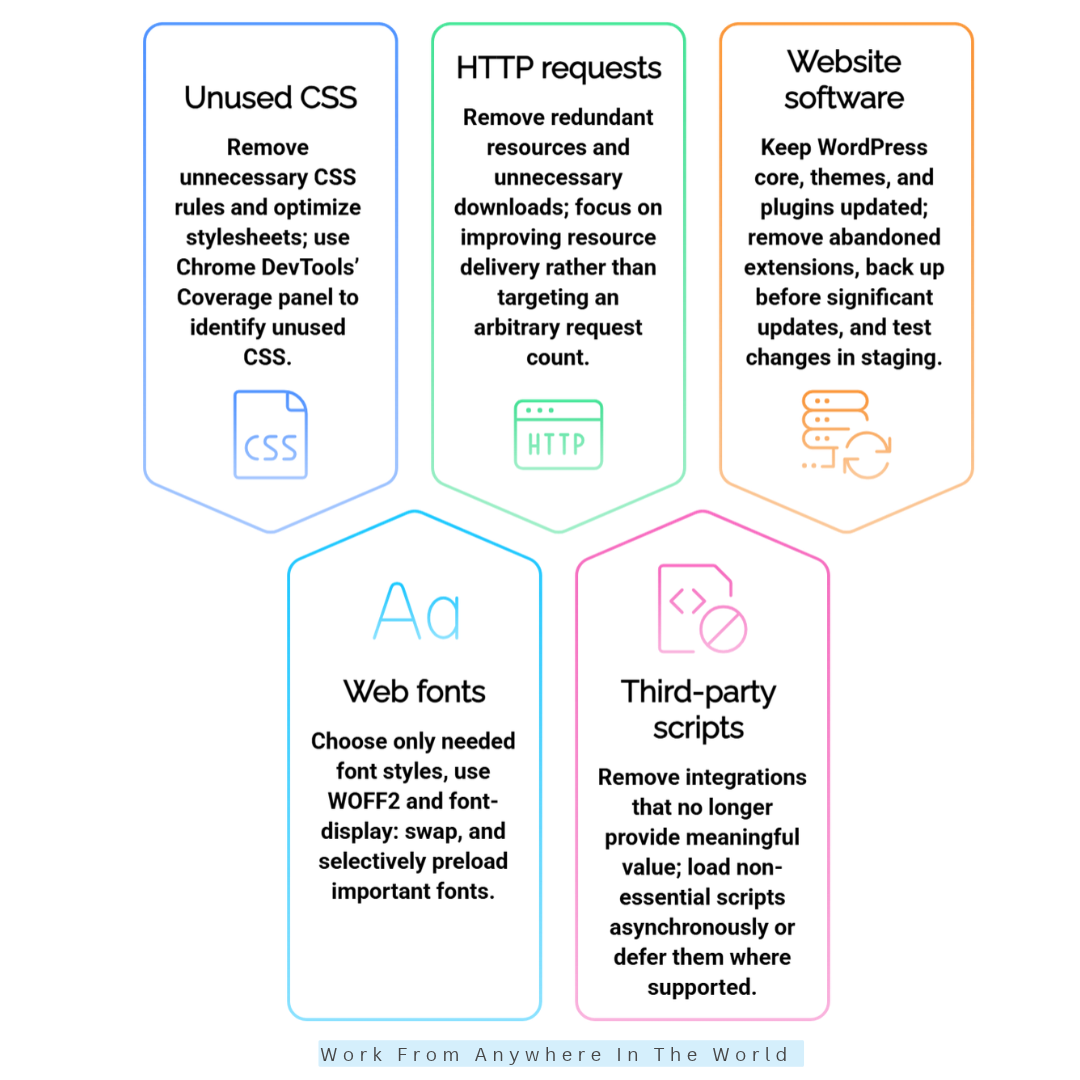
Chrome DevTools provides a Coverage panel that helps identify unused CSS on tested pages. This information can help you determine which stylesheets require further investigation and optimization.
You can also prioritize critical CSS required for above-the-fold content while loading non-critical styles appropriately. This allows browsers to display important visible content more efficiently.
However, removing styles without testing can break layouts on other pages or devices. Careful stylesheet optimization helps browsers render important content more efficiently while maintaining a consistent website appearance.
12. Optimize Web Fonts
Custom fonts improve website appearance and help maintain consistent branding. However, loading multiple font families and weights can increase resource requests and negatively affect initial page rendering.
Explore the 18 best fonts for websites to improve readability and design before selecting your typography. Choose only the font families, styles, and weights your website genuinely needs.
The WOFF2 format offers efficient compression and broad support in modern browsers. You can also use the font-display: swap property to display fallback text while custom fonts load.
For important fonts, selective preloading may improve initial rendering when implemented correctly. Avoid preloading every font file because unnecessary preloads compete with other essential network resources.
Optimizing font delivery helps reduce loading overhead while maintaining readable typography, consistent branding, and an enjoyable visual experience across different devices and screen sizes.
13. Reduce Unnecessary HTTP Requests
Every resource requested by a browser can involve network activity, including images, fonts, stylesheets, scripts, and embedded content. Excessive unnecessary requests may increase loading time, particularly on slower internet connections.
Open Chrome DevTools and inspect the Network panel to identify duplicate files, unnecessary third-party resources, and assets that do not contribute meaningful functionality to the page.
Remove redundant resources and simplify website designs where practical. Review decorative elements, unnecessary widgets, and embedded content that may introduce additional network requests without improving the visitor experience.
Modern HTTP protocols handle multiple requests efficiently, so combining every CSS or JavaScript file is not always beneficial. Combining files unnecessarily may also reduce caching efficiency in certain circumstances.
Focus on eliminating unnecessary downloads and improving resource delivery rather than targeting an arbitrary request count. Test your website after making changes to ensure essential features continue working correctly.
14. Optimize Third-Party Scripts
Third-party scripts provide useful features such as analytics, advertisements, live chat, social sharing, and marketing tracking. However, external scripts can introduce additional network requests and browser processing.
Understanding the benefits of Google Analytics can help you identify which tracking features provide meaningful information. Review your connected services and remove integrations that no longer offer sufficient value.
When comparing the best social media analytics tools, consider whether their features require additional website scripts. Avoid installing multiple tracking integrations that collect essentially the same information.
Where supported, load non-essential scripts asynchronously or defer their execution. You can also consider loading certain interactive features only when visitors need them.
For example, a live chat widget may not need to initialize immediately on every page. Delaying its initialization can reduce initial resource usage while preserving its functionality.
Balance performance improvements with essential business needs. Preserve the analytics, advertising, and conversion tracking features your website requires, and test their functionality after making changes.
15. Keep Your Website Software Updated
Regular software updates help maintain website security, compatibility, stability, and performance. Updates may include bug fixes, code improvements, and better support for modern website technologies.
If you use WordPress, review updates for the core installation, themes, and plugins regularly. Remove abandoned extensions and choose actively maintained software whenever possible to reduce potential security and compatibility problems.
Our Wordfence Security Plugin review provides additional insights into protecting your WordPress website. Maintaining updated software complements other important website security measures.
However, updates can sometimes introduce compatibility issues with existing themes, plugins, or custom code. Create a complete website backup before significant updates and test changes in a staging environment whenever possible.
After updating your software, check important website features, navigation menus, contact forms, and page layouts. Keeping your website software up to date makes it easier to manage, troubleshoot, and optimize performance over time.
Best Tools To Improve Website Speed
Website speed optimization tools help identify performance issues, measure loading times, and discover opportunities for improvement. They also help you evaluate the effectiveness of your optimization efforts.
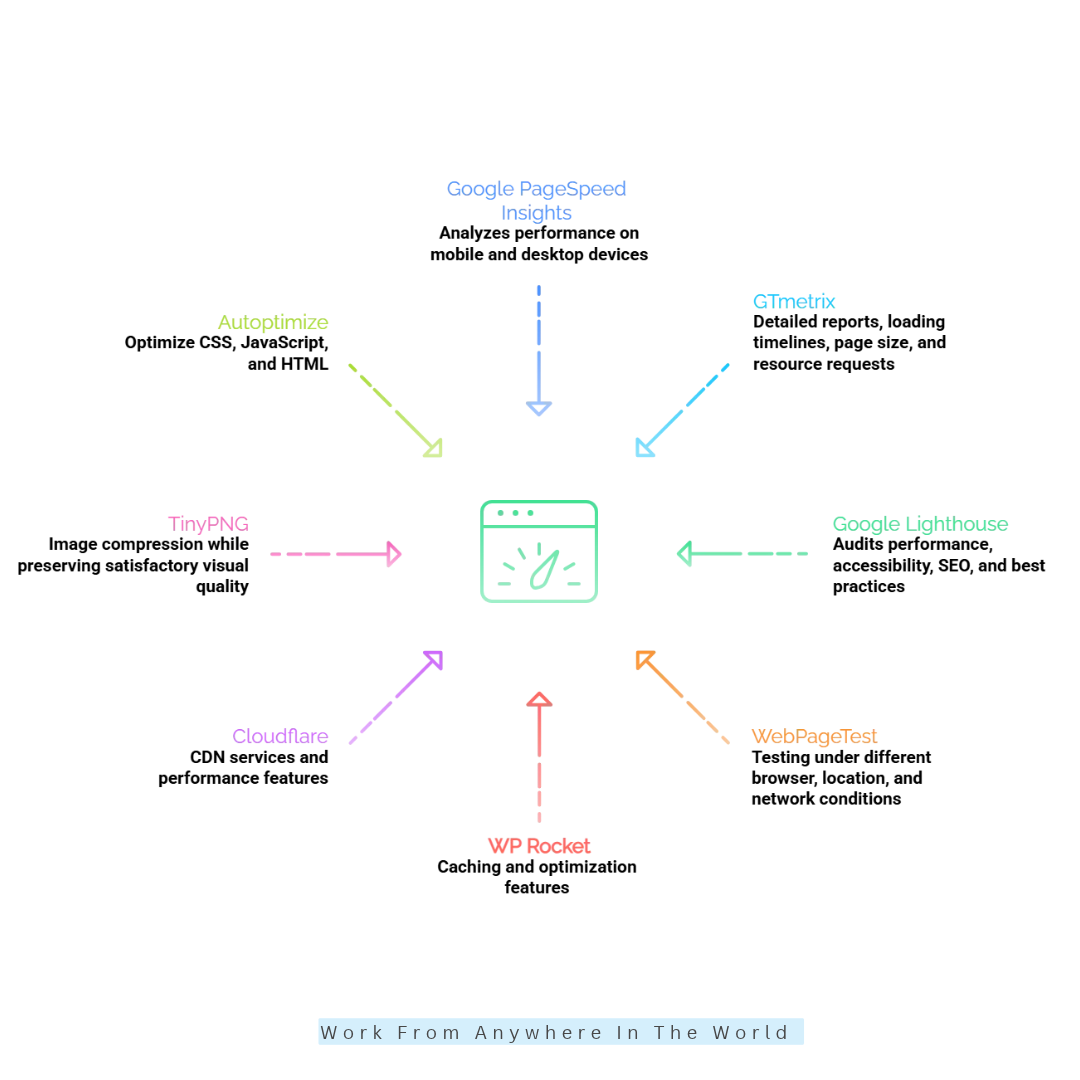
Here are eight useful tools to help you understand how to boost website speed and maintain consistent website performance.
1. Google PageSpeed Insights
Google PageSpeed Insights analyzes website performance on mobile and desktop devices. It provides Lighthouse laboratory results and available real-user field data, including Google’s Core Web Vitals.
The tool identifies issues related to images, JavaScript, CSS, and overall loading performance. Its recommendations help website owners prioritize improvements using measurable performance information and practical optimization suggestions.
2. GTmetrix
GTmetrix provides detailed website performance reports, including loading timelines, page size, and resource requests. It helps identify elements that delay page rendering and highlights potential optimization opportunities.
You can use its waterfall charts to investigate individual resources and identify potential loading bottlenecks. This makes GTmetrix useful for diagnosing performance problems and evaluating the effectiveness of optimization changes.
3. Google Lighthouse
Google Lighthouse is an open-source auditing tool available through Chrome DevTools. It evaluates website performance, accessibility, SEO, and best practices to identify potential areas for improvement.
Its performance report highlights optimization opportunities involving images, scripts, rendering, and resource delivery. Website owners and developers can use repeated audits under consistent testing conditions to compare results after implementing improvements.
4. WebPageTest
WebPageTest provides detailed website performance testing under different browser, location, and network conditions. It offers waterfall charts, loading visualizations, and detailed performance measurements.
Website owners can investigate how individual resources affect page loading and identify potential performance bottlenecks. Its flexible testing options make it particularly useful for understanding website behaviour across different environments and connection speeds.
Wealthy Affiliate – Mini Review
If you’ve ever thought about turning your blog, passion, or niche into an online business,
Wealthy Affiliate (WA) is one of the most beginner-friendly platforms I’ve used.
It combines step-by-step training, website hosting, AI-powered tools,
keyword research, and an active community all in one place.
What I like most is that you can start for free (no credit card needed), explore the platform,
test the tools, and connect with other entrepreneurs before upgrading.
WA isn’t a “get rich quick” scheme — success comes from consistent effort
and applying what you learn over time.
5. WP Rocket
WP Rocket is a premium WordPress performance plugin that offers caching and optimization features. Depending on its configuration, it supports page caching, browser caching, file optimization, and lazy loading.
Its user-friendly interface simplifies several performance optimization tasks for WordPress website owners without requiring extensive technical knowledge. Test settings carefully to ensure optimization features do not negatively affect website appearance or functionality.
6. Cloudflare
Cloudflare provides CDN services and performance features that help deliver website resources efficiently. Its global network can cache eligible content closer to visitors, reducing network latency and improving resource delivery.
Depending on the selected plan and configuration, additional features include compression, caching controls, and image optimization. Cloudflare also offers security services that help protect websites against malicious traffic and various online threats.
7. TinyPNG
TinyPNG is an image compression tool that helps reduce file sizes while preserving satisfactory visual quality. It supports popular image formats, including PNG, JPEG, WebP, and AVIF.
Website owners can compress photographs and graphics before uploading them to their websites. Smaller image files can reduce bandwidth usage and improve page loading efficiency, particularly for image-rich blogs and online stores.
8. Autoptimize
Autoptimize is a WordPress plugin that helps optimize website resources and improve loading efficiency. It offers options to aggregate, minify, and optimize CSS, JavaScript, and HTML files.
Depending on your website configuration, these features can reduce resource sizes and improve content delivery. Always test your website after enabling optimization settings to identify potential layout, compatibility, or functionality issues.
Frequently Asked Questions
Q1: What Is A Good Website Loading Speed?
Aim for a Largest Contentful Paint (LCP) of 2.5 seconds or less for good Core Web Vitals performance. This metric measures how quickly the largest visible image or text element appears.
However, loading speed is only one aspect of website performance. You should also monitor responsiveness and visual stability to ensure visitors enjoy a smooth browsing experience.
Q2: Does Website Speed Affect SEO?
Yes. Website performance and Core Web Vitals contribute to Google’s page experience considerations. Faster loading can also improve usability and make website navigation more convenient.
However, website speed alone does not guarantee higher search engine rankings. Relevant content, search intent, website authority, and other SEO factors remain important for organic visibility.
Q3: Why Is My Website Loading Slowly?
Common causes include large images, slow hosting, excessive plugins, and unoptimized scripts. Poor caching configurations and unnecessary third-party integrations can also contribute to slow loading.
Use website performance testing tools to identify the specific resources affecting your loading speed. Address the most significant performance issues before making smaller optimization adjustments.
Q4: Does Website Hosting Affect Website Speed?
Yes. Server resources, infrastructure, and response times significantly influence website performance. An overcrowded or poorly configured hosting environment can cause delays, particularly during periods of increased traffic.
Choose a reliable hosting provider that offers sufficient resources, modern server technology, and responsive technical support. Review your hosting requirements regularly as your website and audience grow.
Q5: Can Too Many Plugins Slow Down A Website?
Yes. Some plugins add unnecessary scripts, stylesheets, database queries, and server processing. Plugins with overlapping features may also introduce compatibility issues and additional resource usage.
However, plugin quality matters more than the total number of installed plugins. Regularly review your extensions, remove unnecessary tools, and keep essential plugins updated to maintain efficient website performance.
Q6: What Is The Fastest Way To Boost Website Speed?
Start by optimizing large images, improving hosting performance, enabling caching, and reducing unnecessary scripts. These improvements can address several common causes of slow website loading.
Learning how to boost website speed also involves identifying your website’s specific performance bottlenecks. Test your pages before and after implementing changes to determine which improvements deliver the greatest benefits.
Q7: How Often Should I Test Website Speed?
Test your website after major software updates, design changes, or installing new plugins. These modifications can sometimes introduce unexpected performance or compatibility issues.
Perform regular monthly performance checks to identify emerging problems and monitor loading efficiency. Consistent testing helps maintain reliable website performance and a positive browsing experience as your content grows.
Conclusion
Learning how to boost website speed requires regular testing, maintenance, and optimization. Focus on reliable hosting, image compression, caching, and efficient code to improve your website’s overall performance.
Monitor your results regularly and address performance issues as they appear. Remember that even small improvements can contribute to faster loading times and a more enjoyable browsing experience.
A fast, responsive website supports SEO, encourages visitor engagement, and helps readers access valuable content easily. Maintaining consistent website performance also provides a stronger foundation for long-term online business growth.
I trust you enjoyed this article on How to Boost Website Speed: 15 Powerful Tips. Please stay tuned for more insightful blogs on affiliate marketing, online business, and working from anywhere in the world.
Take care!
— JeannetteZ 🌍✨
💬 Your Opinion Is Important To Me
Do you have thoughts, ideas, or questions? I’d love to hear from you. Please leave your comments below or email me directly at Jeannette@WorkFromAnywhereInTheWorld.com.
📚 More Work From Anywhere Reads
🚀 Ready to Build a Business You Can Run from Home
Or from Anywhere in the World?
Imagine earning income on your terms — from home, a cozy café, or wherever life takes you.
With the right tools, training, and community support, it’s entirely possible.
Start your own online business for free — no credit card needed.
Disclosure
This post may contain affiliate links. As an Amazon Associate and participant in other affiliate programs, I earn from qualifying purchases at no extra cost to you. Please read my full affiliate disclosure.