
12 Best Free Keyword Research Tools To Boost Your SEO
The best free keyword research tools help bloggers, website owners, and online entrepreneurs discover valuable search terms and create content that attracts the right audience. Understanding what people search for is an important step toward improving your website’s visibility.
You don’t need an expensive SEO platform to get started. Free tools offer useful insights into keyword ideas, search trends, audience interests, and opportunities to improve existing content.
Popular options include Google Keyword Planner, Google Trends, Google Search Console, Ahrefs, Semrush, and Ubersuggest. Each offers different features that support your keyword research and content planning.
The secret is knowing which tools to use, how to interpret their results, and how to select keywords that match your audience’s needs and your website’s goals.
What Is Keyword Research?
Keyword research is the process of discovering the words and phrases people use when searching for information, products, services, or solutions online. It helps you understand your audience’s interests, questions, and needs so you can create more relevant content.
Successful keyword research goes beyond finding popular search terms. It involves understanding search intent, evaluating competition, identifying related questions, and choosing keywords that match your website’s goals.
For example, someone searching for “SEO” may want general information, while “how to do keyword research for a new website” reveals a more specific need. Understanding these differences helps you create content that answers the right questions.
Effective keyword research connects your audience’s searches with useful information your website provides. This approach strengthens your content strategy, attracts relevant visitors, and helps search engines and AI-powered search tools understand your content.
12 Best Free Keyword Research Tools
You don’t need expensive SEO software to find the right keywords. Several free keyword research tools provide valuable insights into search trends, audience interests, and content opportunities.
Some tools help you discover new keyword ideas, while others reveal search volume estimates, competition levels, or questions people ask online. Each serves a different purpose in your SEO strategy.
The following tools offer free features that bloggers, beginners, and website owners can use to improve their keyword research. Understanding their strengths and limitations will help you choose the right options for your needs.
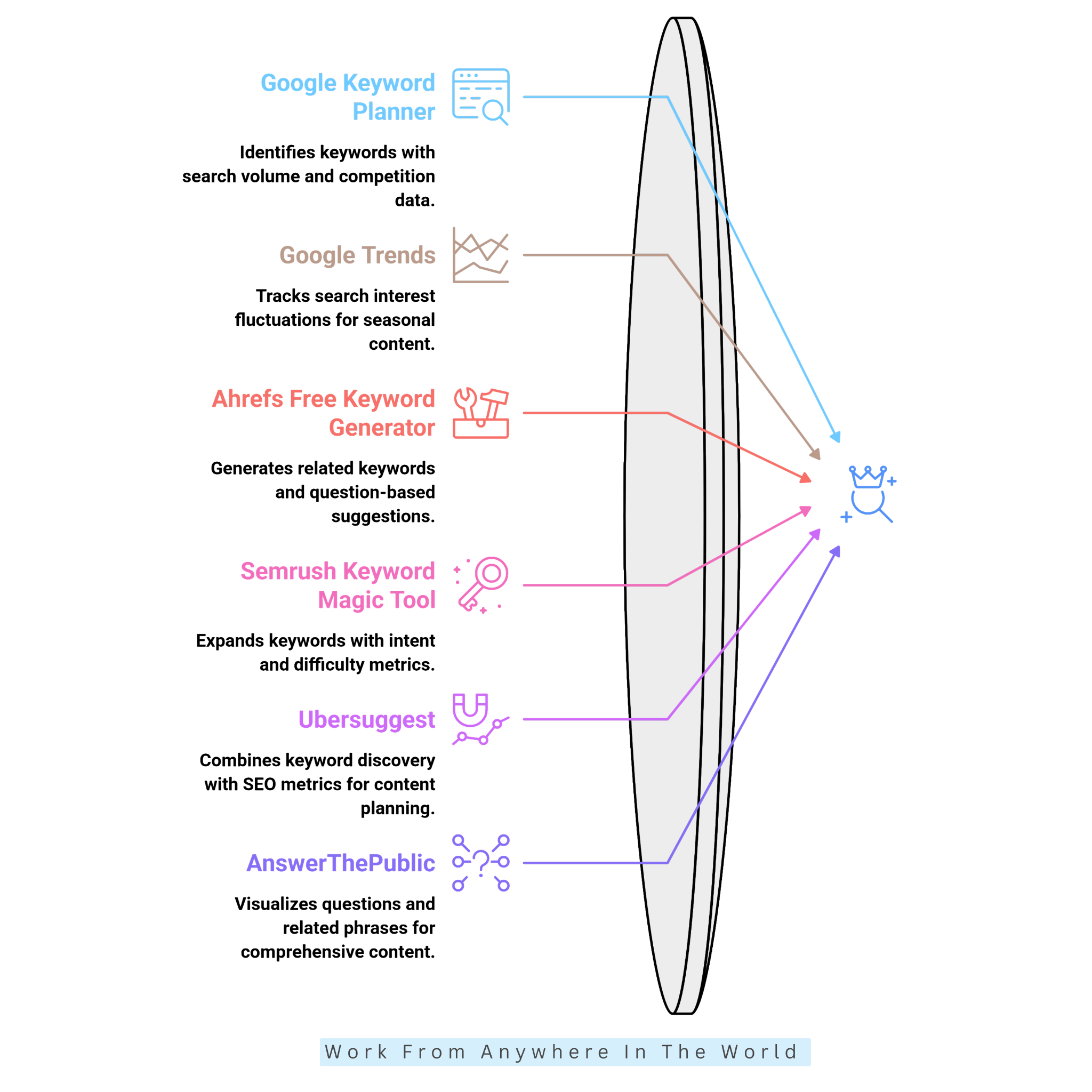
1. Google Keyword Planner
Google Keyword Planner helps you discover relevant search terms using Google’s advertising platform. Enter a topic, product, service, or website to generate related keyword suggestions and explore new content opportunities.
The tool provides estimated monthly searches, advertising competition levels, and suggested bid amounts. These insights help you compare keyword popularity and identify commercial search terms that may interest your audience.
To get started, select Discover New Keywords, enter your topic, and review the suggestions. Filter results by relevance, search demand, or location, then save keywords that match your content goals.
Free Access: Google Keyword Planner is available without advertising expenditure, but you must create a Google Ads account and provide billing information. Search volume figures may also appear as broad ranges when your account has little or no advertising activity.
Remember that its competition scores reflect paid advertising, not organic SEO difficulty. Use these figures as supporting information rather than direct indicators of how difficult a keyword will be to rank for.
2. Google Trends
Google Trends is a free keyword research tool that shows how search interest changes over time. It helps you spot seasonal trends, emerging topics, and subjects gaining or losing popularity.
Enter a keyword or topic, choose your location and time period, and explore the interest graph. You can also compare search terms, discover related queries, and identify topics attracting growing attention.
For example, a gardening blogger might compare searches for growing tomatoes, planting herbs, and container gardening. These insights help you decide which topics deserve attention in different seasons. Combining seasonal trends with long-tail keyword research can reveal more specific content opportunities.
Google Trends is especially useful for planning blog posts, spotting timely content opportunities, and building editorial calendars. Its historical data also helps distinguish recurring seasonal patterns from temporary spikes in interest.
Google Trends measures relative search interest on a scale of 0 to 100, not exact monthly search volumes. Combining it with another keyword research tool gives you a more complete picture of search demand.
Free Access: Google Trends is completely free to use, with no paid subscription required for its standard features. You can explore search trends, compare keywords, and discover related topics without purchasing an SEO plan or providing payment information.
3. Ahrefs Free Keyword Generator
Ahrefs Free Keyword Generator helps bloggers and website owners discover relevant keywords without purchasing an SEO subscription. Enter a seed keyword, choose a search engine and location, and explore suggestions related to your topic.
The tool provides keyword ideas, search volume estimates, and keyword difficulty information. Its question-based suggestions are especially useful for uncovering what people want to know and creating helpful blog posts or FAQ sections.
For example, entering “email marketing” might reveal related searches about building subscriber lists, choosing email platforms, or improving campaigns. These suggestions can inspire articles that address specific audience needs.
The free generator works best for discovering new keyword opportunities. For more advanced research, our Keyword Research With Ahrefs guide explores additional ways to evaluate keywords and improve your SEO strategy.
Free Access: Ahrefs offers its standalone Keyword Generator without requiring a paid subscription or account. The free version offers a limited selection of keyword ideas, while paid plans provide more extensive research features.
4. Semrush Keyword Magic Tool
The Semrush Keyword Magic Tool helps bloggers and website owners discover related keywords and organize them into meaningful topic groups. Enter a seed keyword, choose your target country, and explore suggestions based on search demand.
The tool provides useful metrics, including estimated search volume, keyword difficulty, and search intent. These details help you identify relevant opportunities and understand how challenging individual keywords might be.
Search intent matters because similar topics can attract people with different goals. For example, “best SEO tools” suggests someone comparing products, while “what is SEO” indicates a search for basic information.
You can also explore related questions and longer keyword variations to develop more focused content ideas. This approach helps you plan articles that match what readers are actually searching for.
For a more detailed walkthrough, explore our Semrush tutorial, which explains how to use the platform’s SEO tools to research keywords, analyze competitors, and improve your website’s search visibility.
Free Access: Semrush offers limited access to the Keyword Magic Tool through a free account. Users without a paid SEO Toolkit subscription can currently perform up to 10 searches daily and view 10 results per report.
5. Ubersuggest
Ubersuggest is a beginner-friendly SEO tool that combines keyword discovery with useful search metrics. Enter a seed keyword, select your preferred language and location, and explore related search terms.
The platform suggests keywords, questions, comparisons, and longer search phrases. Available metrics include estimated search volume, SEO difficulty, and search intent, helping you evaluate potential topics.
For example, searching for “content marketing” might reveal opportunities involving strategies, practical examples, marketing tools, and specific audiences. These variations help turn a broad subject into several focused blog posts.
Instead of choosing keywords based on search volume alone, consider relevance, competition, and audience intent. Businesses targeting customers in a particular area can also explore our local SEO strategies for small businesses to understand how location-specific keywords fit into their content planning.
Free Access: Ubersuggest offers a limited free account with three keyword searches per day. You can explore keyword suggestions and basic SEO metrics without a subscription, though the number of results and available features are limited.
6. AnswerThePublic
AnswerThePublic helps bloggers discover the questions people ask about a particular topic. Enter a seed keyword, select your preferred location and language, and explore related searches presented in visual keyword wheels and organized reports.
The tool groups suggestions into questions, comparisons, prepositions, and related phrases. These insights are especially useful for planning blog headings, FAQs, supporting articles, and content clusters.
For example, researching “houseplants” might reveal questions about watering, lighting, plant growth, and pet safety. Seasonal concerns could also inspire a practical guide to caring for indoor plants during winter, when shorter days and indoor heating create different growing conditions.
Instead of creating a separate article for every suggestion, group related questions together. This approach helps you create more comprehensive content while addressing what your readers are searching for.
Free Access: AnswerThePublic offers three free searches per day through a free account. You can explore keyword suggestions and visual reports without purchasing a subscription, although some results and data are restricted.
7. AlsoAsked
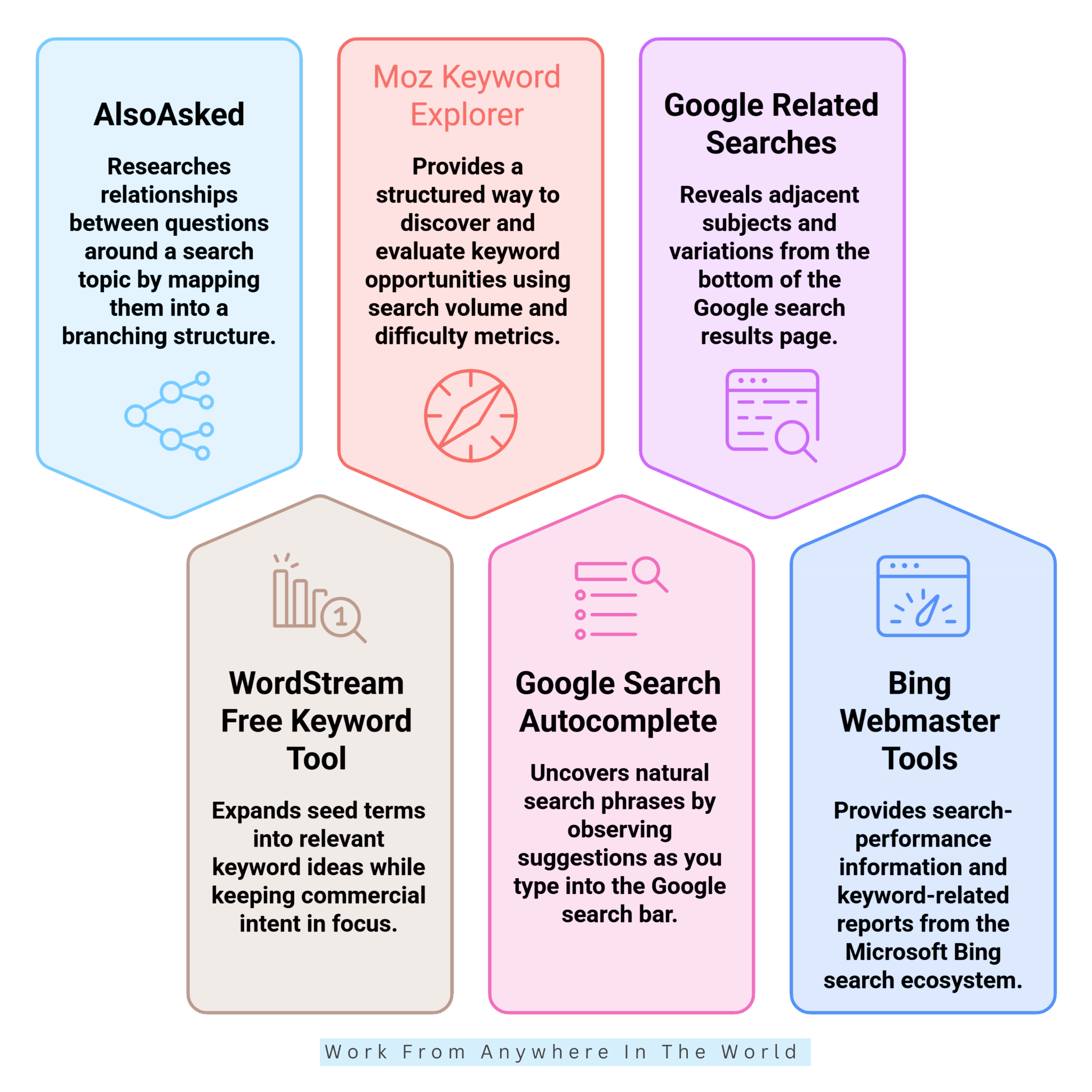
AlsoAsked helps bloggers discover how related search questions connect. Enter a keyword or question, select your preferred language and location, and explore a branching map of questions drawn from Google’s People Also Ask results.
The tool groups related questions, making it easier to understand what readers want to learn about a topic. These connections are especially useful for developing article outlines, FAQs, and supporting content.
For example, researching “how to start a sports blog” might uncover questions about choosing a sports niche, selecting hosting, planning content, and attracting readers. These related questions help organize an article into a logical sequence that addresses readers’ needs.
Instead of treating every question as a separate keyword, look for connections that help you organize information logically. This approach supports more comprehensive articles that guide readers from basic questions toward more detailed information.
Free Access: AlsoAsked offers limited free searches to explore related questions without a subscription. Additional searches and advanced features are available through paid plans.
8. WordStream Free Keyword Tool
WordStream’s Free Keyword Tool helps businesses discover relevant search terms for their products, services, and marketing campaigns. Enter a keyword or website address to explore related keyword suggestions.
The tool provides keyword ideas alongside available search volume and advertising competition metrics. These insights help you identify searches that reflect customer needs and potential buying interest.
For example, a roofing company might research “roof repair” and discover related searches involving leaking roofs, emergency repairs, or specific locations. These more focused phrases show why identifying long-tail keywords matters when targeting customers with specific needs.
WordStream is especially useful for connecting broad business topics with more specific customer searches. However, its advertising-focused metrics should not be confused with organic SEO keyword difficulty.
Free Access: WordStream provides a free keyword research tool without requiring a paid subscription. Some features, such as accessing complete keyword results, may require an email address.
9. Moz Keyword Explorer
Moz Keyword Explorer helps bloggers and website owners discover keywords and evaluate their potential for organic search traffic. Enter a seed keyword, choose your target search market, and explore related keyword suggestions.
The tool provides useful metrics, including estimated search volume, keyword difficulty, and organic click-through rate. These measurements help you understand search demand and assess how competitive a particular keyword might be.
Moz also offers a Priority score that combines several metrics to help identify promising opportunities. However, no single score should determine your keyword choices, especially when relevance and search intent matter just as much.
Before selecting a keyword, review the actual search results to understand what types of content are ranking. This helps you decide whether your article can provide something useful and relevant to readers.
For a deeper understanding of keyword competition, explore our guide to SEO competitive analysis, which explains how examining competing websites can strengthen your SEO strategy.
Free Access: Moz offers limited free keyword research through its Keyword Explorer. A free Moz Community account gives you access to a limited number of keyword queries and results, while more extensive research requires a paid subscription.
10. Google Search Autocomplete
Google Search Autocomplete is a simple way to discover keyword ideas without using a dedicated SEO platform. Start typing a topic into Google’s search bar and explore the suggestions that appear before you finish your query.
Try adding phrases like “how to,” “best,” “for beginners,” or “near me” to uncover different search intentions. These variations can reveal specific questions, comparisons, and topics worth exploring.
For example, typing “best indoor plants for” might suggest low-light rooms, small apartments, or beginners. These ideas could inspire articles about choosing suitable houseplants for different living spaces.
Autocomplete suggestions are influenced by factors such as location, language, and popular searches. They can help you discover relevant topics, but they do not provide exact search volumes or keyword difficulty scores.
Use these suggestions as a starting point, then examine search results and keyword metrics before choosing your final topics. This combination helps you develop content that addresses specific reader interests.
Free Access: Google Search Autocomplete is completely free and requires no subscription or specialized SEO account. Anyone can explore keyword suggestions directly through Google Search.
11. Google Related Searches
Google Related Searches helps bloggers discover additional keyword ideas directly from Google’s search results. Enter a topic, review the results page, and look for related search suggestions that expand your original query.
These suggestions can reveal alternative wording, narrower topics, and related questions that readers may be interested in. Their placement varies, so you might find them near the bottom of the page or elsewhere among the search results.
For example, searching for “keyword research” might lead to related topics involving long-tail keywords, search volume, keyword tools, and effective SEO strategies for e-commerce sites. These ideas can help you identify supporting subjects for existing articles or develop new content.
Collect the most relevant suggestions and group them according to search intent. Then examine the actual search results to determine which topics deserve further research and which belong together in a comprehensive article.
Google Related Searches works particularly well alongside other keyword discovery methods. Although it doesn’t provide search volume or competition scores, it offers a convenient way to explore related subjects without leaving Google Search.
Free Access: Google Related Searches is completely free and requires no account or paid subscription. You can explore related keyword suggestions directly through Google’s search results.
12. Bing Webmaster Tools
Bing Webmaster Tools is a free platform that helps website owners understand how their content performs in Microsoft Bing search results. It offers useful information about search visibility and opportunities to improve organic traffic.
After adding and verifying your website, you can explore search performance reports showing queries, clicks, impressions, and pages appearing in Bing’s results.
These insights help you identify which topics attract visitors and where improvements may be worthwhile. Our guide to increasing organic traffic offers additional strategies for improving your website’s visibility.
Bing Webmaster Tools also includes keyword research features that help you explore search demand within Bing. This provides another perspective when evaluating potential keywords and planning new content.
For bloggers who primarily use Google-focused tools, Bing’s data offers a valuable comparison. Reviewing performance across different search engines helps you identify opportunities that might otherwise go unnoticed.
Free Access: Bing Webmaster Tools is completely free to use. You need a Microsoft account and must verify ownership of your website to access its site-specific reports and tools.
A Note About Free vs Paid Keyword Research Tools
Free keyword research tools help you discover new topics, understand search behaviour, and plan content without investing in expensive SEO software. However, free access doesn’t always mean unlimited searches, complete keyword reports, or access to every feature.
Some platforms restrict daily searches, keyword suggestions, historical data, or advanced metrics. Others offer free tools alongside more comprehensive paid services, so it’s important to know what is included before choosing a platform.
For example, Semrush, Ubersuggest, AnswerThePublic, AlsoAsked, and Moz offer limited free access alongside paid options. Ahrefs also offers a free standalone keyword generator, while its more advanced research tools require a subscription.
Google Trends, Google Search Autocomplete, Google Related Searches, and Bing Webmaster Tools offer useful research features without a paid SEO subscription. Google Keyword Planner is also available without a paid SEO plan, although accessing it requires a Google Ads account.
If you’re starting a blog or managing a small website, free tools may provide everything you need for occasional keyword research. Combining several free resources can also help you compare suggestions and evaluate potential content opportunities.
Paid platforms become more useful when you research keywords frequently, manage multiple websites, or need larger datasets and detailed competitor analysis. Our guide to SEO competitive analysis explores how examining competing websites can help you identify improvement opportunities.
Focus on relevance, search intent, competition, and your audience’s needs before making final decisions. Understanding your readers matters just as much, and our guide to target audience analysis explains how to identify who your content should reach.
How To Use Keyword Research For GEO
Generative Engine Optimization (GEO) focuses on making your content easier for AI-powered search systems to discover, understand, and reference. While traditional SEO helps improve visibility in search results, GEO considers how information may appear in AI-generated answers.
Keyword research remains important because people still search for information using questions, phrases, and specific topics. However, AI-powered search often involves longer, more conversational queries that express detailed information needs.
Instead of focusing only on individual keywords, consider the questions readers ask and the information they expect to find. Understanding search intent helps you develop content that provides clear, relevant, and useful answers.
Free tools such as Google Trends, AnswerThePublic, and AlsoAsked can help identify related questions and emerging topics. These insights provide a starting point for creating informative articles that address a subject from several useful angles.
GEO doesn’t replace traditional SEO. Both approaches benefit from accurate information, logical headings, original insights, and content that genuinely helps readers. The following strategies explain how to apply keyword research when optimizing for AI-powered search.
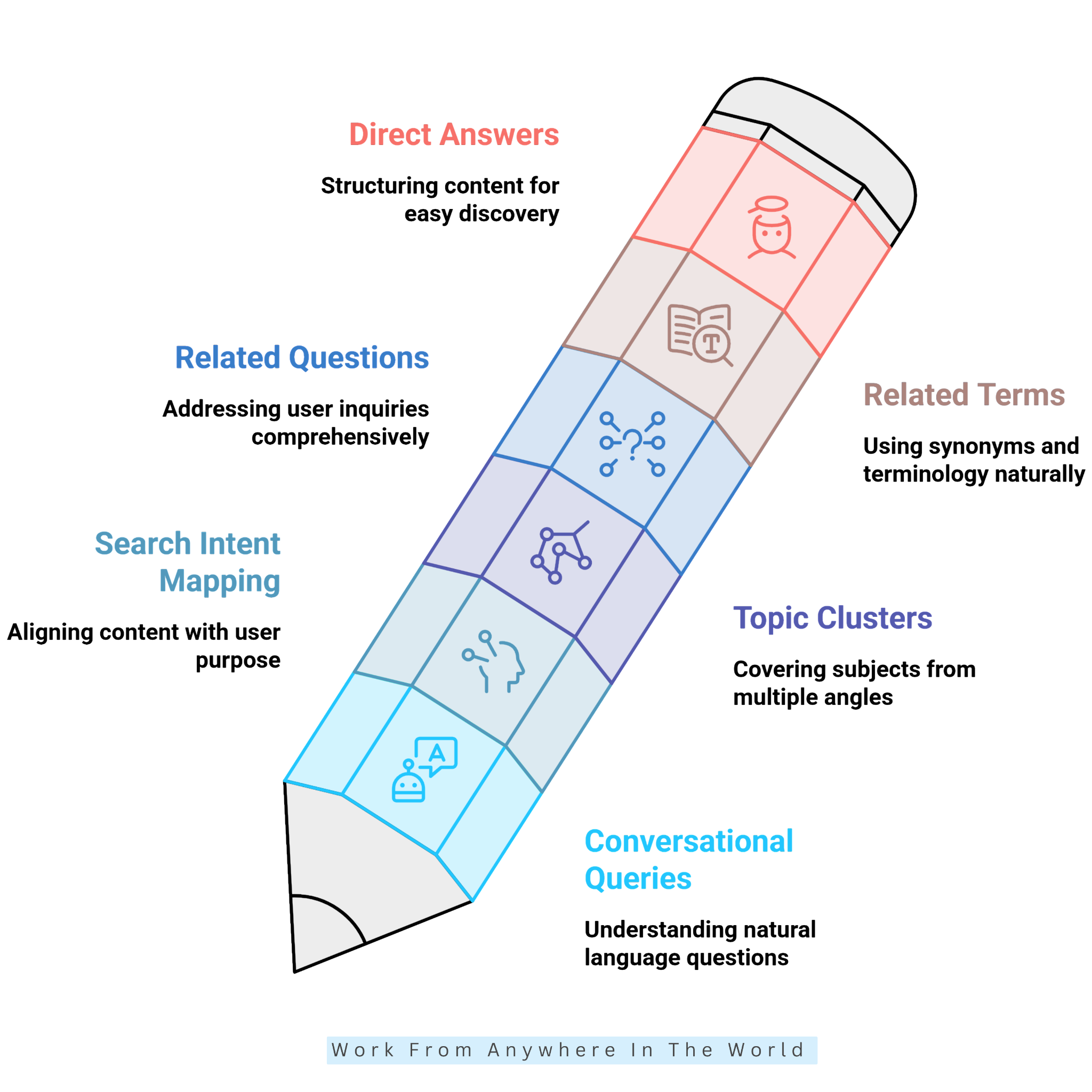
1. Find Conversational Queries
Start by identifying how people naturally ask questions about your topic. Tools such as Google Search Autocomplete, AnswerThePublic, and AlsoAsked help uncover conversational phrases, comparisons, and common concerns.
Look beyond short keywords and explore complete questions that reflect specific information needs. For example, instead of researching only “email marketing,” consider questions such as “How do I start email marketing for a small business?”
Use these questions to develop relevant headings, frequently asked questions, and supporting sections. Provide clear, accurate answers that help readers understand the topic without searching through unnecessary information.
Conversational keyword research supports traditional SEO while making your content more useful for AI-powered search systems that summarize information from multiple sources.
2. Map Keywords To Search Intent
Every search has a purpose, and understanding that purpose helps you create more relevant content. Before choosing a keyword, consider what information readers expect to find and what they want to accomplish.
Search intent generally falls into four categories: informational, navigational, commercial, and transactional. Comparison searches are often considered a form of commercial intent because readers are evaluating different options.
For example, someone searching for “what is email marketing” wants an explanation, while “best email marketing platforms” suggests they are comparing available tools. Each query requires a different approach to content.
Match your headings, examples, and answers to the reader’s expectations rather than simply repeating keywords. This makes your articles more useful to visitors and easier for search systems to interpret.
For GEO, clearly addressing search intent also helps AI-powered systems identify relevant information within your content. However, appearing in AI-generated answers is never guaranteed.
3. Build Topic Clusters
Topic clusters organize related articles around one central subject. Instead of treating every keyword as a separate topic, group closely connected questions and concepts into a structure that helps readers explore the subject in greater detail.
Start with a main article that introduces the broader topic, then identify supporting subjects that deserve their own pages. Each article should provide distinct information rather than repeating what you’ve already published.
For example, a keyword research guide might connect to articles about search intent, long-tail keywords, keyword difficulty, and competitor analysis. Internal links between these resources help readers navigate the topic and allow search engines to discover related content.
For GEO, a well-organized topic cluster provides clear context around your subject. Accurate explanations, descriptive headings, and relevant internal links also make it easier for AI-powered search systems to interpret how your content fits together.
4. Answer Related Questions Clearly
Once you’ve identified relevant questions, organize them into sections that provide direct, useful answers. Address the main question first, then expand on the explanation with examples, practical advice, or supporting information.
For example, if readers ask “How do I find low-competition keywords?” begin by explaining the research process. Follow with specific steps for evaluating keyword difficulty, search intent, and competing websites.
Use descriptive headings that reflect the questions people are asking. Keep paragraphs focused on one main idea so readers can quickly find the information they need without working through unrelated details.
For GEO, clear answers and logical content organization make information easier for AI-powered systems to interpret and potentially reference. Accuracy, relevant examples, and helpful explanations remain more important than simply adding extra questions to your article.
5. Use Related Terms Naturally
Short-tail keywords are broad search phrases, usually containing one or two words, such as “blogging” or “keyword research.” They help establish the main subject of your content but often attract considerable competition.
Long-tail keywords are more specific phrases that reflect particular questions or needs. For example, “free keyword research tools for beginners” provides a clearer indication of what someone wants to find.
Keyword research also reveals synonyms, related phrases, and terminology that help explain your subject. Include these expressions naturally in headings and paragraphs where they add useful information rather than repeating the same keyword unnecessarily.
For GEO, combining broad topics with relevant, specific terminology helps establish context for AI-powered search systems. Focus on accurate explanations and natural language instead of forcing additional keywords into your writing.
6. Structure Content For Direct Answers
Organize your content so readers can find important answers without searching through lengthy explanations. Begin each section with a clear response to the main question, then provide supporting details, examples, or practical advice.
Use descriptive headings to introduce individual topics and keep paragraphs focused on relevant information. Bullet points and numbered steps are useful when explaining processes, while comparison tables can help readers evaluate different options.
For example, an article about keyword research tools might start with a brief overview of each platform, then describe its features, limitations, and practical uses. This approach makes the information easier to follow.
For GEO, a logical content structure helps AI-powered search systems identify individual explanations and understand their context. However, clarity and accuracy matter more than following a specific formatting formula.
Frequently Asked Questions
Q1: Should I Choose Keywords With High Search Volume?
Not necessarily. High-volume keywords often attract strong competition, making it hard for newer or smaller websites to rank.
A lower-volume keyword with clear search intent may attract visitors who are more interested in your content. Focus on relevance, competition, and your audience’s needs, not search volume alone.
Q2: What Is Keyword Search Intent?
Keyword search intent describes the reason someone enters a particular phrase into a search engine. The four main categories are informational, navigational, commercial, and transactional intent.
For example, someone researching the best keyword research tools has commercial intent because they’re comparing options. Understanding these differences helps you create content that answers the right questions.
Q3: Are Paid Keyword Research Tools Better Than Free Tools?
Paid keyword research tools generally offer larger datasets, higher search limits, and more advanced features. These benefits are particularly useful for businesses managing multiple websites or conducting extensive SEO research.
However, free tools provide valuable insights for beginners and bloggers who research keywords occasionally. Combining several free resources is often enough to develop a practical content strategy.
Q4: How Can Keyword Research Help With GEO?
Keyword research helps you identify conversational questions, related topics, and what people expect from search results. These insights help you plan content for Generative Engine Optimization (GEO).
Clear answers, descriptive headings, and accurate supporting information make your content easier for AI-powered search systems to interpret. However, good keyword research alone doesn’t guarantee inclusion in AI-generated answers.
Conclusion
The best free keyword research tools offer much more than a collection of phrases to include in your articles. They help you understand what people search for, identify valuable content opportunities, and build a more effective SEO strategy.
Each tool has its strengths and limitations. Some offer detailed keyword suggestions, while others reveal search trends, related questions, or insights into your existing website traffic.
Combining several free resources helps you evaluate search intent, understand competition, and select keywords that match your audience’s needs. You don’t need an expensive subscription to begin making informed content decisions.
Keyword research also plays an important role in Generative Engine Optimization (GEO). By exploring conversational questions and related topics, you can create clear, informative content that serves readers and AI-powered search systems can understand more easily.
Remember that successful keyword research isn’t about chasing the highest search volume. It’s about identifying realistic opportunities and creating useful content that answers your readers’ questions.
I trust you enjoyed this 12 Best Free Keyword Research Tools To Boost Your SEO. Please stay tuned for more insightful blogs on affiliate marketing, online business, and working from anywhere in the world.
Take care!
— JeannetteZ 🌍✨
💬 Your Opinion Is Important To Me
Do you have thoughts, ideas, or questions? I’d love to hear from you. Please leave your comments below or email me directly at Jeannette@WorkFromAnywhereInTheWorld.com.
📚 More Work From Anywhere Reads
🚀 Ready to Build a Business You Can Run from Home
Or from Anywhere in the World?
Imagine earning income on your terms—from home, a cozy café, or wherever life takes you.
With the right tools, training, and community support, it’s entirely possible.
Start your own online business for free — no credit card needed.
Disclosure
This post may contain affiliate links. As an Amazon Associate and participant in other affiliate programs, I earn from qualifying purchases at no extra cost to you. Please read my full affiliate disclosure.