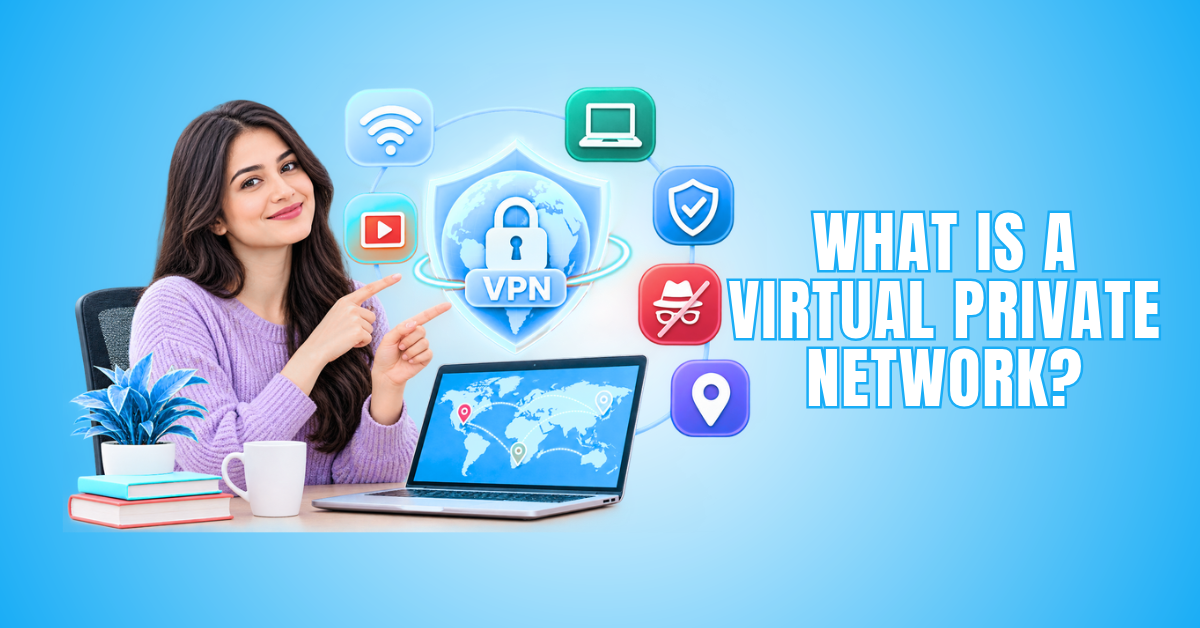
What Is A Virtual Private Network?
What is a Virtual Private Network? Understanding how this technology works can help you protect your personal information and make smarter decisions about your digital security.
The internet makes it easier to communicate, work, shop, and access information. However, every online activity involves sharing data across networks, which can create privacy and security risks.
A Virtual Private Network (VPN) helps protect your internet connection by encrypting your data and routing your internet traffic through a remote server.
Whether you work remotely, use public Wi-Fi, or want greater online privacy, a VPN can provide an additional layer of protection and help you browse more securely.
What Is A Virtual Private Network (VPN)?
A Virtual Private Network (VPN) is a cybersecurity tool that establishes a secure, encrypted connection between a user’s device and a remote VPN server.
It serves as a secure conduit for online communication, reducing exposure to certain cyber threats and helping protect the privacy of sensitive data.
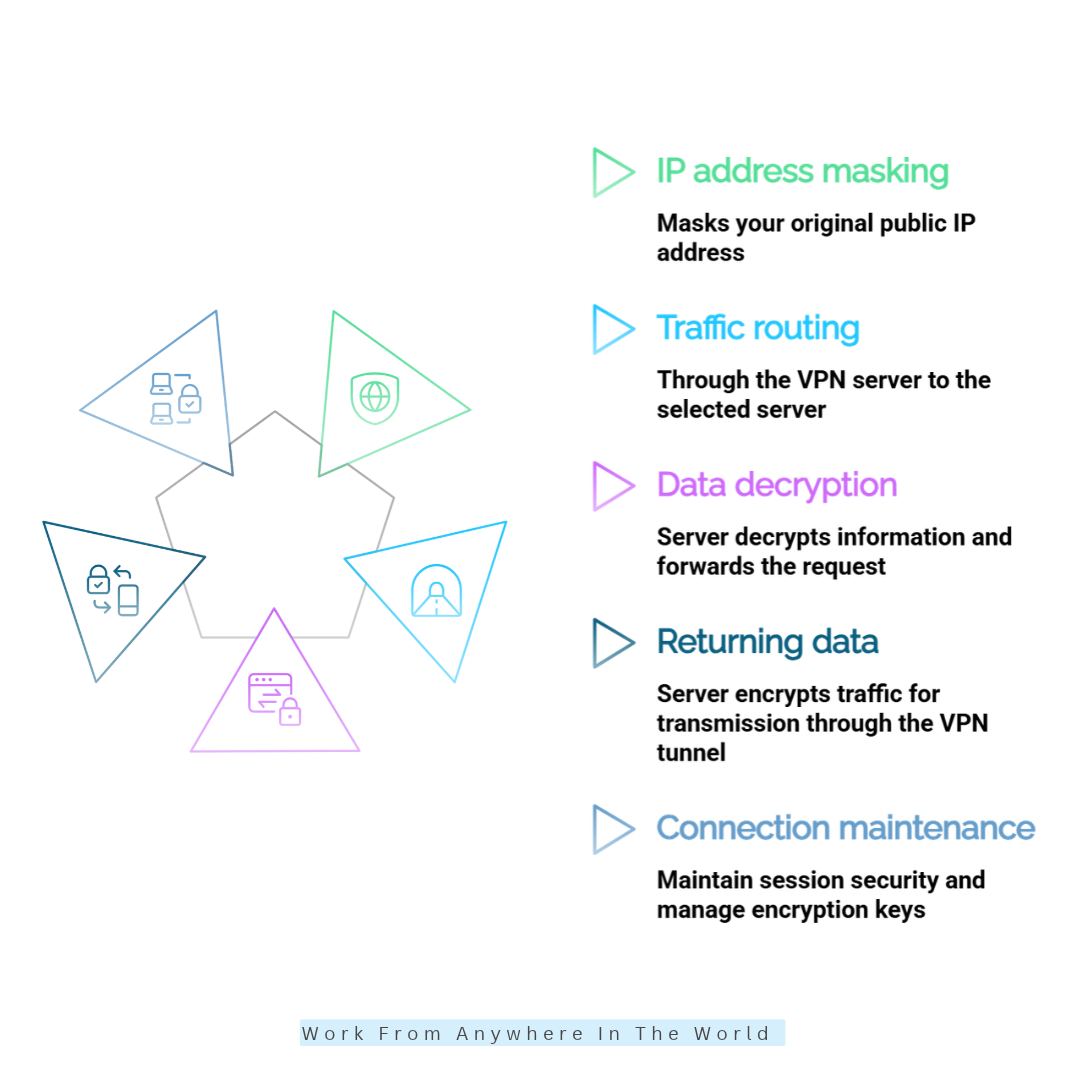
When a user connects to a VPN, their original public IP address is masked by the VPN server’s IP address. Their internet traffic passes through an encrypted connection to the VPN server.
This makes it harder for third parties to monitor online activity, identify a user’s approximate location, or intercept transmitted information. Using a VPN is one of several effective ways to protect your online privacy.
A VPN is particularly useful when accessing the internet through public Wi-Fi networks, such as those in airports, hotels, cafés, and shopping centres.
It can also help individuals and businesses establish secure remote connections to private networks, access region-restricted content where permitted, and maintain greater privacy during everyday browsing.
VPN services such as ExpressVPN offer encryption and remote server connections to help users browse more securely across different devices and networks.
History And Evolution Of VPN Technology
VPN technology began developing in the 1990s, when businesses needed safer ways to connect employees and remote offices over public networks.
In 1996, Microsoft engineer Gurdeep Singh-Pall helped develop the Point-to-Point Tunnelling Protocol (PPTP), which became one of the earliest technologies used to establish VPN connections.
During the late 1990s and early 2000s, VPN technology evolved with protocols such as IPsec and Layer 2 Tunnelling Protocol (L2TP), offering more advanced security and networking capabilities.
Initially, VPNs were primarily used by large organizations to protect business communications, connect different office locations, and support secure remote access.
With the growth of broadband internet, smartphones, cloud computing, and remote working, VPN services gradually became accessible to everyday internet users.
Today, modern VPN solutions use stronger encryption standards and advanced protocols, such as OpenVPN and WireGuard, to support secure browsing, data protection, and private communication across different devices and networks.
Wealthy Affiliate – Mini Review
If you’ve ever thought about turning your blog, passion, or niche into an online business,
Wealthy Affiliate (WA) is one of the most beginner-friendly platforms I’ve used.
It combines step-by-step training, website hosting, AI-powered tools,
keyword research, and an active community all in one place.
What I like most is that you can start for free (no credit card needed), explore the platform,
test the tools, and connect with other entrepreneurs before upgrading.
WA isn’t a “get rich quick” scheme — success comes from consistent effort
and applying what you learn over time.
What Is A Virtual Private Network Used For?
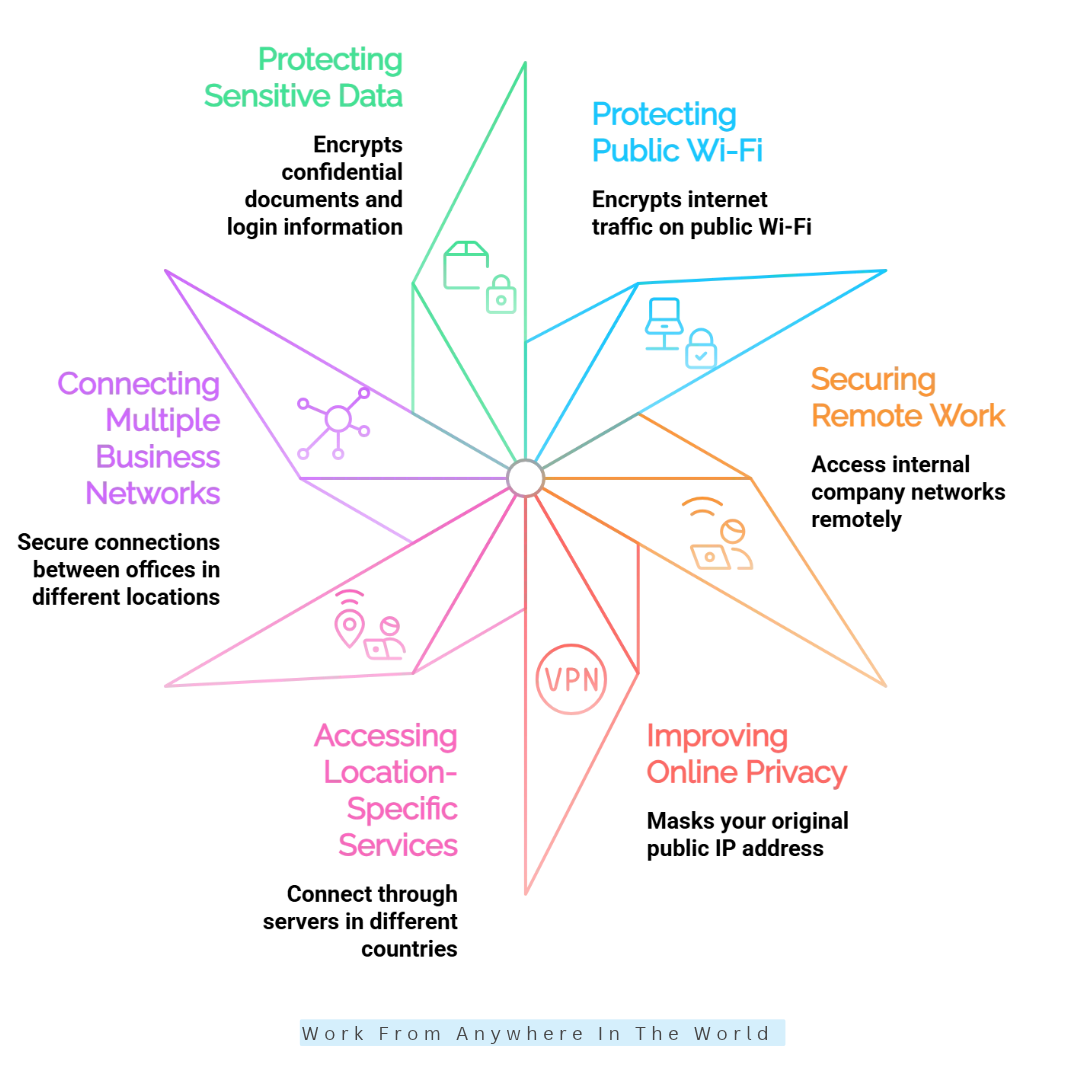
A Virtual Private Network (VPN) serves several purposes, from protecting sensitive information to providing secure access to private networks.
Whether for personal browsing, remote working, or business communications, VPN technology offers practical privacy and security benefits. Here are six common ways individuals and businesses use VPN technology.
1. Protecting Public Wi-Fi Connections
A VPN encrypts internet traffic when you connect to public Wi-Fi in airports, hotels, cafés, or shopping centres. This makes it harder for unauthorized people on the same network to intercept and read your data.
It adds an important layer of protection when checking emails, accessing accounts, or handling sensitive information while travelling.
However, a VPN does not replace other security precautions, such as using secure websites, strong passwords, and multi-factor authentication.
2. Securing Remote Work
Businesses use VPNs to help employees access internal company networks from home or other remote locations. Secure network access is particularly important when implementing effective remote work and telework strategies.
Employees can securely connect to business applications, shared files, and organizational resources without being physically present in the office.
This makes VPN technology particularly useful for remote teams and organizations with distributed workforces, helping them maintain secure communication and access essential business resources.
3. Improving Online Privacy
A VPN helps improve online privacy by masking your original public IP address. Websites generally see the VPN server’s IP address instead of your network’s public address.
It also encrypts traffic between your device and the VPN server, reducing the visibility of your online activity to your internet service provider.
However, a VPN does not provide complete anonymity. Combining VPN technology with other ways to protect your online privacy can help strengthen your overall digital security.
4. Accessing Location-Specific Services
VPN services offer servers in different countries, allowing users to connect through various locations. This can help access certain region-specific websites and services, depending on their availability and terms of use.
It is particularly useful for travellers and digital nomads who earn money while travelling and need access to location-dependent online resources. Users should always respect local regulations and the terms of service of the websites and platforms they access.
5. Connecting Multiple Business Networks
Organizations use site-to-site VPNs to establish secure connections between offices in different locations. Employees can access shared databases, applications, and internal resources through encrypted network connections.
This approach helps businesses maintain secure communication and collaboration across geographically distributed offices while reducing the exposure of confidential business information.
6. Protecting Sensitive Data
A VPN encrypts information travelling between your device and its server, helping protect confidential business documents, login information, and other sensitive data from unauthorized network monitoring.
This additional protection is valuable for professionals who regularly handle private information or work through unfamiliar internet connections.
Combining a VPN with secure websites, updated software, and appropriate cybersecurity practices provides a more comprehensive approach to protecting sensitive information.
How Does A Virtual Private Network Work?
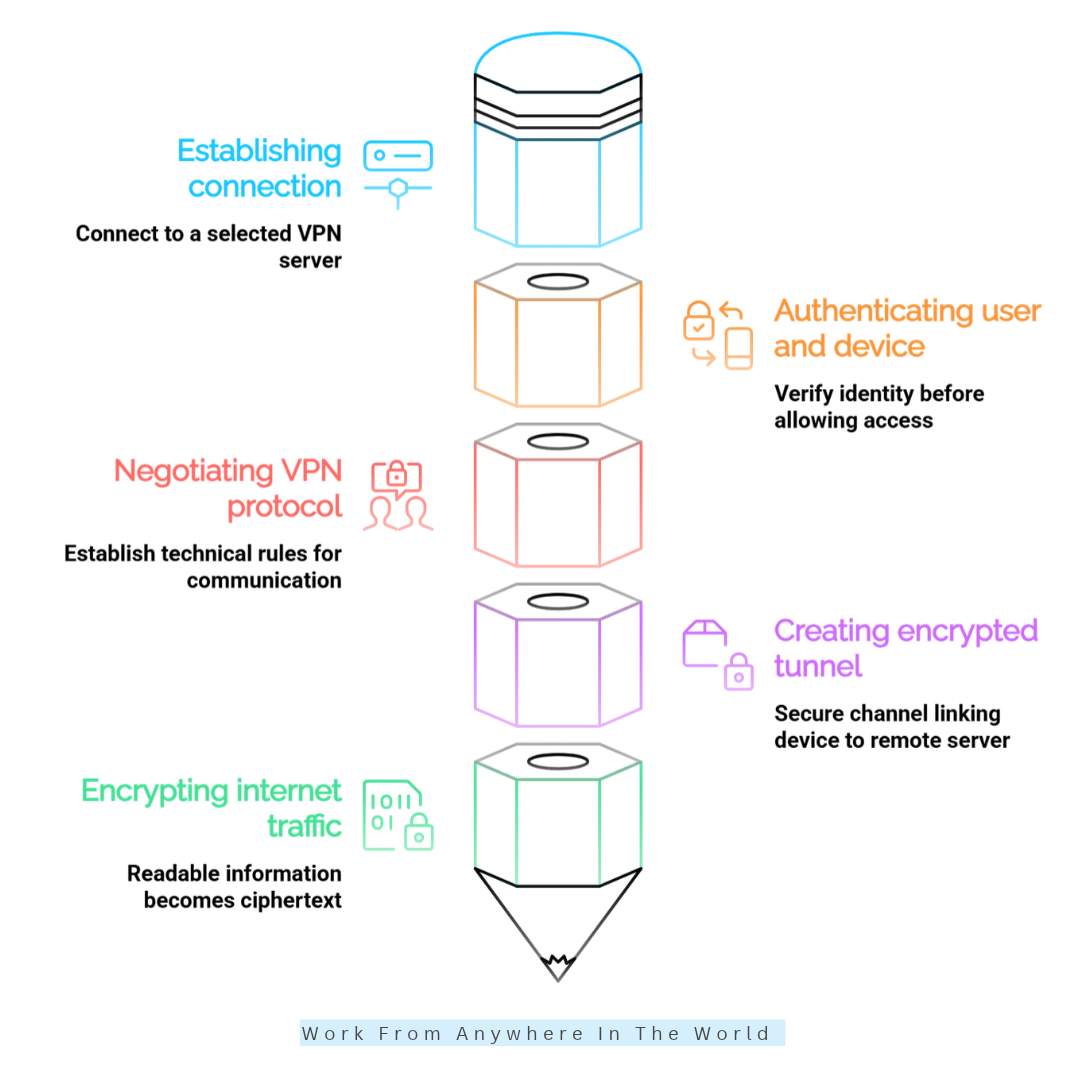
A Virtual Private Network works by creating an encrypted connection between your device and a remote VPN server. This connection helps protect your internet traffic from unauthorized network monitoring.
Several processes work together to establish this secure connection, mask your public IP address, and protect your data. Let’s explore how VPN technology works and what happens when you connect to a VPN server.
Step 1: Establishing A Connection With A VPN Server
The process begins when you open a VPN application on your computer, smartphone, or tablet. You can select a server location or allow the application to choose one automatically.
After clicking the connect button, the VPN client sends a connection request to the selected server. The server responds and begins establishing a secure communication channel.
Both sides exchange the information required to prepare the connection and establish secure communication.
For example, if you are in Bangladesh and select a VPN server in Singapore, your device establishes a connection with that server before routing the designated internet traffic through it.
Step 2: Authenticating The User And Device
Before allowing access, a VPN may verify the identity of the user and device. This process is called authentication and helps restrict access to authorized individuals and devices.
Depending on the configuration, authentication may involve usernames, passwords, digital certificates, or cryptographic keys.
Some business VPN solutions also support multifactor authentication (MFA), which requires additional identity verification.
For example, an employee accessing a company’s internal network may need to enter login credentials and approve a verification request on their smartphone. This helps reduce unauthorized network access.
Step 3: Negotiating The VPN Protocol
During connection establishment, the VPN client and server establish the technical rules for communication. These rules are determined by the VPN protocol, which controls how the connection is created, secured, and maintained.
Different protocols offer different combinations of speed, security, and compatibility. Common examples include OpenVPN, WireGuard, and IPsec.
For instance, WireGuard is designed with a relatively simple codebase and efficient performance, while OpenVPN offers flexibility and broad compatibility.
The selected protocol determines key connection characteristics, including authentication methods, encryption algorithms, and key-exchange procedures.
Choosing a modern, properly configured protocol helps maintain a secure and reliable connection across different devices and networks.
Step 4: Creating An Encrypted Tunnel
Once the connection is configured, the VPN establishes a secure, encrypted tunnel linking your device to the remote server.
An encrypted tunnel is a protected communication channel that carries internet traffic across an existing network. It is virtual rather than a separate physical connection.
Think of it as placing your information inside a locked container before sending it across a public road.
Other people may observe the communication, but they cannot easily understand its contents without the appropriate cryptographic keys.
This tunnel helps protect information from unauthorized monitoring while it travels between your device and the VPN server.
Step 5: Encrypting Your Internet Traffic
Encryption is one of the most important parts of VPN technology. It converts readable information into an encoded format called ciphertext. Only someone with the appropriate cryptographic key can decrypt the information and restore its original form.
When you visit a website, send an email, or use an online application via a VPN, the relevant data is encrypted before being transmitted through the tunnel.
Modern VPN implementations use established encryption algorithms, such as AES-256 and ChaCha20. The specific encryption method depends on the VPN protocol and configuration.
Encryption makes intercepted traffic significantly harder for unauthorized parties to understand, providing additional protection for sensitive information.
Step 6: Hiding Your Original IP Address
Every internet-connected network generally uses an IP address to communicate with other networks. Your public IP address can reveal information about your network and approximate geographical location.
A VPN helps mask your original public IP address by routing internet traffic through its remote server. For example, imagine your internet connection uses an IP address associated with Bangladesh.
If you connect to a VPN server in Germany, the websites you visit generally see the German server’s public IP address instead of your original address.
However, IP masking does not guarantee complete anonymity because websites can still identify users through account logins, cookies, and other tracking technologies.
Step 7: Routing Internet Traffic Through The VPN Server
After encryption, your internet traffic travels through the VPN tunnel to the selected server. The VPN server receives the encrypted information, processes it, and forwards the request to the intended destination.
For example, when you search for information on Google while connected to a VPN, your request first travels through the encrypted tunnel to the VPN server.
The server then forwards the request to Google’s infrastructure. Google generally sees the VPN server’s IP address as the source of the connection.
Depending on your VPN configuration, you can route all supported traffic through the VPN or use split tunnelling. This feature allows selected applications to use the VPN while others continue using your regular internet connection.
Step 8: Decrypting And Forwarding The Data
When encrypted traffic reaches the VPN server, the server removes the VPN encryption using the appropriate cryptographic keys. It then processes the request and forwards it to the destination website or online service.
The destination receives the request and responds normally, while any separate encryption, such as HTTPS, remains in place.
For example, when you open an online shopping website, the VPN server forwards your request to that website. The website processes your request and transmits the necessary information back through the VPN server to your device.
The VPN server serves as an intermediary between your device and the target destination. Its role is to handle the connection and route information without necessarily changing the original request.
Step 9: Receiving And Encrypting The Returning Data
After the destination website processes your request, it sends a response containing the requested information. That response travels back to the VPN server.
The server then encrypts the returning traffic for transmission through the VPN tunnel. Your device receives the encrypted information through the established connection.
The VPN client removes the VPN encryption using the appropriate cryptographic keys, allowing your browser or application to process and display the requested content.
For example, when you open a product page on an e-commerce website, the website sends images, descriptions, and other information back through the network.
The VPN connection helps protect this returning traffic from unauthorized network monitoring as it travels between the VPN server and your device.
Step 10: Maintaining A Secure VPN Connection
A VPN connection continues operating while you browse websites, communicate, or access online services. The VPN client and server maintain the connection through the selected protocol.
Depending on the protocol, they may exchange periodic messages to check connectivity, maintain session security, and manage encryption keys.
If your internet connection changes or the VPN server becomes unavailable, the connection may disconnect. Some VPN applications include a security feature called a kill switch that blocks designated internet traffic when the protected connection is lost.
This helps prevent traffic from unintentionally switching to your regular internet connection and exposing your original public IP address.
When you finish browsing or no longer require the VPN connection, you can safely disconnect through the application and return to your regular internet connection.
What Are The Different Types Of VPNs?
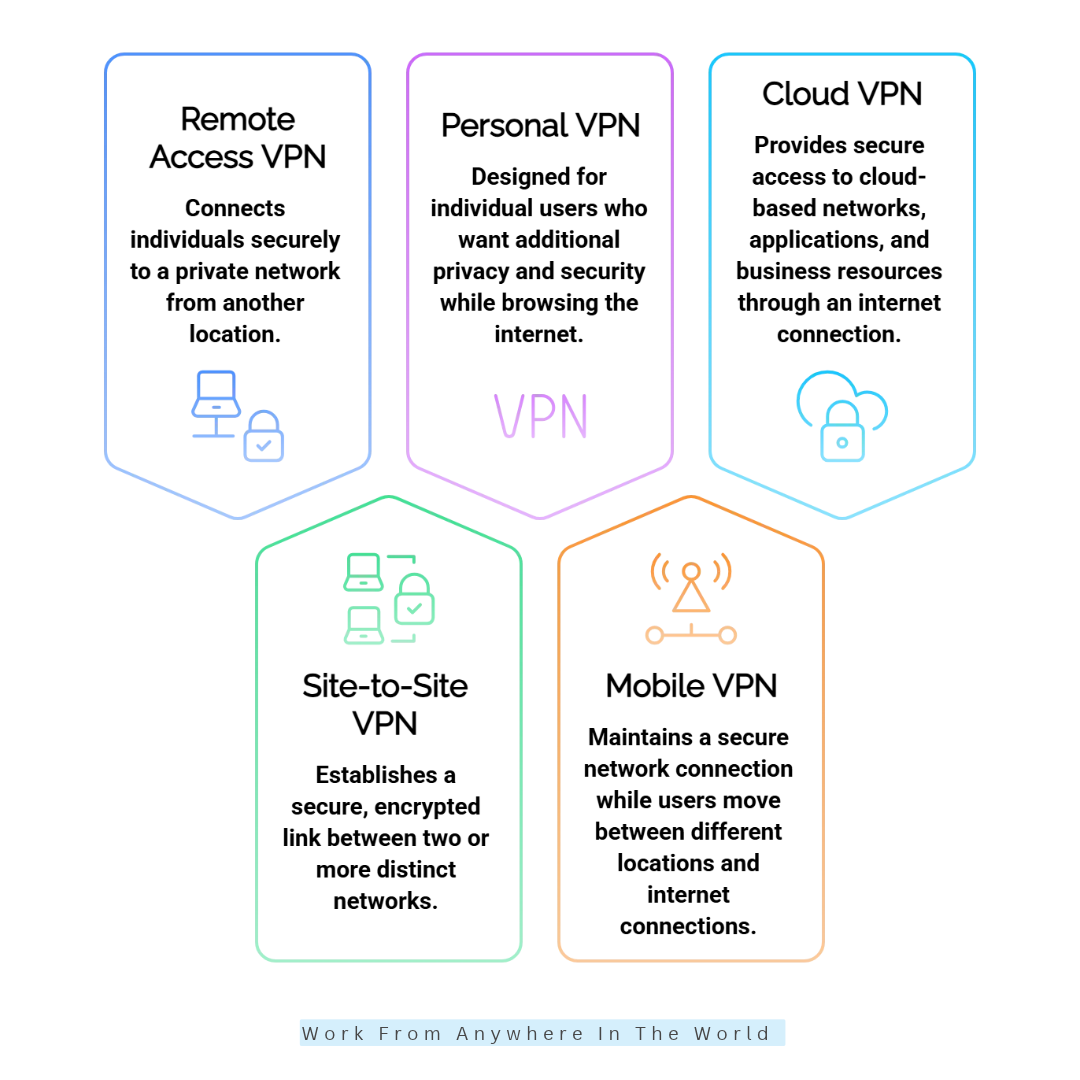
Different types of Virtual Private Networks serve different personal and professional needs. Some focus on individual privacy, while others provide secure access to business networks and cloud-based resources.
Understanding the following five types of VPNs can help you choose a solution that meets your specific security, connectivity, and working requirements.
1. Remote Access VPN
A remote access VPN allows individuals to connect securely to a private network from another location. It is commonly used by employees who work from home, travel frequently, or need access to company resources outside the office.
Users typically install VPN software on their computers or mobile devices and sign in with their approved credentials. Once connected, they can access internal applications, files, and other business resources through an encrypted connection.
This type of VPN helps organizations support flexible working arrangements while protecting sensitive information during transmission. It can also provide additional protection when employees access company resources using public Wi-Fi.
2. Site-to-Site VPN
A site-to-site VPN establishes a secure, encrypted link between two or more distinct networks. Businesses often use this technology to link their headquarters with branch offices, allowing employees to access shared resources securely.
Unlike a remote access VPN, which connects individual devices, a site-to-site VPN connects entire networks. There are two common forms: intranet-based and extranet-based VPNs.
An intranet-based VPN connects different locations belonging to the same organization. An extranet-based VPN securely connects separate organizations, such as business partners or suppliers.
This solution helps companies share information across locations through encrypted connections, even when the underlying network is the public internet.
3. Personal VPN
A personal VPN is designed for individual users who want additional privacy and security while browsing the internet. It routes internet traffic through a VPN provider’s server, masking the user’s original public IP address.
This can make it harder for websites to identify a user’s approximate location through their IP address. Personal VPNs also encrypt traffic between the user’s device and the VPN server.
Many VPN providers offer applications for computers, smartphones, and tablets. These applications provide additional protection for sensitive information when using public Wi-Fi networks.
However, a personal VPN does not make someone completely anonymous or protect against every online threat, such as phishing or malware. Additional cybersecurity precautions remain important.
4. Mobile VPN
A mobile VPN is designed to maintain a secure network connection while users move between different locations and internet connections. For example, a person may switch from office Wi-Fi to mobile data while travelling.
A traditional VPN connection may become interrupted during network changes. However, mobile VPN technology is designed to maintain or restore connectivity as the device switches between networks.
It is particularly useful for employees who work while travelling, field technicians, emergency personnel, and other mobile professionals who frequently change network connections.
Depending on the implementation, a mobile VPN can preserve application sessions during temporary internet interruptions, allowing users to resume accessing organizational resources when connectivity returns.
5. Cloud VPN
A cloud VPN provides secure access to cloud-based networks, applications, and business resources over the internet. It is particularly useful for organizations that store information or operate applications through cloud platforms.
Instead of relying entirely on traditional on-premises VPN infrastructure, businesses can use cloud-hosted VPN services to securely connect remote employees, offices, and devices.
This approach can support flexible access across different locations and make network management easier as an organization grows. Cloud VPN solutions may also integrate with identity management and access-control systems.
However, businesses should review the provider’s security features, performance, scalability, and compatibility with existing business applications before selecting a service.
Frequently Asked Questions
Q1: Is Using A VPN Beneficial On Public Wi-Fi?
Yes. A VPN encrypts communication between your device and its server, making it significantly harder for unauthorized individuals to interpret the data being transmitted.
This additional protection is particularly valuable when accessing emails, business documents, or personal accounts through public Wi-Fi networks in airports, hotels, and cafés.
Q2: Can A VPN Hide My IP Address?
Yes. Websites generally see the VPN server’s public IP address instead of your original public IP address, making it harder to determine your approximate geographical location.
However, masking your IP address does not guarantee complete anonymity. Websites can still identify users through account logins, cookies, and other tracking technologies.
Q3: Does A VPN Improve Internet Speed?
Not usually. Encryption, server distance, and network congestion can sometimes reduce connection speed, although performance varies depending on the provider and network conditions.
In certain circumstances, a VPN may improve connection performance by reducing the effects of activity-specific bandwidth throttling. However, faster internet speeds are not guaranteed.
Q4: Is A VPN Completely Secure?
No. A VPN improves online privacy and protects data travelling between your device and the VPN server, but it cannot prevent every cyber threat, including phishing, malware, or identity theft.
Combining a VPN with strong passwords, updated security software, and multifactor authentication can provide more comprehensive protection against common online threats.
Q5: Is A Free VPN Safe To Use?
Not always. Some free VPN providers may have limited security features, slower connections, restricted server locations, or unclear data privacy policies.
Always review a provider’s privacy policy, reputation, and security practices before installing its software. A reputable free VPN may suit basic needs, but its limitations should be carefully considered.
Q6: Is Using A Virtual Private Network Legal?
Using a VPN is legal in Canada, the United States, and many other countries. However, some countries restrict, regulate, or prohibit VPN use.
Before using a VPN while travelling internationally, check the applicable local laws and regulations. Using a VPN does not make otherwise illegal online activities lawful.
Conclusion
A Virtual Private Network offers valuable benefits for individuals and businesses by improving online privacy, encrypting internet traffic, and supporting secure remote connections.
From protecting public Wi-Fi sessions to connecting business networks, VPN technology helps make everyday internet activities more secure, whether you work from home, travel, or run an online business.
Understanding the benefits and limitations of VPN technology can help you choose a service that meets your personal or professional needs.
By combining a reliable VPN with responsible browsing habits and other cybersecurity measures, you can strengthen your online security and better protect your sensitive information.
I trust you enjoyed this article on What Is A Virtual Private Network? Please stay tuned for more insightful blogs on affiliate marketing, online business, and working from anywhere in the world.
Take care!
— JeannetteZ 🌍✨
💬 Your Opinion Is Important To Me
Do you have thoughts, ideas, or questions? I’d love to hear from you. Please leave your comments below or email me directly at Jeannette@WorkFromAnywhereInTheWorld.com.
📚 More Work From Anywhere Reads
🚀 Ready to Build a Business You Can Run from Home
Or from Anywhere in the World?
Imagine earning income on your terms — from home, a cozy café, or wherever life takes you.
With the right tools, training, and community support, it’s entirely possible.
Start your own online business for free — no credit card needed.
Disclosure
This post may contain affiliate links. As an Amazon Associate and participant in other affiliate programs, I earn from qualifying purchases at no extra cost to you. Please read my full affiliate disclosure.