7 Best Blogging Tools Every Blogger Should Use
The best blogging tools can help you create content, improve SEO, design graphics, and manage your website more efficiently. You don’t need dozens of tools to build a successful blog. A few reliable ones can make a big difference.
With so many options available, choosing the best ones can feel overwhelming. Some tools focus on writing, while others help with keyword research, email marketing, website security, or analytics.
In this guide, you’ll discover some of the most powerful blogging tools available today. Each one serves a different purpose, helping you save time, improve your content, and grow your blog more effectively.
Whether you’re just starting your blogging journey or looking to streamline an established website, these tools can help you build a more successful and profitable blog.
Types Of Blogging Tools
Blogging tools help simplify many of the tasks involved in creating and managing a successful website. Some focus on writing, while others improve SEO, design, marketing, or website performance.
Each tool has a specific purpose and can make your workflow more efficient. Choosing the right combination depends on your blogging goals, budget, and level of experience.
You don’t need to use every available tool to build a successful blog. Starting with a few reliable options often provides everything you need to create high-quality content and manage your website effectively.
The following blogging tools are among the most popular choices for bloggers. They can help you save time, improve your content, and support the long-term growth of your blog.
1. Grammarly
Grammarly is one of the most widely used writing assistants for bloggers, content creators, and professionals. It helps improve grammar, spelling, punctuation, and readability while making editing faster and more efficient.
Whether you’re writing a blog post, an email, or website content, Grammarly checks your writing as you type. It highlights mistakes and suggests improvements before you publish.
Grammarly is available as a browser extension, desktop application, mobile app, and online editor. It also integrates with many popular writing platforms, making it easy to use wherever you create content.
Both free and premium versions are available to suit different writing needs. For many bloggers, Grammarly has become an essential tool for producing clear, polished, and professional content.
Overview
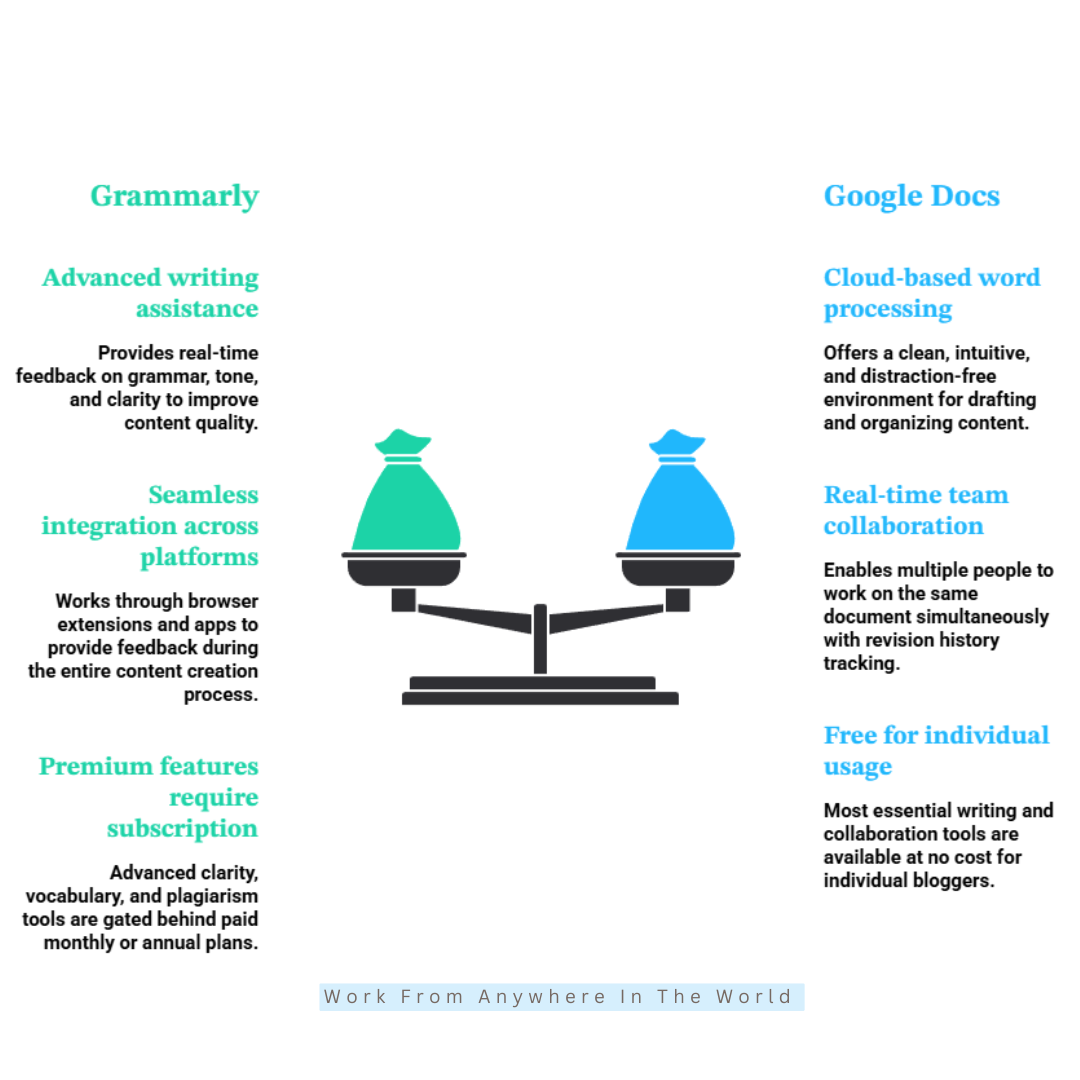
Grammarly is one of the most popular writing tools available for bloggers. It helps improve grammar, spelling, punctuation, clarity, and tone, making it easier to produce polished, professional content.
Whether you’re writing blog posts, emails, or social media updates, Grammarly provides real-time suggestions that reduce editing time and improve readability.
It has become an essential tool for many bloggers who want to publish high-quality content consistently. It also helps you develop stronger writing skills by explaining many of its suggestions.
How It Works
Grammarly checks your writing as you type and highlights spelling, grammar, punctuation, and readability issues. You can review each suggestion individually and decide whether to accept or ignore it.
The tool also provides recommendations for sentence clarity, tone, and word choice. This helps improve both readability and the overall flow of your content.
Grammarly is available as a browser extension, desktop application, mobile app, and online editor. It also integrates with many popular writing platforms, making it easy to use wherever you write.
Premium Features
The free version includes grammar, spelling, and punctuation checks. This makes it an excellent starting point for most bloggers.
The premium version adds advanced writing suggestions, sentence rewrites, vocabulary improvements, plagiarism detection, and AI-powered writing assistance. These features are especially useful if you publish content regularly or manage multiple websites.
What I Like
Grammarly is simple to use and fits naturally into my writing workflow. The suggestions appear instantly, helping me catch mistakes before publishing. It also reduces the amount of time I spend editing.
That allows me to focus more on creating content. I also appreciate that Grammarly explains many of its recommendations. Instead of simply correcting mistakes, it helps you become a better writer.
Potential Drawbacks
Like most writing tools, Grammarly isn’t perfect. Occasionally, it suggests changes that make sentences sound too formal or less natural. Some recommendations may also simplify your writing more than you intended.
It may also remove some of your personal writing style if you accept every suggestion. That’s why it’s important to review each recommendation before making changes instead of accepting them automatically.
While the free version is excellent for everyday writing, many of the advanced features require a paid subscription. For bloggers who only need basic grammar and spelling checks, however, the free version may be all that’s necessary.
2. Google Docs
Google Docs is one of the most popular writing tools for bloggers. It makes it easy to create, edit, and organize content from almost anywhere with an internet connection.
Whether you’re writing your first blog post or managing several websites, Google Docs provides a simple and reliable workspace. Its automatic saving feature also helps prevent the loss of important work.
One of its biggest advantages is collaboration. You can share documents with editors, clients, or team members and work on the same file at the same time.
Google Docs is free for most bloggers and includes the features needed for everyday writing. Its ease of use and accessibility have made it a favourite among content creators.
Overview
Google Docs is a cloud-based word processor designed for creating and editing documents online. It offers a clean writing environment with tools for formatting, organizing, and sharing content.
Many bloggers use Google Docs to draft articles, plan content, and collaborate with editors or team members. Because documents are stored online, you can access them from almost any device and continue working wherever you are.
It combines simplicity with powerful collaboration features, making it a practical choice for both individual bloggers and larger content teams.
How It Works
Google Docs works in any web browser and is also available as a mobile app. Your work is saved automatically as you type, helping prevent accidental data loss.
You can create documents, add images and tables, organize content with headings, and format text using built-in tools. Sharing documents with others is simple, allowing multiple people to edit the same file at the same time.
Google Docs also keeps a revision history, making it easy to review previous versions or restore an earlier draft whenever necessary.
Premium Features
Google Docs is free for personal use and includes everything most bloggers need to create and edit content. The free version also includes essential sharing and collaboration features.
For businesses and larger teams, Google Workspace adds extra cloud storage, advanced collaboration tools, business email, and administrative controls. These additional features are generally more useful for companies than individual bloggers.
What I Like
Automatic saving gives me peace of mind while writing. I never have to worry about losing work because changes are saved almost instantly.
I also like how easy it is to switch between devices or collaborate with editors and clients. Everyone can work on the same document without creating multiple versions.
The interface is clean, simple, and free from unnecessary distractions. That makes it easy to stay focused on writing.
Potential Drawbacks
Google Docs doesn’t include advanced SEO or writing optimization features like some dedicated blogging tools. Bloggers often use additional software for keyword research, grammar checking, or content optimization.
Formatting can also change slightly when content is copied into a website editor. A quick review before publishing is usually enough to correct any formatting issues.
3. Ubersuggest
Ubersuggest is a popular SEO tool that helps bloggers discover keywords, analyze competitors, and find new content ideas. It makes keyword research much easier by presenting key SEO data in a clear, beginner-friendly format.
Whether you’re planning your next blog post or looking for ways to increase search traffic, Ubersuggest provides valuable insights to guide your content strategy. It helps you identify topics that people are actively searching for.
The platform also includes tools for competitor research, site audits, and rank tracking. These features make it easier to improve your website’s SEO and monitor your progress.
Ubersuggest offers both free and premium plans to suit different research needs. For many bloggers, it provides an excellent introduction to keyword research and SEO.
Overview
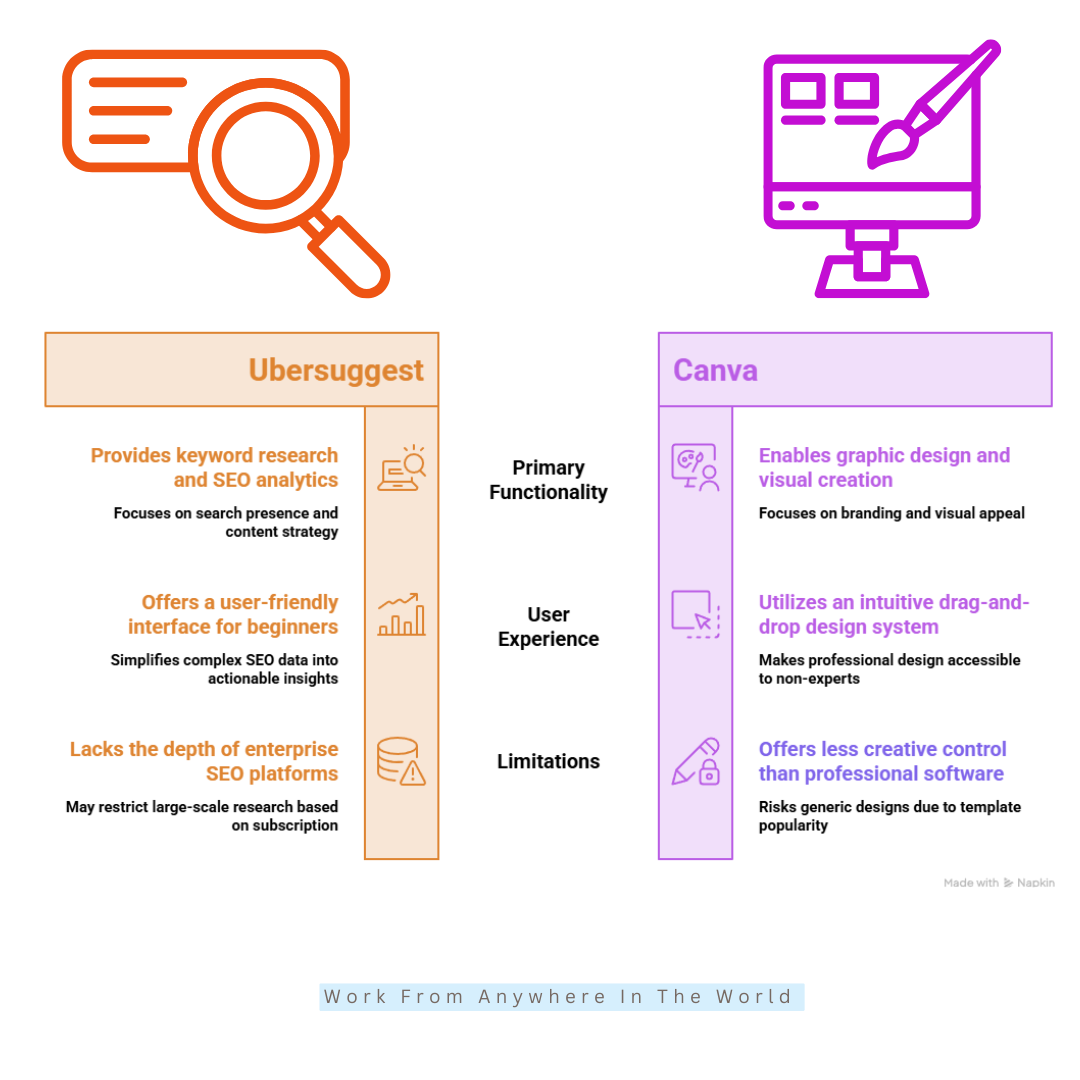
Ubersuggest is a keyword research and SEO tool that helps bloggers discover content opportunities and improve their search rankings. It provides information on search volume, keyword difficulty, traffic potential, and related keyword ideas.
Many bloggers use Ubersuggest to find topics that people are actively searching for. Its simple interface makes keyword research less overwhelming, especially for beginners.
How It Works
After entering a keyword into the search bar, Ubersuggest generates related keyword ideas along with useful SEO data. This includes search volume, keyword difficulty, seasonal trends, and competitor information.
The platform also offers site audits, rank tracking, and content suggestions. These features help bloggers choose better topics and develop a stronger SEO strategy.
Premium Features
The free version includes basic keyword research and limited daily searches. It provides enough information for many new bloggers to begin researching keywords.
Premium plans expand access to keyword data, competitor analysis, rank tracking, site audits, and additional reporting tools. These features are particularly useful for bloggers who publish content regularly and want more detailed SEO insights.
What I Like
I like how easy Ubersuggest is to use. The reports are clear, well-organized, and simple enough for beginners to understand without feeling overwhelmed.
It also combines keyword research, competitor analysis, and site audits in one platform. That makes it a practical tool for planning and improving blog content.
Potential Drawbacks
Although Ubersuggest provides useful SEO data, it doesn’t offer the same depth of analysis as some advanced SEO platforms. Experienced SEO professionals may eventually need more detailed backlink research and competitor data.
The free version also has daily usage limits, which may be restrictive if you perform a large amount of keyword research. Upgrading to a premium plan removes many of these limitations.
4. Canva
Canva has become one of the most popular design tools for bloggers, business owners, and content creators. It makes it easy to create professional-looking graphics without needing graphic design experience.
Whether you need featured images, social media posts, infographics, or presentations, Canva offers thousands of ready-made templates. Its simple drag-and-drop editor helps you create attractive designs in just a few minutes.
Many bloggers also use Canva to build a consistent brand. You can save colours, fonts, and logos, making it easier to create a professional look across your website and social media channels.
Canva offers both free and premium plans to suit different creative needs. For many bloggers, the free version includes everything needed to produce high-quality graphics.
Overview
Canva is an online graphic design platform that helps bloggers create eye-catching visuals with ease. It includes thousands of templates for blog graphics, featured images, social media posts, presentations, and marketing materials.
Its drag-and-drop editor makes designing simple, even for beginners. As a result, Canva has become one of the most widely used tools for creating visual content.
How It Works
Canva lets you choose a template and customize it with your own colours, fonts, images, and branding. You can also upload photos, add text, and arrange design elements with just a few clicks.
Completed designs can be downloaded in several file formats for use on websites, social media, or in presentations. The platform is easy to learn while still offering enough flexibility to create professional-looking graphics.
Premium Features
The free version includes a large collection of templates, graphics, and design tools. It provides everything many bloggers need to create attractive visual content.
Canva Pro adds premium templates, stock photos and videos, background removal, brand management tools, content scheduling, and additional design features. These tools can save time and help maintain consistent branding across multiple platforms.
What I Like
Canva makes graphic design accessible to everyone, regardless of experience level. The templates save time while still giving you plenty of freedom to customize your designs.
I also like how quickly I can create featured images, Pinterest pins, and social media graphics. It helps me add professional-looking visuals to my content without spending hours designing them.
Potential Drawbacks
Although Canva is a powerful design tool, it doesn’t offer the same level of creative control as professional software. Advanced designers may find some editing features limiting.
Because many people use the same templates, designs can sometimes look similar without additional customization. Bloggers who need advanced photo editing or highly specialized design tools may eventually need other software.
5. Google Analytics
Google Analytics is one of the most valuable tools for understanding how people use your website. It helps bloggers track visitor activity, measure content performance, and make informed decisions based on real data.
Instead of guessing which articles are successful, you can see exactly how visitors find your website and which pages receive the most attention. This information can help you improve both your content and your marketing efforts.
Google Analytics also highlights where your visitors come from, how long they stay, and which pages they visit next. These insights make it easier to identify opportunities for growth.
Although the platform has a learning curve, it provides valuable information that can help bloggers improve their websites. For anyone serious about growing a blog, it’s an essential tool.
Overview
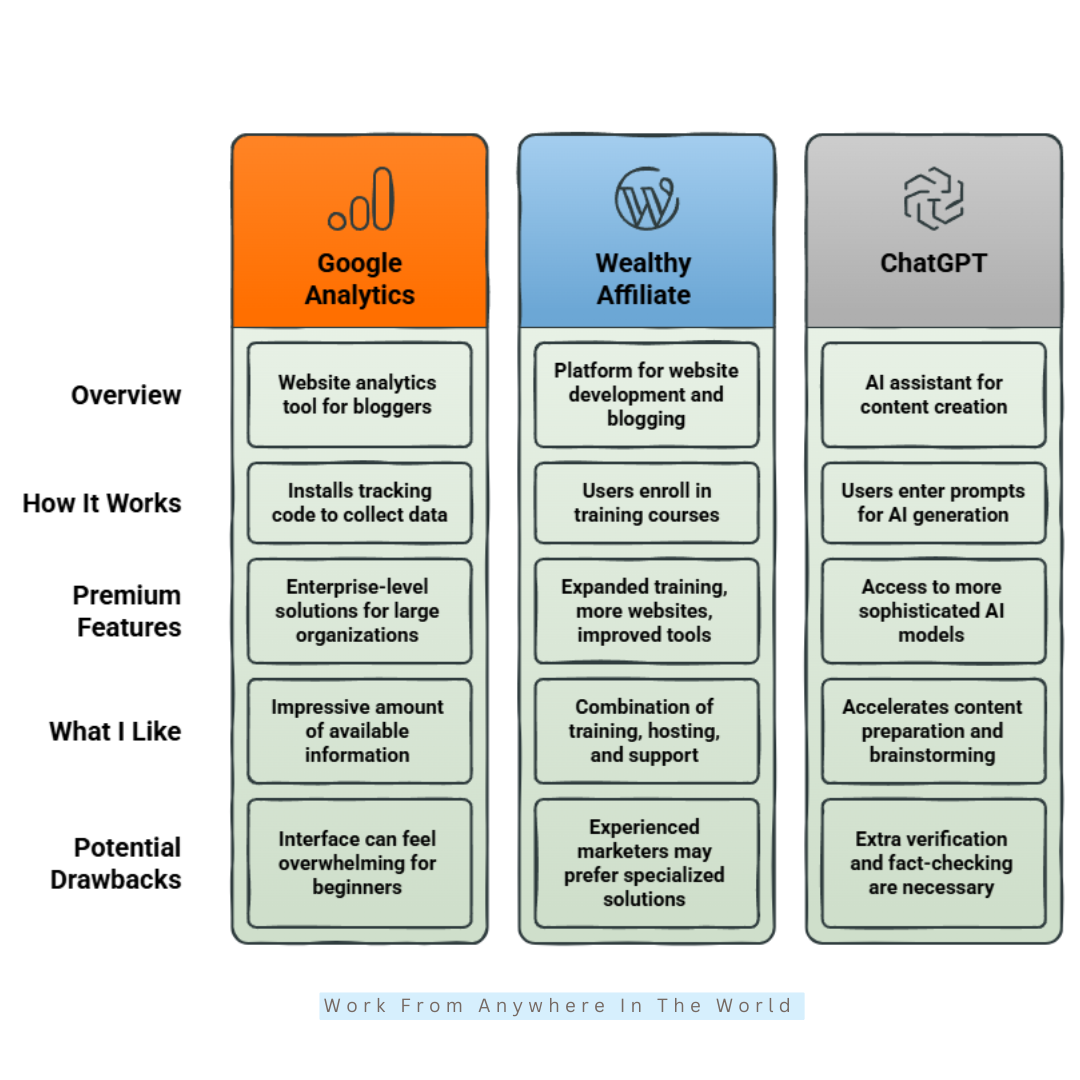
Google Analytics is a website analytics tool that tracks how visitors interact with your website. It provides detailed information about traffic sources, audience behaviour, page performance, and user engagement.
Many bloggers use Google Analytics to discover which articles perform best and how readers navigate their websites. These insights make it easier to create better content and improve the overall user experience.
How It Works
After adding a tracking code to your website, Google Analytics begins collecting information about visitor activity. It records data such as page views, traffic sources, session duration, user locations, and engagement.
The reports help you understand which pages attract the most visitors and where your traffic comes from. You can also measure the performance of your SEO, social media, email marketing, and other promotional efforts.
Premium Features
The free version of Google Analytics includes everything most bloggers need to monitor website performance. It offers detailed reports, audience insights, and traffic analysis at no cost.
Google also offers enterprise solutions for large organizations that require advanced reporting, additional data processing, and dedicated support. For most bloggers and small businesses, however, the free version is more than sufficient.
What I Like
I like having access to real data instead of relying on guesswork. Google Analytics shows which content performs well and helps me understand how visitors use my website.
It also integrates well with other Google products, making it easier to build a complete picture of my website’s performance. Those insights help me make better decisions when planning future content.
Potential Drawbacks
Google Analytics can feel overwhelming when you first start using it. The large number of reports and metrics takes some time to understand.
Bloggers who only want basic traffic statistics may find the platform more complex than necessary. Fortunately, as you become more familiar with the reports, the information becomes much easier to use.
6. Wealthy Affiliate
Wealthy Affiliate is an all-in-one platform designed to help people build blogs and online businesses. It combines training, website hosting, keyword research, and community support in one place.
Whether you’re starting your first website or growing an existing one, the platform provides the tools and training needed to develop your blogging and affiliate marketing skills.
Many bloggers use Wealthy Affiliate because they can learn new skills while applying them to their own websites. This practical approach makes it easier to build confidence and gain experience.
The platform offers both free and premium memberships. As your knowledge and business grow, you can unlock additional training, tools, and resources.
Overview
Wealthy Affiliate combines blogging education, website hosting, keyword research, and community support in one platform. Instead of using several separate services, bloggers can manage much of their online business from one place.
The platform focuses on helping beginners learn affiliate marketing while providing enough tools to support long-term website growth.
How It Works
Members begin with step-by-step training covering blogging, affiliate marketing, SEO, website building, and niche selection. Lessons are designed to help you apply what you learn as you build your own website.
The platform also includes website hosting, keyword research, content creation tools, and an active community where members can ask questions and share advice. Having everything in one place makes it easier to manage your blogging business.
Premium Features
The free membership gives users access to introductory training and basic tools. It provides a good way to explore the platform before upgrading.
Premium memberships include additional training, support for more websites, advanced keyword research, enhanced community features, and extra business-building resources. These features are designed for bloggers who want access to the platform’s complete toolkit.
What I Like
I like having training, hosting, keyword research, and community support available in one place. It eliminates the need to manage several different services when building a blog.
The step-by-step training is easy to follow and helps beginners build confidence while learning the fundamentals of blogging and affiliate marketing.
Potential Drawbacks
Experienced bloggers may eventually prefer specialized SEO or marketing tools with more advanced features. Some users may also find the large number of training resources overwhelming at first.
Like any blogging platform, success still depends on creating quality content and putting what you learn into practice. The tools can support your progress, but they can’t replace consistent effort.
7. ChatGPT
ChatGPT has quickly become one of the most useful tools for bloggers and content creators. It can help generate ideas, organize information, create outlines, and speed up many parts of the writing process.
Whether you’re planning a new article or refreshing existing content, ChatGPT can help you brainstorm topics, improve structure, and overcome writer’s block. It works best when combined with your own knowledge and experience.
Many bloggers also use ChatGPT to create FAQs, improve introductions, write meta descriptions, and simplify complex topics. Used correctly, it can save time while helping you stay productive.
ChatGPT offers both free and paid plans with different features and usage limits. The right choice depends on how often you use AI to support your blogging workflow.
Overview
ChatGPT is an AI-powered writing assistant that helps bloggers brainstorm ideas, organize content, and improve productivity. It can generate outlines, suggest titles, write introductions, create FAQs, and assist with many other writing tasks.
While it isn’t a replacement for human knowledge or creativity, it can make the content creation process faster and more efficient. Many bloggers use it as a tool to support research, planning, and writing.
How It Works
ChatGPT works through a conversational interface where you enter prompts describing the help you need. The quality of the response usually depends on how clear and specific your instructions are.
Bloggers can use ChatGPT to develop outlines, suggest blog titles, write meta descriptions, summarize information, and brainstorm new content ideas. You can also ask follow-up questions to refine or expand the responses.
Premium Features
The free version provides access to AI tools that are suitable for many blogging tasks. It offers enough functionality for brainstorming, outlining, and general writing assistance.
Paid plans provide access to more advanced AI models, higher usage limits, faster responses, and additional productivity features. These options are particularly useful for bloggers who create content regularly.
What I Like
I like how quickly ChatGPT helps organize ideas and overcome writer’s block. It makes brainstorming, outlining, and planning content much faster than starting with a blank page.
I also appreciate its flexibility. Whether I’m improving an introduction, creating FAQs, or refining a blog post, it helps speed up many everyday blogging tasks.
Potential Drawbacks
Like any AI tool, ChatGPT can occasionally produce inaccurate or outdated information. It’s important to verify facts and review the content before publishing.
Responses can also sound generic if your prompts are too broad. The best results come from combining AI with your own knowledge, experience, and writing style.
Frequently Asked Questions
Q1: What Are Blogging Tools?
Blogging tools are software and online platforms that help bloggers create, edit, optimize, publish, promote, and manage their content. They can improve productivity, SEO, design, marketing, and overall website performance.
Q2: Which Blogging Tools Are Best For Beginners?
Beginners often benefit from easy-to-use tools like Grammarly, Google Docs, Canva, and ChatGPT. These tools help with writing, design, and content planning while being simple enough for new bloggers to learn.
Q3: Do I Need Paid Blogging Tools?
No. Many excellent blogging tools offer free versions with enough features for new bloggers. As your blog grows, upgrading to paid plans can provide additional features and save time.
Q4: Which Blogging Tool Should I Start With?
The best tool depends on your needs. Many bloggers begin with Google Docs for writing, Canva for graphics, Grammarly for editing, and Google Analytics for tracking website performance. As your blog grows, you can add more specialized tools.
Q5: Can Blogging Tools Help Increase Website Traffic?
Yes. Blogging tools can improve your content, optimize your pages for search engines, monitor visitor behaviour, and help promote your articles across multiple channels. Used together, they can support steady website growth.
Q6: Can I Build A Successful Blog Using Free Blogging Tools?
Yes. Many successful bloggers begin with free versions of tools like Google Docs, Canva, Grammarly, Google Analytics, and ChatGPT. You can always upgrade later if you need additional features.
Conclusion
Choosing the right blogging tools can save time, improve your content, and make managing your website much easier. Whether you’re writing articles, creating graphics, researching keywords, or tracking performance, the right tools help you work more efficiently.
Start with the tools that match your current needs instead of trying to use everything at once. As your experience grows, you can gradually expand your toolkit and streamline more of your workflow.
The best blogging tools don’t replace creativity or quality content. They simply support your efforts by helping you stay organized, make informed decisions, and publish with greater confidence.
With the right combination of blogging tools and a consistent publishing strategy, you’ll be well positioned to grow your audience and build a successful blog.
I trust you enjoyed this article on the 7 Best Blogging Tools Every Blogger Should Use. Please stay tuned for more insightful blogs on affiliate marketing, online business, and working from anywhere in the world.
Take care!
— JeannetteZ 🌍✨
💬 Your Opinion Is Important To Me
Do you have thoughts, ideas, or questions? I’d love to hear from you. Please leave your comments below or email me directly at Jeannette@WorkFromAnywhereInTheWorld.com.
📚 More Work From Anywhere Reads
🚀 Ready to Build a Business You Can Run from Home
Or from Anywhere in the World?
Imagine creating income on your terms — from home, a cozy café, or wherever life takes you.
With the right tools, training, and community support, it’s entirely possible.
Start your own online business for free — no credit card needed.
Disclosure
This post may contain affiliate links. As an Amazon Associate and participant in other affiliate programs, I earn from qualifying purchases at no extra cost to you. Please read my full affiliate disclosure.