What Are Instagram Features? A Complete Guide
What Are Instagram Features? Instagram has evolved far beyond a simple photo-sharing app and now offers a wide range of tools designed for creators, businesses, and everyday users.
Whether you want to grow your audience, sell products, or share your story, the platform provides powerful features to help you connect with people worldwide. Understanding these tools is the first step toward using Instagram more effectively.
In this guide, we’ll break down the key features that make Instagram so popular and show you how to use them to your advantage.
History And Evolution Of Instagram
Instagram launched in October 2010 as a simple photo-sharing app created by Kevin Systrom and Mike Krieger. The original idea was straightforward: allow users to capture moments, apply filters, and share them instantly.
It quickly stood out for its clean design, intuitive interface, and strong visual focus. Within just two months, Instagram reached one million users, proving that people loved sharing photos in a social space.
In 2012, Instagram was acquired by Facebook (now Meta)) for $1 billion. This move helped expand its resources and global reach. Around the same time, the platform introduced advertising, making it attractive for businesses.
The launch of Instagram Direct in 2013 introduced private messaging, making Instagram a more interactive social network.
The most significant shift came in 2016 with the launch of Instagram Stories. Inspired by Snapchat, Stories allowed users to share temporary posts that disappeared after 24 hours.
This feature transformed Instagram into a real-time, interactive platform. Later, in 2018, IGTV introduced longer videos, while Reels, introduced in 2020, targeted the booming short-form video trend popularized by TikTok.
Over the years, Instagram has added Shopping, Guides, and advanced analytics to serve creators and businesses. Today, Instagram is not just for sharing photos—it's a hub for e-commerce, content creation, marketing, and social interaction.
From a simple photo app to a global social media powerhouse, Instagram's evolution reflects changing user needs, technological innovation, and the growing importance of visual storytelling in digital life.
Complete Guide To Instagram Features For Users & Businesses
1. Instagram Feed
The feed is where Instagram truly lives. It shows posts from accounts you follow. These can be photos, videos, carousels, or Reels previews. The algorithm determines what you see based on engagement, interests, and post recency.
Anything can be instantly liked, commented on, saved, or shared. The feed is essential to creators' brand development. You stay visible with regular postings and excellent images.
It's the primary way to engage with your audience and showcase your sense of style. Each post contributes to recognition and interaction.
Feature Highlights
- Displays posts from accounts that have been followed
- Includes reels, pictures, movies, and carousels.
- Obtain comments, shares, and likes.
- Increases creative branding and visibility

2. Instagram Stories
Stories allow you to share images or movies that vanish after a day. They're perfect for quick updates or behind-the-scenes moments.
You can add stickers, music, polls, or questions to make them interactive. Stories appear at the top of the feed, grabbing attention. You can also highlight essential Stories on your profile permanently.
They encourage engagement because viewers can reply directly or vote in polls. Consistent posting keeps followers interested.
For creators and brands, Stories are a fun way to connect, show personality, and share real-time content without overloading the main feed.
Feature Highlights
- Temporary posts disappear after 24 hours
- Add polls, music, stickers, and questions
- Highlights keep important Stories visible
- Engages followers with interactive content
3. Instagram Reels
Instagram Reels are short videos that entertain and engage. They usually last 15 to 90 seconds. You can add music, text, and visual effects to make them stand out.
Reels appear in a dedicated section and on the Explore page, increasing your reach. Trends often revolve around popular audio or challenges, making them shareable. Reels allow both creators and brands to grow audiences quickly.
High-quality, creative content is key—consistency and timing matter. Reels can go viral, giving exposure beyond followers. They are perfect for showcasing talent, products, tutorials, or fun moments in an engaging, fast-paced format.
Feature Highlights
- Short videos of 15–90 seconds
- Add music, text, effects, filters
- High reach via the Explore page
- Supports viral and trending content
4. Instagram Live
Instagram Live lets you stream videos in real time to followers. People get notifications when you go live. It's ideal for Q&A sessions, tutorials, interviews, or casual chats. Instant messaging allows users to ask questions, provide comments, and send emojis.
After finishing, you can save Live videos to your profile or share them as IGTV content. Live builds authenticity and trust. Engaging directly with your audience strengthens connections.
Planning topics, promoting the session, and interacting with viewers increases impact. Live is perfect for creators, influencers, and brands who want real-time engagement and deeper relationships with their followers on Instagram.
Feature Highlights
- Stream videos in real time
- Viewers can comment and react
- Save Live to profile or IGTV
- Builds trust and engagement instantly
5. Instagram Direct Messaging
DMs let you send private messages to other users. You can share text, images, videos, or voice notes. Group chats allow conversations with multiple participants.
You can even send disappearing photos or media for privacy. DMs are ideal for networking, collaboration, and customer service. Users can reply to Stories or engage privately through DMs.
Creators use them to build loyal communities. Businesses handle inquiries and support. You can also organize messages with folders and filters.
DMs provide a direct connection to your audience and foster engagement outside public posts. Timely responses increase trust and interaction.
Feature Highlights
- Private text, photo, video messages
- Supports group chats and replies
- Disappearing media for privacy
- Enhances networking and customer support
6. Instagram Close Friends
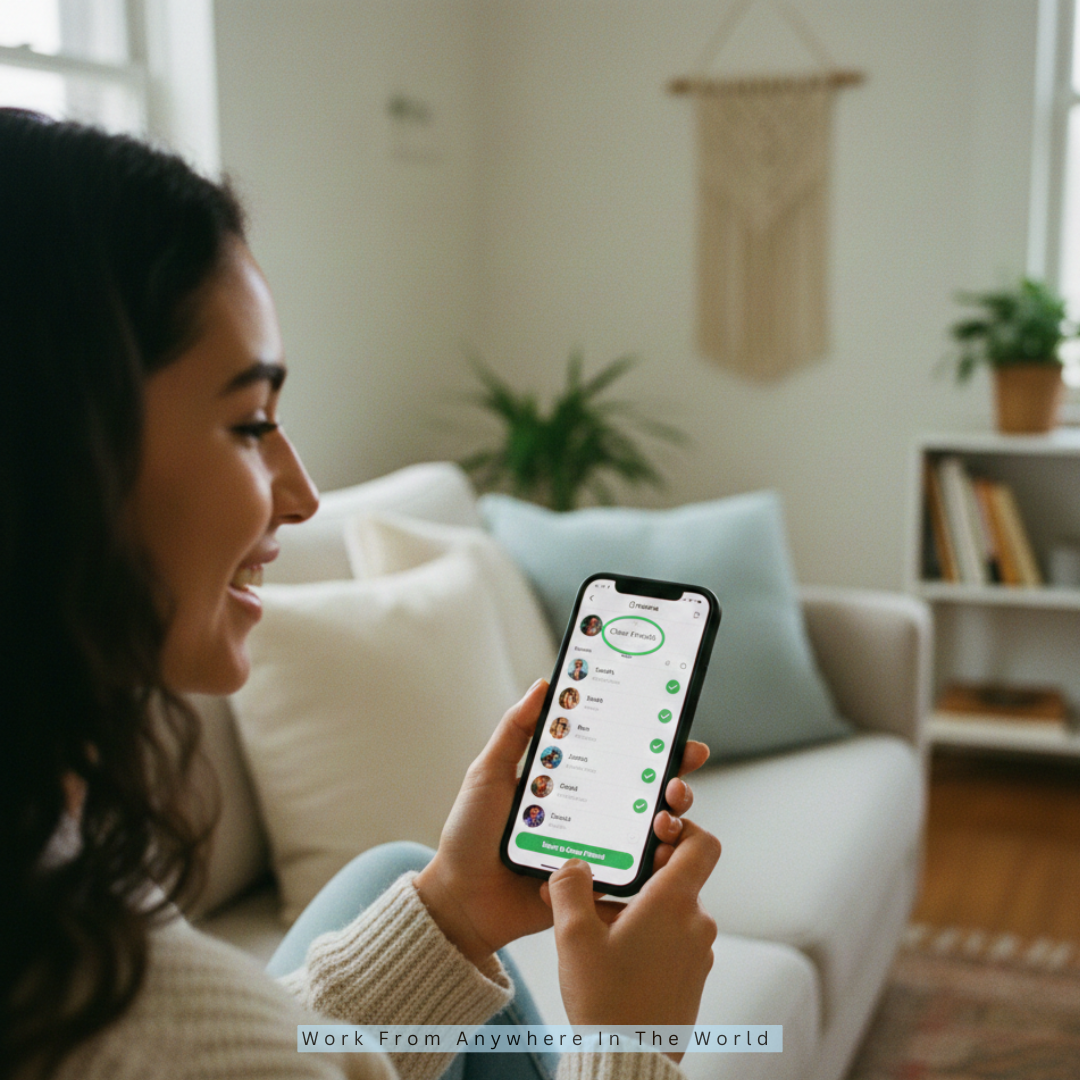
Close Friends lets users share Stories with a selected group. Only chosen followers can view these Stories, making content feel exclusive. It's perfect for behind-the-scenes updates, special announcements, or VIP promotions.
Close Friends builds trust and strengthens relationships with loyal followers. Creators can test new content or reward dedicated fans. Lists are adjustable anytime. Exclusive content encourages interaction and loyalty.
Followers appreciate feeling part of a private community. Businesses can use it for early offers or product previews. Close Friends enhances engagement, sustains follower interest, and adds a personal touch to the platform.
Feature Highlights
- Share Stories with select followers
- Provide exclusive content and updates
- Build trust and loyalty
- Engage the audience personally
7. Instagram Explore Page
The Explore page shows posts Instagram thinks you'll like. It suggests photos, videos, Reels, and Stories based on your activity. Users discover new content beyond their followers.
It's algorithm-driven, factoring engagement and interests. Appearing here increases visibility dramatically. Hashtags and trending content increase the likelihood of discovery.
Creators and brands benefit from broader reach. Regular engagement and high-quality posts increase Explore opportunities. The page is a gateway to new followers, collaborations, and viral content.
Experimenting with trends and interactive features helps your content perform well. Explore is essential for growth and audience expansion on Instagram.
Feature Highlights
- Suggests content based on interests
- Displays photos, videos, Reels, Stories
- Boosts reach beyond followers
- Supports trending content discovery
8. Instagram Shopping
Instagram Shopping lets businesses tag products in posts, Stories, and Reels. Users can view product details and prices, and complete purchases without leaving the app.
Brands can create storefronts and collections to make navigation easier. Shopping turns Instagram into a mini e-commerce platform. Promotions, discounts, and notable launches can be highlighted.
Shopping analytics help track performance and conversions. It's perfect for increasing online sales through social media. Visual appeal and clear calls to action drive purchases.
Instagram Shopping integrates seamlessly with ads and posts. Both small and large businesses use it to boost sales, engage customers, and showcase products professionally.
Feature Highlights
- Tag products in posts and Stories
- View details and purchase in-app
- Create storefronts and collections
- Track performance with analytics
9. Story Highlights
Highlights are permanent collections of your Stories. They appear on your profile under the bio. Users can categorize them by topic, like tutorials, behind-the-scenes, or promotions.
Highlights let followers access important content anytime. They improve profile organization and professionalism. You can create covers to make them visually appealing.
Highlights maintain engagement beyond the usual 24-hour Story limit. They're helpful for brands, creators, and individuals wanting to showcase key information.
Careful planning and curation of highlights help guide followers. They increase content lifespan and give first-time visitors a clear idea of your style, offerings, or personality.
Feature Highlights
- Permanent Story collections on profile
- Organize content by topic or theme
- Create custom covers for appeal
- Extend content visibility beyond 24 hours
10. Instagram Hashtags
Using hashtags allows users who are not your followers to find and categorize your content. Up to 30 tags can be added to each post, combining branded, specialty, and trending tags.
Hashtags increase visibility, reach, and engagement. They help posts appear on the Explore page and in searches. Businesses and creators use them to attract relevant audiences.
Campaign-specific hashtags track participation and performance. Overusing irrelevant hashtags can reduce credibility. Researching both popular and niche hashimprovestargeting.
Clever hashtag use makes posts easier to find, connects with communities, and drives growth, ultimately helping profiles gain recognition and expand audience reach on Instagram.
Feature Highlights
- Categorize content for discovery
- Boost reach and engagement
- Track campaign participation
- Connect with relevant audiences
11. Instagram Filters And Effects
Instagram offers filters and AR effects to make photos and videos stand out. You can adjust brightness, contrast, saturation, or apply fun face filters. AR effects include interactive elements such as virtual objects and backgrounds.
Creators can even design custom effects for followers to use. Filters help maintain a consistent aesthetic and boost engagement.
They're perfect for storytelling, branding, or fun personal posts. Using effects strategically makes content more shareable. Regular experimentation with filters keeps your profile fresh.
High-quality visuals attract followers and encourage interaction, making your posts more memorable and visually appealing on the platform.
Feature Highlights
- Enhance photos and videos easily
- Add interactive AR effects
- Create custom filters for followers
- Boost engagement and visual appeal

12. Instagram Insights
Instagram Insights provides analytics for posts, Stories, Reels, and overall account performance. You can track likes, comments, shares, saves, reach, and impressions.
Insights show follower demographics, including age, gender, and location. This data helps creators and businesses optimize content strategies. You can see which posting times and content types perform best.
Tracking trends allows adjustments to maximize engagement. Insights also measure growth and audience behaviour over time. Regularly reviewing analytics improves decision-making.
By understanding what works, creators can create better content, increase visibility, strengthen connections with followers, and grow their influence on Instagram.
Feature Highlights
- Track engagement, reach, and impressions
- Analyze follower demographics
- Optimize posting times and content
- Improve strategy with data
13. Instagram Collabs
Collabs let two users co-author a post or Reel, sharing content, likes, and comments. Both accounts' followers see the post, increasing exposure. Creators and brands use collabs to reach new audiences and build credibility.
Invitations can include photos, videos, or Reels. Engagement is shared across both profiles. Collaborations encourage interaction, trend participation, and community growth.
Creative co-authored content often performs better than solo posts. Consistent collabs strengthen relationships with other creators.
They are ideal for brand partnerships, influencer campaigns, and joint promotions. Using collabs strategically accelerates growth, expands reach, and enhances visibility on Instagram.
Feature Highlights
- Co-author posts and Reels
- Share engagement on both accounts
- Expand reach to new audiences
- Strengthen collaborations and credibility
14. Instagram Guides
Guides are curated collections of posts, products, or places within Instagram. They function like mini-blog posts for tips, tutorials, or recommendations. Creators and brands organize content to make it easy for followers to access.
Guides can include your posts or posts from other accounts—They're helpful for evergreen content and storytelling. Businesses use Guides to highlight products, services, or campaigns.
Guides provide value while improving profile organization and professionalism. Followers can return to Guides at any time, thereby enhancing engagement.
Carefully curated Guides boost credibility, showcase expertise, and make content exploration easier. They also encourage longer audience interaction on your profile.
Feature Highlights
- Curate posts, products, or places
- Organize content for easy access
- Share tutorials or tips
- Showcase expertise and credibility
Wealthy Affiliate – Mini Review (2025)
If you’ve ever thought about turning your blog, passion, or niche into an online business,
Wealthy Affiliate (WA) is one of the most beginner-friendly platforms I’ve used.
It combines step-by-step training, website hosting, SEO research tools,
and an active community all in one place.
What I like most: you can start free (no credit card needed),
explore lessons, test the tools, and connect with other entrepreneurs
before upgrading. WA isn’t a “get rich quick” scheme — it’s a platform where success comes
from consistent effort and applying what you learn.
Instagram Safety & Privacy Features: Protect Your Account And Online Presence
Instagram is one of the most widely used social media platforms for sharing images, videos, and narratives. For users in Bangladesh and worldwide, staying safe online is important.
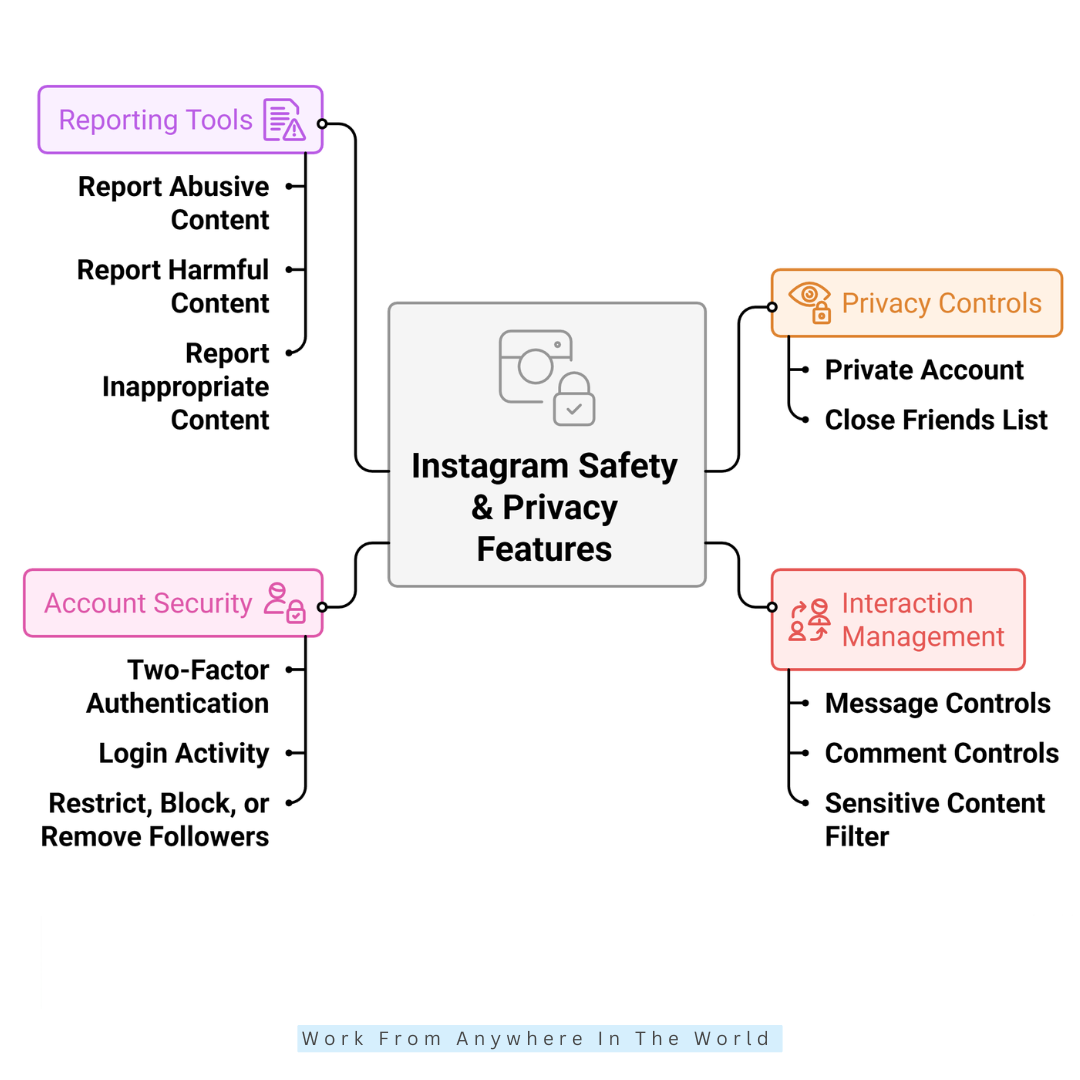
Instagram provides multiple privacy and safety features to help control who sees your content, manage interactions, and protect your account from misuse. Here are the key features you should know:
1. Private Account
- Turning your account private ensures only approved followers can see your posts and stories.
- Especially useful for teens and young adults who want to limit unknown people from viewing personal content.
- How to enable: Profile → Settings → Account Privacy → Private Account.
2. Close Friends List
- Share stories with a select group instead of all followers.
- Helps maintain privacy when posting personal or temporary content.
3. Message Controls
- Messages from unknown users go into Message Requests, allowing you to accept or ignore.
- The Limit feature can temporarily restrict messages and comments from people who are not your followers or recently interacted negatively.
4. Comment Controls
- Instagram automatically filters offensive comments using AI.
- You can add custom keywords to hide comments containing specific words or phrases.
- This creates a safer, positive environment on your posts.
5. Sensitive Content Filter
- Limits exposure to potentially upsetting or inappropriate content in Explore and Reels.
- Useful for younger users or those who want a safer browsing experience.
6. Account Security
- Two-Factor Authentication (2FA) adds an extra login step via SMS or an authentication app.
- Login Activity lets you see where your account is logged in and log out from unknown devices.
7. Restrict, Block, Or Remove Followers
- Restricting limits someone’s interactions without notifying them.
- Block prevents a user from viewing your content or messaging you.
- Remove allows you to remove followers from a private account without blocking them.
8. Reporting Tools
- Report abusive, harmful, or inappropriate content.
- Instagram reviews reports and can remove unsafe posts or accounts.
FAQs
Q1: How Do Hashtags Work On Instagram?
Hashtags categorize content, making posts discoverable to users interested in specific topics. Using relevant hashtags increases visibility and helps attract a wider audience.
Q2: How Does the Instagram Algorithm Work?
Content is ranked by the algorithm based on user interests, past engagement, and recency. Posts with higher levels of engagement are more likely to show up in followers' feeds and on the Explore page.
Q3: What Is Instagram Crossposting?
Sharing posts, Stories, or Reels on Facebook and Instagram simultaneously is possible via crossposting. Time is saved, and your audience stays engaged on both platforms.
Conclusion
Numerous aspects of Instagram are intended to foster creativity, connection, and personal development. From Feed and Stories to Reels, Shopping, and Analytics, each tool helps users express themselves, engage audiences, and achieve personal or business goals.
Understanding and using these features strategically can boost visibility, strengthen relationships, and enhance content impact.
Whether for fun, networking, or marketing, Instagram's tools provide endless opportunities to create, share, and grow in today's social media landscape.
I trust you enjoyed this article on the What Are Instagram Features. Please stay tuned for more insightful blogs on affiliate marketing, online business, and working from anywhere in the world.
Take care!
— JeannetteZ 🌍✨
💬 Your Opinion Is Important To Me
Do you have thoughts, ideas, or questions? I’d love to hear from you. Please leave your comments below or email me directly at Jeannette@WorkFromAnywhereInTheWorld.com.
📚 More Work From Anywhere Reads
🚀 Ready to Build a Business You Can Run from Home
Or from Anywhere in the World?
Imagine creating income on your terms — from home, a cozy café, or wherever life takes you.
With the right tools, training, and community support, it’s entirely possible.
Start your own online business for free — no credit card needed.
Disclosure
This post may contain affiliate links. As an Amazon Associate and participant in other affiliate programs, I earn from qualifying purchases at no extra cost to you. Please read my full affiliate disclosure.