PicMonkey Review: Is It Worth Using?
This PicMonkey Review explores how the platform combines photo editing, graphic design, and creative tools in one workspace. It offers practical features for bloggers, marketers, small businesses, and content creators.
PicMonkey helps users transform ordinary photographs into attractive visuals for websites, social media, and promotional campaigns. Its editing tools and customizable templates make creating professional-looking graphics more approachable.
The platform also includes background removal, stock images, branding features, and collaboration tools. These capabilities support everything from simple photo adjustments to more involved marketing projects.
However, PicMonkey has limitations, including subscription restrictions and fewer advanced editing controls than specialized professional software.
This review examines PicMonkey’s features, advantages, disadvantages, and subscription options. It will help you decide whether the platform suits your creative needs and budget.
What Is PicMonkey?
PicMonkey is an online photo editor and graphic design platform that lets users edit photographs, create marketing graphics, build social media content, design branded materials, make collages, and work with video.
The platform sits between a straightforward photo editor and a full graphic design workspace. Start with a blank canvas, upload your own image, or choose a template and modify it as you like.
Its current feature set includes photo editing, touch-up tools, background removal, graphic effects, customizable templates, stock photos and videos, collage layouts, branding tools, social media designs, and collaboration features.
This combination makes PicMonkey useful for different creative tasks. For example, you can retouch a product photo, remove its background, add branded text, resize the design, and prepare versions for different social networks.
PicMonkey Features
1. Photo Editing Tools
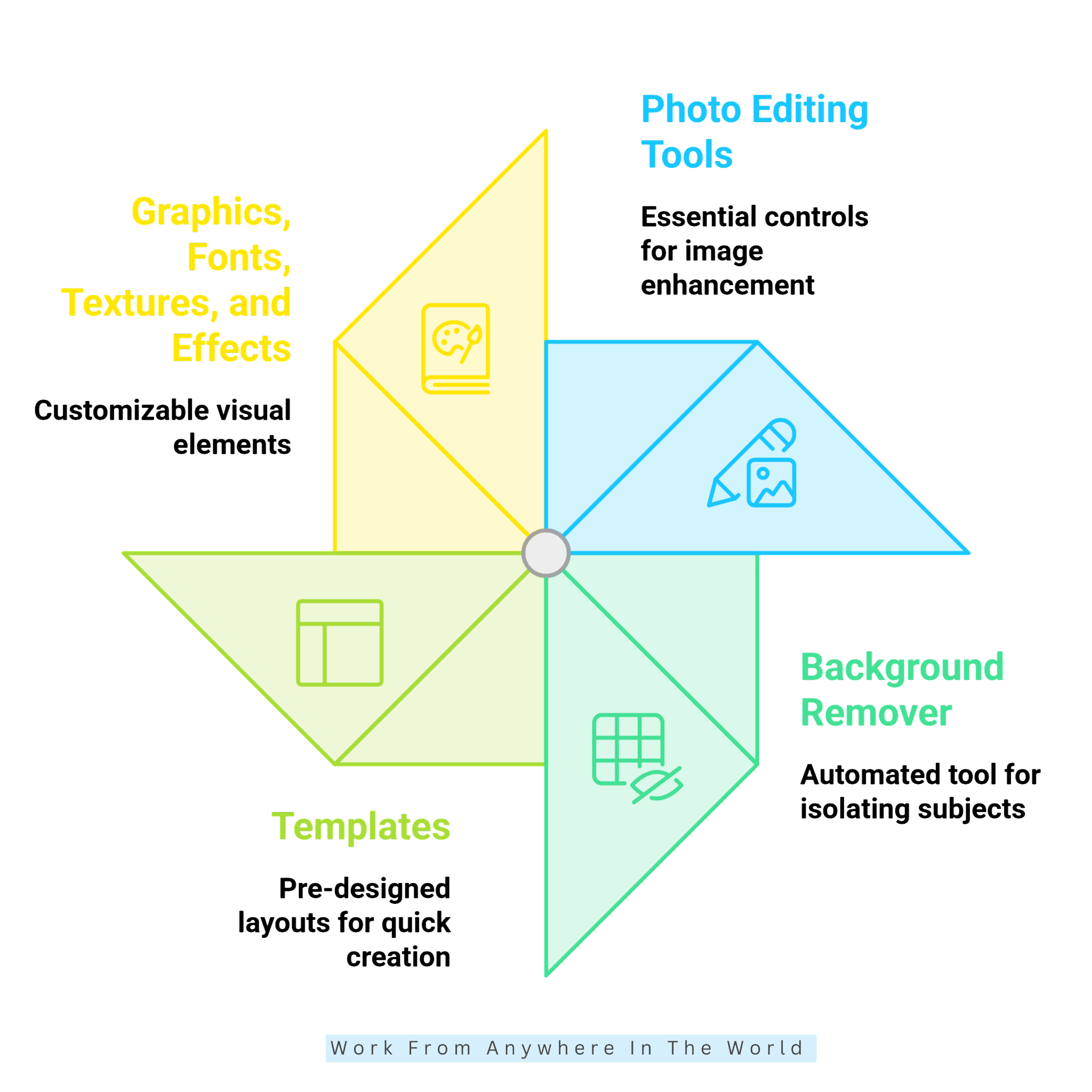
PicMonkey provides essential editing controls to improve everyday photos without making the process overly technical. You can trim and resize images, adjust brightness and hues, enhance or blur details, and apply filters and effects.
The editor also includes tools for adding text, graphics, textures, and other visual elements. This makes it useful when a simple photograph needs to become a finished marketing asset, not just a corrected image.
For beginners, the biggest advantage is accessibility. You can make meaningful improvements without first learning complicated editing workflows. More experienced users can combine adjustments, effects, graphics, and layers to create more customized compositions.
2. Background Remover
The Background Remover is one of PicMonkey’s particularly useful features for product-focused and marketing content. With the Pro plan, the tool can automatically remove an image’s background with a single click.
After removal, you can refine edges using the erase and paintbrush tools, introduce a new background, add a colour background, or apply an outline effect.
This is especially useful for ecommerce product images, thumbnails, promotional graphics, social media posts, and logo-related designs.
Because the process is automated, users can save considerable editing time compared with manually selecting an object’s edges. PicMonkey also offers the feature in its mobile app for Pro subscribers.
3. Templates
Templates give PicMonkey a strong advantage for users who prefer starting with an established visual structure.
The platform offers templates for categories including Instagram, Facebook, Pinterest, LinkedIn, YouTube, presentations, logos, flyers, brochures, business cards, invitations, infographics, posters, advertisements, resumes, and many other formats.
Instead of staring at a blank canvas, you can choose a suitable layout and swap out the imagery, typography, colours, and other elements.
This approach is particularly helpful for beginners because the template provides a visual foundation. Experienced marketers can also use templates as starting points when they need to produce content quickly while maintaining a consistent visual style.
4. Graphics, Fonts, Textures, And Effects
PicMonkey provides a large collection of customizable graphics, textures, fonts, filters, and effects.
The platform currently highlights more than 9,000 graphics and icons, along with a broad collection of fonts and design resources. You can layer graphics into designs, recolor them, position them, and combine them with photos and text.
Text effects such as outlines, curves, shadows, and other treatments can give ordinary typography more visual personality.
These resources are particularly useful when you want to create a design from scratch instead of relying entirely on templates. They also make it easier to develop visual variations while keeping the same core concept.
5. Stock Photos And Video
PicMonkey integrates stock visual content into its design workflow. Its official pages currently describe access to millions of Shutterstock stock photos, while stock video can also be used in designs.
This is convenient for creators who need supporting imagery but do not have suitable original photographs for every project.
For example, a small business could combine its own product photograph with a stock background or lifestyle image. A social media creator could use stock footage in a promotional design.
Premium stock access is associated with paid plans, so the exact assets available depend on the subscription level.
6. Collage Maker
PicMonkey’s collage functionality lets users arrange multiple images within customizable grid layouts.
The platform offers hundreds of collage layouts, giving users a range of starting structures for travel albums, product collections, social posts, family photography, mood boards, and promotional visuals.
The layouts can incorporate photographs, stock images, videos, colours, and other design elements.
The collage tool offers more flexibility than a basic photo grid. You can treat the layout as a design canvas and adjust the visual presentation around your specific purpose.
For anyone who frequently needs multi-image graphics, this feature can reduce the time spent manually arranging photographs.
7. Branding And Brand Kit
Brand consistency becomes easier when you store logos, fonts, colours, and other brand elements in one place.
PicMonkey’s Brand Kit keeps key visual identity elements accessible while designing. This can include brand colours, logos, fonts, and graphics.
Pro users can create a Brand Kit, while Business provides multiple brand kits for organizations managing several brands or clients. PicMonkey also lets you upload your own fonts on eligible plans.
This feature is particularly advantageous for entrepreneurs, small businesses, social media managers, and agencies that regularly produce content.
Instead of searching for the correct logo or remembering a specific colour value for every design, users can keep core branding resources within their workflow.
8. Video And Animation
PicMonkey has expanded beyond static graphics by letting users incorporate video clips into designs. Users can work with their own video clips or select content from the stock video library. The platform also supports animation of design elements.
This makes PicMonkey more versatile for creators producing social media content where motion is increasingly common.
It is not positioned primarily as a dedicated professional video-editing suite. Instead, the video functionality complements the platform’s existing design tools, making it easier to introduce movement into promotional graphics and social content without switching to a separate design environment.
9. Social Media Design
PicMonkey includes design resources for several major social platforms.
Users can create Instagram posts and Stories, Facebook posts and covers, YouTube thumbnails and banners, Pinterest graphics, and other platform-specific content.
Pre-sized templates reduce the need to determine canvas dimensions manually. This can be particularly useful for marketers managing several channels at the same time.
The workflow also works well for repurposing content. A single campaign concept can be transformed into multiple visual formats instead of requiring a completely new design for every platform.

Pros Of PicMonkey
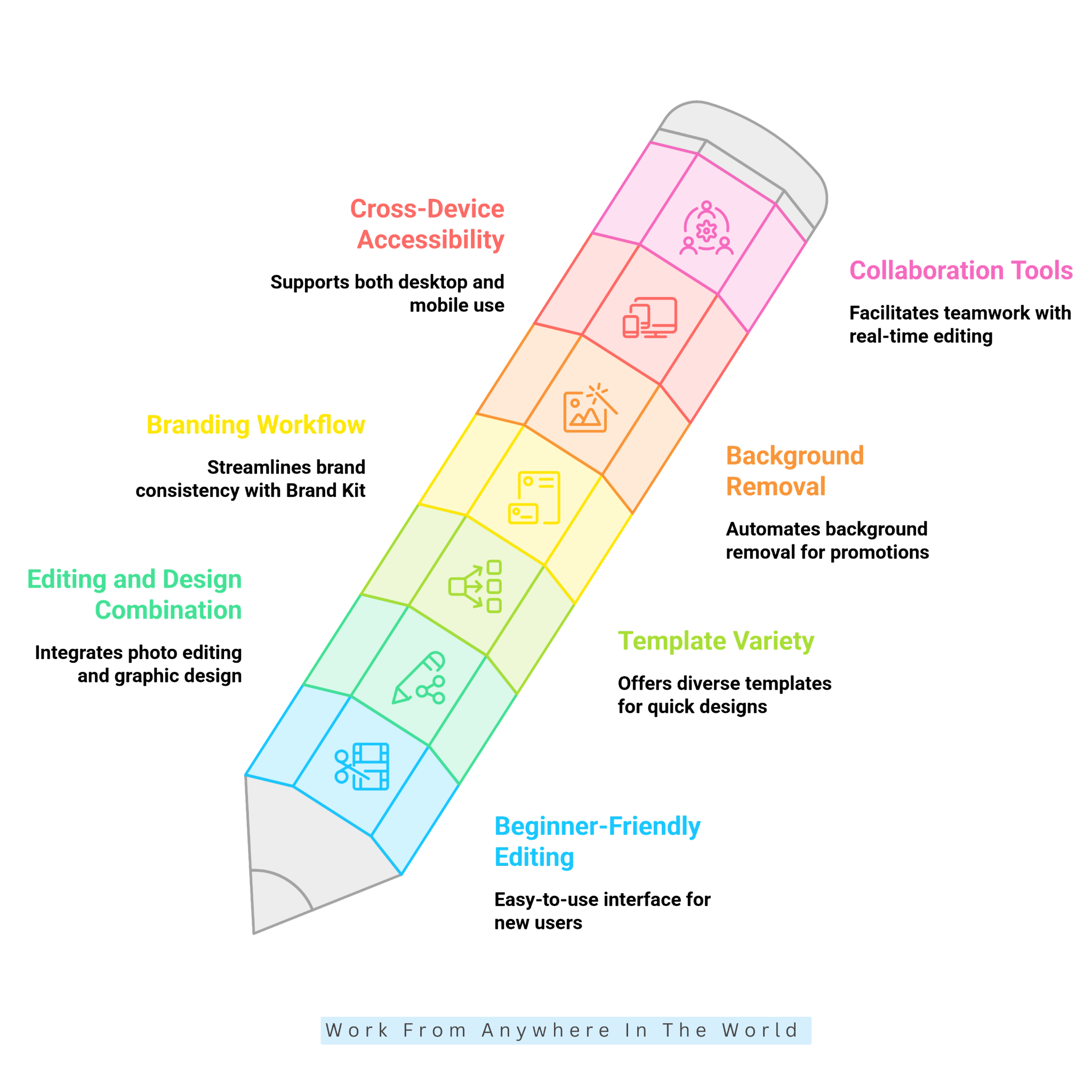
PicMonkey offers several advantages for beginners, content creators, and small businesses. Its photo editing tools, customizable templates, and creative resources make everyday design tasks more manageable.
The platform combines practical editing features with graphic design capabilities. Users can improve photographs, create promotional materials, and develop branded content without learning complicated software.
PicMonkey also supports different creative needs, from simple photo adjustments to social media campaigns. Its flexible tools help users produce attractive visuals while maintaining a consistent design style.
The following seven advantages highlight PicMonkey’s strengths and practical applications. They also explain why the platform may appeal to users seeking an accessible creative workspace.
1. Beginner-Friendly Editing
PicMonkey offers an accessible starting point for people exploring photo editing and graphic design. Users can move beyond basic filters without learning complicated professional software.
The interface combines familiar photo editing controls with creative design tools. Beginners can adjust photographs and create graphics within the same workspace.
For example, a small business owner can crop a product photograph and improve its appearance. They can then add text and turn it into a social media graphic without switching applications.
PicMonkey’s templates and tutorials also make learning the platform easier. Users can explore different features while gradually developing their editing and design skills.
This approach benefits beginners and content creators who value practical results. It makes everyday creative projects more manageable without requiring extensive technical knowledge.
2. Strong Combination Of Photo Editing And Design
PicMonkey combines photo editing and graphic design in one workspace. Users can improve photographs and turn them into finished visual projects without switching between applications.
Traditional photo editors often focus on image corrections rather than marketing layouts. Basic graphic design tools may offer convenient templates but fewer options for adjusting photographs.
PicMonkey brings these capabilities together. Users can edit an image, add it to a template, and customize the layout with text, graphics, and colours.
For example, a small business owner can improve a product photograph and create a promotional graphic. They can complete both tasks within the same platform.
This integrated workflow helps content creators and social media managers stay organized. It also reduces the need to export and import files between different applications.
3. Excellent Template Variety
PicMonkey offers a wide selection of templates that simplify everyday design projects. These ready-made layouts help users create attractive graphics without starting from scratch.
The template collection covers social media posts, business materials, marketing campaigns, and personal projects. Users can choose designs that suit their intended audience and purpose.
Each template is customizable, not fixed. Users can replace photographs, adjust typography, change colours, and add graphics to create a more personalized result.
Templates are particularly helpful for people who understand their marketing message but lack confidence in graphic design. Existing layouts provide inspiration for arranging images, text, and other visual elements.
This flexibility helps beginners and experienced creators save time while maintaining their individual style. It also makes it easier to produce consistent designs across different projects.
Wealthy Affiliate – Mini Review
If you’ve ever thought about turning your blog, passion, or niche into an online business,
Wealthy Affiliate (WA) is one of the most beginner-friendly platforms I’ve used.
It combines step-by-step training, website hosting, AI-powered tools,
keyword research, and an active community all in one place.
What I like most is that you can start for free (no credit card needed), explore the platform,
test the tools, and connect with other entrepreneurs before upgrading.
WA isn’t a “get rich quick” scheme — success comes from consistent effort
and applying what you learn over time.
4. Useful Branding Workflow
PicMonkey’s Brand Kit helps businesses maintain a consistent visual identity across their designs. It keeps essential branding resources organized and accessible within the platform.
Businesses can save their logos, brand colours, and preferred fonts for repeated use. This reduces the need to search for design assets or enter colour codes when creating new content.
The platform also supports custom font uploads, which are useful for businesses with established typography guidelines. These features help maintain a recognizable appearance and support personal branding across marketing materials.
Freelancers and agencies managing several clients may benefit from multiple Brand Kits available with PicMonkey’s Business plan. They can organize different visual identities separately without mixing branding elements.
This organized workflow makes PicMonkey useful for ongoing content creation rather than occasional image editing. It helps businesses produce professional-looking materials while maintaining brand consistency.
5. Helpful Background Removal
Manual background removal can be time-consuming, especially when photos have complex details. PicMonkey simplifies this task with its automatic Background Remover, available with the Pro plan.
The tool helps users isolate products, people, and other subjects from their original backgrounds. This makes it useful for online sellers, marketers, bloggers, and YouTube creators.
After removing the background, users can replace it with a different photo, solid colour, or graphic design. This flexibility supports different campaigns and broader eCommerce selling strategies.
For example, an online seller can place a product against a clean background for an online store. The same photograph can be adapted for social media advertisements or promotional banners.
Automatic background removal reduces the need for detailed manual selections. It also makes creating professional-looking graphics more manageable for users with limited editing experience.
6. Cross-Device Accessibility
PicMonkey supports creative projects on desktop computers and mobile devices. This flexibility helps users work on their designs without remaining tied to one location.
The desktop version provides a larger workspace for detailed photo editing and graphic design. PicMonkey’s mobile app offers convenient editing tools for smartphones and tablets.
Users can begin a project on their computer and return to it later on a mobile device. This makes it easier to handle small adjustments while travelling or working away from a desk.
PicMonkey’s mobile app also helps content creators who manage social media accounts from their phones. They can prepare graphics and make last-minute changes before publishing.
Access to both environments makes PicMonkey more versatile than a desktop-only app. Understanding the differences between mobile and desktop websites also helps creators prepare designs for different viewing experiences.
7. Collaboration For Growing Teams
PicMonkey offers collaboration features that help growing teams work together on creative projects. These tools are available through its Business plan.
Real-time co-editing allows team members to work on shared designs. Comments also make it easier to discuss specific elements and provide feedback without exchanging separate files.
Shared Spaces help teams organize their projects and keep important design materials accessible. Permission controls provide additional flexibility when managing access to shared work.
These features are particularly useful for marketing teams, agencies, and businesses with established approval processes. They also support managing a virtual team by keeping design feedback and revisions organized.
Instead of creating multiple versions and sending files back and forth, collaborators can work on shared projects. This approach supports clearer communication and a more organized team workflow.
Cons Of PicMonkey
Although PicMonkey offers useful photo editing and graphic design tools, it also has limitations worth considering. Some features require a paid subscription, while others may not meet experienced designers’ needs.
The platform focuses on accessible editing and everyday creative projects. Users who need advanced professional controls or specialized tools may find its capabilities restrictive.
Subscription options, collaboration requirements, and workflow preferences can also influence whether PicMonkey is the right choice. These considerations matter most for businesses that produce content regularly.
Understanding PicMonkey’s disadvantages alongside its strengths helps readers make an informed decision. The following limitations highlight areas worth examining before choosing a plan.
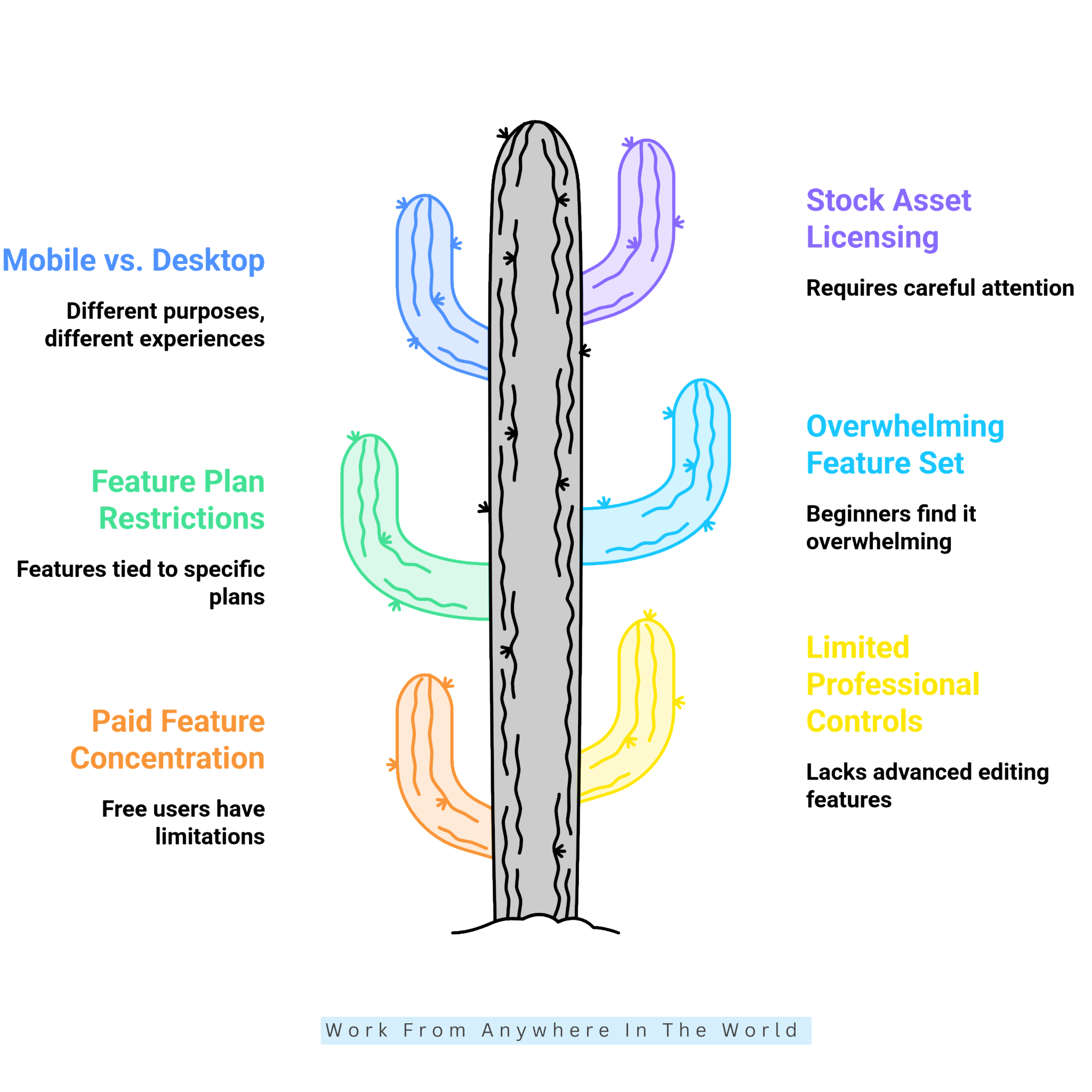
1. Limited Free Features
PicMonkey offers a free trial, but access to its editing tools comes with restrictions. Users generally need a paid subscription to download and share their finished designs.
Several useful features are reserved for paid plans. The Pro plan includes background removal, Smart Resize, Brand Kit, unlimited storage, premium stock assets, PDF export, and custom font uploads.
These restrictions may disappoint casual users who only need occasional photo editing. Paying for a subscription might not be worthwhile when their design requirements are limited.
For businesses and regular content creators, however, the additional features may justify the expense. The decision depends on how frequently they use the platform and which tools they need.
Before subscribing, users should explore PicMonkey’s free trial and compare the available plans. This helps determine whether the included features suit their creative projects and budget.
2. Limited Advanced Editing Tools
PicMonkey focuses on accessible photo editing and graphic design rather than highly specialized image manipulation. This makes the platform approachable, although its tools may not satisfy every professional requirement.
Experienced photographers and graphic designers sometimes need more detailed editing controls. Complex photo corrections, advanced compositing, and technical production tasks may require specialized software.
For example, professional photographers may need precise colour adjustments or sophisticated retouching capabilities. Designers working with complicated image compositions may also prefer applications with more extensive editing options.
PicMonkey remains useful for everyday marketing graphics, social media content, and product photography. Its combination of editing and design tools supports many common creative projects.
However, users with demanding technical requirements should compare PicMonkey with professional alternatives. The best choice depends on project complexity and the editing capabilities you need.
3. Subscription Plan Restrictions
PicMonkey’s features vary by subscription plan, so it’s important to understand what each option includes. Users may need to upgrade to access tools that support their particular projects.
Not every plan includes features such as background removal, Smart Resize, Brand Kit, and premium stock assets. Multiple Brand Kits and certain collaboration tools also require higher-tier subscriptions.
For example, a blogger creating occasional graphics may have different requirements from an agency managing several brands. Choosing the wrong plan could mean paying for unnecessary features or missing key tools.
These differences can complicate subscription selection, especially for beginners. Users should identify their essential editing and design requirements before comparing plans.
4. Overwhelming Features For Beginners
PicMonkey combines photo editing, templates, graphics, branding, stock assets, and video tools in one platform. While this variety offers flexibility, beginners may initially find the number of features overwhelming.
Learning where to find different tools and understanding how they work together takes time. Users who only need basic editing may find the interface more complicated than expected.
For example, social media managers can begin with templates, text, graphics, and resizing tools. Once comfortable, they can explore branding features, animations, and more advanced editing options.
Online sellers may prefer to start with photo adjustments, background removal, and product layouts. These features address common eCommerce needs without requiring users to explore every available tool.
Learning PicMonkey gradually makes its extensive feature collection easier to manage. Starting with essential tools helps beginners build confidence before exploring additional creative possibilities.
5. Different Mobile And Desktop Experiences
PicMonkey supports editing on both desktop computers and mobile devices, but the experience differs between them. Users may find certain design tasks more comfortable on one device than another.
The mobile app is convenient for making quick adjustments, preparing social media graphics, and editing while travelling. However, smaller screens may make detailed design work more challenging.
Complex layouts involving multiple images, text elements, and graphics are often easier to manage on a desktop computer. A larger display provides more room for arranging elements and reviewing the finished design.
Creators who regularly switch between devices may appreciate PicMonkey’s flexibility. However, they should not expect every editing task to feel equally convenient on a smartphone or computer.
Understanding these differences helps users choose the most suitable device for each project. It also helps prevent frustration when switching between mobile and desktop workflows.
6. Stock Asset Licensing Restrictions
PicMonkey provides stock photographs, graphics, and other visual resources that simplify content creation. Users who want to explore additional stock images can also read our Shutterstock Review.
PicMonkey’s licensing terms restrict certain uses of its stock content. For example, users cannot resell stock photos or graphics as standalone assets or claim them as their own.
These restrictions matter most for businesses creating merchandise, digital products, templates, or promotional materials. Different commercial applications may involve additional licensing considerations.
Stock resources remain useful for creating original designs, including social media graphics and marketing materials. However, incorporating an asset into a design does not automatically permit every commercial use.
Before selling or distributing products containing PicMonkey assets, users should review the applicable licensing terms. This helps them understand permitted uses and avoid potential copyright or licensing problems.
Frequently Asked Questions
Q1: Who Should Use PicMonkey?
PicMonkey suits bloggers, small businesses, marketers, freelancers, and content creators who regularly produce visual content. It combines photo editing and graphic design in one workspace.
The platform is particularly useful for creating social media graphics, promotional materials, and branded content. Users can complete everyday design projects without learning complicated professional software.
Q2: Is PicMonkey Good For Beginners?
Yes, PicMonkey offers beginner-friendly editing tools, customizable templates, and straightforward design controls. New users can begin with basic photo adjustments and simple graphics.
As their confidence grows, they can explore branding tools, background removal, and other creative features. The available templates also help beginners develop attractive layouts without starting from scratch.
Q3: Can PicMonkey Be Used For Free?
PicMonkey offers a free trial, allowing users to explore its editing and design capabilities. However, downloading finished projects generally requires a paid subscription.
Users should compare the available plans before subscribing. This helps them understand which features are included and whether the subscription suits their needs.
Q4: Can PicMonkey Remove Photo Backgrounds?
Yes, PicMonkey includes an automatic Background Remover with its Pro plan. This feature helps users isolate people, products, and other subjects from their original backgrounds.
You can replace the removed background with a photograph, solid colour, or graphic design. This is particularly useful for product photography, social media content, and promotional materials.
Q5: Can PicMonkey Be Used For Commercial Projects?
Yes, PicMonkey can create marketing graphics, promotional materials, and other commercial designs. Businesses can combine photographs, text, templates, and graphics to produce branded content.
However, commercial users must follow the licensing conditions associated with stock assets. Reviewing the applicable terms is particularly important when creating merchandise, templates, or products intended for resale.
Q6: Is PicMonkey Better Than Canva?
Both PicMonkey and Canva provide photo editing, customizable templates, and graphic design tools. PicMonkey emphasizes photo editing alongside design, while Canva supports a broader range of creative projects.
The better choice depends on your needs and preferred workflow. Readers can explore our Canva Review to compare its features, advantages, and limitations before deciding.
Conclusion
This PicMonkey Review highlights the platform’s practical combination of photo editing and graphic design. Its accessible tools make creating professional-looking visuals easier for bloggers, marketers, and small businesses.
Features such as customizable templates, background removal, Smart Resize, and Brand Kit support everyday creative projects. Stock resources and collaboration tools provide additional flexibility for regular content creators.
However, subscription restrictions and limited advanced editing capabilities may not suit everyone. Professional designers with specialized requirements may prefer software offering more detailed controls.
PicMonkey is particularly appealing to users who want to edit photographs and create branded graphics in one workspace. Its combination of convenience and creative flexibility makes it worth considering.
Exploring the available trial before subscribing is a sensible starting point. Comparing its features with your creative needs and budget will help you decide whether PicMonkey is the right choice.
I trust you enjoyed this PicMonkey Review. Please stay tuned for more insightful blogs on affiliate marketing, online business, and working from anywhere in the world.
Take care!
— JeannetteZ 🌍✨
💬 Your Opinion Is Important To Me
Do you have thoughts, ideas, or questions? I’d love to hear from you. Please leave your comments below or email me directly at Jeannette@WorkFromAnywhereInTheWorld.com.
📚 More Work From Anywhere Reads
🚀 Ready to Build a Business You Can Run from Home
Or from Anywhere in the World?
Imagine creating income on your terms — from home, a cozy café, or wherever life takes you.
With the right tools, training, and community support, it’s entirely possible.
Start your own online business for free — no credit card needed.
Disclosure
This post may contain affiliate links. As an Amazon Associate and participant in other affiliate programs, I earn from qualifying purchases at no extra cost to you. Please read my full affiliate disclosure.