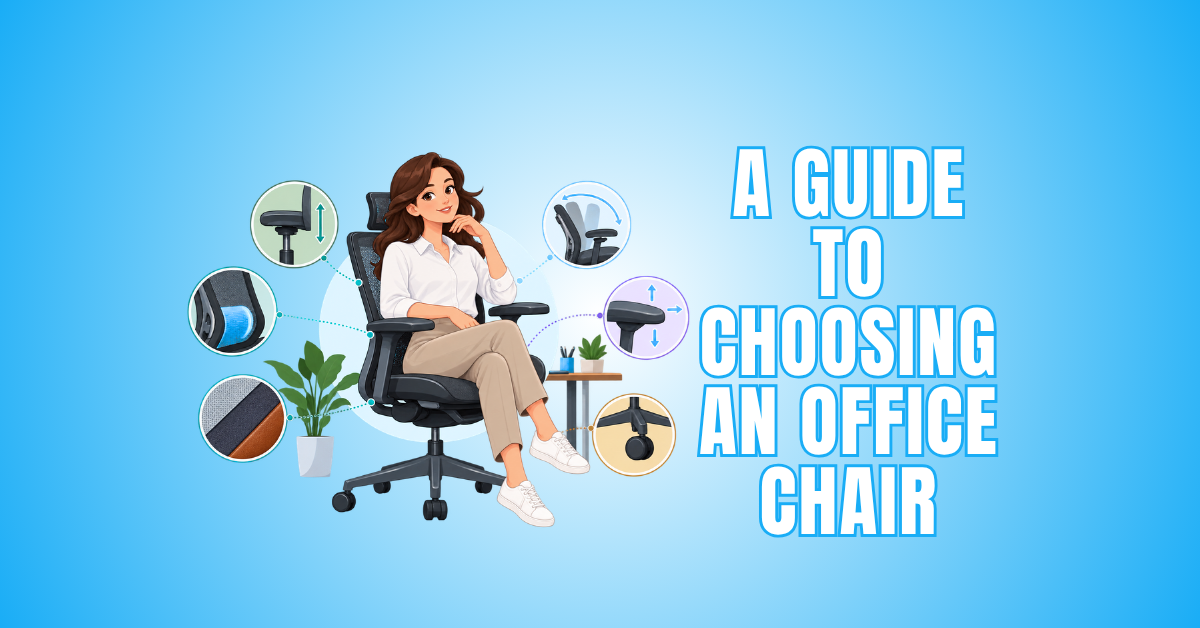
A Guide To Choosing An Office Chair: 10 Essential Tips
Choosing an office chair is about more than finding a soft seat or an attractive design. The right chair should work comfortably with your body, desk, and everyday working habits.
If you spend several hours at a desk, small details can make a noticeable difference. Seat height, depth, lumbar support, armrests, and adjustability all influence how comfortably the chair fits your workspace.
Your individual needs matter too. Body size, preferred sitting position, desk height, available space, and how long you sit can all affect which chair feels right for you.
Durability and build quality are also worth considering, especially if you’ll use the chair every day. Looking beyond appearance can help you choose one that remains comfortable and practical over the long term.
This guide explains the important features to check before buying an office chair. It also introduces seven well-known international chair brands and models to help you compare available options.
A 10-Step Guide To Choosing An Office Chair
Choosing the right office chair starts with understanding how you use your workspace. A chair that works well for occasional computer use may not provide the comfort and support you need for several hours of daily work.
When choosing an office chair, consider how the seat, backrest, armrests, and adjustments work together. Each feature can affect how comfortably the chair accommodates your body and preferred sitting position.
Your desk and equipment also play a role. The chair should allow you to sit comfortably at your workstation while keeping frequently used items within easy reach.
There is no single office chair that suits everyone. Body size, working habits, available space, and personal comfort preferences can all influence which features matter most.
The following ten tips will help you compare important chair features and decide what to look for before making your choice. They can also help you narrow your options based on your workspace, working habits, and individual comfort needs.
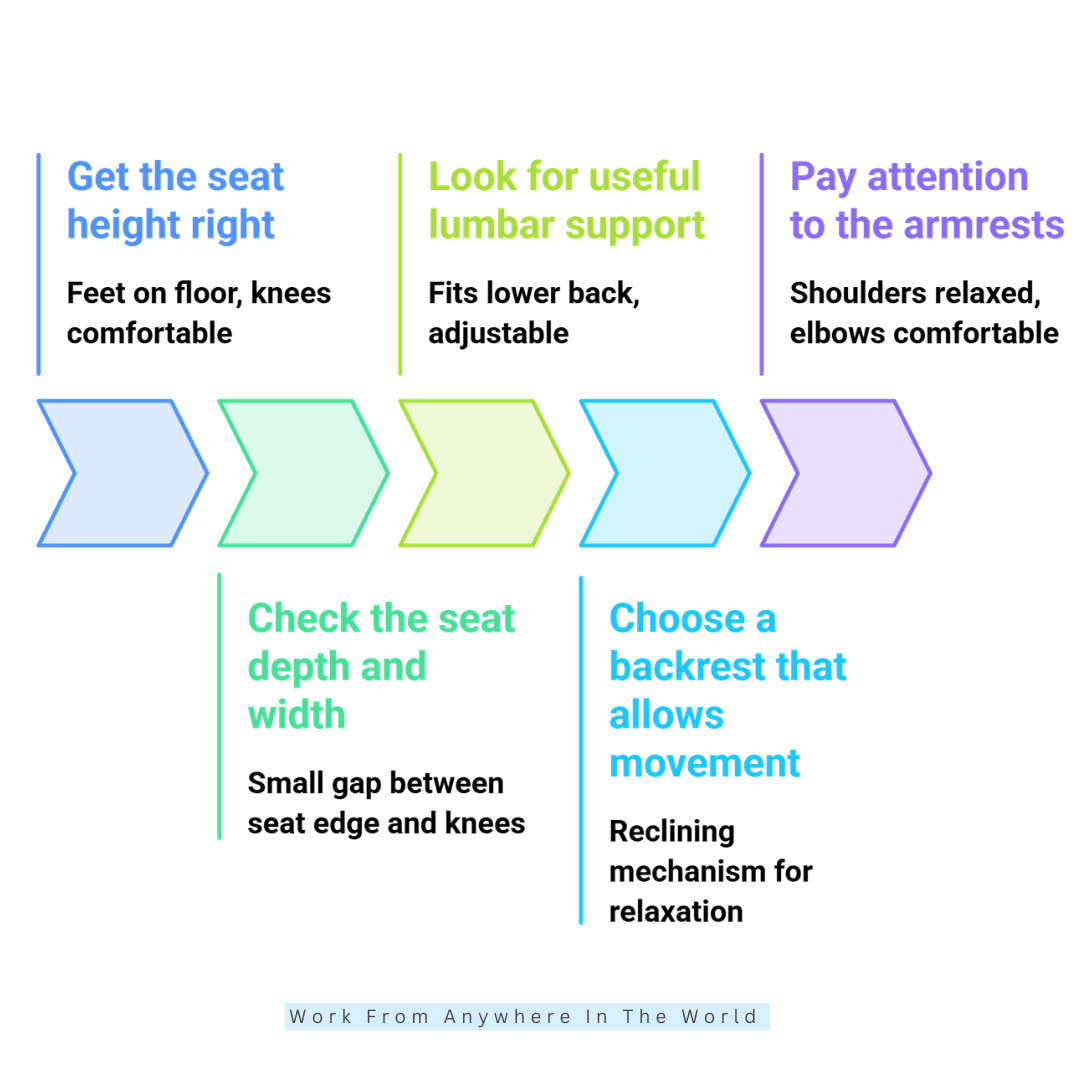
1. Get The Seat Height Right
Seat height affects almost everything else about your sitting position. When properly adjusted, your feet should rest comfortably on the floor or a suitable footrest, with your knees in a relaxed position.
Look for an office chair with enough seat height adjustment to suit both your body and your workstation. A wider adjustment range can also be useful when working with different desk heights.
A common mistake is raising the chair simply because it makes the keyboard or desktop easier to reach. This can leave your feet unsupported and make the overall setup less comfortable.
Instead, adjust the chair to suit your body first. You can then position your desk, keyboard, monitor, or footrest as needed to create a more comfortable office workstation.
When choosing an office chair, useful adjustability generally matters more than an oversized backrest or extra-thick cushioning. The goal is to find a chair you can adapt to your individual working position.
Key Points
- Choose a chair with suitable seat height adjustment.
- Keep your feet comfortably supported.
- Adjust the chair to your body before adapting the workstation.
- Consider how the chair height works with your desk.
- Prioritize useful adjustments over excessive cushioning.
2. Check The Seat Depth And Width
Seat depth and width are easy to overlook when comparing office chairs, especially when shopping online. Both dimensions can have a noticeable effect on how comfortably the chair fits your body.
Sit fully against the backrest and consider the distance between the front edge of the seat and the back of your knees. Ideally, there should be a small, comfortable gap rather than pressure against the backs of your legs.
If the seat is too deep, you may find yourself sliding forward instead of using the backrest comfortably. A seat that is too shallow, on the other hand, may not provide enough support beneath your thighs.
Seat width matters as well. You need enough room to shift positions comfortably, but an excessively wide seat can make it harder to position the armrests where you need them.
When choosing an office chair that several people will use, adjustable seat depth can be particularly useful. It lets different users adjust the chair to their body size and sitting preferences.
Key Points
- Consider both seat depth and seat width.
- Leave a comfortable gap behind your knees.
- Avoid a seat that feels excessively deep or shallow.
- Make sure the seat provides room to change position comfortably.
- Consider adjustable seat depth for multiple users.
3. Look For Useful Lumbar Support
Lumbar support is designed to support the natural curve of your lower back while you are seated. When choosing an office chair, look at how well the support fits your body rather than simply whether the chair includes it.
An adjustable lumbar system gives you more control over where the support sits. Some office chairs allow vertical adjustment, while others also let you change the depth or amount of support.
Fixed lumbar support can still work well when its shape and position suit your body. However, support that sits in the wrong place may feel uncomfortable or make it difficult to settle naturally against the backrest.
More pronounced lumbar support isn’t necessarily better. The goal is to find a comfortable level of support that works with your preferred sitting position rather than forcing your lower back forward.
If possible, test different lumbar settings before deciding which feels best. Small adjustments can make a noticeable difference when you spend several hours working in the chair.
Key Points
- Look for lumbar support that fits your lower back comfortably.
- Consider adjustable lumbar support for greater flexibility.
- Don’t assume stronger lumbar support is always better.
- Make sure the support allows you to use the backrest comfortably.
- Test different settings when possible.
4. Choose A Backrest That Allows Movement
A supportive backrest should help you sit comfortably while still allowing you to change position throughout the day. Remaining in one fixed position for long periods can become uncomfortable, even in a well-designed office chair.
A reclining backrest lets you move between more upright working positions and relaxed positions as needed. When choosing an office chair, consider how smoothly the backrest moves and whether the recline feels natural.
Adjustable tilt tension can give you greater control over how easily the chair reclines. Some chairs also include a tilt lock, which can be useful when you prefer to keep the backrest in a particular position.
If you tend to change positions frequently, a flexible or free-moving mechanism may suit your working style better. The key is having enough movement without feeling like the chair is hard to control.
Backrest height isn’t the only consideration. Shape, recline range, support, and adjustability all matter when deciding whether a backrest suits the way you work.
Key Points
- Choose a backrest that supports comfortable movement.
- Consider how smoothly the chair reclines.
- Look for adjustable tilt tension when useful.
- Decide whether you prefer a tilt lock or freer movement.
- Consider backrest shape and adjustability, not just height.
5. Pay Attention To The Armrests
Armrests can help support your arms while you work, but their position matters. Poorly positioned armrests may cause you to raise your shoulders or prevent you from sitting comfortably at your desk.
Your shoulders should remain relaxed, with your elbows and forearms comfortably supported when typing or using a mouse. When choosing an office chair, consider whether the armrests can be adjusted to suit your body and working position.
Height-adjustable armrests are useful for many people, while models with additional adjustments can provide greater flexibility. Some allow you to change the width, depth, or angle as well as the height.
Consider how the armrests work with your desk too. If they are too high or wide to fit underneath it, you may have to sit farther away and reach forward to use your keyboard or mouse.
Before buying, compare the armrest dimensions with the clearance beneath your desk. This simple measurement can help you determine whether the chair will fit comfortably into your existing workstation.
Key Points
- Look for armrests that allow your shoulders to remain relaxed.
- Consider how much armrest adjustment you actually need.
- Make sure the armrests work with your desk height and width.
- Avoid a setup that forces you to reach forward.
- Check desk clearance before choosing your chair.
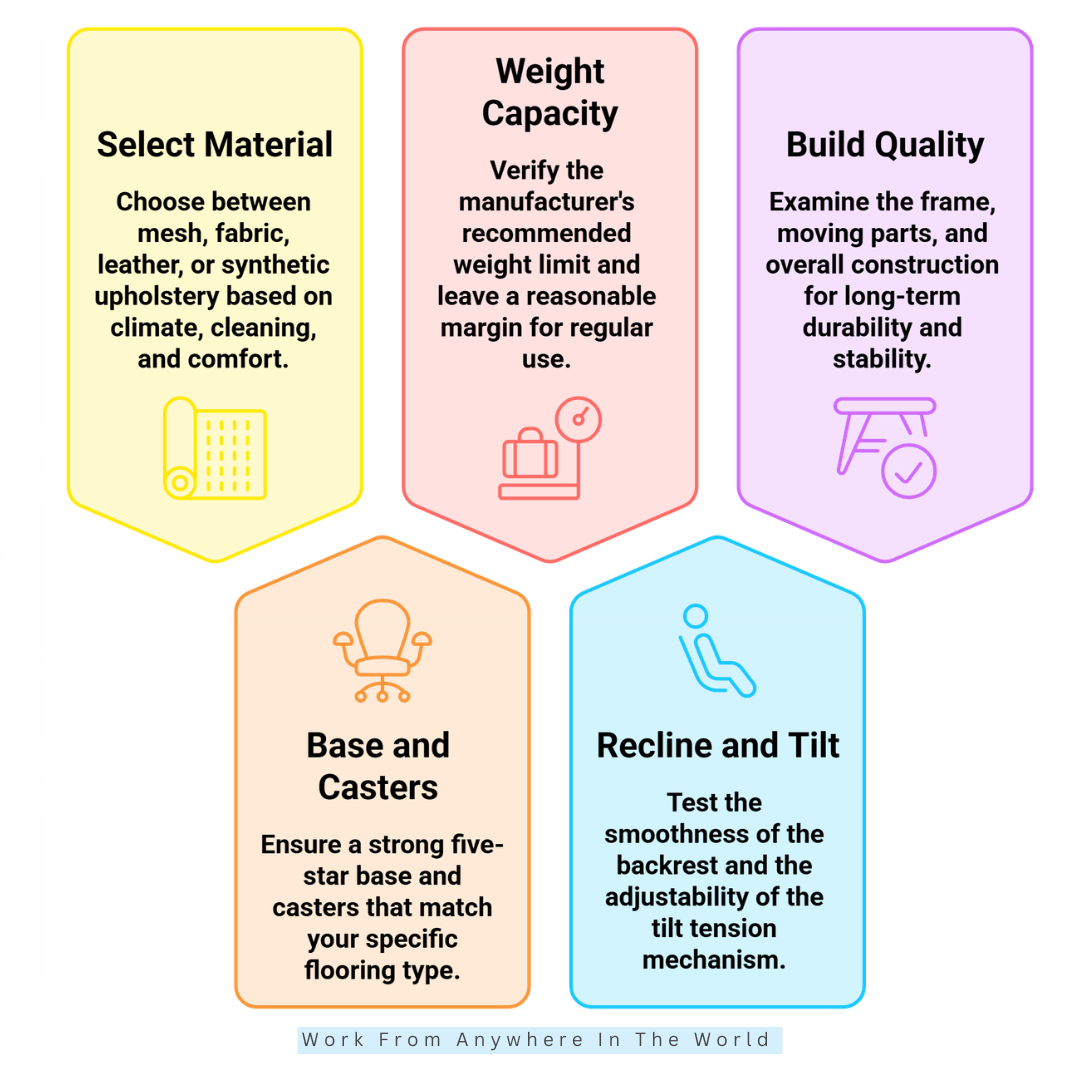
6. Select The Right Material
The material of an office chair can affect comfort, airflow, cleaning, and appearance. When choosing an office chair, think about how the material will feel during your typical working day rather than focusing on looks alone.
Mesh is popular because it allows air to circulate through the seat or backrest, which can feel more comfortable in warmer environments. Quality matters, however, because some mesh may feel rough or provide less support over time.
Fabric upholstery often provides a softer and warmer sitting surface. It is available in many textures and designs, although spills and stains may require more careful cleaning than some other materials.
Leather and synthetic leather can create a polished appearance and are generally easy to wipe clean. However, they may feel warmer during long working sessions, particularly in hot or humid conditions.
The best office chair material depends on your climate, comfort preferences, cleaning needs, budget, and workspace. Consider how the chair will be used every day rather than choosing a material based solely on appearance.
Key Points
- Consider comfort, airflow, cleaning, and appearance.
- Mesh can provide greater airflow in warmer environments.
- Fabric often offers a softer sitting surface.
- Leather and synthetic leather are generally easy to wipe clean.
- Choose a material that suits your everyday working environment.
7. Consider The Base, Casters, And Stability
The base and casters affect how stable an office chair feels and how easily you can move around your workspace. These features may receive less attention than the seat or backrest, but they matter during everyday use.
A sturdy five-star base is common on office chairs and provides support in several directions. When choosing an office chair, also check that its overall dimensions and weight capacity are appropriate for the intended user.
Casters should suit the type of flooring in your workspace. Wheels designed primarily for carpet may perform differently on hardwood, laminate, tile, or other hard flooring.
The chair should roll smoothly without requiring excessive effort, but it shouldn’t move so freely that you constantly slide away from your desk. Consider how easily you can reposition yourself during normal work.
Stability matters when you lean back, turn, or move around your workstation. A well-designed chair should feel secure during these movements rather than unstable or difficult to control.
Key Points
- Look for a sturdy and stable chair base.
- Check the manufacturer’s weight capacity and chair dimensions.
- Choose casters suitable for your flooring.
- Make sure the chair rolls smoothly and predictably.
- Consider stability during reclining and everyday movement.
8. Check The Chair’s Weight Capacity
Weight capacity is an important specification to consider, particularly when an office chair will be used for several hours each day. Don’t assume that a larger-looking chair automatically supports a higher weight.
Check the manufacturer’s recommended weight capacity before buying. When choosing an office chair, make sure the specifications are appropriate for the person who will use it rather than relying on the chair’s appearance.
Weight capacity is only part of the picture. Seat width, seat depth, base construction, and overall chair dimensions can also influence whether a particular model feels comfortable and suitable.
A chair may have an appropriate weight rating but still feel restrictive if the seat is too narrow. Comparing the dimensions with your individual needs can help you avoid choosing a chair that doesn’t fit comfortably.
For a shared workspace, consider both weight capacity and the chair’s adjustment range. A model that accommodates different body sizes and sitting preferences can provide greater flexibility for multiple users.
Key Points
- Check the manufacturer’s recommended weight capacity.
- Don’t judge capacity by the size of the chair.
- Consider seat dimensions and base construction as well.
- Make sure the chair fits the intended user’s individual needs.
- Look for a broad adjustment range in shared workspaces.
9. Test The Recline And Tilt Mechanism
A chair’s recline and tilt mechanism affects how easily you can change positions throughout the working day. When choosing an office chair, consider whether the backrest moves smoothly and gives you enough control over its movement.
Tilt tension allows you to adjust how much resistance you feel when leaning back. This can help you adapt the chair’s movement to your body weight and personal preference.
Some office chairs offer several lockable recline positions, while others allow more continuous movement. Neither approach is necessarily better, so consider which one suits the way you prefer to work.
Your daily activities can help determine which features are useful. A stable upright position may suit extended periods of typing, while a comfortable recline can be helpful when reading, attending virtual meetings, or taking a short break from the keyboard.
More adjustments aren’t automatically better if you never use them. Look for a recline and tilt mechanism that provides the flexibility you need without adding unnecessary complexity.
Key Points
- Check whether the chair reclines smoothly.
- Consider adjustable tilt tension for greater control.
- Compare lockable positions with continuous movement.
- Think about how reclining fits your daily work habits.
- Choose adjustments you are likely to use regularly.
10. Consider The Chair’s Build Quality
Build quality can determine how well an office chair holds up to regular use. A chair may feel comfortable when new but become less practical over time if the frame, base, controls, or moving parts are poorly constructed.
Look beyond the upholstery and examine the chair’s overall construction. The frame, base, casters, adjustment controls, and reclining components should feel sturdy and operate smoothly.
When choosing an office chair for daily use, durability deserves particular attention. Consider how solid the chair feels when you sit down, recline, turn, or shift your weight from side to side.
Also look at the materials used and whether important components can be replaced if they wear out. Replaceable casters, armrests, or other parts may help extend the useful life of a well-made chair.
Finally, consider how the manufacturer describes the chair’s intended use. A model designed for regular office work may be more appropriate for a full-time workstation than one intended primarily for occasional seating.
Key Points
- Examine the chair’s overall construction, not just its upholstery.
- Check that controls and moving parts operate smoothly.
- Consider durability when the chair will be used every day.
- Look for replaceable components when available.
- Choose a chair designed for your expected level of use.
7 International Office Chair Brands And Models Worth Considering
Once you know what to look for when choosing an office chair, comparing established brands and models becomes much easier. Different chairs approach comfort, adjustability, support, and movement in different ways.
Some models emphasize extensive adjustments, while others rely on flexible materials or simpler designs that respond naturally as you move. The right approach depends on how you prefer to sit and work.
Your body size, desk setup, working habits, and typical hours of use can all influence which chair feels most suitable. Features that matter greatly to one person may be less important to another.
Brand reputation can be useful when researching your options, but it shouldn’t be the deciding factor. Look closely at how each chair is designed and whether its features match the priorities you identified in the first part of this guide.
The following seven international office chair brands and models provide a useful starting point for comparison. Each offers a different combination of design, adjustability, movement, and everyday comfort.
1. Herman Miller Aeron
The Herman Miller Aeron is one of the best-known ergonomic office chairs. Its distinctive design uses a breathable suspension material rather than a traditional upholstered seat and backrest.
The chair’s 8Z Pellicle suspension is designed with different tension zones to provide support while allowing airflow. This can make the Aeron appealing to people who prefer a cooler sitting surface during long working sessions.
Depending on the configuration, the Aeron can include PostureFit SL back support, adjustable arms, and Herman Miller’s Harmonic 2 Tilt mechanism. These features provide several ways to adapt the chair to different working positions.
The Aeron is also available in three sizes, making chair dimensions an important part of choosing the right model. When choosing an office chair, finding an appropriate fit can be just as important as having numerous adjustments.
This model may suit professionals who prefer a supportive suspension chair and spend many hours at a desk. However, people who prefer a soft, cushioned seat may find its suspension design less familiar.
Key Points
- Uses breathable 8Z Pellicle suspension.
- Available in three different sizes.
- Offers adjustable ergonomic features depending on configuration.
- Designed to support movement during office work.
- Best suited to people who prefer a suspension-style seat.
2. Steelcase Gesture
The Steelcase Gesture is designed to accommodate the different ways people work with computers and mobile devices. Its adjustable features allow users to shift positions as they move between a keyboard, mouse, phone, tablet, or multiple screens.
One of its distinctive features is the highly adjustable 360-degree arm design. The armrests can be repositioned to support different tasks and working positions rather than remaining fixed in one place.
The Gesture also uses Steelcase’s 3D LiveBack technology, which is designed to flex as you move. This allows the backrest to respond to changes in position rather than encouraging you to remain in one fixed posture.
When choosing an office chair for a varied work routine, this combination of movement and adjustability may be particularly useful. It can suit professionals who frequently change tasks or use several devices throughout the working day.
The extensive adjustments may be more than some people need, however. Someone with a simpler workstation may prefer a chair with fewer controls and a more straightforward setup.
Key Points
- Features highly adjustable 360-degree arms.
- Uses 3D LiveBack technology to accommodate movement.
- Supports a variety of working positions and devices.
- Offers extensive adjustment for different work routines.
- May provide more features than some users require.
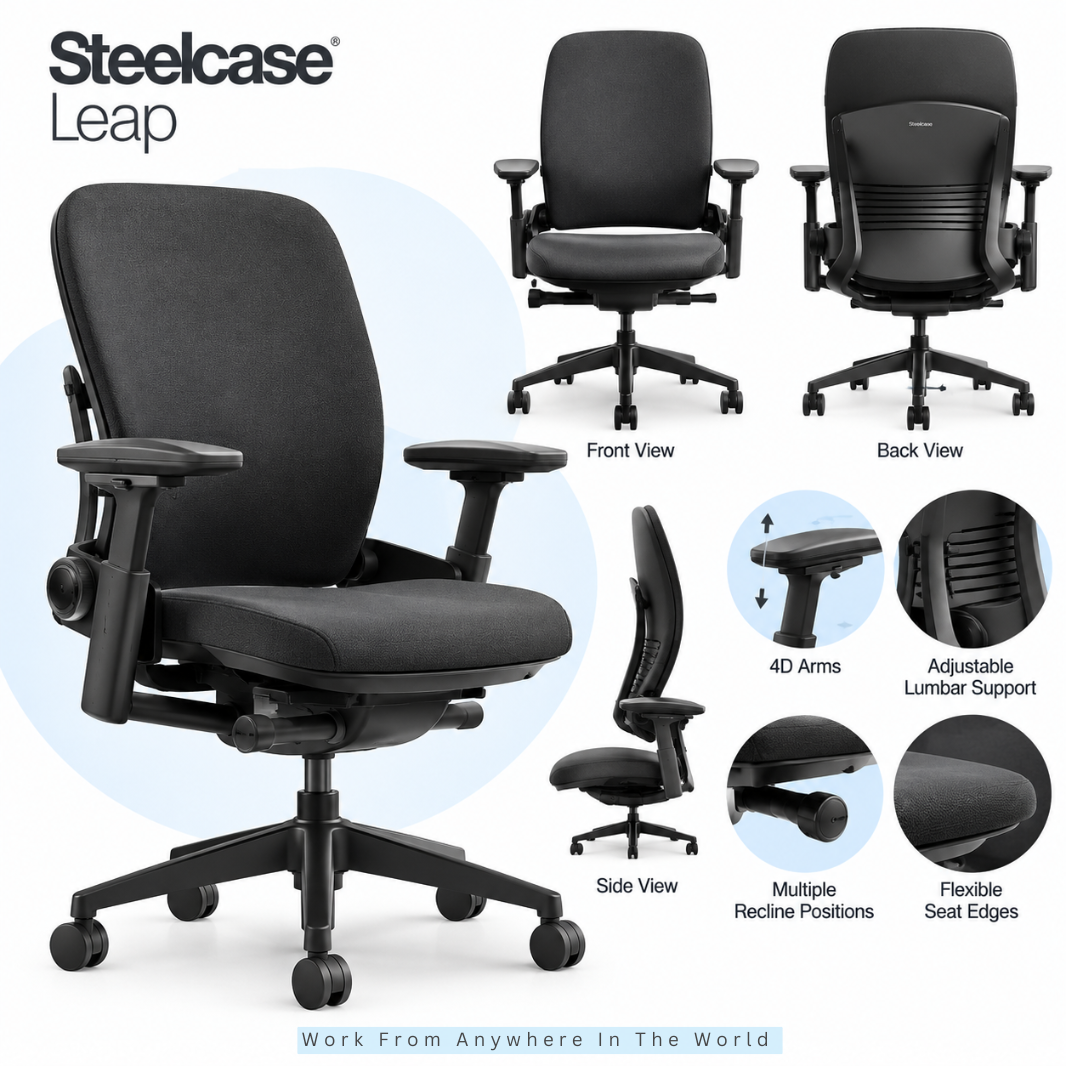
3. Steelcase Leap
The Steelcase Leap is designed for people who want considerable control over how their office chair fits and moves. Its range of adjustments allows users to fine-tune several areas rather than relying on one fixed ergonomic shape.
The chair includes adjustable seat depth, lumbar support, lower-back firmness control, and highly adjustable arms. These features can help accommodate different body sizes, sitting preferences, and workstation setups.
Steelcase’s LiveBack technology is designed to flex as you change position, while the seat edge responds as you move. The recline system also provides control over how far you lean back and how much resistance you experience.
When choosing an office chair for several hours of daily use, this level of customization can be valuable. It may particularly suit people who like to experiment with their chair settings until they find a comfortable working position.
The number of adjustments can take some time to become familiar with. Someone who prefers a simpler chair may not need this much customization, but the flexibility is one of the Leap’s defining features.
Key Points
- Offers extensive adjustment for individual fit.
- Includes adjustable seat depth and lumbar support.
- Uses LiveBack technology to accommodate movement.
- Provides adjustable arms and recline controls.
- Suits users who value a highly customizable office chair.
4. Haworth Fern
The Haworth Fern takes a flexible approach to ergonomic support. Its backrest is designed to move with the user rather than hold the body in one fixed position throughout the working day.
Its Wave Suspension system is designed to provide support while responding to movement. This may appeal to people who frequently shift positions while sitting and prefer a backrest with greater flexibility.
Depending on the configuration, the Fern offers features such as adjustable seat height and depth, lumbar support, tilt tension, forward tilt, and adjustable armrests. When choosing an office chair, check the exact configuration because available features can vary.
The forward-tilt option may be useful for tasks that involve working closer to the desk, such as writing or detailed computer work. Other adjustments allow users to personalize the chair according to their body and preferred working position.
The Fern may suit people who value movement and a broad range of ergonomic adjustments. However, comparing the specifications of the particular model you are considering is important because not every Fern configuration includes the same features.
Key Points
- Uses a flexible Wave Suspension backrest.
- Designed to accommodate movement while sitting.
- Offers several ergonomic adjustments depending on configuration.
- Forward tilt may suit tasks performed closer to the desk.
- Check the exact model specifications before choosing.
5. Humanscale Freedom
The Humanscale Freedom takes a different approach to ergonomic office chair design by reducing the number of manual adjustments required. Instead, several features are designed to respond automatically as the user moves.
Its weight-sensitive recline adjusts according to the user’s body rather than relying on a traditional manual recline control. This can appeal to people who prefer natural movement without frequently changing chair settings.
Depending on the configuration, the Freedom can also include a dynamic headrest that moves with the user while reclining. The armrests are designed to move with the chair, helping maintain support as your sitting position changes.
When choosing an office chair, consider whether you prefer automatic movement or greater manual control. The Freedom may suit professionals who want a relatively simple setup that adapts as they move throughout the working day.
Its simplicity is one of its distinguishing features, but it won’t suit everyone. People who prefer independently adjusting numerous chair settings may favour a more customizable model, making it worthwhile to try the Freedom before deciding.
Key Points
- Uses a weight-sensitive reclining mechanism.
- Reduces the need for multiple manual controls.
- Offers a dynamic headrest on applicable configurations.
- Designed to respond naturally as the user changes position.
- Suits people who prefer automatic adjustment over numerous controls.
Wealthy Affiliate – Mini Review
If you’ve ever thought about turning your blog, passion, or niche into an online business,
Wealthy Affiliate (WA) is one of the most beginner-friendly platforms I’ve used.
It combines step-by-step training, website hosting, AI-powered tools,
keyword research, and an active community all in one place.
What I like most is that you can start for free (no credit card needed), explore the platform,
test the tools, and connect with other entrepreneurs before upgrading.
WA isn’t a “get rich quick” scheme — success comes from consistent effort
and applying what you learn over time.
6. Knoll Generation
The Knoll Generation is designed for people who prefer to move between different sitting positions rather than remain in one fixed posture. Its flexible construction responds as you shift, lean, turn, or sit sideways during the working day.
The chair’s frameless Flex Back combines an elastomer back with a distinctive structure designed to allow multidirectional movement. It provides support while giving the upper body greater freedom to change positions.
Its Flex Seat also allows movement around the seat edge and includes adjustable seat depth. Continuous Lumbar extends the back support through the arm structure, helping maintain support when moving from upright to alternative sitting positions.
When choosing an office chair, this flexible approach may appeal to people who dislike feeling restricted by a rigid backrest. It can also suit workers who frequently change position as they move between different tasks.
However, the design may feel different to someone accustomed to a more structured office chair. Personal preference matters, so testing its flexible design before buying can help you decide whether this style of movement suits you.
Key Points
- Designed to accommodate frequent changes in sitting position.
- Uses a frameless Flex Back for multidirectional movement.
- Features a flexible seat with adjustable seat depth.
- Continuous lumbar support supports different sitting positions.
- May suit people who prefer a less rigid office chair.
7. HÅG Capisco
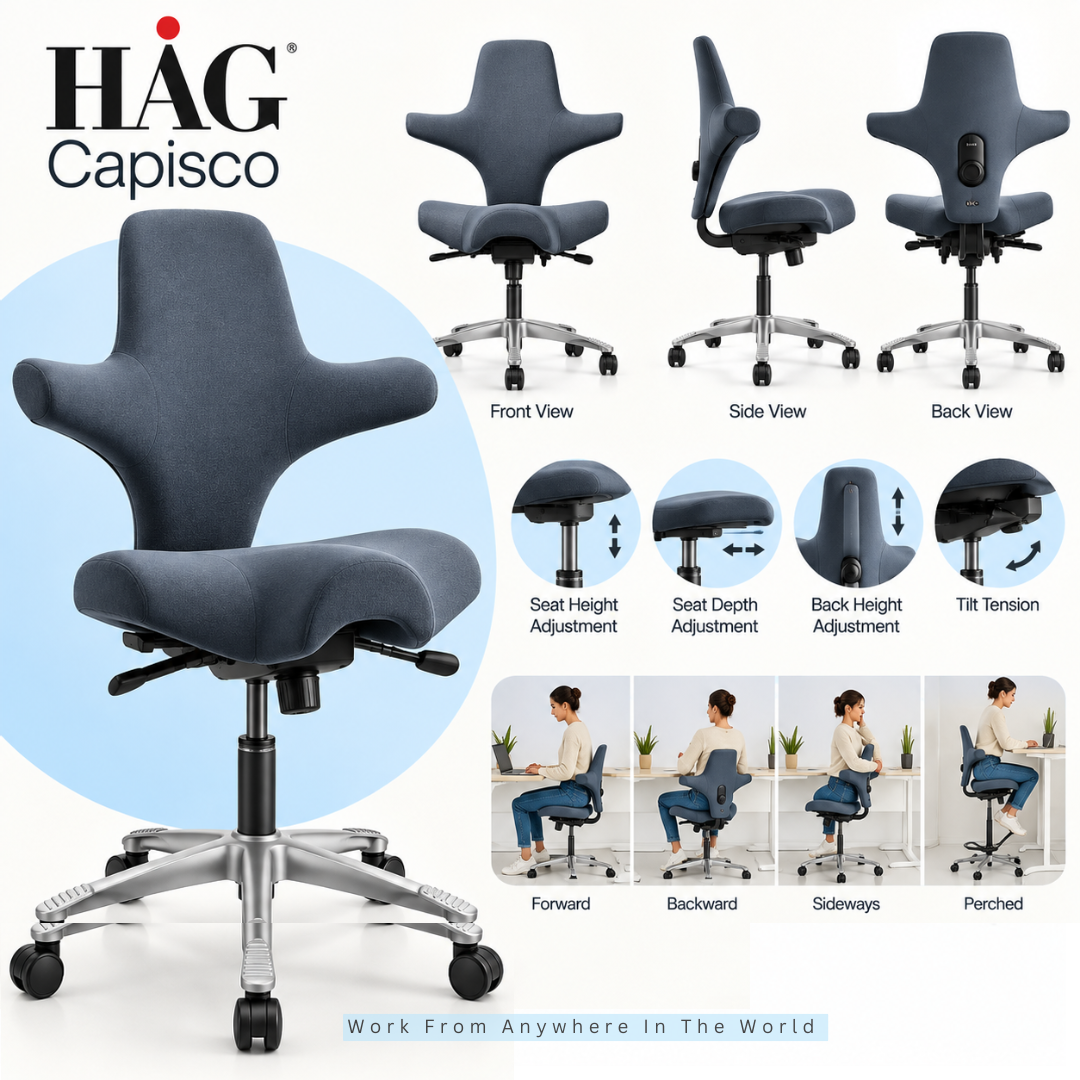
The HÅG Capisco stands apart from conventional office chairs with its distinctive saddle-style seat. Its design encourages users to change sitting positions rather than remain in one traditional posture throughout the working day.
The Capisco allows you to sit facing forward, backward, or sideways, as well as in a higher, more perched position. This flexibility may appeal to people who prefer a more active sitting style or frequently change positions while working.
The HÅG Capisco 8106 includes adjustable seat height, seat depth, backrest height, and tilt tension. Different lift options also allow the chair to work with a range of desk heights, including higher work surfaces.
When choosing an office chair for a sit-stand desk, this broader height range can be particularly useful. It gives users more flexibility to move between conventional sitting and higher working positions.
However, the saddle-style seat feels quite different from a conventional task chair. Trying the Capisco before buying can help you decide whether its shape and more active sitting style suit your body and working preferences.
Key Points
- Features a distinctive saddle-style seat.
- Encourages several different sitting positions.
- Offers adjustable seat depth and backrest height.
- Can accommodate higher working positions.
- May suit people who prefer a more active sitting style.
Frequently Asked Questions
Q1: Is An Ergonomic Office Chair Worth It?
An ergonomic office chair can be worthwhile if you spend several hours working at a desk. Features such as adjustable seat height, lumbar support, armrests, and recline can help you adapt the chair to your body and workstation.
However, the word “ergonomic” doesn’t guarantee that a particular chair will suit you. When choosing an office chair, individual fit and useful adjustments matter more than the label alone.
Q2: Is Mesh Better Than A Cushioned Office Chair?
Neither material is automatically better. Mesh office chairs generally provide greater airflow, while cushioned seats and backrests may offer a softer or warmer sitting experience.
Material quality, chair design, and personal preference all influence comfort. Consider your working environment and how the chair feels during extended use rather than choosing based on material alone.
Q3: Should An Office Chair Have Adjustable Lumbar Support?
Adjustable lumbar support can be useful because body proportions and sitting preferences vary. It allows you to change the position or amount of support rather than relying entirely on a fixed backrest shape.
However, adjustable lumbar support isn’t essential for everyone. A fixed system can also be comfortable when its shape and position suit your lower back properly.
Q4: Are Armrests Necessary On An Office Chair?
Armrests aren’t essential for everyone, but properly positioned ones can support your forearms while allowing your shoulders to remain relaxed. Adjustable armrests can provide additional flexibility for different tasks.
They should also work comfortably with your desk. Armrests that prevent you from moving close enough to your workstation may be more of a hindrance than a benefit.
Q5: How Long Should I Test An Office Chair?
Spend enough time in the chair to try its important adjustments and experience several normal working positions. A quick sit may not tell you how the chair will feel during regular use.
Adjust the seat height, backrest, armrests, lumbar support, and recline where applicable. If possible, use the chair with a desk so you can judge how well it fits your actual workstation.
Q6: Is A More Expensive Office Chair Always Better?
No. A more expensive office chair may offer stronger construction, higher-quality materials, or additional adjustments, but a higher price doesn’t guarantee a better individual fit.
Focus on the features you will actually use and how comfortably the chair accommodates your body and workspace. A simpler model that fits well may be a better choice than a premium chair with unnecessary features.
Q7: What Is The Biggest Office Chair-Buying Mistake?
One of the biggest mistakes is choosing a chair primarily because of its appearance, price, or one impressive feature. A chair needs to work as part of your complete workstation rather than simply look attractive.
Consider seat dimensions, adjustability, back support, armrests, materials, stability, and build quality together. Choosing an office chair based on overall fit can help you narrow your options more effectively.
Conclusion
The best office chair isn’t necessarily the most expensive or the one with the longest list of features. What matters most is how well the chair fits your body, workstation, and everyday working habits.
When choosing an office chair, consider the features that affect your individual fit and comfort. Seat dimensions, lumbar support, armrests, backrest movement, materials, stability, and adjustability all deserve attention.
Think about how you actually work as well. Someone who changes positions frequently may value flexible movement, while another person may prefer more structured support and precise adjustments.
Comparing established office chair brands can help you understand the different designs and features available. Whenever possible, test a chair and experiment with its adjustments rather than judging it solely by photographs or specifications.
A well-chosen office chair should work naturally with the rest of your workspace. Focus on the features that genuinely suit your needs, and you’ll have a much better foundation for making your final choice.
I trust you enjoyed this article on the [Blog Post Title]. Please stay tuned for more insightful blogs on affiliate marketing, online business, and working from anywhere in the world.
Take care!
— JeannetteZ 🌍✨
💬 Your Opinion Is Important To Me
Do you have thoughts, ideas, or questions? I’d love to hear from you. Please leave your comments below or email me directly at Jeannette@WorkFromAnywhereInTheWorld.com.
📚 More Work From Anywhere Reads
🚀 Ready to Build a Business You Can Run from Home
Or from Anywhere in the World?
Imagine creating income on your terms — from home, a cozy café, or wherever life takes you.
With the right tools, training, and community support, it’s entirely possible.
Start your own online business for free — no credit card needed.
Disclosure
This post may contain affiliate links. As an Amazon Associate and participant in other affiliate programs, I earn from qualifying purchases at no extra cost to you. Please read my full affiliate disclosure.