
How To Tell If A Website Is Legitimate: 11 Important Checks
Knowing how to tell if a website is legitimate has become increasingly important as more everyday activities move online. Shopping, banking, learning, working, and communicating often require us to trust websites with personal or financial information.
Unfortunately, a professional-looking website isn’t necessarily trustworthy. Fake websites can imitate legitimate businesses, use convincing designs, and create a sense of urgency to encourage visitors to act before checking carefully.
Some warning signs are easy to notice, while others require a closer look. The website address, contact information, independent reviews, privacy policies, payment methods, and other details can all provide useful clues.
No single check can guarantee that a website is legitimate. Looking at several signals together gives you a much better picture of whether a site deserves your trust.
This guide explains practical ways to evaluate a website before sharing personal information, creating an account, making a purchase, or entering payment details.
How To Tell If A Website Is Legitimate Before You Trust It
A trustworthy website is about more than professional design or familiar logos. Before you provide personal information, create an account, or make a purchase, it is worth looking more closely at who is behind the site.
Fake websites can imitate legitimate businesses surprisingly well. They may use convincing branding, realistic product images, and familiar payment logos to make visitors feel comfortable.
The strongest clues often come from several details working together. Business information, independent reviews, website history, privacy practices, and the way a company communicates with customers can all help you assess its credibility.
You don’t need technical expertise to investigate an unfamiliar website. A few practical checks can help you notice inconsistencies and decide whether the site deserves your trust before you proceed.
11 Checks To Help You Identify A Legitimate Website
A website can look professional and still give you reasons to be cautious. Instead of relying on appearance alone, look at several details that can help you evaluate whether the site deserves your trust.
Some clues are visible immediately, while others require a little investigation. Checking the website address, security features, contact details, business information, and independent reviews can reveal inconsistencies you might otherwise miss.
No single sign proves that a website is legitimate. Looking at several factors together can help you make a more informed decision before sharing personal information or making a purchase.
The following 11 checks provide a practical way to examine a website more carefully and recognize potential warning signs. Use them together to build a clearer picture before deciding whether a website is trustworthy.
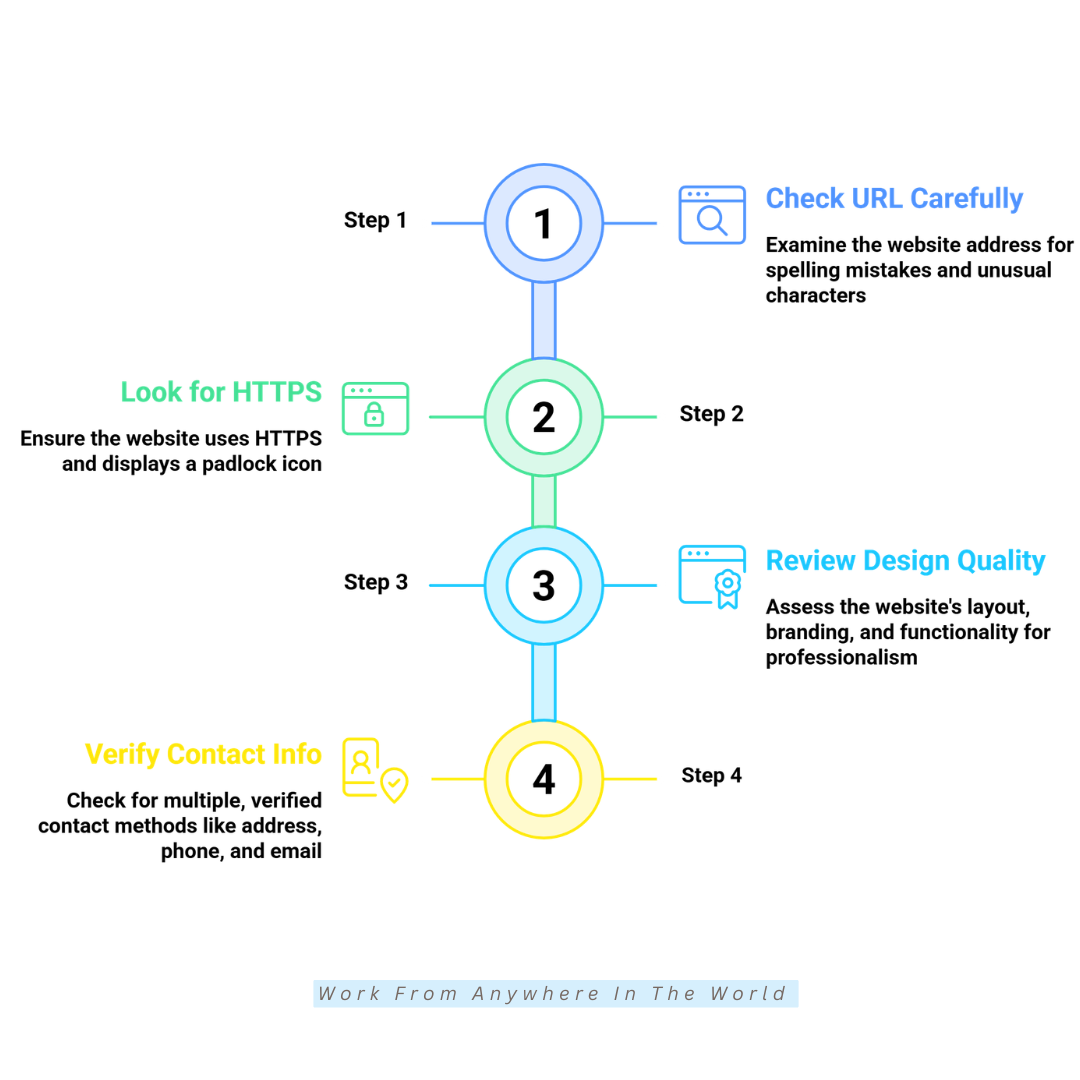
1. Check The Website URL Carefully
The website URL is one of the first things to examine when deciding whether a site is trustworthy. Fraudulent websites may use domain names that closely resemble those of established businesses.
Look carefully for misspelled brand names, substituted letters or numbers, added words, unusual punctuation, or unexpected domain endings. Small differences can be easy to overlook when a website otherwise looks convincing.
Pay particular attention when you arrive through an email, advertisement, text message, or social media link. Instead of trusting the link automatically, compare the address with the company’s official website before entering personal or payment information.
For example, a fraudulent website might replace a letter with a similar-looking number or add words to a familiar brand name. The goal is to make the address appear genuine at a quick glance.
For websites you use regularly, such as banking or payment services, saving the verified address as a bookmark can help you return to the correct site without relying on links in unexpected messages.
Key Points
- Read the complete website address carefully.
- Look for misspellings, substituted characters, or added words.
- Be cautious when arriving through unexpected links.
- Compare unfamiliar URLs with the company’s official website.
- Bookmark verified websites you use regularly.
2. Look For HTTPS Security
HTTPS means the connection between your browser and a website is encrypted. This helps protect information such as passwords and payment details while it travels between your device and the website.
However, HTTPS does not prove that a website is legitimate. Fraudulent websites can also use HTTPS, so it should be treated as a basic security feature rather than a guarantee that the business behind the site can be trusted.
Check the website address to see whether the connection uses HTTPS. Modern browsers also show security information about the connection, although the symbols and wording can vary by browser and version.
Be cautious about entering sensitive information on a website that does not use a secure connection. If the site asks for passwords, banking information, or payment details, an insecure connection is a strong reason to leave.
Use HTTPS alongside the other checks in this guide. A secure connection, accurate business information, independent reviews, and other trust signals provide a much more useful picture when considered together.
Key Points
- HTTPS encrypts information sent between your browser and the website.
- HTTPS is an important security feature, but it does not prove legitimacy.
- Fraudulent websites can also use secure HTTPS connections.
- Avoid entering sensitive information through an insecure connection.
- Consider HTTPS alongside several other trust signals.
3. Review The Website Design And Overall Quality
Website quality can provide useful clues about whether a business takes its online presence seriously. However, a polished design should never be treated as proof that a website is legitimate.
Look beyond the homepage and explore several areas of the site. Check whether menus work properly, pages load as expected, images display correctly, and important information is easy to find.
Poor spelling, unfinished pages, broken links, inconsistent branding, copied-looking content, or unusual formatting can all be warning signs. Several problems appearing together deserve closer attention.
At the same time, fraudulent websites can look extremely professional. Modern website-building tools make it relatively easy to create convincing pages, so consider an attractive design alongside the other checks in this guide.
Focus on the entire browsing experience, not just one impressive page. A consistent, functional website is encouraging, but verifying the business behind it matters more than judging its appearance alone.
Key Points
- Explore several pages before forming an opinion.
- Check menus, images, links, and important information.
- Watch for poor writing, unfinished pages, and inconsistent content.
- Remember that fraudulent websites can also look professional.
- Never rely on website design alone to determine legitimacy.
4. Verify The Contact Information
Legitimate businesses generally provide customers with a clear way to contact them. Depending on the type of business, this might include a phone number, email address, contact form, physical address, or customer support page.
Visit the website’s Contact page and look at the information provided. Be cautious when contact details are missing, extremely limited, or difficult to find, particularly when the website is asking you to make a purchase or provide personal information.
You can also check whether the contact information matches details found elsewhere online. Searching the business name, phone number, or address may reveal inconsistencies or help confirm that the company has an established presence.
Keep in mind that contact details can also be copied or fabricated. A physical address or professional-looking email address is useful information, but neither proves the business is genuine.
If you are considering a significant purchase, contacting the company with a reasonable question can provide another clue. Whether the response is relevant and professional may tell you more than simply seeing contact information listed on the website.
Key Points
- Look for clear and accessible contact information.
- Check whether details are consistent across the website.
- Independently verify unfamiliar contact details when appropriate.
- Remember that addresses and phone numbers can be fabricated.
- Consider contacting the business before a significant purchase.
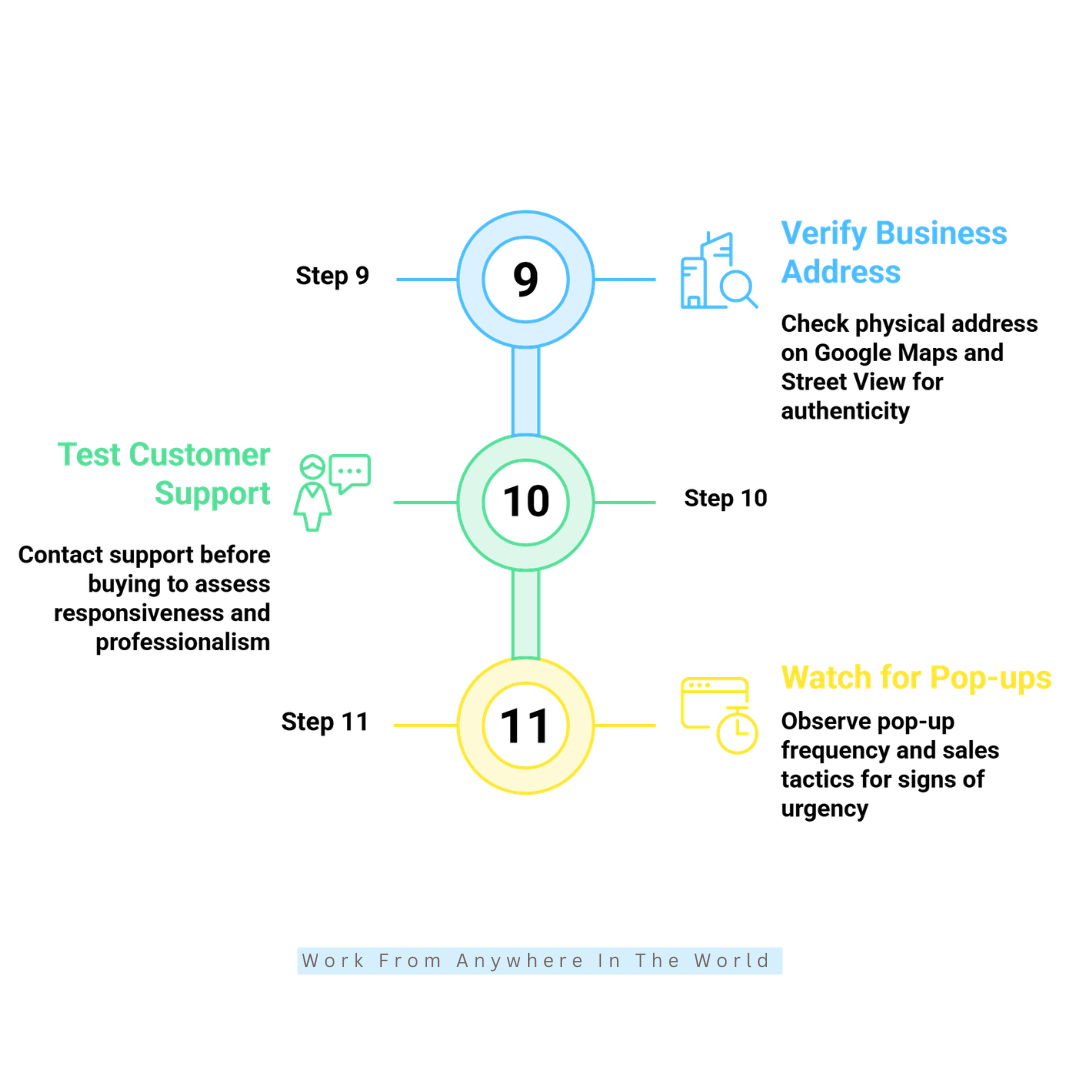
5. Check The Domain Age
A domain’s age can provide useful background when you are evaluating an unfamiliar website. An established domain may have a longer online history to investigate, while a recently registered one provides less information to work with.
A new domain does not automatically mean a website is fraudulent. New businesses launch every day, and established companies sometimes create new websites or change their domain names.
Domain information becomes more useful when you compare it with claims made on the website. For example, if a company says it has operated online for 15 years but its domain was registered only recently, the discrepancy deserves further investigation.
You can use a domain registration lookup to check information such as the registration date and registrar. Some ownership details may be hidden for privacy, so missing registrant information should not automatically be considered suspicious.
Treat domain age as one piece of evidence, not a deciding factor. Combine it with the website’s contact information, independent reviews, business history, and the other checks in this guide.
Key Points
- Check when an unfamiliar domain was registered.
- Don’t assume that every new domain is suspicious.
- Compare the domain history with the business’s claims.
- Remember that some registration information may be private.
- Consider domain age alongside several other trust signals.
6. Read Independent Customer Reviews
Independent customer reviews can provide useful insight into other people’s experiences with a business. They may reveal recurring problems with products, deliveries, refunds, customer service, or other aspects of the buying experience.
Don’t rely only on testimonials displayed on the company’s own website. Search for reviews from several independent sources to get a broader picture of the business and how it treats its customers.
Read both positive and negative feedback, paying particular attention to patterns rather than individual complaints. Repeated reports of undelivered orders, unexpected charges, difficulty obtaining refunds, or unresponsive customer service deserve closer attention.
Reviews themselves can also be misleading. Fake or manipulated reviews may be extremely positive or negative, so consider how detailed and credible they appear rather than relying solely on star ratings.
A business doesn’t need perfect reviews to be legitimate. A realistic mixture of experiences, along with thoughtful responses to customer concerns, can often be more informative than a page filled entirely with glowing five-star ratings.
Key Points
- Look beyond testimonials on the company’s own website.
- Check reviews from more than one independent source.
- Watch for recurring complaints and patterns.
- Remember that online reviews can also be fake or manipulated.
- Don’t judge a business solely by its star rating.
Wealthy Affiliate – Mini Review
If you’ve ever thought about turning your blog, passion, or niche into an online business,
Wealthy Affiliate (WA) is one of the most beginner-friendly platforms I’ve used.
It combines step-by-step training, website hosting, AI-powered tools,
keyword research, and an active community all in one place.
What I like most is that you can start for free (no credit card needed), explore the platform,
test the tools, and connect with other entrepreneurs before upgrading.
WA isn’t a “get rich quick” scheme — success comes from consistent effort
and applying what you learn over time.
7. Read The Privacy Policy
A privacy policy explains how a website collects, uses, stores, and shares personal information. For sites that collect customer details, it can provide useful insight into how seriously the business approaches privacy and transparency.
Look for a Privacy Policy link, which is commonly found in the website footer. The policy should explain what personal information the site gathers, why it needs it, whether it is shared with third parties, and how users can contact the organization about privacy concerns.
Pay attention to whether the policy appears to belong to the website you are visiting. Incorrect company names, references to unrelated businesses, unfinished sections, or generic text that doesn’t match the site’s activities can be warning signs.
However, the presence of a detailed privacy policy does not prove that a website is legitimate. Policies can be copied from other websites or created from templates, so consider the information alongside the other trust signals you are checking.
A missing or questionable privacy policy deserves additional attention, particularly when a website asks you to create an account, provide personal details, or make a purchase.
Key Points
- Look for an accessible Privacy Policy.
- Check what information the website collects and why.
- Make sure the policy appears relevant to the business.
- Watch for incorrect names, unfinished sections, or unrelated content.
- Don’t treat a privacy policy alone as proof of legitimacy.
8. Check The About Us Page
An About Us page can help you understand who is behind a website and what the business does. Established companies often provide information about their background, purpose, services, or the people involved in the organization.
Read the page carefully rather than simply checking that one exists. Look for specific information that helps you understand the company’s history, activities, location, or leadership.
Be cautious if the page contains only vague marketing language and tells you very little about the actual business. Incorrect company names, inconsistent details, or information that appears copied from somewhere else can also warrant further investigation.
You can search the company name or people mentioned on the page to see whether the information is consistent with other credible sources. An established online presence can help support the claims made on the website.
Like the other checks in this guide, an About Us page is only one piece of the puzzle. A convincing company story can be fabricated, so use it alongside contact information, reviews, domain history, and other trust signals.
Key Points
- Read the About Us page rather than simply checking that one exists.
- Look for specific information about the company and its background.
- Be cautious of vague, inconsistent, or copied-looking content.
- Verify important company details through other credible sources.
- Don’t rely on the About Us page alone to establish legitimacy.
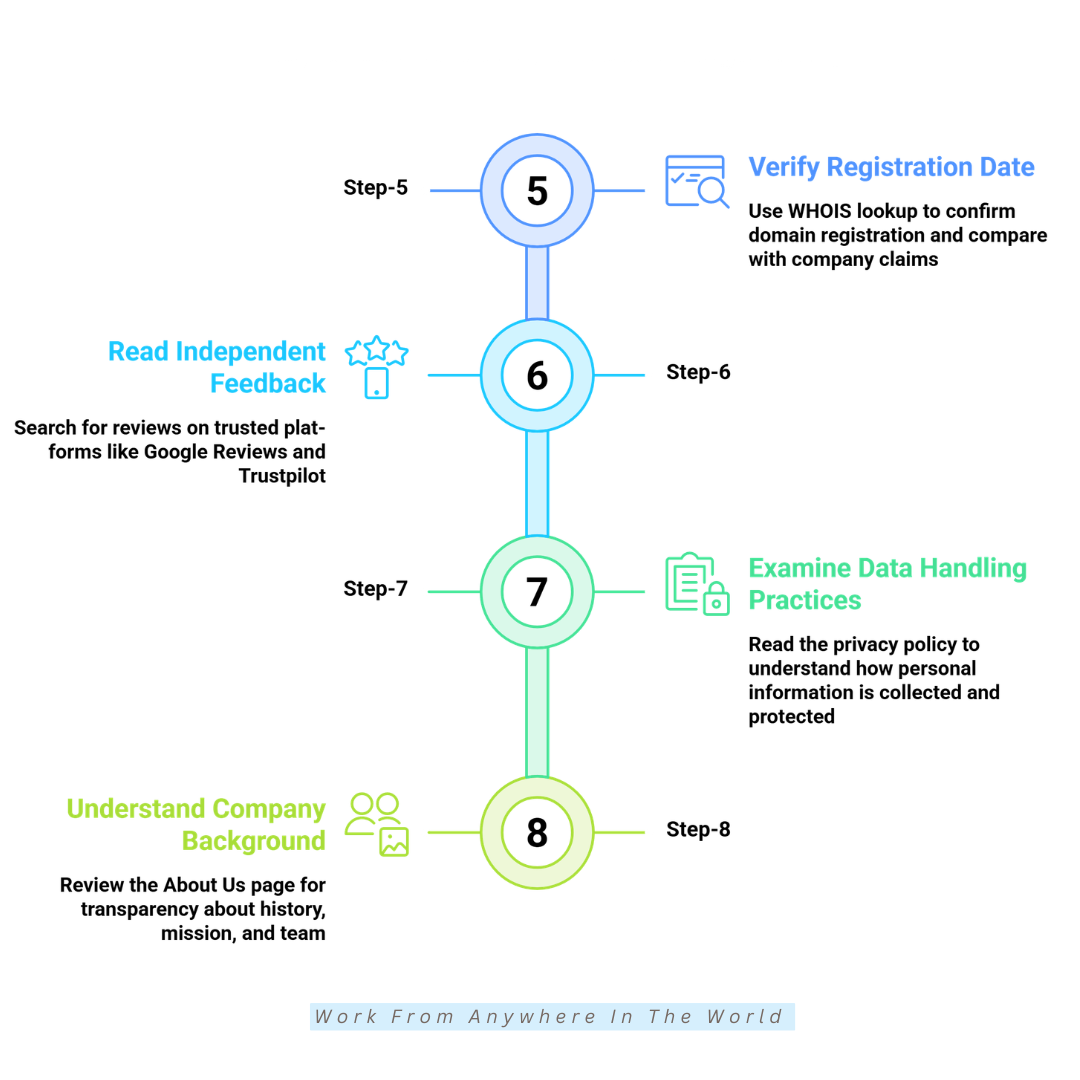
9. Verify The Business Address
A business address can provide another way to check whether the company behind a website is genuine. Depending on the type of business, this might be an office, retail location, warehouse, or registered business address.
Search the address independently using a mapping service or search engine. Check whether the location exists and whether the information you find matches the company and the type of business it claims to operate.
Keep in mind that not every legitimate online business has a storefront or traditional office. Some companies operate from home, use shared workspaces, or have registered addresses that are different from their day-to-day operating locations.
The presence of an address is also not proof of legitimacy. Fraudulent websites can provide false addresses or copy legitimate business details, so check whether the company name and other information are connected with the location.
If something doesn’t match, investigate further before providing personal information or making a purchase. An address that belongs to an unrelated company or doesn’t appear to exist can be an important warning sign.
Key Points
- Search the business address independently.
- Check whether the location actually exists.
- Compare the address with other company information.
- Remember that legitimate online businesses don’t always have storefronts.
- Be cautious when an address is false, unrelated, or inconsistent.
10. Test Customer Support Before Buying
Contacting customer support before making a purchase can give you another opportunity to evaluate the business. This can be particularly useful when you are unfamiliar with the company or considering an expensive purchase.
Send a simple question through one of the contact methods provided on the website. You might ask about shipping, returns, product availability, or another detail that isn’t already clearly answered on the site.
Pay attention to the quality of the response rather than expecting an answer within a particular timeframe. A helpful reply should address your question clearly instead of avoiding it or providing an unrelated generic response.
However, responsive customer service does not prove that a website is legitimate. Fraudulent businesses can also respond convincingly, so consider the interaction alongside the other information you have gathered.
Keep important emails or chat conversations related to your purchase. They may be useful if you later need to refer to information provided by the company or resolve a problem with your order.
Key Points
- Consider contacting unfamiliar businesses before making a significant purchase.
- Ask a specific question that requires a meaningful response.
- Pay attention to the quality and relevance of the reply.
- Don’t assume responsive customer service proves legitimacy.
- Keep important correspondence related to your purchase.
11. Watch For Pop-Ups And Aggressive Sales Tactics
Promotions, pop-ups, and limited-time offers are common on legitimate websites. However, excessive pressure tactics can be a warning sign when they appear designed to stop you from thinking carefully before making a purchase.
Watch for repeated countdown timers, claims that only one item remains, constant pop-ups, or messages suggesting that an offer will disappear almost immediately. These tactics can create urgency and push you to decide quickly.
Consider whether the urgency appears genuine. For example, if a countdown timer resets when you refresh the page or the same “last chance” offer repeatedly returns, the promotion may be creating artificial pressure.
Aggressive sales tactics don’t necessarily mean a website is fraudulent. However, when they appear alongside questionable contact information, suspicious reviews, unrealistic offers, or other warning signs, it’s worth investigating further.
If a website makes you feel rushed, give yourself time before entering payment information. Comparing the product and seller with other sources can help you make a more informed decision.
Key Points
- Don’t assume every pop-up or limited-time offer is suspicious.
- Watch for repeated or excessive pressure tactics.
- Be cautious of countdown timers that appear to reset.
- Consider aggressive selling alongside other warning signs.
- Take time to research before making a rushed purchase.
Frequently Asked Questions
Q1: What Is The Fastest Way To Tell If A Website Is Legitimate?
Start by checking the website address, HTTPS connection, contact information, and independent customer reviews. These checks can reveal some of the most obvious warning signs relatively quickly.
However, no single indicator can confirm that a website is legitimate. Looking at several trust signals together gives you a more reliable picture before you provide personal information or make a purchase.
Q2: Is A Website Safe Just Because It Uses HTTPS?
No. HTTPS means that information travelling between your browser and the website is encrypted, but it does not confirm that the website itself is trustworthy.
Fraudulent websites can also use HTTPS. Consider the site’s business information, independent reviews, policies, and other trust signals before deciding whether to trust it.
Q3: How Can I Check If An Online Store Is Trustworthy?
Review the store’s contact information, customer reviews, return and refund policies, business details, and payment options. Check whether this information is consistent and easy to verify independently.
Be especially cautious if prices seem unusually low or important information is difficult to find. Comparing the store with established retailers can also help you identify potential warning signs.
Q4: Are Newly Created Websites Always Suspicious?
No. New businesses launch websites regularly, so a recently registered domain isn’t automatically a warning sign. An established company may also create a new domain for legitimate reasons.
If a website is new, simply investigate some of the other trust signals more carefully. Contact information, business history, independent reviews, and transparent policies can provide additional context.
Q5: What Should I Do If I Visit A Fake Website?
If you haven’t entered any information or downloaded anything, leave the website and avoid interacting with it further. Simply visiting a suspicious page does not necessarily mean your information has been compromised.
If you provided passwords, payment details, or other sensitive information, take appropriate steps based on what you shared. This may include changing affected passwords, monitoring financial accounts, or contacting your financial institution.
Q6: Can Fake Websites Appear In Google Search Results?
Yes. Appearing in search results does not guarantee that a website is legitimate. Fraudulent or misleading websites may sometimes appear in search results or advertisements.
Don’t rely solely on search-engine placement when deciding whether to trust an unfamiliar site. Examine the website and verify important information independently before making a purchase or sharing personal details.
Q7: Which Tools Can Help Verify A Website’s Legitimacy?
Tools such as domain registration lookups and website security-checking services can provide additional information about an unfamiliar site. Independent review sources can also help you investigate a company’s reputation.
These tools are most useful when combined with your own checks. No single service can guarantee that a website or the business operating it is legitimate.
Conclusion
Trusting a website shouldn’t depend on how convincing it looks at first glance. Taking a few moments to investigate an unfamiliar site can reveal details that aren’t immediately obvious.
Consider several factors together, including the website address, secure connection, business information, independent reviews, privacy policy, and overall transparency. Each one adds another piece to the picture.
Be especially cautious when information doesn’t match or a website pressures you to act quickly. A few extra minutes of research can help you avoid sharing personal or financial information with the wrong people.
Online scams keep changing, but the habit of checking before trusting remains valuable. Knowing common warning signs makes it easier to spot when something deserves closer attention.
A little caution doesn’t have to make using the internet complicated. Verify what you can, watch for inconsistencies, and give yourself time to make an informed decision before trusting an unfamiliar website.
I trust you enjoyed this article on the [Blog Post Title]. Please stay tuned for more insightful blogs on affiliate marketing, online business, and working from anywhere in the world.
Take care!
— JeannetteZ 🌍✨
💬 Your Opinion Is Important To Me
Do you have thoughts, ideas, or questions? I’d love to hear from you. Please leave your comments below or email me directly at Jeannette@WorkFromAnywhereInTheWorld.com.
📚 More Work From Anywhere Reads
🚀 Ready to Build a Business You Can Run from Home
Or from Anywhere in the World?
Imagine creating income on your terms — from home, a cozy café, or wherever life takes you.
With the right tools, training, and community support, it’s entirely possible.
Start your own online business for free — no credit card needed.
Disclosure
This post may contain affiliate links. As an Amazon Associate and participant in other affiliate programs, I earn from qualifying purchases at no extra cost to you. Please read my full affiliate disclosure.