SEOPress vs Semrush: Which SEO Tool Is Better For You?
SEOPress vs Semrush is a comparison worth exploring when choosing the right SEO tools for your website. Both platforms help improve search visibility, but they serve different purposes.
SEOPress focuses on WordPress SEO optimization, making it useful for bloggers and website owners who want to improve their content, metadata, and technical SEO settings.
Semrush, on the other hand, provides a broader range of digital marketing tools. These include keyword research, competitor analysis, backlink tracking, and content optimization.
Understanding these differences can help you avoid paying for features you don’t need while choosing the right tools to grow your website.
In this comparison, we’ll explore their key features, advantages, disadvantages, and differences to help you decide which platform best supports your SEO strategy.
What Is SEOPress?
SEOPress is a WordPress SEO plugin that helps website owners optimize their content for search engines such as Google and Bing. It provides tools for managing SEO titles, meta descriptions, XML sitemaps, canonical URLs, schema markup, and social media metadata.
The plugin offers a free version and a paid version called SEOPress PRO. Advanced features include 404 error monitoring, redirect management, and additional structured data options.
SEOPress also supports content analysis and integrations with tools such as Google Analytics. Learning how to write SEO-friendly content helps bloggers make better use of these optimization features.
Unlike Semrush, which focuses on keyword research and broader digital marketing activities, SEOPress primarily manages SEO within WordPress. Website owners can also explore the best WordPress SEO plugins to compare alternative solutions.
You can explore the available plans and features on the official SEOPress pricing page. This allows you to compare options without relying on prices that may change over time.
Although SEOPress provides useful optimization tools, installing an SEO plugin alone does not guarantee higher search engine rankings. Creating valuable content, maintaining a well-structured website, and following SEO best practices are equally important for long-term success.
What Is Semrush?
Semrush is an all-in-one SEO and digital marketing platform that helps businesses, bloggers, and marketing professionals improve their online visibility. It provides tools for technical SEO audits, backlink monitoring, rank tracking, competitor analysis, keyword research, and content optimization.
Its Keyword Magic Tool helps users discover keyword ideas, estimated search volumes, keyword difficulty, and related search terms. Bloggers can also explore how to use the Google Keyword Planner to discover additional keyword opportunities.
Semrush’s Domain Overview and Keyword Gap tools help identify competitors’ organic search performance and potential content gaps. Learning to master SEO competitive analysis can help website owners turn these insights into practical strategies.
Semrush also offers advertising research, local SEO, social media marketing, and AI search visibility features. These tools help businesses develop marketing strategies and monitor their performance across different digital channels.
Unlike SEOPress, which primarily manages SEO within WordPress, Semrush focuses on research, analysis, and marketing strategy. This makes it particularly useful for SEO specialists, agencies, and businesses managing multiple websites.
Semrush offers paid plans with different limits for keyword tracking, website audits, and competitor research. You can compare the available features and current subscription options on the official Semrush pricing page.
Although Semrush provides valuable insights, its keyword volumes, traffic figures, and competitor metrics are estimates, not exact measurements. Combining these insights with your website analytics helps you make better-informed SEO decisions.
Wealthy Affiliate – Mini Review
If you’ve ever thought about turning your blog, passion, or niche into an online business,
Wealthy Affiliate (WA) is one of the most beginner-friendly platforms I’ve used.
It combines step-by-step training, website hosting, AI-powered tools,
keyword research, and an active community all in one place.
What I like most is that you can start for free (no credit card needed), explore the platform,
test the tools, and connect with other entrepreneurs before upgrading.
WA isn’t a “get rich quick” scheme — success comes from consistent effort
and applying what you learn over time.
Pros And Cons Of SEOPress
Choosing the right WordPress SEO plugin involves more than comparing features and subscription plans. You also need to consider ease of use, technical requirements, and how well the plugin supports your website.
SEOPress provides essential optimization features alongside advanced tools for managing search visibility. Understanding the different types of SEO optimization can help you identify which features matter most.
However, every SEO plugin has strengths and limitations that may affect its suitability for your website. Exploring these advantages and disadvantages can help you make a more informed decision.
Pros Of SEOPress
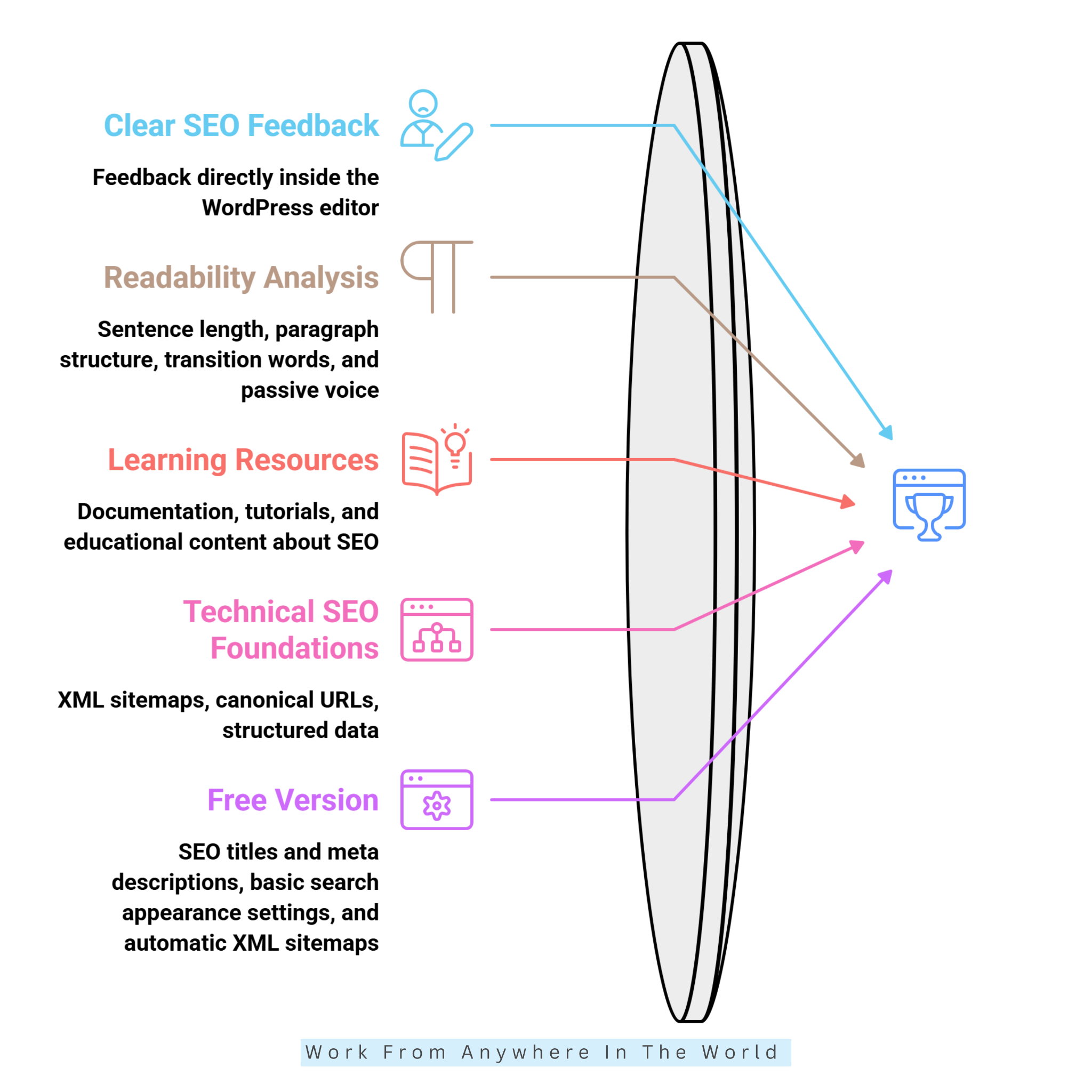
SEOPress brings several important SEO features together within the WordPress dashboard. If you’re new to WordPress, our simple WordPress tutorial for beginners can help you become more familiar with the platform.
Its free and premium options suit beginners, experienced bloggers, and agencies managing multiple websites. Bloggers can also explore essential blogging tools that complement their SEO efforts.
SEOPress supports everyday website management, but effective optimization also requires a thoughtful content strategy. Applying proven SEO techniques can help website owners use their optimization tools more effectively.
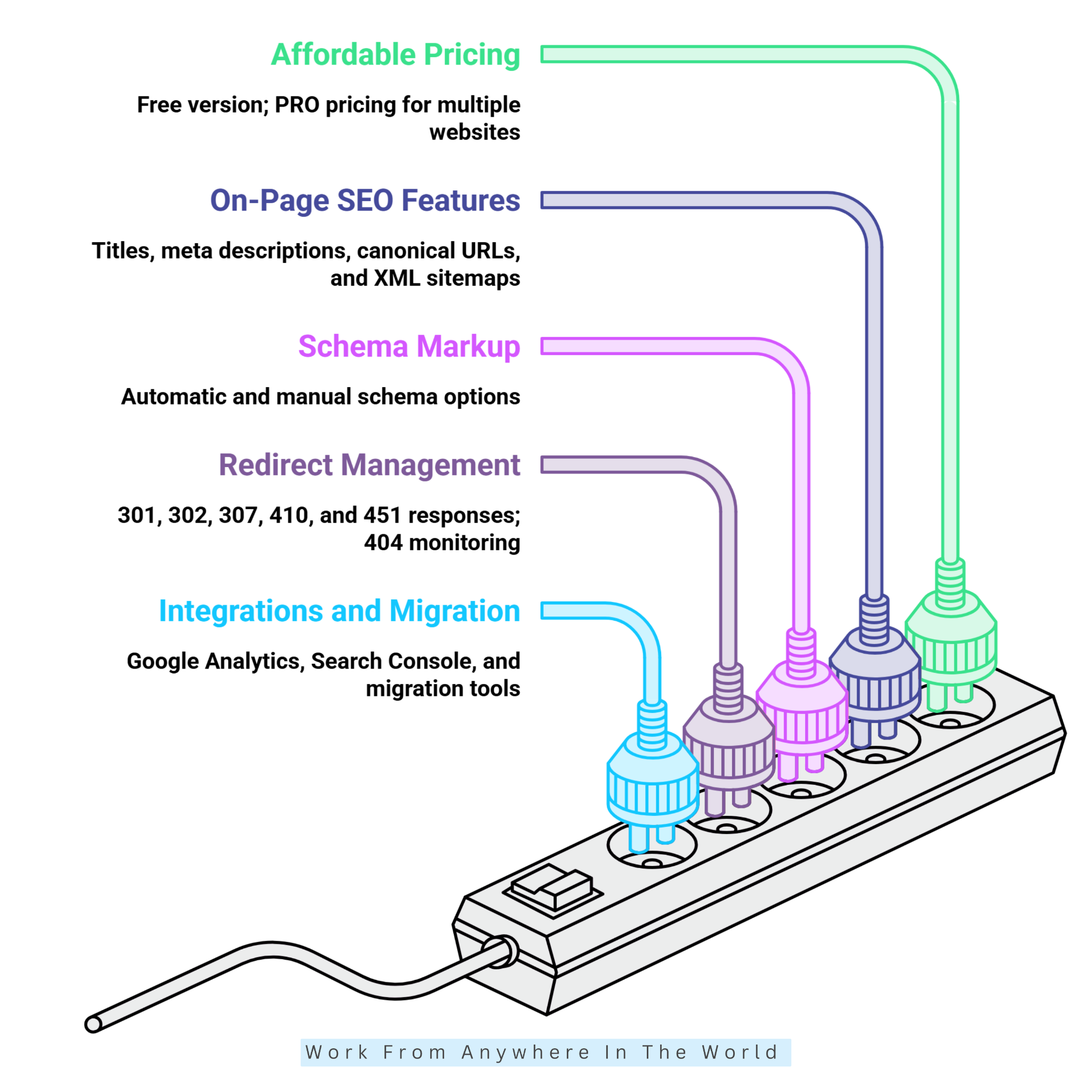
1. Affordable Pricing For Multiple Websites
SEOPress offers a free version for essential SEO tasks, making it accessible to new bloggers and small businesses. Its paid PRO version provides additional features for website owners who need more advanced SEO capabilities.
SEOPress offers licensing options for individual websites and multiple installations, including an unlimited-site plan. This flexibility appeals to freelancers and agencies managing several WordPress websites.
Rather than listing prices that may change, readers can compare the available options on the official SEOPress pricing page. This makes it easier to choose a plan based on the number of websites and required features.
2. Comprehensive On-Page SEO Features
SEOPress helps users customize SEO titles, meta descriptions, canonical URLs, robots directives, and social sharing metadata directly within WordPress. Its content analysis tool supports multiple target keywords, including in the free version.
These features are particularly helpful for bloggers who regularly publish SEO-friendly content around related search terms. Users can also configure XML sitemaps to help search engines discover important pages on the site.
However, optimizing metadata and incorporating keywords doesn’t guarantee higher rankings. Content relevance, search intent, website quality, and competition remain important factors.
3. Supports Schema Markup And Structured Data
Structured data helps search engines understand information about products, organizations, articles, and local businesses. SEOPress PRO offers automatic and manual schema options, allowing website owners to configure supported markup without writing every element themselves.
These features benefit eCommerce stores, service businesses, and informational websites. Properly implemented schema may help eligible pages qualify for enhanced search appearances, depending on Google’s requirements.
Website owners should validate their markup using Google’s Rich Results Test or the Schema Markup Validator. These tools help identify errors and check whether structured data follows the expected format.
4. Includes Redirect Management And 404 Monitoring In PRO
Broken URLs and poorly managed website migrations can create frustrating user experiences and SEO problems. SEOPress PRO includes redirect management and 404 error monitoring to help website owners identify and address these issues.
Its redirect manager supports HTTP status codes such as 301, 302, 307, 410, and 451, along with regular-expression redirects. These options help users manage changed URLs, obsolete pages, and website restructuring.
Redirects are especially useful when updating older blog posts, changing permalink structures, or migrating a website. Combining proper redirects with effective internal linking strategies helps keep the website organized.
However, redirects require careful configuration to avoid unnecessary chains, loops, and irrelevant destination pages. Regularly reviewing your redirects helps maintain a smooth browsing experience and prevents avoidable SEO problems.
5. Offers Useful Integrations And Migration Options
SEOPress supports integrations with Google Analytics and Google Search Console, helping website owners connect SEO management with performance data. Depending on the configuration, users may access relevant analytics information within WordPress.
The plugin also offers migration tools for importing SEO metadata from alternatives such as Yoast SEO, Rank Math, and All in One SEO. This reduces manual work when switching plugins on an established website.
Website owners considering a different plugin can explore our AIOSEO vs Yoast comparison to learn more about another popular WordPress SEO option.
SEOPress also offers white-label capabilities for agencies that want a customized client-facing experience. Before migrating, users should back up their websites and review important metadata, schema, and indexing settings afterward.
Cons Of SEOPress
Although SEOPress provides valuable optimization tools, it may not meet every website owner’s SEO requirements. Some limitations become more noticeable when managing competitive keywords, complex websites, or advanced marketing campaigns.
Understanding these drawbacks helps you determine whether SEOPress can handle your SEO tasks on its own. It also highlights situations where additional tools, technical knowledge, or paid features may be necessary.
1. Limited External Keyword Research Capabilities
SEOPress helps users optimize pages for selected keywords, but it cannot fully replace dedicated keyword research platforms. Its content analysis and keyword suggestions are useful, although they provide less competitive research data than Semrush.
SEO professionals may need external tools to investigate keyword difficulty, estimated search volumes, competitor rankings, and keyword gaps. Learning keyword research with Ahrefs can introduce another approach to identifying search opportunities.
Using additional research platforms may involve extra subscriptions or manual work. This limitation reflects SEOPress’s primary role as a WordPress optimization plugin rather than a comprehensive SEO research platform.
2. Several Advanced Features Require A Paid Plan
Although SEOPress Free covers essential SEO tasks, several advanced capabilities require SEOPress PRO. These include website auditing, redirect management, 404 monitoring, and additional structured data options.
The paid version offers more functionality, but it adds an expense for website owners with limited budgets. Users should compare the available features carefully before choosing a subscription.
SEOPress Insights, which provides keyword position and backlink monitoring, is also a separate paid product. Website owners can review its current features and subscription options on the official SEOPress Insights page.
3. It Does Not Guarantee Higher Google Rankings
SEOPress helps users implement SEO best practices, but installing the plugin cannot guarantee first-page rankings or increased organic traffic. Search engines consider numerous factors, including content relevance, website quality, competition, and search intent.
A website may have optimized titles, meta descriptions, and sitemaps yet still struggle to attract visitors. Understanding short-tail keywords for SEO can help explain why broad search terms are often difficult to rank for.
Website owners must also monitor indexing, crawlability, website performance, and content quality. Consistently improving useful content and reviewing search performance remain essential for long-term SEO success.
4. Beginners May Need Time To Learn Advanced Settings
SEOPress includes configuration options for metadata, schema markup, XML sitemaps, indexing directives, and redirects. Although its setup wizard simplifies installation, understanding advanced settings can take time.
For example, accidentally applying a noindex directive to important pages may prevent them from appearing in search results. Incorrect canonical URLs or redirect rules can also create technical SEO problems.
Beginners unfamiliar with these settings may benefit from the official SEOPress documentation. Following step-by-step instructions and reviewing changes carefully can help prevent avoidable mistakes.
5. Rank Tracking And Backlink Monitoring Need Additional Tools
SEOPress primarily focuses on managing SEO settings within WordPress rather than providing a complete external research platform. Its separate Insights product offers keyword position and backlink monitoring, but these features are not included in the standard plugin.
Businesses conducting extensive competitor research, backlink prospecting, or large-scale keyword analysis may require additional software. Exploring effective link-building strategies can help website owners understand the work involved in developing a stronger backlink profile.
SEOPress PRO’s site auditing features and Google Search Console integrations help identify certain website issues. However, they cannot replace every specialized SEO research and monitoring workflow.
For agencies managing complex campaigns, combining SEOPress with external tools may provide a more complete solution. This approach can increase costs and require additional time to manage information across several platforms.
Pros And Cons Of Semrush
Semrush offers a broad range of SEO and digital marketing tools, making it useful for bloggers, businesses, and marketing professionals. However, choosing the right platform requires understanding both its capabilities and potential limitations.
Its research, monitoring, and reporting features can support different stages of an SEO campaign. Let’s explore the advantages and disadvantages to see whether Semrush fits your website’s needs.
Pros Of Semrush
One of Semrush’s biggest advantages is its ability to combine SEO research, competitor analysis, and performance monitoring within one platform. This helps website owners make more informed decisions about their content and marketing strategies.
Semrush also provides tools for technical SEO, backlink research, and digital advertising. The following advantages explain how these features can support website growth and improve everyday marketing workflows.
1. Extensive Keyword Research Capabilities
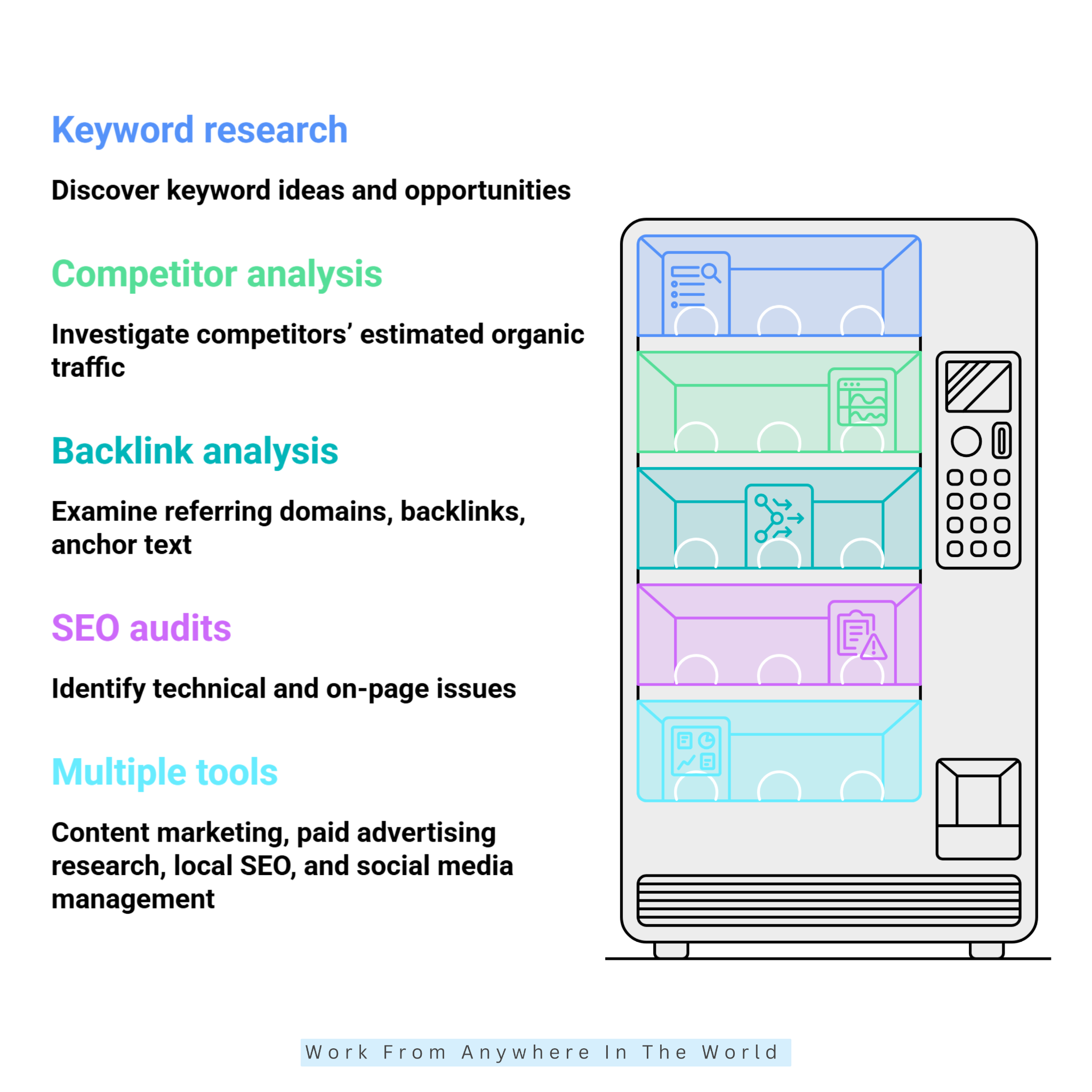
Semrush offers several keyword research tools, including Keyword Overview and Keyword Magic Tool. Users can explore keyword ideas, estimated search volumes, keyword difficulty, search intent, and related search terms.
These insights help bloggers plan content around relevant topics and identify opportunities in competitive niches. Learning how to identify long-tail keywords can also help website owners target more specific search queries.
The Keyword Magic Tool allows users to explore keyword variations, questions, and related search terms. This makes it useful for building topic clusters and planning informative articles.
Bloggers can also compare other long-tail keyword finder tools to discover additional research options. However, keyword volumes and difficulty scores are estimates that should be checked against actual search results.
2. Powerful Competitor Analysis
Semrush helps users investigate competitors’ estimated organic traffic, ranking keywords, paid search activity, and backlink profiles. Its Domain Overview and Keyword Gap tools can reveal search terms that competing websites rank for but yours may be missing.
These insights help businesses identify content gaps and develop more informed SEO strategies. Learning how to beat your competition at blogging can provide additional ideas for strengthening your content approach.
Businesses can also examine which competing pages appear to attract the most organic visibility. These findings may reveal opportunities for new articles, improved existing content, and more focused keyword targeting.
Competitor analysis is particularly valuable for agencies and businesses operating in competitive markets. However, estimated traffic figures should not be mistaken for exact data from another website’s analytics account.
3. Comprehensive Backlink Analysis
Semrush provides backlink research tools that help users examine referring domains, backlinks, anchor text, and link attributes. Its Backlink Analytics feature also allows users to investigate competitors’ backlink profiles.
The Backlink Audit tool helps identify potentially suspicious links that may require further investigation. These insights can support outreach planning and help website owners understand their existing backlink profiles.
SEO professionals can use this information to identify relevant websites and develop stronger link-building campaigns. Quality, relevance, and editorial value generally matter more than simply accumulating large numbers of backlinks.
Semrush also helps users monitor changes in backlink profiles over time. However, backlink audit warnings should be reviewed carefully rather than treating every flagged link as harmful.
4. Technical SEO Audits And Rank Tracking
Semrush’s Site Audit tool crawls websites to identify technical and on-page SEO issues. These may include broken links, crawlability problems, duplicate content signals, and missing metadata.
Its Position Tracking tool monitors selected keywords and reports ranking changes across supported locations and devices. Together, these features help website owners prioritize improvements and evaluate SEO progress.
Agencies can also use reporting features to communicate findings and performance trends to clients. Understanding the different types of SEO optimization can help users interpret these reports and identify appropriate improvements.
However, not every detected issue has the same impact on search performance. Users should review recommendations carefully, while remembering that tracking limits and audit capacity depend on their subscription plans.
5. Multiple Digital Marketing Tools In One Platform
Semrush goes beyond traditional SEO by offering tools for content marketing, paid advertising research, local SEO, and social media management. These capabilities help businesses coordinate different marketing activities within a broader platform.
Marketing teams can research search demand, examine competing advertising strategies, and identify new content opportunities. Learning how to get started with content marketing can help beginners turn these insights into a practical strategy.
Combining research, planning, and reporting tools may save time for agencies managing several clients. Businesses can also explore free content marketing tools to complement their existing workflows.
However, not every feature is included in every Semrush subscription. Some capabilities require separate products or add-ons, so users should compare the available plans before purchasing.
Cons Of Semrush
Although Semrush offers powerful SEO and digital marketing tools, it may not be the most practical choice for every website owner. Its subscription costs, extensive features, and usage restrictions can present challenges for beginners and smaller businesses.
Understanding these limitations can help you decide whether the platform offers enough value for your needs. Let’s examine five disadvantages worth considering before subscribing.
1. Expensive Subscription Plans
One of Semrush’s main disadvantages is its subscription cost. Its extensive research features may be expensive for beginners, individual bloggers, and small businesses working with limited budgets.
Pricing varies depending on the subscription plan, billing frequency, and additional products selected. Some website owners may end up paying for features they rarely use, particularly when their SEO requirements are relatively simple.
Before subscribing, compare the available plans against the number of projects, tracked keywords, and reports you need. You can review current options on the official Semrush pricing page.
For bloggers who primarily need basic WordPress optimization, a dedicated SEO plugin may provide better value. Exploring our Yoast SEO review can help you understand an alternative approach to managing website SEO.
2. Data Is Estimated, Not Exact
Semrush provides estimated search volumes, organic traffic figures, keyword difficulty scores, and competitor performance metrics. These estimates help users compare opportunities but do not represent exact figures from Google’s systems or competitors’ private analytics accounts.
Actual website traffic may differ because of location, seasonality, ranking changes, and click-through rates. A keyword with substantial estimated search volume may also attract fewer visitors when search results provide answers directly.
Users should therefore treat Semrush data as a research guide rather than an absolute measurement. Connecting Google Search Console and Google Analytics can help validate results using first-party website data.
Combining estimated keyword metrics with actual performance information supports better decision-making. It also helps website owners identify which content attracts visitors and where improvements may be needed.
3. Beginners May Find The Platform Overwhelming
Semrush includes numerous tools, reports, filters, and performance metrics that can make the platform challenging to navigate initially. Beginners may struggle to understand keyword difficulty, backlink indicators, competitive gaps, and technical audit recommendations.
Access to extensive information is helpful only when users understand how to interpret it. Learning to use the platform effectively may require practice, experimentation, and additional training.
Website owners who are new to SEO can begin with our Rank Math SEO guide to become familiar with essential optimization concepts. Understanding basic SEO practices makes it easier to interpret more advanced research tools.
Starting with Semrush’s Keyword Overview, competitor analysis, and Site Audit features can also simplify the learning process. Users can gradually explore additional tools as their confidence and website requirements grow.
4. Subscription And Usage Limits Can Restrict Workflows
Semrush subscriptions include limits on activities such as keyword tracking, research requests, scheduled reporting, and website crawling. These restrictions vary by plan and may affect agencies managing multiple clients or businesses researching numerous competitors.
When users exceed their allowances, they may need to upgrade their subscriptions or adjust their research activities. Certain specialized features may also require separate purchases, increasing the overall expense.
Before committing to a plan, website owners should estimate their monthly research and monitoring requirements. Reviewing the current subscription comparison can help prevent unexpected restrictions or unnecessary upgrades.
For smaller websites, choosing tools that match actual needs may be more practical than purchasing a comprehensive platform. This approach helps businesses manage expenses while maintaining an effective SEO workflow.
5. Recommendations Still Require Human Judgment
Semrush identifies SEO issues and provides recommendations, but automated reports cannot fully understand every website’s goals or audience expectations. Website owners must still evaluate suggestions against their content strategy and business priorities.
For example, a technical audit may highlight issues that have little impact on a particular website. Meanwhile, more important content-quality problems may require manual investigation and editorial improvements.
Keyword suggestions also cannot guarantee that a topic matches the audience’s search intent. Learning how to write SEO-friendly content can help bloggers balance optimization recommendations with useful, reader-focused information.
Users should review recommendations, prioritize meaningful improvements, and verify important changes before implementation. Semrush works best as a research and analysis platform rather than a replacement for SEO knowledge and thoughtful decision-making.

Frequently Asked Questions
Q1: Is SEOPress Better Than Semrush?
SEOPress is better suited to managing on-page SEO settings directly within WordPress. It helps website owners optimize metadata, sitemaps, and structured data.
Semrush offers broader tools for keyword research, competitor analysis, and backlink monitoring. The better choice depends on your website’s needs and SEO goals.
Q2: Can SEOPress Replace Semrush?
SEOPress can handle many essential WordPress SEO tasks without requiring a separate research platform. However, it does not offer the same extensive keyword and competitor research capabilities.
Semrush provides more advanced tools for analyzing search opportunities and monitoring competitors. Businesses requiring both types of functionality may benefit from using the platforms together.
Q3: Can I Use SEOPress And Semrush Together?
Yes, SEOPress and Semrush complement each other because they serve different purposes. SEOPress manages technical and on-page optimization within WordPress.
Semrush helps you research keywords, analyze competitors, and monitor search performance. Combining both tools can create a more complete SEO workflow.
Q4: Which Tool Is Better For SEO Agencies?
Semrush is generally better suited to agencies requiring extensive competitor research and performance reporting. Its tools also support backlink analysis, rank tracking, and multiple client projects.
SEOPress can be useful for agencies managing SEO settings across several WordPress websites. Using both platforms may provide a practical combination of optimization and research capabilities.
Q5: Does SEOPress Improve Google Rankings?
SEOPress helps website owners implement important SEO practices, including optimizing metadata and sitemaps. These features can support better website organization and search engine accessibility.
However, installing an SEO plugin never guarantees higher rankings. Content quality, relevance, competition, and technical performance also influence search visibility.
Q6: Does Semrush Guarantee Higher Rankings?
No, Semrush cannot guarantee higher Google rankings or increased organic traffic. Its research tools provide insights that help website owners identify potential SEO improvements.
Successful optimization still requires useful content, technical maintenance, and ongoing evaluation. Semrush supports these activities but cannot replace thoughtful SEO strategies.
Conclusion
Choosing between SEOPress and Semrush depends on your SEO goals, budget, and website requirements. Both tools offer valuable features, but they serve different purposes.
SEOPress is a practical option for bloggers and small businesses managing SEO directly within WordPress. Its optimization features help simplify everyday website management without requiring an extensive research platform.
Semrush is better suited to comprehensive keyword research, competitor analysis, backlink monitoring, and digital marketing strategies. Its advanced tools can help businesses identify opportunities and monitor their SEO performance.
You can also use SEOPress and Semrush together for a more complete SEO workflow. Ultimately, the best choice supports your website’s needs and long-term growth goals.
I trust you enjoyed this article on SEOPress vs Semrush: Which SEO Tool Is Better For You? Please stay tuned for more insightful blogs on affiliate marketing, online business, and working from anywhere in the world.
Take care!
— JeannetteZ 🌍✨
💬 Your Opinion Is Important To Me
Do you have thoughts, ideas, or questions? I’d love to hear from you. Please leave your comments below or email me directly at Jeannette@WorkFromAnywhereInTheWorld.com.
📚 More Work From Anywhere Reads
🚀 Ready to Build a Business You Can Run from Home
Or from Anywhere in the World?
Imagine earning income on your terms — from home, a cozy café, or wherever life takes you.
With the right tools, training, and community support, it’s entirely possible.
Start your own online business for free — no credit card needed.
Disclosure
This post may contain affiliate links. As an Amazon Associate and participant in other affiliate programs, I earn from qualifying purchases at no extra cost to you. Please read my full affiliate disclosure.