How To Create Your Own Facebook Page: 15 Easy Steps
If you’re wondering how to create your own Facebook page, you’re in the right place. Setting up a professional presence on Facebook is one of the simplest ways to build your brand, promote your business, and connect with your audience.
The process is straightforward and only takes a few minutes, even if you’re completely new to social media. Once your page is properly set up, it becomes a powerful tool for building credibility, connecting with your audience, and sharing updates that strengthen your brand.
In this guide, you’ll learn step-by-step how to create and optimize your Facebook page so it looks professional and supports your goals from day one.
What Is A Facebook Page?
A Facebook Page is a public profile designed for businesses, brands, creators, organizations, and communities. Unlike a personal Facebook profile, which is meant for individual use and connecting with friends, a Facebook Page is built to reach a broader audience.
Anyone on or off Facebook can view a page, follow it, and interact with its content. Facebook Pages allow you to share posts, photos, videos, updates, and events with followers.
They also include professional tools that personal profiles lack. For example, page owners can access Insights (analytics) to track performance, run paid advertisements, schedule posts in advance, and add call-to-action buttons such as “Contact Us” or “Shop Now.”
These features make pages ideal for marketing and brand building. Another key difference is that Facebook Pages can have unlimited followers.
Personal profiles have friend limits, but pages are designed for growth. People can like or follow your page to receive updates in their feed without needing to send a friend request.
Pages also allow multiple admins or team members to manage them. This is useful for businesses that need staff to handle content, customer service, or advertising.
In simple terms, a Facebook Page is your public digital storefront or online identity. It enables you to build a professional presence on one of the world's largest social media networks, establish credibility, and engage with your target audience.
Whether you're promoting products, sharing knowledge, or building a community, a Facebook Page provides the tools to do it effectively.
Benefits Of Having A Facebook Page
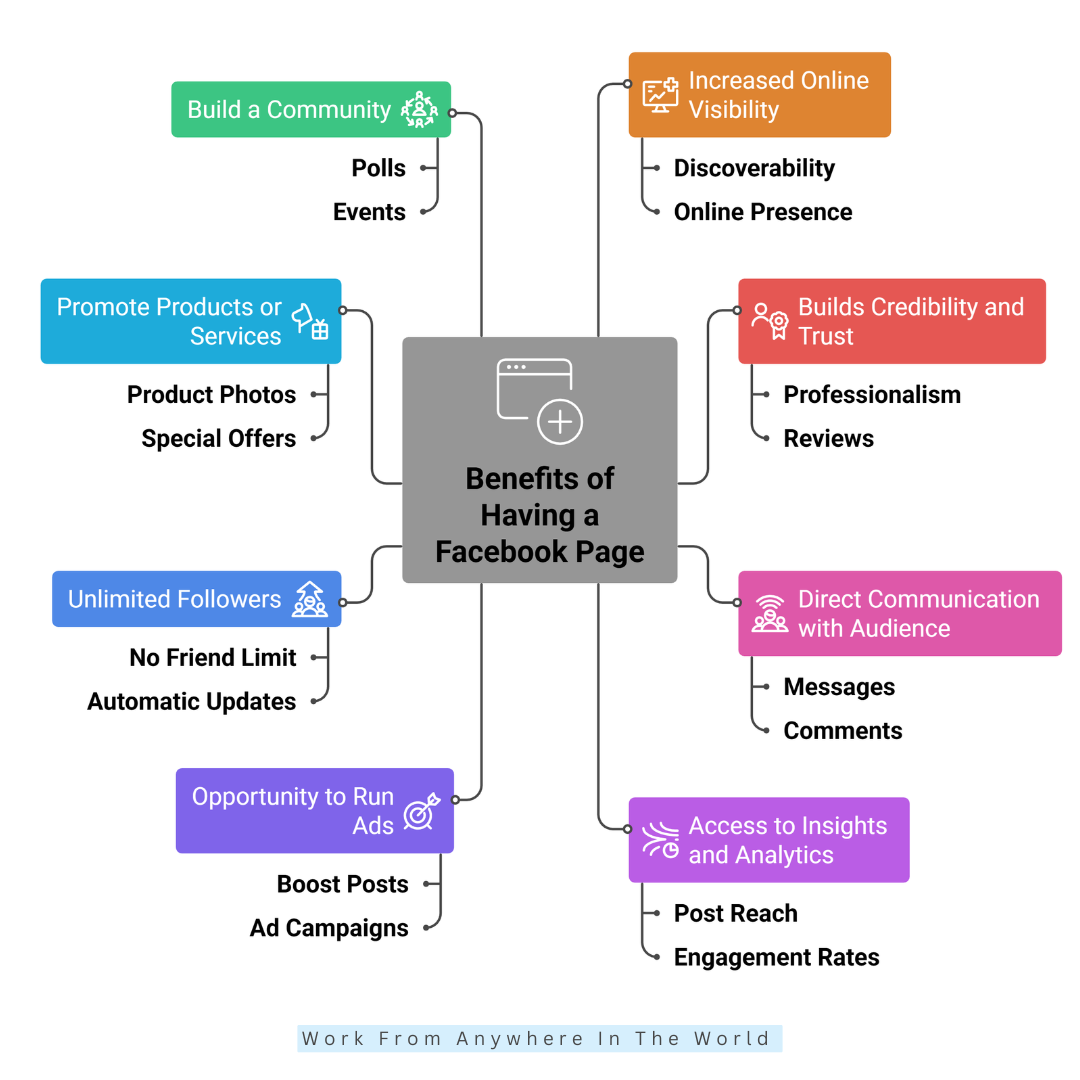
1. Increased Online Visibility
A Facebook page puts your brand, business, or personal profile in front of millions of users. It helps people find you easily, improving your online presence and making your content discoverable to potential customers, followers, or supporters.
2. Builds Credibility And Trust
Having a well-maintained page signals professionalism. People tend to trust brands or creators with an active page. Reviews, consistent posts, and accurate information help establish credibility, making followers more likely to engage, share, and support your page.
3. Direct Communication With Audience
Pages allow followers to send messages, leave comments, or interact with posts. This creates a direct line of communication, helping you respond to queries, provide support, and build relationships with your audience in real time, thereby improving loyalty and engagement.
4. Access To Insights And Analytics
Facebook provides detailed data on your page performance. You can track post reach, engagement rates, follower growth, and audience demographics. Insights help you understand what works, optimize content, and make data-driven decisions to grow your page effectively.
5. Opportunity To Run Ads
Facebook pages enable paid advertising to target specific audiences. You can boost posts, create ad campaigns, or promote products and services. Ads help you reach new customers, increase visibility, and cost-effectively drive traffic or sales.
6. Unlimited Followers
Unlike personal profiles, pages have no friend limit. This allows your content to reach a large audience without restrictions. People can like or follow your page, ensuring your updates appear in their news feeds automatically and expand your reach.
7. Promote Products Or Services
Facebook pages are perfect for showcasing what you offer. You can post updates, product photos, special offers, or services. You can gradually improve sales and draw in new clients with well-structured posts and a polished layout.
8. Build A Community
Pages allow you to create a loyal follower base. You can engage users through posts, polls, events, or discussions. Building a community increases interaction, brand loyalty, and encourages followers to share your content organically.
15 Steps To Create Your Own Facebook Page
Step 1: Log In To Your Facebook Account
To create a Facebook page, you need a personal Facebook account. Don't worry—your personal profile won't be visible to followers. Log in, then go to the homepage.
On the left-hand menu, click “Pages” to see existing pages and manage them. Next, click “Create New Page”. This officially starts your page setup.
You may now choose categories, give your page a name, and go on creating a polished and interesting online presence for your company, brand, or community on one of the biggest social media networks in the world.
Step 2: Choose The Right Page Name
Your page name is your identity online. It should clearly represent your brand, business, or purpose. Keep it simple, memorable, and relevant to your audience. Avoid symbols, unnecessary capitalization, or long strings of words.
A strong name helps people find you in search and makes a positive first impression. Think of it as the headline for your online presence. Take a few minutes to brainstorm names that clearly communicate your purpose.
Once chosen, it will appear in search results and URLs, so pick a name that accurately reflects your page and the content you plan to share.
Step 3: Select The Correct Page Category
Categories help Facebook understand your page and connect you with the right audience. You can choose up to three categories, such as Business, Blogger, Digital Creator, Restaurant, or Community.
The right category ensures your page appears in relevant searches and recommendations. It also affects the features available to you, such as appointment scheduling and shop tools.
Think about what best describes your page's purpose and audience. You can change it later, but selecting the most accurate category from the start improves discoverability. This simple step helps people immediately understand what your page is about.
Step 4: Write A Strong Page Bio
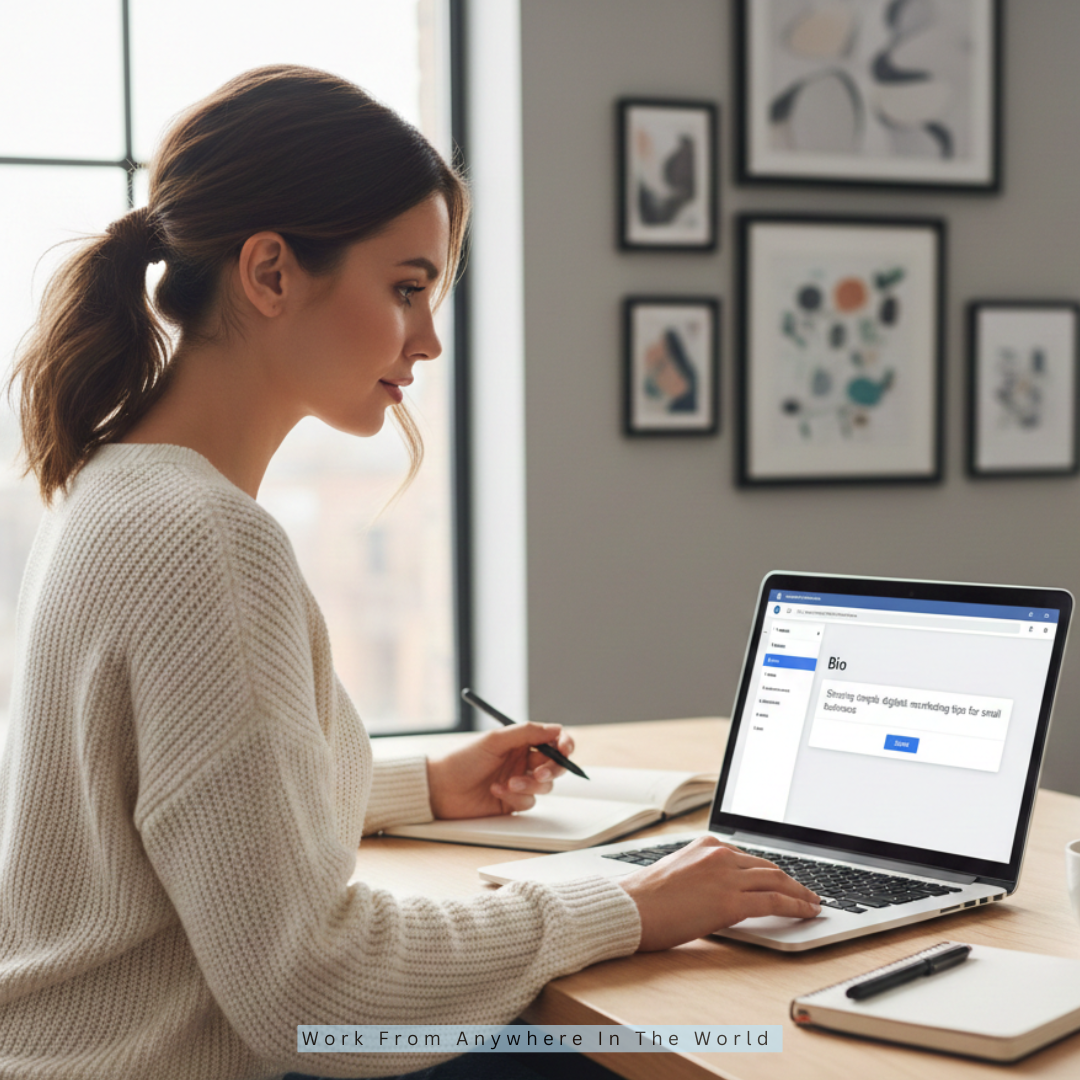
Your bio is short but powerful. Use it to tell people who you are, what you do, and who your content is for. Keep it clear, friendly, and concise, ideally within 100–255 characters. Avoid generic statements or complicated sentences.
A good bio instantly communicates your value, encourages followers, and builds credibility. For example, “Sharing simple digital marketing tips for small businesses” tells readers exactly what to expect.
Your bio is often one of the first things visitors read, so make it informative, approachable, and reflective of your page's tone.
Step 5: Add A Profile Picture
The first thing people see about your page is your profile image. Use a clear, high-quality image that represents your brand or personality. Logos work best for businesses, while professional headshots suit personal brands or creators.
Ensure the photo is square and at least 400×400 pixels. Avoid cluttered or text-heavy images that are hard to read in small formats.
A recognizable profile picture helps people quickly identify your page in comments, messages, and search results. Consistency with other social media accounts improves brand recognition and makes your page appear more professional.
Step 6: Add A Cover Photo
The cover photo is your page's billboard. It appears at the top of your page and can visually communicate your brand, products, or services. Recommended size is 820×312 pixels.
Use clear, simple images that convey your message without overcrowding. You can showcase products, share a tagline, or highlight your brand's vibe.
A professional-looking cover photo sets the tone and encourages visitors to explore your page. Remember, the first impression matters, so choose an image that complements your profile picture and reflects your page's purpose, style, and personality.
Step 7: Add A Call-To-Action Button
A call-to-action (CTA) button helps visitors interact with your page immediately. Options include Contact Us, Send Message, Shop Now, Sign Up, and Learn More. Choose one that aligns with your page goal.
For beginners, the Send Message feature is effective for initiating conversations with followers. The CTA appears prominently below your cover photo, making it easy for visitors to take action.
This button can drive engagement, generate leads, or drive sales, depending on your objective. Make it relevant, clear, and inviting, and monitor performance to see which actions your audience prefers.
Wealthy Affiliate – Mini Review (2025)
If you’ve ever thought about turning your blog, passion, or niche into an online business,
Wealthy Affiliate (WA) is one of the most beginner-friendly platforms I’ve used.
It combines step-by-step training, website hosting, SEO research tools,
and an active community all in one place.
What I like most: you can start free (no credit card needed),
explore lessons, test the tools, and connect with other entrepreneurs
before upgrading. WA isn’t a “get rich quick” scheme — it’s a platform where success comes
from consistent effort and applying what you learn.
Step 8: Complete The About Section
The About section builds trust with your audience. Fill in your page description, website link, email address, phone number, and location if applicable.
Accuracy and completeness are key—people check this information before engaging with your page. Include relevant details that help visitors understand your page's purpose and how to connect with you.
A well-crafted About section shows professionalism and makes your page appear credible. Keep it clear, concise, and helpful. Regularly review and update it as your page evolves or new features become available, ensuring visitors always have the correct information.
Step 9: Set Your Page Username
A username creates your custom Facebook URL, such as facebook.com/YourPageName. It makes your page easier to share, search, and remember.
Choose something short, relevant, and consistent with your brand. Avoid complicated spellings or long phrases. Your username reinforces your identity and makes your page look professional.
Once set, it appears in comments, tags, and links, so take time to pick the most suitable one. This simple step ensures your page is recognizable and accessible, improving your reach and helping people find you across Facebook and other platforms.
Step 10: Create Your First Post
The tone of your page is established by your first post. Tell visitors what to expect, introduce yourself or your brand, and describe the page's goal.
Keep it simple, friendly, and engaging. You can share a short story, a welcoming message, or a behind-the-scenes photo. Avoid overloading with too much information.
A strong first post encourages followers to engage and helps your page feel active from the start. Remember, people are drawn to authentic content, so write naturally and let your personality shine while clearly communicating your value.

Step 11: Invite Friends To Like Your Facebook Page
Once your page is set up, invite friends to like it. Start with people who genuinely support your work or brand. Avoid sending mass invitations that feel spammy.
Your early audience helps generate engagement, giving your page credibility and momentum. Encourage friends to share your page with others who might be interested.
The first few likes and comments are crucial for social proof, making new visitors more likely to follow. Focus on quality connections over quantity, and grow your audience organically through meaningful interactions.
Step 12: Enable Messages And Notifications
To stay connected with followers, ensure messaging is enabled. Turn on notifications so you know when someone interacts with your page. Quick responses improve trust and engagement.
You can also set up auto-replies to acknowledge messages when you're away. Prompt communication builds relationships and shows professionalism. Slow or ignored replies may reduce follower interest and credibility.
Consistent responsiveness encourages visitors to reach out, increasing engagement and potential conversions. Proper notification settings help you stay on top of activity, ensuring no opportunity to interact with your audience is missed.
Step 13: Learn Basic Page Settings
Spend time exploring Page Settings. Important areas include visibility, country restrictions, age restrictions, content moderation, and profanity filters. These settings control who can see your page and the types of interactions allowed.
Understanding them helps ensure your page runs smoothly and securely. You don't need to adjust everything immediately, but knowing where options are helps with future management.
Regularly review settings as your page grows or as new Facebook features are introduced. Proper configuration improves security, audience targeting, and overall page performance, giving you more control over your online presence.
Step 14: Understand Facebook Page Roles
A Facebook page can be managed by several people in various roles, including administrator, editor, moderator, advertiser, and analyst.
Each role has specific permissions. Admins have full control, while Editors can post and manage content. Moderators handle comments and messages, and Analysts track performance.
Assign roles carefully to team members based on responsibilities. Understanding roles ensures your page runs smoothly without compromising security.
Even if you start solo, knowing these roles helps when adding team members later. Effective role management streamlines collaboration and helps maintain a professional, organized page.
Step 15: Use Facebook Insights
Insights show how your page performs. Track reach, engagement, follower growth, and audience demographics. Insights help you understand which content resonates, the best posting times, and how to improve engagement.
Use data to experiment and optimize your strategy. Analytics guide decisions on content creation, promotions, and community engagement. Learning to interpret Insights ensures your efforts are effective and growth is measurable.
Regularly checking data allows you to adjust tactics, improve content quality, and enhance follower satisfaction while avoiding strategies that don't work.

Content Ideas For Your Facebook Page
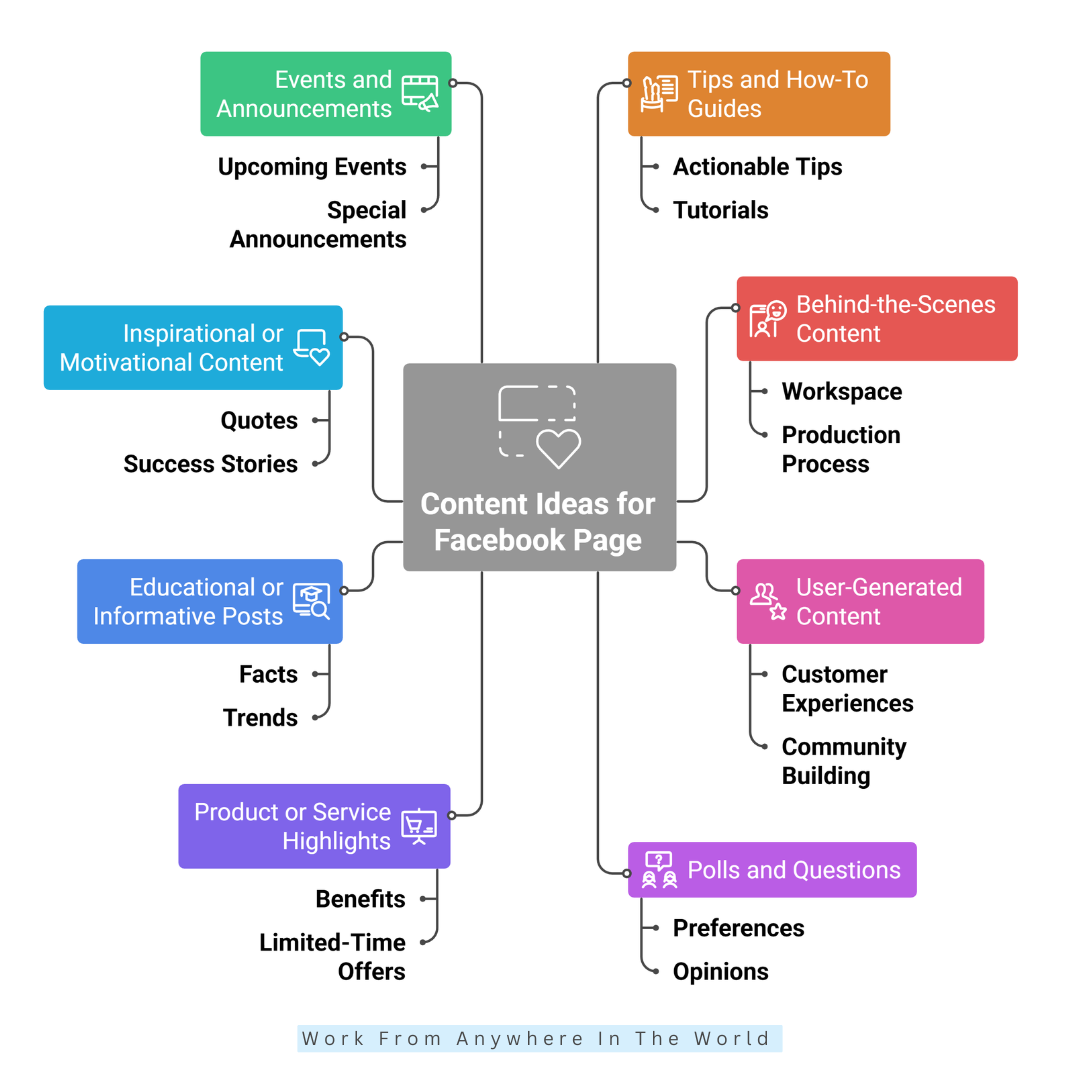
1. Tips And How-To Guides
Share actionable tips, tutorials, or step-by-step guides related to your niche. This positions your page as helpful and authoritative.
Short, practical content keeps followers engaged, encourages shares, and builds trust. Use images, videos, or infographics to make your tips easy to understand and visually appealing.
2. Behind-The-Scenes Content
Give followers a glimpse behind the scenes of your business, projects, or creative process. This builds authenticity and humanizes your brand.
Show your workspace, production process, team activities, or brainstorming sessions. Behind-the-scenes posts make followers feel included and more emotionally connected to your page.
3. User-Generated Content
Invite fans to share their experiences with your products or services so you can highlight them on your page. User-generated content builds social proof and engagement.
It shows real people enjoy your brand, inspiring trust in potential followers and creating a community-focused environment around your page.
4. Polls And Questions
Engage your audience with interactive polls or thought-provoking questions. Ask about preferences, opinions, or experiences.
These posts spark conversation, increase comments, and provide valuable insights about your audience. Polls also encourage followers to participate and feel involved in your page's content.
5. Product Or Service Highlights
Showcase your products, services, or offerings attractively. Highlight benefits, features, or limited-time offers. Use images, short videos, or customer testimonials. These posts remind followers about what you provide and can drive traffic or sales without being overly promotional.
6. Educational Or Informative Posts
Share valuable information, facts, or industry insights relevant to your niche. Educational content positions your page as a trusted source.
It can include tips, statistics, trends, or news updates. Followers are more likely to save, share, or revisit pages that provide consistent learning value.
7. Inspirational Or Motivational Content
Post quotes, success stories, or motivational messages related to your brand or niche. Inspirational content resonates emotionally, encourages engagement, and increases shares. It strengthens your brand personality and gives followers a reason to check your page regularly for uplifting posts.
8. Events And Announcements
Promote upcoming events, launches, or special announcements. Create posts to inform followers, generate excitement, and invite participation.
Using Facebook's event tools or countdowns enhances visibility. This type of content helps keep your audience updated and engaged with your latest activities.
Conclusion
Creating your own Facebook page is easier than it seems, and it's a powerful way to build your brand, connect with your audience, and grow your online presence.
By setting up your page correctly, posting valuable content, and engaging consistently, you can attract followers, build trust, and showcase your business or passion.
Start small, stay authentic, and focus on providing value—over time, your Facebook page can become a strong platform for growth, connection, and opportunities.
I trust you enjoyed this article on How To Create Your Own Facebook Page: 15 Easy Steps. Please stay tuned for more insightful blogs on affiliate marketing, online business, and working from anywhere in the world.
Take care!
— JeannetteZ 🌍✨
💬 Your Opinion Is Important To Me
Do you have thoughts, ideas, or questions? I’d love to hear from you. Please leave your comments below or email me directly at Jeannette@WorkFromAnywhereInTheWorld.com.
📚 More Work From Anywhere Reads
🚀 Ready to Build a Business You Can Run from Home
Or from Anywhere in the World?
Imagine creating income on your terms — from home, a cozy café, or wherever life takes you.
With the right tools, training, and community support, it’s entirely possible.
Start your own online business for free — no credit card needed.
Disclosure
This post may contain affiliate links. As an Amazon Associate and participant in other affiliate programs, I earn from qualifying purchases at no extra cost to you. Please read my full affiliate disclosure.