
15 Powerful Tips For Teaching Online
The right tips for teaching online can help educators create engaging lessons, build student confidence, and make virtual learning more enjoyable.
Whether you teach academic subjects, professional skills, languages, or creative courses, effective teaching strategies make a meaningful difference.
Successful online teaching involves more than presenting information through a screen. It requires thoughtful preparation, clear communication, interactive activities, and a supportive learning environment that encourages participation.
As online education continues to evolve, educators benefit from strengthening their digital teaching skills. Learning to use technology effectively, keep students engaged, and meet different learning needs makes virtual classrooms more rewarding.
This guide explores 15 powerful tips for teaching online, offering practical strategies to improve student engagement, strengthen your teaching confidence, and create memorable learning experiences.
Discover The 15 Powerful Tips For Teaching Online
Successful online teaching combines thoughtful preparation, effective communication, and engaging learning activities. These elements help educators create a welcoming environment where students feel comfortable participating.
Every virtual classroom presents different opportunities and challenges. Students have individual learning preferences, technical abilities, and expectations that influence how they engage with lessons.
Developing effective teaching habits can make online education more rewarding for everyone involved. Small improvements in lesson planning, classroom interaction, and digital tool selection can produce meaningful results.
The following 15 tips for teaching online offer practical strategies you can apply to your lessons. Whether you are an experienced educator or just getting started, these ideas will help you strengthen your teaching skills and support student success.
1. Prepare Every Lesson Before Class
Preparation is one of the most valuable habits an online teacher can develop. Students notice when lessons flow smoothly, and careful planning makes that possible.
Before each class, organize your presentation slides, learning materials, activities, quizzes, and discussion questions in a logical order. Review your lesson objectives to ensure every activity supports your learning goals.
1. Prepare Every Lesson Before Class
Keeping all your teaching resources in one organized folder saves valuable time during live sessions. You can access materials quickly without interrupting the lesson or distracting students. For additional planning strategies, explore these tips on how to prepare for teaching online.
Spending a few extra minutes preparing before class creates a professional learning atmosphere. It also reduces last-minute issues and lets you focus on helping students succeed.
2. Create A Comfortable Teaching Environment
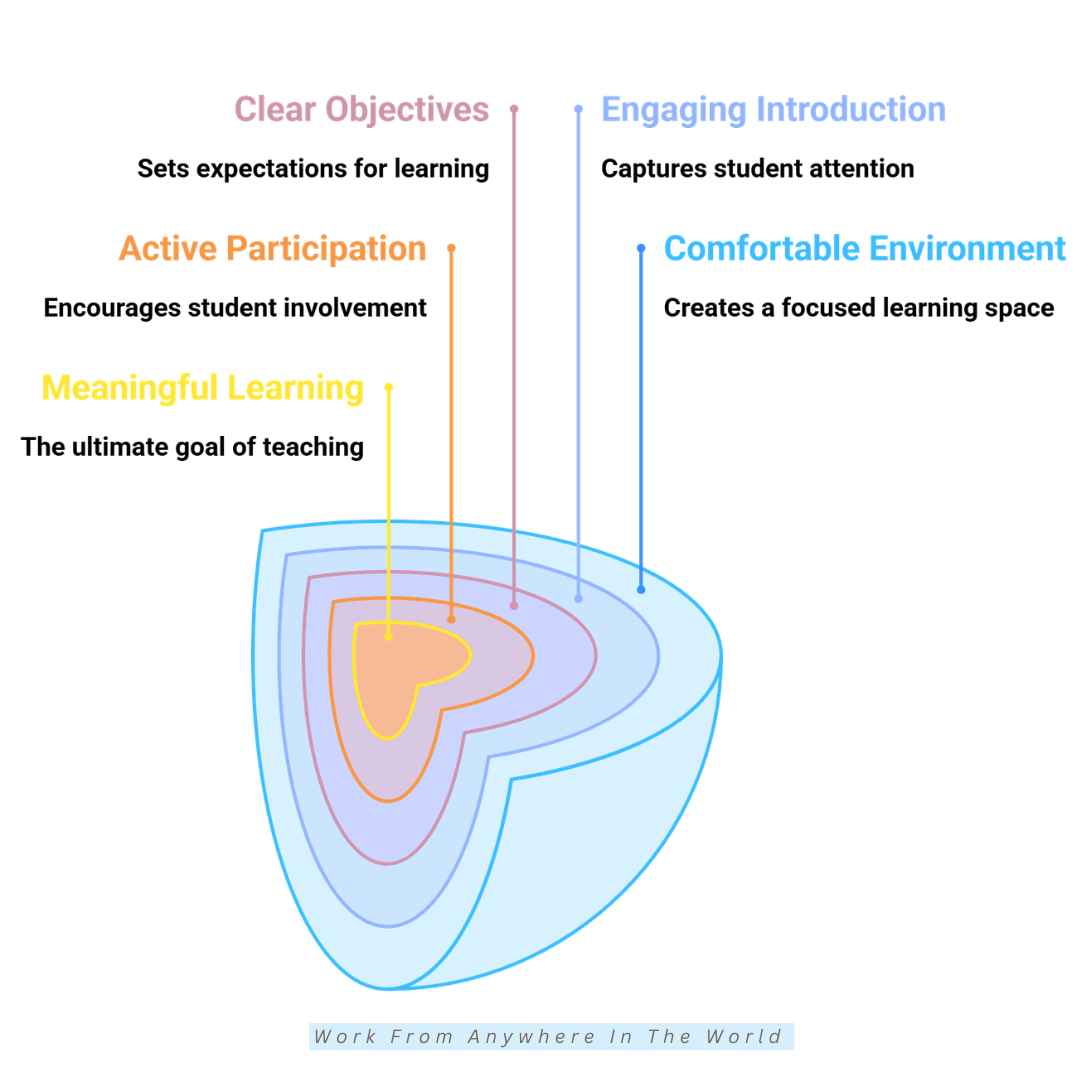
Your teaching environment plays an important role in how students experience online classes. A quiet workspace with good lighting, reliable internet, and clear audio helps learners concentrate without unnecessary distractions.
2. Create A Comfortable Teaching Environment
Choose a clean, professional background to create a positive first impression and build credibility. Position your camera at eye level to encourage natural eye contact and a more personal connection with students. Our home office lighting guide offers additional ideas for creating a well-lit workspace.
Test your microphone, webcam, and internet connection before every class. These quick checks help prevent technical interruptions and let you start each lesson with confidence.
A comfortable, welcoming teaching environment helps students feel at ease and encourages active participation. It also makes online lessons more enjoyable for everyone involved.
3. Start Every Class With An Engaging Introduction
The first few minutes of an online class often influence how engaged students remain throughout the lesson. A warm, enthusiastic introduction helps capture their attention and creates a positive learning atmosphere.
Rather than jumping straight into the topic, begin with a friendly greeting, a quick icebreaker, or a thought-provoking question. These activities encourage participation and help students feel connected.
You might also review the previous lesson or share an interesting fact related to today’s subject. Connecting familiar information with new material helps students understand what they are about to learn.
An engaging introduction sparks curiosity, strengthens classroom connections, and prepares students to participate confidently. It also establishes a welcoming tone that supports the rest of the lesson. Discover more ways to improve your online teaching presence and connect with your students.
4. Set Clear Learning Objectives
Students learn more effectively when they understand what they are expected to achieve. At the beginning of each lesson, explain the learning objectives in clear, straightforward language.
Understanding the purpose of each class helps students stay focused and measure their progress. It also allows you to organize teaching activities in a logical sequence that supports your learning goals.
Revisit the objectives throughout the lesson to reinforce important concepts. Summarize them at the end so students can recognize what they have learned and identify areas that need more practice.
Clear expectations reduce confusion, build confidence, and give students a greater sense of accomplishment. For additional resources, explore these digital education tools for teachers and students that support lesson planning and learning activities.
5. Encourage Active Student Participation
Learning becomes more meaningful when students actively participate rather than only listen. Asking open-ended questions, encouraging discussions, and inviting learners to share their ideas keeps everyone involved.
Interactive features such as polls, chat boxes, breakout rooms, and collaborative whiteboards make participation easier. These tools also provide quieter students with comfortable ways to contribute.
Acknowledge student responses with positive feedback and encouragement. Creating a supportive environment helps learners feel valued and more confident about expressing their opinions.
Regular interaction improves attention, strengthens understanding, and transforms online classes into enjoyable conversations. Explore these eLearning tools for teachers and students for additional ways to encourage collaboration and participation.
6. Keep Lessons Short And Well Structured
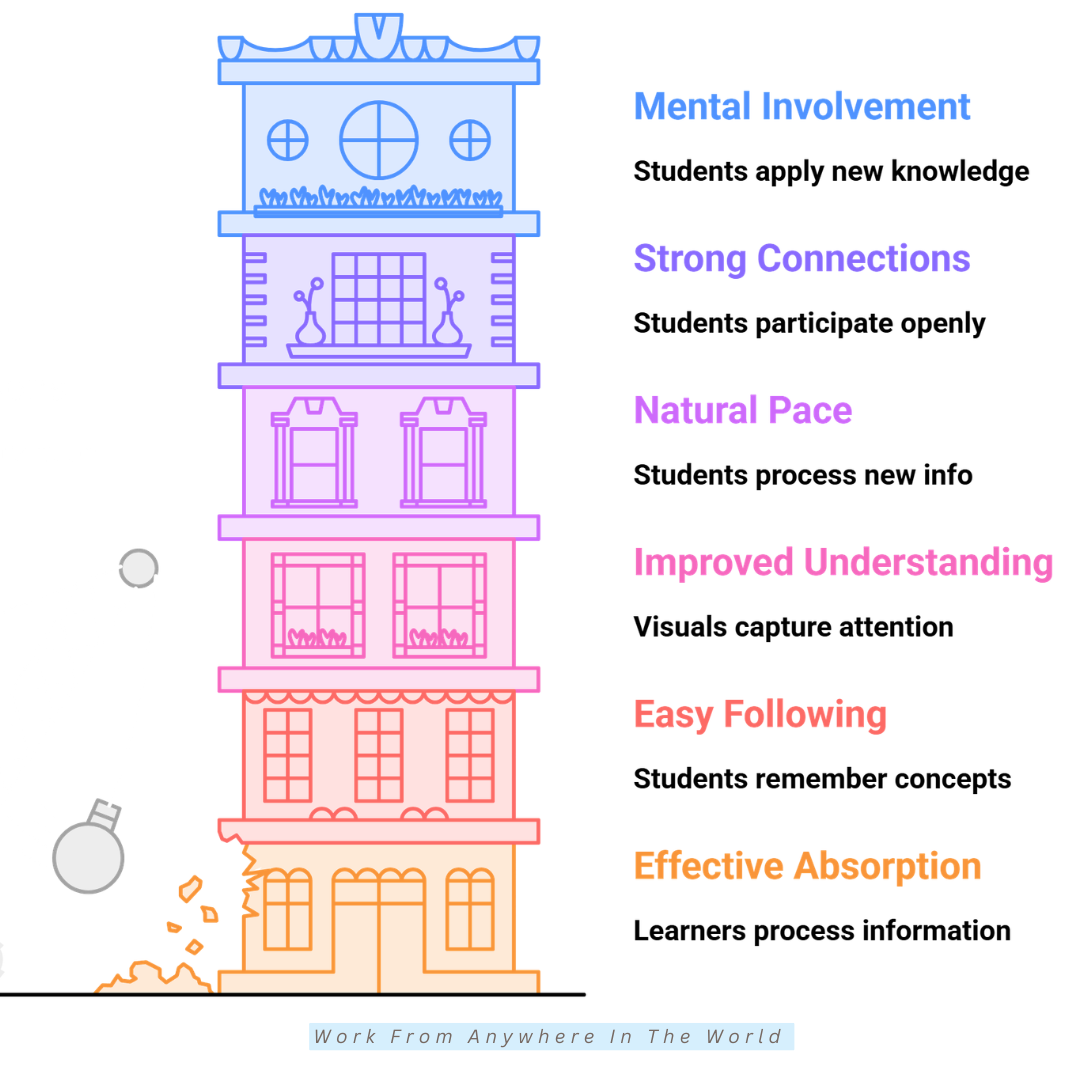
Long lectures make it difficult for students to maintain concentration in a virtual classroom. Dividing lessons into smaller sections with clear transitions helps learners absorb information more effectively.
Introduce each concept, explain it clearly, and demonstrate a practical example. Follow with a short activity or discussion before moving to the next topic to reinforce understanding.
This approach creates natural breaks that refresh attention and encourage participation. It also gives students opportunities to ask questions and clarify important information before continuing.
Well-structured lessons make explanations easier to follow and help students remember key concepts. Consistent pacing also creates a more comfortable learning experience without overwhelming participants. Developing strong communication skills can further improve how you present information and guide discussions.
7. Use Visual Content To Improve Understanding
Visual content makes complex ideas easier to understand and helps students follow explanations. Images, diagrams, charts, videos, and infographics provide useful alternatives to spoken instruction.
Choose visuals that support your lesson objectives and illustrate important concepts. You can also use simple graphics or digital whiteboards to highlight key points during live sessions.
Keep images and presentations clean, readable, and free from unnecessary distractions. Well-designed visuals help students focus on essential information and remember important details.
Combining visual materials with explanations and classroom discussions creates a more engaging learning experience. Our How To Use Canva tutorial offers practical guidance for creating attractive presentations, graphics, and other visual teaching materials.
8. Speak Clearly And Maintain A Natural Pace
Clear communication is essential for successful online teaching. Internet delays, background noise, and inconsistent audio quality sometimes make fast conversations difficult to follow.
Speak at a comfortable pace and pronounce words clearly so students have enough time to process new information. Pause briefly after explaining important concepts to encourage questions and allow learners to take notes.
Vary your tone naturally to maintain interest and prevent lessons from sounding repetitive. Emphasizing important words and adjusting your speaking rhythm also helps students recognize key information.
Thoughtful communication builds confidence, improves understanding, and encourages participation. A natural speaking style makes virtual lessons more welcoming and easier to follow. Explore these practical ways to improve your online teaching presence and connect with learners.
9. Build Strong Connections With Your Students
Successful online teaching involves more than delivering information. Building genuine relationships encourages students to participate openly and feel comfortable asking questions.
Greet learners by name, celebrate their progress, and respond with patience when they need additional support. These thoughtful interactions create a positive classroom culture where everyone feels valued.
Take a few moments to check how students are doing and invite them to share their learning experiences. Regular communication strengthens trust and helps you recognize individual learning needs.
Students who feel connected to their instructor often become more motivated to learn and participate in discussions. Strong relationships also encourage commitment and create a supportive learning community. Discover additional strategies for becoming an excellent online teacher.
10. Make Every Lesson Interactive
Interactive lessons keep students mentally involved and reduce passive learning. Quizzes, problem-solving activities, group discussions, case studies, and live demonstrations encourage learners to apply new knowledge immediately.
Change activities periodically to maintain energy and prevent attention from fading during longer classes. Invite students to explain concepts in their own words or share examples from their experiences.
Collaborative tasks also encourage teamwork and give learners opportunities to exchange ideas. Digital learning platforms offer useful features for creating interactive activities and encouraging participation.
Interactive learning strengthens understanding and makes online education more enjoyable for students with different learning preferences. Explore these online teaching platforms to discover additional options for delivering engaging lessons.
11. Give Clear Instructions For Every Activity
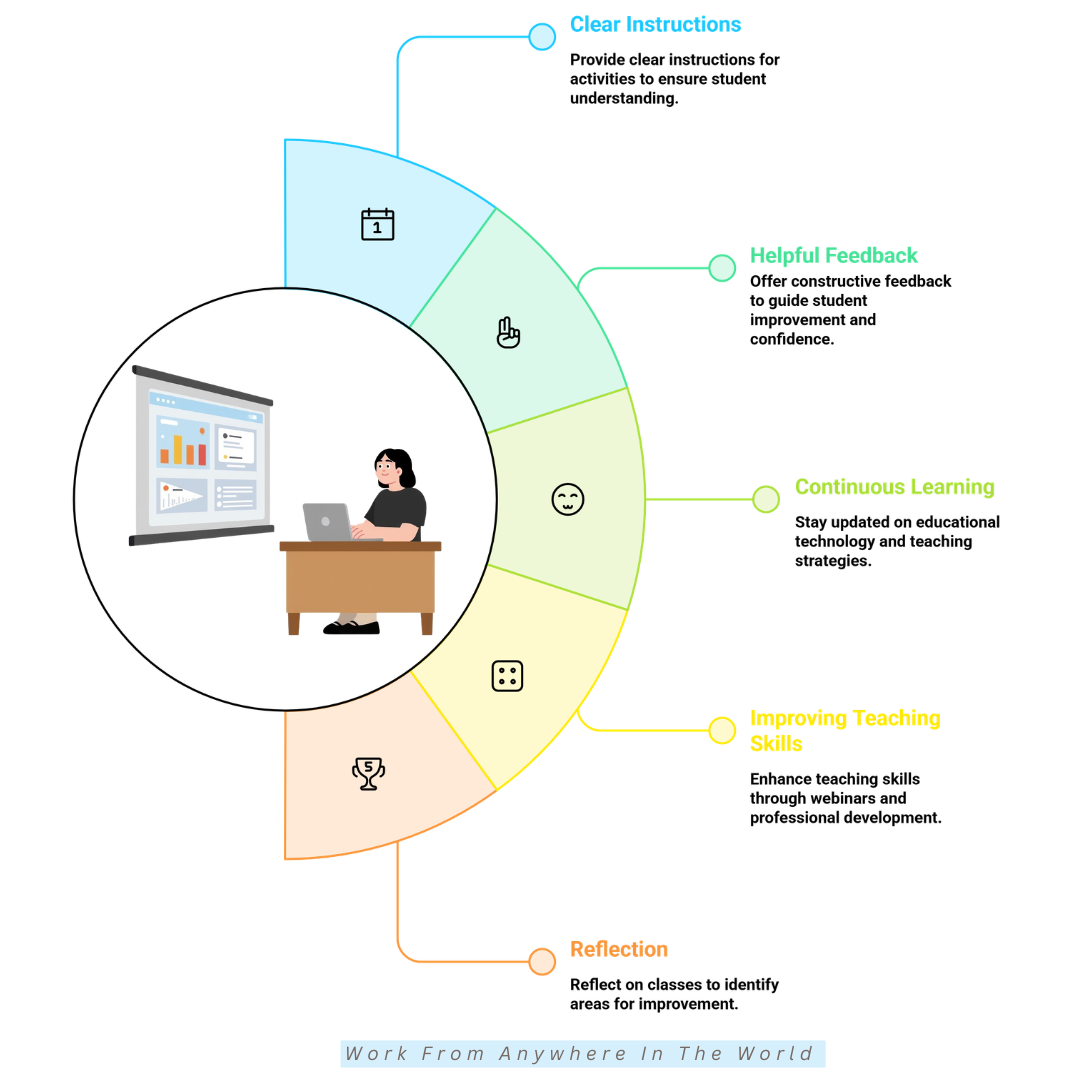
Students perform better when they understand exactly what they need to do. Before starting an activity, explain its objective, expected outcome, available time, and how students should submit or share their work.
Demonstrate a simple example to make instructions easier to follow. Showing students what a completed task might look like helps clarify expectations and reduces unnecessary confusion.
Invite questions before the activity begins and check that everyone understands the directions. Written instructions in the classroom chat or learning platform also provide a useful reference.
Clear guidance keeps lessons running smoothly and helps students focus on learning. Setting SMART goals for time management can also help educators establish realistic activity objectives and deadlines.
12. Provide Helpful And Encouraging Feedback
Constructive feedback helps students recognize their strengths and identify areas for improvement. Rather than focusing only on mistakes, acknowledge positive efforts and offer practical suggestions for future progress.
Specific feedback is more valuable than general comments because it explains what students did well. It also identifies opportunities to strengthen their understanding and develop new skills.
Provide feedback during classroom discussions, written assignments, or individual conversations after class. Personalized follow-up emails can reinforce important suggestions and give students time to reflect on their progress.
Supportive communication builds confidence, strengthens motivation, and keeps students engaged. Educators who communicate regularly by email may also find useful ideas in these email marketing content strategies, particularly for organizing clear, engaging messages.
13. Continue Learning As An Online Educator
Successful online educators continue developing their knowledge throughout their careers. Educational technology, teaching strategies, and student expectations evolve, making professional development an important part of long-term success.
Reading educational articles, attending webinars, and joining teaching communities can introduce fresh ideas. Conversations with experienced educators also provide opportunities to exchange strategies and discover different approaches to online learning.
Building professional connections can introduce you to valuable resources, experienced mentors, and collaborative opportunities. Our guide to networking for beginners offers practical ideas for developing these relationships.
Continuing your education strengthens your confidence, expands your knowledge, and encourages creativity. Every new skill gives you another opportunity to inspire students and create meaningful learning experiences.
14. Continue Improving Your Teaching Skills
Every online class offers opportunities to strengthen your teaching approach. Improving your presentation style, classroom management, and ability to explain difficult concepts can make lessons more effective and enjoyable.
Review recorded classes to observe your speaking pace, explanations, and interactions with students. Notice which techniques worked well and identify areas where small adjustments could improve the learning experience.
Experiment with different teaching methods, interactive activities, and presentation techniques. Educational podcasts, professional development courses, and discussions with fellow educators can provide practical inspiration.
Developing stronger social skills can also help you communicate confidently and build positive classroom relationships. Regular practice allows you to adapt your teaching style and respond more effectively to students’ needs.
15. Reflect After Every Online Class
Reflection is a valuable habit for becoming a more effective online educator. After each class, spend a few minutes considering which activities captured students’ attention and which explanations could have been clearer.
Think about when students participated most actively and whether the lesson achieved its objectives. These observations help you recognize successful teaching strategies and identify opportunities for improvement.
Keep a teaching journal or write brief notes after each session. Recording student questions, classroom challenges, and successful activities makes it easier to recognize patterns and plan future lessons.
Student feedback provides another perspective on your teaching effectiveness. Combining their suggestions with your observations turns every class into a learning opportunity and helps you become a more confident, adaptable educator.
Best Tools That Support Online Teaching
Choosing the right digital tools can make online teaching more organized, interactive, and enjoyable. From virtual classrooms to creative learning activities, technology helps educators deliver effective lessons and encourage student participation.
Different teaching platforms serve different purposes. Some focus on live video lessons and classroom management, while others provide interactive quizzes, collaborative activities, and visual learning materials.
The best tools depend on your teaching style, students’ needs, and learning objectives. Combining a few complementary platforms can improve communication, simplify lesson preparation, and create more engaging educational experiences.
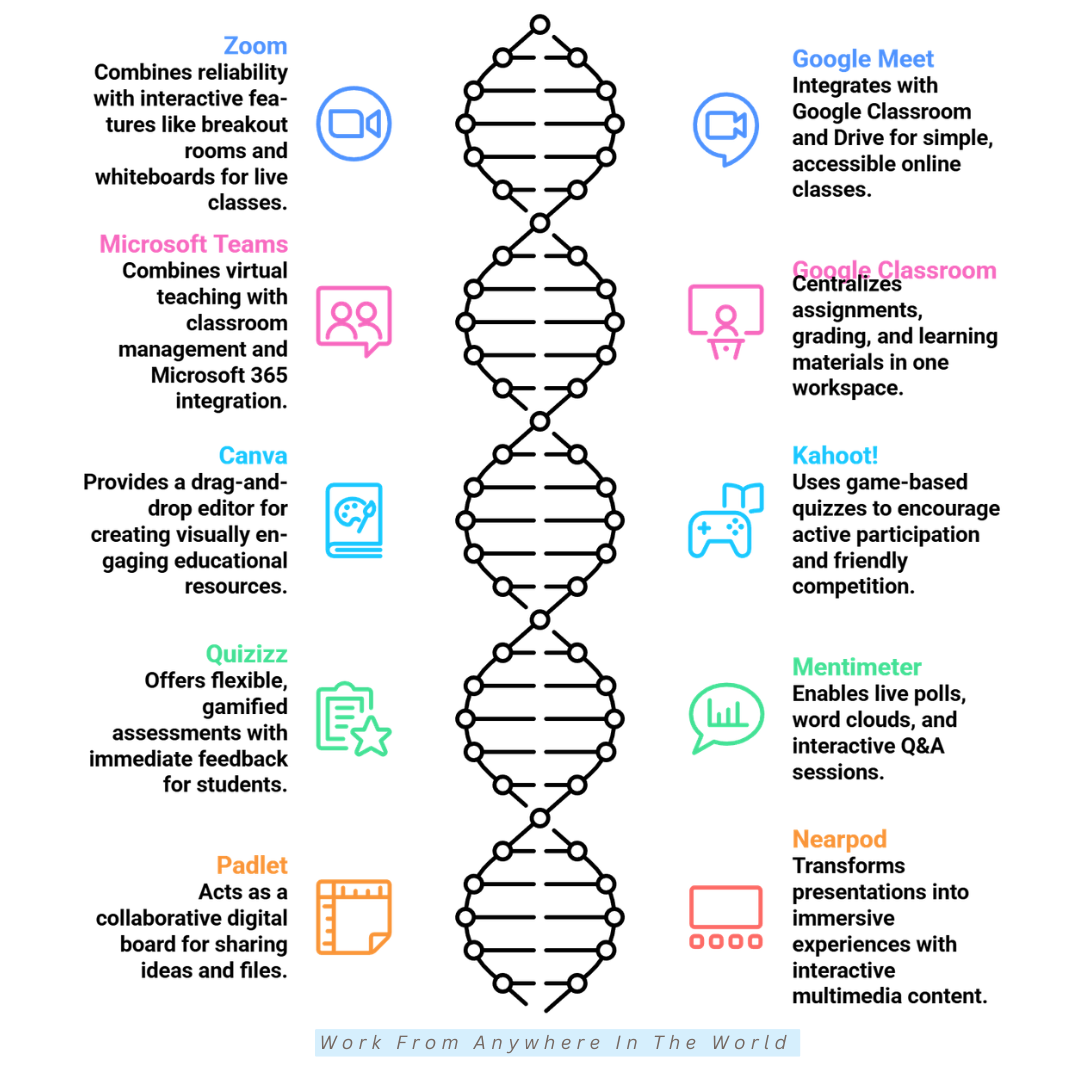
The following ten online teaching tools offer practical features to support lesson planning, student engagement, and classroom collaboration. Explore their capabilities to discover which options best suit your virtual teaching environment.
1. Zoom
Zoom is a popular platform for online teaching, offering reliable video conferencing and interactive classroom features. Educators can host live lessons, share presentations, and create breakout rooms for group activities.
Teachers can also launch polls, record sessions, and collaborate using whiteboard tools. These features encourage participation and make it easier to explain concepts through visual demonstrations.
The platform accommodates individual tutoring sessions, small groups, and larger virtual classrooms. Its flexible features help educators adapt lessons to different teaching needs and student preferences.
Zoom’s user-friendly interface allows teachers to focus on engaging students rather than navigating complicated settings. This creates an organized, professional learning environment that supports meaningful classroom interaction.
2. Google Meet
Google Meet provides a straightforward solution for educators who want to conduct virtual classes without complicated setup procedures. Its integration with Google Classroom, Google Calendar, and Google Drive helps streamline lesson planning and communication.
Teachers can schedule classes, share learning materials, and organize educational resources within Google’s ecosystem. This connected approach reduces administrative tasks and makes everyday classroom management more convenient.
Features such as live captions and screen sharing support accessibility and different learning preferences. Meeting recordings are also available with eligible Google Workspace plans, allowing students to revisit important explanations.
Google Meet’s clean interface helps teachers and students join lessons quickly. Its familiar tools create a comfortable virtual environment with fewer technical distractions.
3. Microsoft Teams
Microsoft Teams for Education combines video conferencing, classroom management, and collaborative learning tools. Educators can organize virtual classes, communicate with students, and manage educational resources within one platform.
Beyond live meetings, Teams provides discussion channels, assignment management, file sharing, and collaborative note-taking. Integration with Microsoft 365 applications helps teachers coordinate lessons and classroom activities.
Educators can organize courses, monitor assignment progress, and provide feedback without switching between multiple platforms. Students also benefit from having learning materials and important communications in one accessible location.
This integrated approach supports teamwork, improves organization, and encourages consistent student participation. Microsoft Teams is particularly useful for educators managing structured courses or ongoing virtual classrooms.
4. Google Classroom
Google Classroom simplifies course management by bringing assignments, announcements, learning materials, and grading into one organized workspace. Teachers can manage everyday classroom activities without switching between multiple platforms.
Educators can distribute resources, collect homework, provide personalized feedback, and monitor student progress. These features reduce administrative tasks and create more time for meaningful instruction.
The platform integrates with Google Docs, Sheets, Slides, and Forms, making it easier to create learning materials and encourage collaboration. Students can access assignments, complete activities, and stay informed about upcoming deadlines.
Google Classroom’s intuitive design helps educators manage their responsibilities efficiently. It also encourages students to stay organized, participate actively, and work toward their learning goals.
5. Canva
Canva helps educators transform ordinary lessons into visually engaging learning experiences. Its drag-and-drop editor makes it easy to create attractive educational materials without advanced design skills.
Teachers can develop presentations, worksheets, infographics, lesson plans, certificates, flashcards, and social media resources. Thousands of customizable templates provide inspiration and reduce preparation time.
Visual learning materials can clarify complicated concepts and make important information easier to remember. Colourful diagrams, illustrations, and thoughtfully designed presentations also encourage student participation.
Canva’s flexible design features allow educators to adapt materials for different subjects, age groups, and learning preferences. This creative approach makes virtual classrooms more engaging, organized, and enjoyable.
Wealthy Affiliate – Mini Review
If you’ve ever thought about turning your blog, passion, or niche into an online business,
Wealthy Affiliate (WA) is one of the most beginner-friendly platforms I’ve used.
It combines step-by-step training, website hosting, AI-powered tools,
keyword research, and an active community all in one place.
What I like most is that you can start for free (no credit card needed), explore the platform,
test the tools, and connect with other entrepreneurs before upgrading.
WA isn’t a “get rich quick” scheme — success comes from consistent effort
and applying what you learn over time.
6. Kahoot!
Kahoot! transforms traditional lessons into interactive learning experiences through game-based quizzes. Teachers can create customized activities or choose from a large collection of ready-made educational games.
Students answer questions in real time, creating friendly competition that encourages participation. Teachers can use these activities to introduce topics, review previous lessons, or assess understanding.
Instant feedback helps educators identify learning gaps and recognize student achievements. Quiz results also provide useful insights for adjusting future lessons and offering additional support.
Kahoot! makes classroom assessments more enjoyable while reinforcing important concepts. Its playful approach encourages motivation, strengthens knowledge retention, and creates memorable learning experiences.
7. Quizizz
Quizizz, now known as Wayground, offers flexible online assessments through live and self-paced quizzes. Teachers can create interactive activities that reinforce learning and make reviewing important concepts more enjoyable.
Students receive immediate feedback that helps them recognize mistakes and strengthen their understanding. Teachers can also adjust activities to accommodate different learning speeds and classroom needs.
Detailed performance reports provide insights into overall class progress and individual learning challenges. These results help educators identify topics that require additional explanations or practice.
Gamified features, colourful visuals, and varied question formats encourage participation without unnecessary pressure. The platform makes it easier to review lessons, assess understanding, and keep students motivated.
8. Mentimeter
Mentimeter helps educators create interactive presentations that encourage students to participate throughout a lesson. Teachers can incorporate live polls, quizzes, word clouds, surveys, and question-and-answer sessions.
Students can submit responses using their own devices, including anonymously when the activity supports it. This flexibility encourages quieter learners to contribute without feeling uncomfortable speaking in front of others.
Real-time visual results allow teachers to assess understanding and identify different perspectives. Displaying responses during lessons can also spark meaningful discussions and encourage students to explore new ideas.
Mentimeter transforms traditional presentations into engaging classroom conversations. Its interactive features promote collaboration, curiosity, and active learning while helping educators respond to student needs.
9. Padlet
Padlet provides a collaborative digital workspace where teachers and students can share ideas, upload files, post images, and organize classroom discussions. Its visual layout makes group activities more accessible and engaging.
Students can contribute simultaneously, making brainstorming sessions and collaborative projects more interactive. Teachers can also use the platform to collect feedback, share resources, and encourage creative expression.
Flexible layouts allow educators to organize information into columns, timelines, maps, and other visual arrangements. These options help adapt activities to different subjects, learning objectives, and classroom projects.
Padlet encourages teamwork, communication, and active participation while giving students opportunities to learn from one another. Its creative features make collaborative learning more organized and enjoyable.
10. Nearpod
Nearpod transforms traditional presentations into interactive learning experiences by combining slides with quizzes, videos, virtual field trips, polls, drawing activities, and formative assessments.
Teachers can control lesson pacing during instructor-led sessions or allow students to complete activities independently. This flexibility supports different teaching styles and accommodates individual learning needs.
Real-time participation and assessment reports help educators monitor student understanding throughout lessons. These insights make it easier to identify learning gaps, adjust explanations, and provide additional support when needed.
Nearpod combines multimedia resources with engaging classroom activities that encourage active participation. Its interactive approach helps students understand important concepts, retain information, and enjoy more meaningful online learning experiences.
Frequently Asked Questions
Q1: How Can I Keep Students Engaged In Online Classes?
Keep students engaged by including interactive discussions, quizzes, polls, breakout activities, and visual presentations. Asking questions regularly encourages participation and helps learners remain focused.
Vary activities throughout the lesson and invite students to share their ideas or experiences. A welcoming environment also helps quieter learners feel comfortable participating.
Q2: Which Platform Is Best For Teaching Online?
Popular platforms include Zoom, Google Meet, Microsoft Teams, and Google Classroom. The best choice depends on your teaching goals, class size, and the features you need.
Consider whether you require live video lessons, assignment management, collaborative activities, or student progress tracking. Testing a platform before committing can help you choose confidently.
Q3: How Long Should An Online Lesson Be?
Online lesson length depends on students’ ages, attention spans, and learning objectives. Sessions lasting 45–90 minutes may work well for some adult learners when they include interactive activities and appropriate breaks.
Younger students often benefit from shorter sessions and more frequent changes in activity. Focus on maintaining engagement and achieving learning objectives rather than following a fixed duration.
Q4: What Equipment Do I Need To Teach Online?
A reliable computer, stable internet connection, webcam, and good-quality microphone provide the foundation for effective online teaching. Comfortable lighting and a quiet workspace also help create a professional learning environment.
Depending on your subject, you may benefit from a headset, digital drawing tablet, or second monitor. Start with essential equipment and expand your setup as your teaching needs develop.
Q5: How Can I Support Students Who Struggle With Online Learning?
Provide clear instructions, manageable activities, and additional explanations when students need support. Recorded lessons, visual resources, and flexible learning materials can help students review difficult concepts at their own pace.
Check in regularly and encourage learners to ask questions without feeling embarrassed. Personalized feedback and reasonable adjustments can improve confidence and help students overcome learning challenges.
Q6: How Can I Become A Better Online Teacher?
Improve your online teaching skills by preparing thoughtful lessons, encouraging participation, and experimenting with different teaching methods. Professional development courses and educational communities can introduce valuable ideas.
Reflect on your lessons, review student feedback, and identify areas for improvement. Consistent practice and a willingness to adapt will help you become a more confident and effective educator.
Conclusion
Online teaching continues to create exciting opportunities for educators worldwide. Applying these tips for teaching online helps you develop engaging lessons, encourage student participation, and build confidence in your virtual classroom.
Thoughtful preparation, clear communication, and interactive activities make online learning more enjoyable and rewarding. Choosing appropriate digital tools also helps you accommodate different learning needs and create meaningful educational experiences.
Every teaching experience offers opportunities to strengthen your skills and discover new approaches. Reflecting on your lessons, listening to student feedback, and continuing your professional development will help you grow as an educator.
With patience, creativity, and a genuine passion for helping others learn, you can create memorable online classes that inspire students. Your commitment to continuous improvement can make a lasting difference in their educational success.
I trust you enjoyed this article on 15 Powerful Tips for Teaching Online. Please stay tuned for more insightful blogs on affiliate marketing, online business, and working from anywhere in the world.
Take care!
— JeannetteZ 🌍✨
💬 Your Opinion Is Important To Me
Do you have thoughts, ideas, or questions? I’d love to hear from you. Please leave your comments below or email me directly at Jeannette@WorkFromAnywhereInTheWorld.com.
📚 More Work From Anywhere Reads
🚀 Ready to Build a Business You Can Run from Home
Or from Anywhere in the World?
Imagine creating income on your terms — from home, a cozy café, or wherever life takes you.
With the right tools, training, and community support, it’s entirely possible.
Start your own online business for free — no credit card needed.
Disclosure
This post may contain affiliate links. As an Amazon Associate and participant in other affiliate programs, I earn from qualifying purchases at no extra cost to you. Please read my full affiliate disclosure.